Assigned Uninstalling Zemana leaves Drivers behind?

This thread is being handled by a member of the staff.
Status
Not open for further replies.

Ink

Administrator
Thread author
Verified
Jan 8, 2011
22,318
2
55,055
8,379
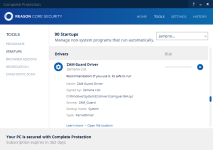
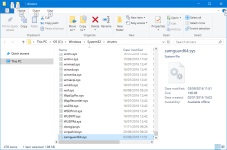
Uninstalled Zemana Anti-Malware Premium about 3 months ago, but I discover the drivers are still loaded into Windows 10.

Zemana leaving drivers behind is normal?
upload_2017-1-15_1-16-49.png upload_2017-1-15_1-18-59.png
 
Uninstalled Zemana Anti-Malware Premium about 3 months ago, but I discover the drivers are still loaded into Windows 10.

Zemana leaving drivers behind is normal?
View attachment 132138 View attachment 132139
I and a few users also posted 2-3 threads here about this and never get a proper answer
we have to use autoruns to disable those 2 drivers -> reboot -> delete .sys files manually. Uninstallers seem to be uneffective
 
Comodo Programs Manager might get them. It finishes program removals during boots. Only trouble is that the programs should be installed for Windows 7 mode. Then make sure all the .exes (application files) in the CPM folder are set to run in Win 7 mode. Also, set all of them to "Run as administrator" at the same time if you use a limited account. CPM is underrated I feel.
 
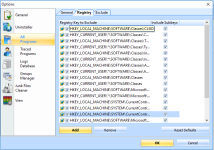
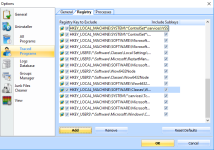
The Claim that revo uninstaller pro doesn't remove the drivers is false,may be on his or her pc but on mine revo removes everything.
Revo must be configured properly first of all, because straight out the box usage does not produce full power.
 
  • Like
Reactions: Al-Faqir and ispx
The Claim that revo uninstaller pro doesn't remove the drivers is false,may be on his or her pc but on mine revo removes everything.
Revo must be configured properly first of all, because straight out the box usage does not produce full power.

Please elaborate on proper settings? Serious question BTW, just curious. Thanks.
 
  • Like
Reactions: Al-Faqir and DardiM
I also have used Revo pro to uninstall Zemana AM and just checked the drivers.
There is no ZAM driver left.
But after uninstalling it i opened regedit and deleted some registry keys that were left behind.
 
  • Like
Reactions: Al-Faqir and DardiM
This is the screenshot of Revo 3.1.8 with the latest database
First it uninstalled using the official unistaller -> I chose Advanced leftover scan in Revo -> The driver still persists, Advanced scan cannot find the .sys file in "drivers" folder

What's the problem? I also have the portable version. However, Revo should also detect .sys file
lQwLkG4.png

I don't know what else to tweak Revo
 
Last edited:
we have to use autoruns to disable those 2 drivers -> reboot -> delete .sys files manually. Uninstallers seem to be uneffective
I will try this, I also found leftover Files from AntiLogger Free on my system.

The manual method is always the better option, because I don't think I will use Revo Pro just to remove a few files. @Evjl's Rain Did you restart after uninstallation with Revo and is that Pro or Free?

Thanks for the suggestions given the in this thread. :)
 
  • Like
Reactions: DardiM and askmark
I will try this, I also found leftover Files from AntiLogger Free on my system.

The manual method is always the better option, because I don't think I will use Revo Pro just to remove a few files. @Evjl's Rain Did you restart after uninstallation with Revo and is that Pro or Free?

Thanks for the suggestions given the in this thread. :)
I think I restarted but it always persisted. ZAM.trace and ZAM.krnl.trace kept creating themselves after 2 minutes even after ZAM was uninstalled (drivers were not yet deleted)
 
I will try this, I also found leftover Files from AntiLogger Free on my system.

The manual method is always the better option, because I don't think I will use Revo Pro just to remove a few files. @Evjl's Rain Did you restart after uninstallation with Revo and is that Pro or Free?

Thanks for the suggestions given the in this thread. :)
If you want to remove the driver completely manually then:

Go to command prompt and type:

sc stop ZAM_Guard
sc delete ZAM_Guard
del c:\windows\system32\drivers\zamguard64.sys
 
It is a bit pity that product cannot be uninstalled properly without using 3rd party tools, playing with the registry or looking manually in system folders.
Zemana should really improve their product and instead of removing functions from ZAM/ZAL they should polish their default uninstaller or provide an extra cleanup tool like Emsisoft for example.
 
Question - Zemana dropped files
=> how to remove the services

+

About activity even with a portable version
I think I already explained the purpose of trace files. They log Zemana activity and help us solve the bugs. They will always be there. What we can do is to move them to some non-visible location.

But when we uninstall the program, strange behavior.
 
Last edited:
Status
Not open for further replies.