Assigned Untitled search results with redirects on google , with Chrome and Firefox

A staff member is handling this support request.
Status
Not open for further replies.

Vanadium

New Member
Hi!
As the title says, Im getting 'untitled' search results on google, wich redirect to spam/malware sites on both Chrome and Firefox. Strangely, it started after enabled Sync on my Android phone, to get my bookmarks on my Windows 10 PC.
I've tried everything, uninstall/install browsers again, clear cache and files, profiles, reset Chrome App on my phone, of course disabled Sync features.
I performed different scans with Emsisoft, Eset, Malwarebytes, Adwarecleaner, with no results.
I attached an image , it looks pretty much like that. At first, the links simulated domains in my search history.google-untitled-spam-mobile-1643559140.png
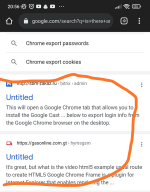
I attached the files form Farbar Recovery, thank you in advance!
 

Attachments

Hello ..! Welcome to MalwareTips..! :)

I see you are using a non-English version of FRST. This makes it difficult for me to read your logs, so please do the following ....
  • Rename FRST64.exe to FRSTEnglish.exe
  • Run a new scan
  • Post the new FRST.txt and Addition.txt logs, which should now be in English.
 
Hello..! I see something:

Scan result of Farbar Recovery Scan Tool (FRST) (x64) Version: 12-05-2023 01
Ran by karat (administrator) on IMAGORO (ASUSTeK COMPUTER INC. X555LD) (17-05-2023 12:35:56)
Running from C:\Users\karat\Desktop\FRSTEnglish.exe
Loaded Profiles: karat
Platform: Microsoft Windows 10 Home Single Language Version 22H2 19045.2965 (X64) Language: Español (España, internacional)
Default browser not detected!
Boot Mode: Normal

You may find this helpful...:


Farbar Recovery Scan Tool - Fix

NOTICE: This script was written specifically for this user, for use on this particular machine. Running this on another machine may cause damage to your operating system that cannot be undone


Please download the attached file to the same folder where the Farbar tool is running from.
The location is listed in the 3rd line of the FRST.txt log you have submitted.

Run FRST and click Fix only once and wait.

The Computer will restart when the fix is completed.

It will create a log (Fixlog.txt) please post it to your reply.


In your next reply, please include:
  • Fixlog.txt
 

Attachments

Thank you ! Fixlog attached! Ive had to run Farbar twice, because it will freeze and never completes, but heres the fixlog.
 

Attachments

Here is my fixlog again, now farbar completed and restarted ! Before this new fixlog, i did a google search, on the last page results again, an Untitled redirect link appeared, with a domain from my last (long deleted) search history.
 

Attachments

Hello..! Very strange..!

Please run FRST tool once more, and attach for me fresh logs:

  • Double-click on the FRST icon to run it, as you did before. When the tool opens click Yes to disclaimer.
  • Press Scan button and wait for a while.
  • The scanner will produce two logs on your Desktop: FRST.txt and Addition.txt.
  • Please attach these two logs in your next reply.
 
No real signs of an active infection in your logs..! If problems with your machine persist, it is not due to malware..!
What problems are you currently experiencing with your computer..?
 
Last edited:
Ive been doing a little bit of search on Google and i dont see any 'Untitled' redirects now. If i try with Bing for example, 'Untitled' results dont appear at all. I'll uninstall Kaspersky Vpn, but i had this app for years on my computer. Only extensions that i had on Chrome were Ublock Origin and Shazam.
Thank you Icotonev for your help and MalwareTips community ! I'll let you know how it goes!
 
I'll uninstall Kaspersky Vpn

I meant to temporarily uninstall Kaspersky Vpn and check if this problem persists..!
Let's remove the programs we used:

  • Download KpRm and save it to your Desktop (see here if you must use Chrome)
  • Note: If the file is detected as malware it is not and it is safe to download. The detection is a false positive.
  • Right click on the icon and select Run as administrator
  • Click Yes on the Disclaimer
  • Place a check mark in Delete Tools, Create Restore Point, and Delete in 7 days
  • Click Run
  • Click OK on All operations are completed
  • KpRm will delete itself from you Desktop and you can either save or remove the report that is generated
  • You are free to remove any other tools/reports still remaining
  • Please copy and paste its contents in your next reply.
 
Last edited:
Done, i uninstalled Kaspersky VPN just in case. I havent see any rare search results on google yet, so thank you for your help.
I cant actually figure out what happened, but my google search results were plagued by those redirects. But phone sync , i think must be something in this case, but i cant say 100% for sure. Thank you!
 

Attachments

Status
Not open for further replies.

Recently browsing

Members who viewed this thread in the last 5 minutes

Back
Top