

The MalwareTips app
Your community, one tap away.
Open MalwareTips from your Home Screen or desktop. Follow discussions, find answers and pick up where you left off.
- Home Screen access
- Optional push alerts
- Your community
You're ready to explore.Explore what's new
Installation instructions
iPhone & iPad
- Open MalwareTips in Safari and tap Share. You may need to open the Page Menu first.
- Choose Add to Home Screen. If it is not listed, use Edit Actions to add it.
- Keep Open as Web App enabled if shown, then tap Add.
Android
- Open MalwareTips in Chrome or another browser that supports app installation.
- Open the browser menu and look for Install app, Install and create shortcut, or Add to Home screen.
- Choose Install and confirm. Wording varies by browser.
Desktop
- Chrome: use the install icon in the address bar, or the menu under Cast, save and share.
- Edge: open the menu, then More tools, Apps and Install this site as an app.
- Safari on Mac: choose Share or File, then Add to Dock. Firefox on Windows: look for the web apps button in the address bar.
If you cannot find an install option, update your browser or use its bookmark option to keep MalwareTips close.
Keep up with your conversations
After installation, open the app and sign in. Enable push notifications in Preferences if you want alerts. On iPhone and iPad, push requires a Home Screen web app and iOS or iPadOS 16.4 or later.
Sign in to manage notificationsInstallation is optional. Your notification settings stay under your control.
You are using an out of date browser. It may not display this or other websites correctly.
You should upgrade or use an alternative browser.
You should upgrade or use an alternative browser.
Solved vm troubles
-
 Thread starter
nsm0220
Thread starter
nsm0220
- Start date
- 19 Replies
- 3,256 Views
- Status
- Not open for further replies.


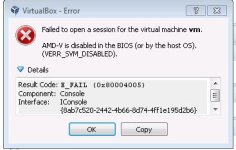
VirtualBoxWhich VM you use VirtualBox or VMware? and please give more info because I don't understand "BIOS missing"
Attachments
Upvote
0
but you can only save one snapshot at a time unless you can find a way to bypass itHave you tryed VMware?
Upvote
0

but you can only save one snapshot at a time unless you can find a way to bypass it
I'm not sure about that, i have VirtualBox now but before, i been with VMware and that was working great with good snapshoots (unlimited) but not sure..
Upvote
0

jim lin
Level 8
if Virtualbox was working fine and you updated Virtualbox lately it could be a bad update
install or something is wrong with the version of Virtualbox you are using and you found
a bug
i'v had a bad version update of Virtualbox that act's like this and would not let me install
or run a 64bit OS it would only run a 32bit OS
so i went back to the version of Virtualbox before the update and it worked i could use my
64bit OS again so i let a few updates pass before i tryed again and it worked that new
version was ok
i see someone else saying something like this on the Virtualbox forums
Problem using virtualbox
https://forums.virtualbox.org/viewtopic.php?f=6&t=60866
an easy way to check if AMD-v is turned in the BIOS is try this
Microsoft® Hardware-Assisted Virtualization Detection Tool
The Hardware-assisted virtualization (HAV) detection tool checks
if the computer processor supports HAV and if this setting is enabled.
http://www.microsoft.com/en-us/download/details.aspx?id=592

James
install or something is wrong with the version of Virtualbox you are using and you found
a bug
i'v had a bad version update of Virtualbox that act's like this and would not let me install
or run a 64bit OS it would only run a 32bit OS
so i went back to the version of Virtualbox before the update and it worked i could use my
64bit OS again so i let a few updates pass before i tryed again and it worked that new
version was ok
i see someone else saying something like this on the Virtualbox forums
Problem using virtualbox
https://forums.virtualbox.org/viewtopic.php?f=6&t=60866
an easy way to check if AMD-v is turned in the BIOS is try this
Microsoft® Hardware-Assisted Virtualization Detection Tool
The Hardware-assisted virtualization (HAV) detection tool checks
if the computer processor supports HAV and if this setting is enabled.
http://www.microsoft.com/en-us/download/details.aspx?id=592
James
Upvote
0
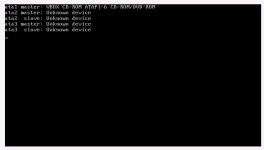

are kidding me they are costly to get and yes i use VMWare player because VMWare wants money for next verison of VMWareBuy a new PC
Have you tryed VMWare ?
and besides i need to test av's petty soon
Last edited:
Upvote
0
4.3.10 and the error happen before the update and doing the old version as wellThis the error occur after an VBox update, changes to your PC or VM settings? What version of VirtualBox are you using?
Upvote
0
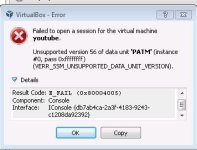
No idea on what the issue could be, have you browsed the VirtualBox Support Forums for anyone with similar issues?
Also I asked, have you made any changes to your PC or VM settings? As from experience moving VM data files around can cause problems too.
If nothing works, then you can always do a complete uninstall of VBox, delete the VM virtual disks and start from scratch.
Also I asked, have you made any changes to your PC or VM settings? As from experience moving VM data files around can cause problems too.
If nothing works, then you can always do a complete uninstall of VBox, delete the VM virtual disks and start from scratch.
Upvote
0
- Status
- Not open for further replies.
Recently browsing
Members who viewed this thread in the last 5 minutes
You may also like...
-

-

-
 Troubleshooting Trying to get OSRS to run Post MD block
 -
 Software Review K7 Ultimate Security 2026
 -
