
New Update VoodooShield CyberLock 7.0

Have you explored the Rules option as a potential solution? Deactivate Simple Alerts to enable CL to show normal alerts, including the "Rules (Optional)" option. If CL shows an alert for the DLL file, try using the Rules (Optional) option to potentially resolve the issue.
short answer is NO, IIRC Rules option was added several years ago, and when I looked into it, did not seem necessary to me, although I did create a few Rules more recently (past year or so) in some context and with @danb help, but don't recall why at the moment -- might have been in context with DeepInstinct (possible conflict), but it did not fix a problem I was seeing. Currently running default config smart mode aggressive & WLC firewall rule both directions in VM with NOD32.

But I think you lost me! I have CL Settings open, you say: "Deactivate Simple Alerts to enable CL to show normal alerts, including the "Rules (Optional)" option. If CL shows an alert for the DLL file..." Not clear TO ME exactly what you mean or where in Settings to do this? o_O:unsure: Ready willing (not able) to do this unless you can be more specific. Eg, what is a "simple alert" and what is a "normal alert" not sure what you mean or where to find this in Settings. My apology in advance if I'm looking right it, it would not be the first time. :ROFLMAO:
 
But I think you lost me! I have CL Settings open, you say: "Deactivate Simple Alerts to enable CL to show normal alerts, including the "Rules (Optional)" option. If CL shows an alert for the DLL file..." Not clear TO ME exactly what you mean or where in Settings to do this? o_O:unsure: Ready willing (not able) to do this unless you can be more specific. Eg, what is a "simple alert" and what is a "normal alert" not sure what you mean or where to find this in Settings. My apology in advance if I'm looking right it, it would not be the first time. :ROFLMAO:
@scorpionv has activated Simple Alerts without the Rules (Optional) feature. Above the taskbar, Simple Alerts appear in the middle. Under the UI Tweaks settings, you'll find the SA option.
 
@scorpionv has activated Simple Alerts without the Rules (Optional) feature. Above the taskbar, Simple Alerts appear in the middle. Under the UI Tweaks settings, you'll find the SA option.
WOW I probably have not looked at UI Tweaks tab in years, I think many changes there since the last time I looked: very vaguely now recall danb mentioned some tweak changes, eg, sandbox is default OFF. At the risk of sounding "thick as a brick" you mean: enable "Display simple user and mini prompts" :unsure: or are we talking passed each other :ROFLMAO:

1702596740973.png
 
WOW I probably have not looked at UI Tweaks tab in years, I think many changes there since the last time I looked: very vaguely now recall danb mentioned some tweak changes, eg, sandbox is default OFF. At the risk of sounding "thick as a brick" you mean: enable "Display simple user and mini prompts" :unsure: or are we talking passed each other :ROFLMAO:
I suggested @scorpionv to disable it and activate normal alerts. You may enable it and see if you prefer normal or simple alerts. Enabling that option disables normal alerts.
 
Last edited by a moderator:
I suggested @scorpionv to disable it and activate normal alerts. You may enable it and see if you prefer normal or simple alerts. Enabling that option disables normal alerts.
errr ok... in my thick as a brick mode, :sick: IIRC yours is the first reference I've heard re "simple alerts" & "normal alerts" -- I can enable (/disable) to see the difference, but then I very rarely ever get a CL alert... danb may have added this feature &/or language and if so, I never paid it any attention. IIRC danb is usually somewhat behind with user manuals so I haven't paid much attention to them either. On the plus side danb responds to email support very quickly & VS/CL just works :D
 
Have you explored the Rules option as a potential solution? Deactivate Simple Alerts to enable CL to show normal alerts, including the "Rules (Optional)" option. If CL shows an alert for the DLL file, try using the Rules (Optional) option to potentially resolve the issue.

Yes, I added a rule some time ago, but that didn't do anything (visible).

Eg, what is a "simple alert" and what is a "normal alert" not sure what you mean or where to find this in Settings. My apology in advance if I'm looking right it, it would not be the first time. :ROFLMAO:

@scorpionv has activated Simple Alerts without the Rules (Optional) feature. Above the taskbar, Simple Alerts appear in the middle. Under the UI Tweaks settings, you'll find the SA option.

Had a bit of a search for this as well. Not a GUI man/fan either 🤭

I suggested @scorpionv to disable it and activate normal alerts. You may enable it and see if you prefer normal or simple alerts. Enabling that option disables normal alerts.

And I enabled it, now waiting for the alert to pop up 😴 Just kidding, it's a good thing there are few alerts. I'll find an installer to fire up to view the normal alert.
Thank you guys, I think @scorpionv's issue has been resolved, it was a unique / isolated issue.

@danb explained by mail that the command lines from the davclnt.dll alert are somewhat different, and Cyberlock needs to learn to trust them all.

CyberLock should learn the command lines over time and quiet down, but if the command lines contain completely different characters, you may need to use wildcards in the CyberLock Settings / Command Lines tab to fix this.

Thanks everyone for the assistance! You only learn these things by stumbling into them (y)
 
Hello,
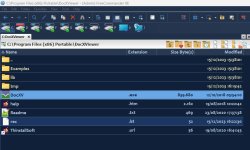
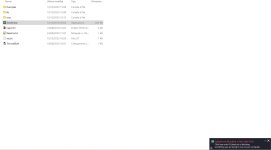
I've just discovered that if I double-click on a file for the first time with a rather known file manager as FreeCommander XE (running with Admin rights) Cyberlock warning window doesn't popup. Cyberlock lets it run by adding the exe file as a auto-allowed whitelist rule. After deleting this rule I double-clicked on the same file with Explorer and this time Cyberlock window correctly popped out as it should be. The file I'm referring to is DocXV.exe (not signed), part of DocX Viewer Portable. Is this behavior normal ? I'm running Cyberlock 7.62, Cyberlock mode: Always on, Security posture: aggressive (default). Thanks


Attachments

  • Free Commander.jpg
    Free Commander.jpg
    76.2 KB · Views: 161
  • Explorer.jpg
    Explorer.jpg
    53.6 KB · Views: 162
Hello,
I've just discovered that if I double-click on a file for the first time with a rather known file manager as FreeCommander XE (running with Admin rights) Cyberlock warning window doesn't popup. Cyberlock lets it run by adding the exe file as a auto-allowed whitelist rule. After deleting this rule I double-clicked on the same file with Explorer and this time Cyberlock window correctly popped out as it should be. The file I'm referring to is DocXV.exe (not signed), part of DocX Viewer Portable. Is this behavior normal ? I'm running Cyberlock 7.62, Cyberlock mode: Always on, Security posture: aggressive (default). Thanks
It might be because of this setting:
[Advanced] Automatically allow by parent process (disable if you are using a web or vulnerable app that is not listed below)

Remove the rule, disable the specified setting, and attempt again.
 
Hi,
I did as you suggested but no avail, unfortunately. Thanks anyway.

I found the solution by adding manually FreeCommander.exe to the Protected Vulmerable Application (anti-exploit) list on the same Advanced settings page. This way by double-clicking on DocXV.exe inside FreeCommander XE correctly triggers Cybelock alert.
 
I found the solution by adding manually FreeCommander.exe to the Protected Vulmerable Application (anti-exploit) list on the same Advanced settings page. This way by double-clicking on DocXV.exe inside FreeCommander XE correctly triggers Cybelock alert.
Disabling the advanced option "Automatically allow by parent process..." didn't resolve the issue. I'm curious why. Can you provide some insight, @danb?
 
Right now I repeated the procedure you suggested to make sure I didn't make any mistakes the first time: first I checked that DocXV.exe wasn't in whitelist and that FreeCommander.exe wasn't in then Protected Vulmerable Application (anti-exploit) list, then I disabled the advanced option "Automatically allow by parent process (disable if you are using a web or vulnerable app that is not listed below)", I double-clicked on DocXV.exe inside FreeCommander XE and like the first time Cyberlock alert didn't trigger and DocX Viewer Portable ran without issues.
 
Right now I repeated the procedure you suggested to make sure I didn't make any mistakes the first time: first I checked that DocXV.exe wasn't in whitelist and that FreeCommander.exe wasn't in then Protected Vulmerable Application (anti-exploit) list, then I disabled the advanced option "Automatically allow by parent process (disable if you are using a web or vulnerable app that is not listed below)", I double-clicked on DocXV.exe inside FreeCommander XE and like the first time Cyberlock alert didn't trigger and DocX Viewer Portable ran without issues.
I know the answer to this, its because you are not an average user, the tool recognizes this. If you were an average user the tool would just do it for you and you wouldn't have to even understand any of the wording you posted. This according to the developer and many of the fans of the tool, its so simple to understand anyone can use it.
 
I know the answer to this, its because you are not an average user, the tool recognizes this. If you were an average user the tool would just do it for you and you wouldn't have to even understand any of the wording you posted. This according to the developer and many of the fans of the tool, its so simple to understand anyone can use it.
Here is what you do not understand. If he were an extreme novice through average user, he would not be installing FreeCommander in the first place, so he never would have encountered this issue.

JT, I have been working directly with end users for 20+ years, 12 while developing VS, so I am extremely familiar what all user experience levels are capable of and are not capable of, and we have optimized and tweaked VS over the years to fix any issues they might have had. This is why most users find VS to be quite user-friendly, especially for a zero-trust product. This is not by accident, it is by hard work and dedication.

BTW, if you are here to argue and to cause trouble, do not post on my thread.
 
BTW, if you are here to argue and to cause trouble, do not post on my thread.
I understand very well how users are mislead to believe anyone can use a tool designed for advanced users. You are claiming though your tool is fault, bug, free and it's simplicity will underwhelm everyone, this is not true.

Just stating, hey my tool requires some knowledge of system files and how applications you choose to use work would go a long way towards it's reality.

Have to apologize, I was unaware you owned this thread. Hope it didn't cost you too much to purchase.
 
  • Like
Reactions: [correlate]