
Why is that a con? Easily a massive pro for me. Microsoft Store is garbage.Only con, not available in MS store.


Open MalwareTips from your Home Screen or desktop. Follow discussions, find answers and pick up where you left off.
If you cannot find an install option, update your browser or use its bookmark option to keep MalwareTips close.
After installation, open the app and sign in. Enable push notifications in Preferences if you want alerts. On iPhone and iPad, push requires a Home Screen web app and iOS or iPadOS 16.4 or later.
Sign in to manage notificationsInstallation is optional. Your notification settings stay under your control.
Why is that a con? Easily a massive pro for me. Microsoft Store is garbage.Only con, not available in MS store.

Try Phoxosee, one of the fastest image viewer that I have used that doesn't look like it was made in 1990s. Only con, not available in MS store.


I meant for OP as they had it as a requirement.Why is that a con? Easily a massive pro for me. Microsoft Store is garbage.
You are welcome.Thank you very much.
It was very quick; I had a few issues setting the default files, but I resolved them manually.
I then uninstalled Microsoft Photo.
I also added the software to the MD Anti-Exploit list.

Perhaps because VLC supports hardware acceleration by default, while it is disabled in PotPlayer.On my PC, VLC runs lighter than PotPlayer (which I had on my old computer).
Perhaps because VLC supports hardware acceleration by default, while it is disabled in PotPlayer.

My current problem with PotPlayer is that it has started to show up in "System Informer" as "Low Process Image Coherency." I'm not sure what this means, but it's the only program with this color, and it wasn't like this before, so I'm not sure what changed.No, it's VLC's lightest interface by default.
I've also disabled other options in VLC.
I probably would have had to go through a lot more trouble to achieve the same result in Potplayer.
I only tested it with hardware acceleration enabled.
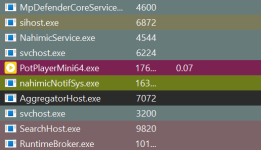
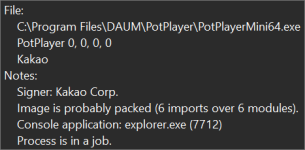
I'm sorry, I don't use Potplayer, so I can't guess what your problem is.My current problem with PotPlayer is that it has started to show up in "System Informer" as "Low Process Image Coherency." I'm not sure what this means, but it's the only program with this color, and it wasn't like this before, so I'm not sure what changed.
Does anyone have any idea why "PotPlayer" appears in this color in "System Informer" (which stands for Low Process Image Coherency)?
The latest stable release is version 6, and it is fantastic.I'll wait for the stable 5.1.2 release.
The latest stable release is version 6, and it is fantastic.
I've fallen too far behind... I'll have to muster up the courage and start customizing it.
What specifically are you looking for in a junk cleaner? Perhaps I or another member could be able to help you find something that fits.
Come to think of it, there are always too many “issues.”
It's a bit of a hassle for me since I use a standard account.
You have to restart the computer to see the folder in the menu,strange path......
I don't remember if the installer isn't signed, but the uninstaller definitely isn't.
Too many issues for my liking.
This is what I get when I ask AI:I'm sorry, I don't use Potplayer, so I can't guess what your problem is.
Have you tried asking ChatGPT for any suggestions?
Copy/paste the image to your computer,and then write your question.
Should I replace PotPlayer since I didn't understand anything? Although I am aware that the English version we use was translated by someone else and was not created by the original developer, it was downloaded from the official PotPlayer website.what is Low Process Image Coherency in system informer mean
**Low Process Image Coherency** in System Informer (formerly Process Hacker) indicates a mismatch between the executable image file on disk and the version of that code currently mapped into the process's memory. This feature compares the on-disk binary with the active process image to calculate a similarity value between 0 and 1, where a value lower than 1 signifies incoherence.
This discrepancy is primarily used to detect **process tampering techniques** such as:
* **Herpaderping**: Overwriting the file on disk with malicious payload while the process runs from a cached section object.
* **Hollowing**: Injecting code into a legitimate process by replacing its memory content.
* **Doppelgänging**: Creating a process from a deleted or modified file using transactional NTFS.
While useful for identifying exploited or tampered processes, the metric can also flag legitimate software that uses **binary packing**, **self-extracting archives**, or **polymorphic code**, as these also result in a difference between the on-disk file and the in-memory execution image. Users can disable highlighting for these cases if they result in false positives.
This is what I get when I ask AI:
Should I replace PotPlayer since I didn't understand anything? Although I am aware that the English version we use was translated by someone else and was not created by the original developer, it was downloaded from the official PotPlayer website.
View attachment 297697
What specifically are you looking for in a junk cleaner? Perhaps I or another member could be able to help you find something that fits.
I do like a bit of winapp2.ini to clean the obscure programs, but ever since CCleaner turned into bloatware I've missed it. Don't use Bleechbit.
Stress free. Use advanced settings, basically enable everything and done. You can usually get the PRO version on giveaway, that enables shell bags deletion.
You use Privazer,even though I find its GUI a bit confusing,how do you find using this software?
Stress free. Use advanced settings, basically enable everything and done. You can usually get the PRO version on giveaway, that enables shell bags deletion.
Only problem I've found is lately EDGE will not delete data/history even when killed from a cleaning app. I have to manually delete history. Maybe it's just me?
Members who viewed this thread in the last 5 minutes


