

The MalwareTips app
Your community, one tap away.
Open MalwareTips from your Home Screen or desktop. Follow discussions, find answers and pick up where you left off.
- Home Screen access
- Optional push alerts
- Your community
You're ready to explore.Explore what's new
Installation instructions
iPhone & iPad
- Open MalwareTips in Safari and tap Share. You may need to open the Page Menu first.
- Choose Add to Home Screen. If it is not listed, use Edit Actions to add it.
- Keep Open as Web App enabled if shown, then tap Add.
Android
- Open MalwareTips in Chrome or another browser that supports app installation.
- Open the browser menu and look for Install app, Install and create shortcut, or Add to Home screen.
- Choose Install and confirm. Wording varies by browser.
Desktop
- Chrome: use the install icon in the address bar, or the menu under Cast, save and share.
- Edge: open the menu, then More tools, Apps and Install this site as an app.
- Safari on Mac: choose Share or File, then Add to Dock. Firefox on Windows: look for the web apps button in the address bar.
If you cannot find an install option, update your browser or use its bookmark option to keep MalwareTips close.
Keep up with your conversations
After installation, open the app and sign in. Enable push notifications in Preferences if you want alerts. On iPhone and iPad, push requires a Home Screen web app and iOS or iPadOS 16.4 or later.
Sign in to manage notificationsInstallation is optional. Your notification settings stay under your control.
You are using an out of date browser. It may not display this or other websites correctly.
You should upgrade or use an alternative browser.
You should upgrade or use an alternative browser.
Question what is a good chrome theme that will let me distinguish between active tab...
-
 Thread starter
Brie
Thread starter
Brie
- Start date
- 9 Replies
- 983 Views
Help answer the author's question with clear explanations and useful steps.


Yes, inactive tabs matter too, because if they are hard to distinguish or the text has poor contrast, the browser becomes tiring to use and accessibility suffers....and non-active tabs? i also want it to be able to read it well. i get themes that have dark writing on a dark background or light writing on a light background.
What to look for in a theme
- Good contrast on the active tab
- Readable text on inactive tabs
- Clear visual difference between active and inactive tabs
- Readable toolbar text, menu text, and bookmark text
- No dark-on-dark or light-on-light combinations
Best approach
If a theme looks nice but makes tab titles hard to read, it is usually not worth using. A good browser theme should be readable first and decorative second.
Practical advice
- Preview the theme carefully before keeping it
- Check active tab and inactive tab text color
- Check how pinned tabs, toolbar buttons, and menus look
- Avoid themes with busy images behind the tab bar
- If available, use the browser’s default dark or light theme instead of third-party themes for better consistency
If this is for Firefox or Chromium-based browsers
In general, built-in themes are usually more reliable for readability than community-made ones, because custom themes sometimes do not handle inactive tab contrast well.
Conclusion
Yes, non-active tabs should be readable as well. If the theme does not keep both active and inactive tabs clearly visible, it is a poor theme from a usability standpoint.

I use Nord Theme for Chrome v 2. It's a dark blue-grey theme that shows active tab title in amber font. This is the only Nord theme extension I like mainly because of the contrasting tab color....and non-active tabs? i also want it to be able to read it well. i get themes that have dark writing on a dark background or light writing on a light background.
When you download and extract the zip file from deviantart.com you'll see there are different color versions but I use the straight Nord Theme blue version. You'll have to side load the extension in any chromium browser by enabling developer mode in extensions. Once installed, you may disable developer options.

Notice the amber higlighted areas in the active tab and the address bar.
Last edited:

I've been through the same thing as well. I ended up in using Chrome's option(s), it seems like a good balance for my eyes.

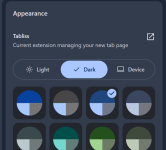

I like classic blue theme Classic blue theme - Chrome Web Store


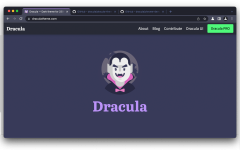
I like Dracula Theme for practically all software, and you can use it in any browser. The Chrome theme is available here.
I hope you find something to your liking.thank you all for your replies.
Recently browsing
Members who viewed this thread in the last 5 minutes