

The MalwareTips app
Your community, one tap away.
Open MalwareTips from your Home Screen or desktop. Follow discussions, find answers and pick up where you left off.
- Home Screen access
- Optional push alerts
- Your community
You're ready to explore.Explore what's new
Installation instructions
iPhone & iPad
- Open MalwareTips in Safari and tap Share. You may need to open the Page Menu first.
- Choose Add to Home Screen. If it is not listed, use Edit Actions to add it.
- Keep Open as Web App enabled if shown, then tap Add.
Android
- Open MalwareTips in Chrome or another browser that supports app installation.
- Open the browser menu and look for Install app, Install and create shortcut, or Add to Home screen.
- Choose Install and confirm. Wording varies by browser.
Desktop
- Chrome: use the install icon in the address bar, or the menu under Cast, save and share.
- Edge: open the menu, then More tools, Apps and Install this site as an app.
- Safari on Mac: choose Share or File, then Add to Dock. Firefox on Windows: look for the web apps button in the address bar.
If you cannot find an install option, update your browser or use its bookmark option to keep MalwareTips close.
Keep up with your conversations
After installation, open the app and sign in. Enable push notifications in Preferences if you want alerts. On iPhone and iPad, push requires a Home Screen web app and iOS or iPadOS 16.4 or later.
Sign in to manage notificationsInstallation is optional. Your notification settings stay under your control.
You are using an out of date browser. It may not display this or other websites correctly.
You should upgrade or use an alternative browser.
You should upgrade or use an alternative browser.
Question what is the best and easiest spell checker for chrome browser?
- Thread starter Brie
- Start date
Chrome & Chromium
13 Replies
1,965 Views
Help answer the author's question with clear explanations and useful steps.


I personally prefer this one.

 chromewebstore.google.com
AI Grammar Checker & Paraphraser – LanguageTool - Chrome Web Store
Instantly Enhance Your Texts with LanguageTool’s Grammar Checker and Paraphrasing Tool
chromewebstore.google.com
I use LanguageTool.

I used to use Grammarly, but the icon that sits on the page at times in a forum box when posting, would get in the way, and I could never figure out how to move it. There was a tipping point where I quit using it. Maybe it also had to do with their privacy policy of what you're typing being sent to them? Can't remember for certain.Hello! I'd recommend "Grammarly for Chrome". It's straightforward and efficient for spell checking and punctuation errors. You can disable the grammar correction feature in the settings.
That's what I'm using, too.I think these spell checkers are massive privacy risk so I just use the one that comes with the browser. Even though if it's terrible like the one in Firefox.

Indeed.I think these spell checkers are massive privacy risk so I just use the one that comes with the browser. Even though if it's terrible like the one in Firefox.
Same here.That's what I'm using, too.
@Brie I advise against using an extension for functions that the browser already provides. Extension should be trustworthy and kept to a minimum because they increase browser attack surface and vulnerability.

I think these spell checkers are massive privacy risk so I just use the one that comes with the browser.
Google, Microsoft can get your passwords via web browser's spellcheck
Enhanced Spellcheck features in Google Chrome and Microsoft Edge web browsers transmit form data, including personally identifiable information (PII) and in some cases, passwords, to Google and Microsoft respectively.

Learn about smart features & controls for Google Workspace & other Google products - Computer - Gmail Help
To give you more granular control over your data, we’ve updated our smart feature settings fo
 support.google.com
So is it better to use a 3rd party spell checker, or do 3rd party apps have that ability as well?Also do not forget to enable Smart features in Google, so it can read your emails, messages and etc, for your own good of course. It can even remove disinformation on your behalf.Google, Microsoft can get your passwords via web browser's spellcheck
Enhanced Spellcheck features in Google Chrome and Microsoft Edge web browsers transmit form data, including personally identifiable information (PII) and in some cases, passwords, to Google and Microsoft respectively.www.bleepingcomputer.com
Learn about smart features & controls for Google Workspace & other Google products - Computer - Gmail Help
To give you more granular control over your data, we’ve updated our smart feature settings fo
TIA
I would pick something with a local dictionary rather than AI/web based. Edge default translator supposedly uses local only, but leaks and misconfigurations happen, I locked it by policy.So is it better to use a 3rd party spell checker, or do 3rd party apps have that ability as well?
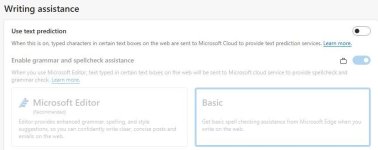
If you select Basic instead of Microsoft Editor, Microsoft Edge will perform only local spellchecking on the device, and no data will be sent to the cloud for spellchecking services.

User data and privacy in Microsoft Edge
Privacy aspects of features of Microsoft Edge, including how your data is shared with Microsoft and how to change settings for this data sharing.
learn.microsoft.com
It can be also blocked/secured by DNS, if paranoid enough.

Code:
nleditor.osi.office.net
turing-writingassistance.edge.microsoft.com
Yeah. That's my philosophy I stick to. The less software PC/apps phone/extensions browser has installed, the better. That alone significantly decreases number of possibly undiscovered vulnerabilities on the device. It also helps with keeping your devices in best shape and retaining the speed.Indeed.
Same here.
@Brie I advise against using an extension for functions that the browser already provides. Extension should be trustworthy and kept to a minimum because they increase browser attack surface and vulnerability.
This is kind of expected because it checks every single word you enter inside the browser, no matter if it's password or something else. I mean, they could stop spell check for passwords (because who the hell spell checks passwords), but that would ruin all the fun for them and would defeat the purpose of cloud spell checker.Also do not forget to enable Smart features in Google, so it can read your emails, messages and etc, for your own good of course. It can even remove disinformation on your behalf.Google, Microsoft can get your passwords via web browser's spellcheck
Enhanced Spellcheck features in Google Chrome and Microsoft Edge web browsers transmit form data, including personally identifiable information (PII) and in some cases, passwords, to Google and Microsoft respectively.
Learn about smart features & controls for Google Workspace & other Google products - Computer - Gmail Help
To give you more granular control over your data, we’ve updated our smart feature settings fo
It's worth to note that standard spell checker doesn't send any information to Google. The only sent request is to download the dictionary on your device and it happens when you add a language in the settings of the browser. Same is with Google's standard Safe Browsing; it downloads file containing malicious URLs and checks everything locally. Enhanced Safe Browsing checks URLs in real time with their servers and sends URLs to Google.
General rule is... if you value your privacy at least a bit, you'll turn off everything Google, Microsoft & co. offer you.
I wish there was an app that would do system-wide spell check and locally on the device. I'd totally use that.I would pick something with a local dictionary rather than AI/web based. Edge default translator supposedly uses local only, but leaks and misconfigurations happen, I locked it by policy.
User data and privacy in Microsoft Edge
Privacy aspects of features of Microsoft Edge, including how your data is shared with Microsoft and how to change settings for this data sharing.learn.microsoft.com
View attachment 287871
It can be also blocked/secured by DNS, if paranoid enough.
Code:nleditor.osi.office.net turing-writingassistance.edge.microsoft.com

sophiakaile
Level 1
Microsoft Editor is the best option to choose.
Recently browsing
Members who viewed this thread in the last 5 minutes
You may also like...
-

-
-
B
Advice Request Microsoft update problem
- R
-
