Poll What is Your Favorite Search Engine?

What is Your Favorite Search Engine?

  • Brave Search

    Votes: 13 10.7%
  • DuckDuckGo

    Votes: 24 19.8%
  • Ecosia

    Votes: 1 0.8%
  • Google Search

    Votes: 64 52.9%
  • Microsoft Bing

    Votes: 6 5.0%
  • Mojeek

    Votes: 0 0.0%
  • Qwant

    Votes: 5 4.1%
  • Searx

    Votes: 4 3.3%
  • Startpage

    Votes: 3 2.5%
  • Swisscows

    Votes: 0 0.0%
  • Yahoo! Search

    Votes: 0 0.0%
  • Yandex Search

    Votes: 1 0.8%

  • Total voters
    121
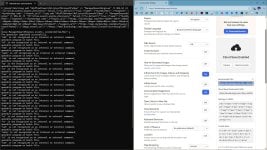
Changing to DDG, but "Keeps parameters" when you erase history or set to "clear data on exit" when restart all parameters are gone, load cloud parameters works indeed but each time you'll have to enter password, it's a bit annoying i think/imho so for now it works like this, automatically load parameters :

ddg.gif
 
Changing to DDG, but "Keeps parameters" when you erase history or set to "clear data on exit" when restart all parameters are gone
DDG allows to create search URL with custom settings, so there is no need to save them, but it is a bit difficult to setup.
I for one disable AI and that is not even available in parameters. :cautious:
 
@TairikuOkami
Yes i've ever seen that, but when data are cleared, restart browser with all these parameters
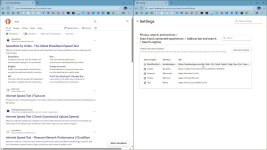
You can supposedly copy/paste the custom or cloud URL into browser's search settings, it is not affected by cookies or cleared data, but it never worked for me.

I do it via policies, but it fails with a custom URL. As I said, it is not easy to setup properly and there is no support.

capture_03142026_100350.jpg capture_03142026_101418.jpg
 
Last edited:
You can supposedly copy/paste the custom or cloud URL into browser's search settings, it is not affected by cookies or cleared data, but it never worked for me.

I do it via policies, but it fails with a custom URL. As I said, it is not easy to setup properly and there is no support.

View attachment 296330 View attachment 296332
So i will stick with my methods, work like a charm, if you're interested, i can share you the config file.
 
@TairikuOkami
You will need AutoHotKey V2 for the ahk file, Windows Spy for set the pixel of the auto mouse clic and Ahk2.exe to convert to exe, for the timing (sleep), it depends of your net speed, if you set to low it will not work. Easy txt file, create a blank ahk with AutoHotKey file then copy paste and enter your personal fields.
 

Attachments

Changing to DDG, but "Keeps parameters" when you erase history or set to "clear data on exit" when restart all parameters are gone, load cloud parameters works indeed but each time you'll have to enter password, it's a bit annoying i think/imho so for now it works like this, automatically load parameters :

View attachment 296329
Off-topic:

Would you kindly share your installed software list in the thread below? I'm interested. By the way, I like the wallpaper.
 
  • Like
Reactions: simmerskool
Beyond the Overview: Our top alternatives to Google’s continuous AI push in search results
Many users are increasingly fed up with Google's aggressive push toward artificial intelligence, particularly with the introduction of AI Overviews, which the company describes as “a snapshot of key information about a topic or question with links so you can easily explore more on the web”. Between these overviews, AI summaries, and AI-powered direct answers, artificial intelligence has become ubiquitous in the Google Search experience, often cluttering results with synthesized content rather than direct links. For those tired of wading through algorithmic interpretations and yearning for simpler, more straightforward search results, a growing number of no-AI alternatives are here to reclaim the traditional search experience.
 
  • Like
Reactions: Virtuoso
I keep trying the Duck from time to time, but the results keep being disappointing. Always takes to find the answers and forget about complex rabbit hole questions.
 
  • Like
Reactions: Jonny Quest