

The MalwareTips app
Your community, one tap away.
Open MalwareTips from your Home Screen or desktop. Follow discussions, find answers and pick up where you left off.
- Home Screen access
- Optional push alerts
- Your community
You're ready to explore.Explore what's new
Installation instructions
iPhone & iPad
- Open MalwareTips in Safari and tap Share. You may need to open the Page Menu first.
- Choose Add to Home Screen. If it is not listed, use Edit Actions to add it.
- Keep Open as Web App enabled if shown, then tap Add.
Android
- Open MalwareTips in Chrome or another browser that supports app installation.
- Open the browser menu and look for Install app, Install and create shortcut, or Add to Home screen.
- Choose Install and confirm. Wording varies by browser.
Desktop
- Chrome: use the install icon in the address bar, or the menu under Cast, save and share.
- Edge: open the menu, then More tools, Apps and Install this site as an app.
- Safari on Mac: choose Share or File, then Add to Dock. Firefox on Windows: look for the web apps button in the address bar.
If you cannot find an install option, update your browser or use its bookmark option to keep MalwareTips close.
Keep up with your conversations
After installation, open the app and sign in. Enable push notifications in Preferences if you want alerts. On iPhone and iPad, push requires a Home Screen web app and iOS or iPadOS 16.4 or later.
Sign in to manage notificationsInstallation is optional. Your notification settings stay under your control.
You are using an out of date browser. It may not display this or other websites correctly.
You should upgrade or use an alternative browser.
You should upgrade or use an alternative browser.
Advice Request What is your opinion about Microsoft Windows Defender (Windows 10)?
-
 Thread starter
Captain Awesome
Thread starter
Captain Awesome
- Start date
- 327 Replies
- 83,785 Views
Share practical recommendations that address the author's needs.


Andy Ful
From Hard_Configurator Tools
Verified
Honorary Member
Top Poster
Developer
Well-known
Forum Veteran
That is normal when you can see Defender alerts frequently. But, for most people, such alerts are so rare that the poor GUI, lags, etc. do not matter at all.Personally I don't like windows defender.
Sure it has amazing detection rates when configured properly and has always ran pretty light on any system i've ever owned.
But there's a few things about it that i personally dont like (yes I know these are just small things, but I'm very particular)
first of all, it lacks fine built in controls, I don't like having to use a third party program to control it
Second, even with a third party application, there's no way to set it to "ask" when it detects a threat (atleast no way that I have seen)
and last, the toaster notifications for when a threat is detected on any system I have ever used has been extremely laggy
as well as it doesnt hand threats in a timely manner (I.E it takes it a bit of time to remove something as simple as the Eicar test file)
I want to like it, I really do. I've seen it come a long way. But I just cant.


Andy Ful
From Hard_Configurator Tools
Verified
Honorary Member
Top Poster
Developer
Well-known
Forum Veteran
Yes. I noticed similar behavior on one of my laptops (32 GB EMMC, 2GB RAM, Atom processor). The big CPU load is present while updating the system and Microsoft Store applications, performing system management tasks, and system scan. After that, the computer is fully usable (web browsing, watching videos, document editing). Anyway, I would prefer the Chromebook for such simple tasks.In my case the biggest problem I've encountered is when the Antimalware Service Executable (MsMpEng.exe) uses the CPU almost 100% and this means that Windows Defender is sinking the system making it almost unusable for most of the time.

Microsoft Defender has received a new platform update today. No changelog is available yet.
"Antimalware Client Version: 4.18.2102.3".
"Antimalware Client Version: 4.18.2102.3".

Setup PCPC setup
I had a failed install multiple times. But the third time it just disappeared and my Client Version matches the current one...never seen that one.Microsoft Defender has received a new platform update today. No changelog is available yet.
"Antimalware Client Version: 4.18.2102.3".
It was being installed at the same time as the latest optional Windows Update/
Last edited:
I have seen some of this windows update failing reports a couple of times from several users. The issue is random it seems.I had a failed install multiple times. But the third time it just disappeared and my Client Version matches the current one...never seen that one.
It was being installed at the same time as the latest optional Windows Update/
Setup PCPC setup
Seemed to also sort itself out quickly. So I’m not complaining.I have seen some of this windows update failing reports a couple of times from several users. The issue is random it seems.

Microsoft Defender has received a new platform update today. No changelog is available yet.
"Antimalware Client Version: 4.18.2102.3".
Confirmed
 here it was manually updated by me on Windows Security Center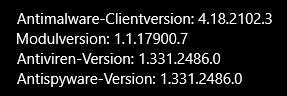
Recently browsing
Members who viewed this thread in the last 5 minutes
You may also like...
-

-

-

-
 Serious Discussion Is Defender enough with Malwarebytes Free on Windows 11?
 -
