

The MalwareTips app
Your community, one tap away.
Open MalwareTips from your Home Screen or desktop. Follow discussions, find answers and pick up where you left off.
- Home Screen access
- Optional push alerts
- Your community
You're ready to explore.Explore what's new
Installation instructions
iPhone & iPad
- Open MalwareTips in Safari and tap Share. You may need to open the Page Menu first.
- Choose Add to Home Screen. If it is not listed, use Edit Actions to add it.
- Keep Open as Web App enabled if shown, then tap Add.
Android
- Open MalwareTips in Chrome or another browser that supports app installation.
- Open the browser menu and look for Install app, Install and create shortcut, or Add to Home screen.
- Choose Install and confirm. Wording varies by browser.
Desktop
- Chrome: use the install icon in the address bar, or the menu under Cast, save and share.
- Edge: open the menu, then More tools, Apps and Install this site as an app.
- Safari on Mac: choose Share or File, then Add to Dock. Firefox on Windows: look for the web apps button in the address bar.
If you cannot find an install option, update your browser or use its bookmark option to keep MalwareTips close.
Keep up with your conversations
After installation, open the app and sign in. Enable push notifications in Preferences if you want alerts. On iPhone and iPad, push requires a Home Screen web app and iOS or iPadOS 16.4 or later.
Sign in to manage notificationsInstallation is optional. Your notification settings stay under your control.
You are using an out of date browser. It may not display this or other websites correctly.
You should upgrade or use an alternative browser.
You should upgrade or use an alternative browser.
Advice Request Which Apps Updater do you use?
-
 Thread starter
RoboMan
Thread starter
RoboMan
- Start date
- 52 Replies
- 9,555 Views
Share practical recommendations that address the author's needs.
Thanks for all these positive feedbacks on SUMo. Get the lastest version and discussion here : SUMo v5.x Changelog

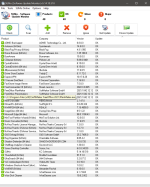
Tried Patch My PC, (again) it found 3 programs to update, two were redistributable that were the same as on but numbered differently & SM Player I already know about - Sumo detects 40 programs - Patch 18 programs, worth keeping as it uses little space.
Attachments
Last edited:

for portable why when scan result it is 508 softwares ?
why not scan only install apps ?
latest portable version 5.14.10 !!!
...
i need to delet portable and re-download,portable update it is not specific tutorial on kcsoftwares site !
...
when it is new discount for SUMo ?
why not scan only install apps ?
latest portable version 5.14.10 !!!
...
i need to delet portable and re-download,portable update it is not specific tutorial on kcsoftwares site !
...
when it is new discount for SUMo ?
Last edited:

I have Kerish Doctor which I like run each 2-3 months run to do a check on outdated apps. Does a pretty nice job. However, most of my softwares do check on startup if they need to update. Edge, potplayer, qbittorent and some more.

Patchmypc, Ruckzuck and Sumo.

I started to use winget, it seems to include way more apps now. It is as simple as running:
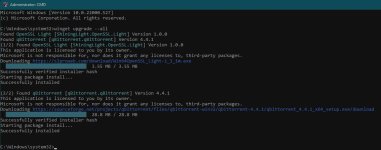
It can be even used to automatically install all apps on the fresh install as long as you have exported them before.
Code:
winget upgrade --allIt can be even used to automatically install all apps on the fresh install as long as you have exported them before.
Code:
winget export -o D:\OneDrive\Setup\winget.txt
winget import -i D:\OneDrive\Setup\winget.txt
Code:
{
    "$schema" : "https://aka.ms/winget-packages.schema.2.0.json",
    "CreationDate" : "2022-02-17T00:07:36.153-00:00",
    "Sources" :
    [
        {
            "Packages" :
            [
                {
                    "PackageIdentifier" : "M2Team.NanaZip"
                },
                {
                    "PackageIdentifier" : "Discord.Discord"
                },
                {
                    "PackageIdentifier" : "Microsoft.Edge"
                },
                {
                    "PackageIdentifier" : "Microsoft.EdgeWebView2Runtime"
                },
                {
                    "PackageIdentifier" : "Microsoft.OneDrive"
                },
                {
                    "PackageIdentifier" : "ShiningLight.OpenSSL.Light"
                },
                {
                    "PackageIdentifier" : "Daum.PotPlayer"
                },
                {
                    "PackageIdentifier" : "CreativeTechnology.SoundBlasterCommand"
                },
                {
                    "PackageIdentifier" : "SumatraPDF.SumatraPDF"
                },
                {
                    "PackageIdentifier" : "BiniSoft.WindowsFirewallControl"
                },
                {
                    "PackageIdentifier" : "WiseCleaner.WiseDiskCleaner"
                },
                {
                    "PackageIdentifier" : "WiseCleaner.WiseRegistryCleaner"
                },
                {
                    "PackageIdentifier" : "XnSoft.XnView.Classic"
                },
                {
                    "PackageIdentifier" : "qBittorrent.qBittorrent"
                },
                {
                    "PackageIdentifier" : "Microsoft.VC++2010Redist-x64"
                },
                {
                    "PackageIdentifier" : "Microsoft.VC++2015-2022Redist-x64"
                },
                {
                    "PackageIdentifier" : "Microsoft.VC++2008Redist-x64"
                },
                {
                    "PackageIdentifier" : "Microsoft.VC++2005Redist-x86"
                },
                {
                    "PackageIdentifier" : "ShiningLight.OpenSSL.Light"
                },
                {
                    "PackageIdentifier" : "TheDocumentFoundation.LibreOffice"
                },
                {
                    "PackageIdentifier" : "Microsoft.VC++2008Redist-x86"
                },
                {
                    "PackageIdentifier" : "AOMEI.Backupper"
                },
                {
                    "PackageIdentifier" : "Microsoft.VC++2010Redist-x86"
                },
                {
                    "PackageIdentifier" : "Microsoft.VC++2005Redist-x64"
                }
            ],
            "SourceDetails" :
            {
                "Argument" : "https://winget.azureedge.net/cache",
                "Identifier" : "Microsoft.Winget.Source_8wekyb3d8bbwe",
                "Name" : "winget",
                "Type" : "Microsoft.PreIndexed.Package"
            }
        }
    ],
    "WinGetVersion" : "1.2.3411-preview"
}
Last edited:
I didn't know about winget. I just ran it and if found and installed a number of updates.I started to use winget, it seems to include way more apps now. It is as simple as running:
Code:winget upgrade --all


Softpedia email notifications & SUMo free for me.I used PatchMyPC till it broke and stopped updating apps properly. So I just use Softpedia's email notifications and downloads.
Softpedia updates are automatic (in notification
 ) & SUMo is manual.
Both these cover every software on my PC.
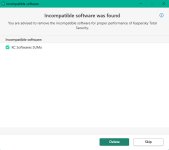
EDIT: SUMo is incompatible with kaspersky, Still i ignore Kaspersky recommendation for deletion.
Last edited:
In fact this alert is simply done by Kaspersky to block SUMo and promote their own crappy Software Updater.... No technical issue due to SUMo. What a poor commercial practice...
for portable why when scan result it is 508 softwares ?
why not scan only install apps ?
latest portable version 5.14.10 !!!
...
i need to delet portable and re-download,portable update it is not specific tutorial on kcsoftwares site !
...
when it is new discount for SUMo ?
I'll send a discount by PM to you.
@Kyle_Katarn
Your latest version (and previous versions) of SUMo has some issues identifying some programs
1) Portable Librewolf of mine is already 97.0.1 version but SUMo reports as 96.x.x
2) ExpressVPN is still at 10.17.0.28 but SUMo reports a newer version 10.19.0.7 available
Last edited:

I started to use winget, it seems to include way more apps now. It is as simple as running:
Code:winget upgrade --all
View attachment 264473
Yuuuup. I just read about this somewhere else, and it seems awesome. Just create a script that calls "winget upgrade --all" (run as admin) and you're done. Updating couldn't be easier. How long has this been around?
Code:
@echo off

powershell.exe -ExecutionPolicy Unrestricted -Command ". 'C:\SCRIPT.ps1'"

TIMEOUT /T 5
.bat file to call powershell
Code:
winget upgrade --all

exit
.ps1 file referrenced in above .bat file. Just execute the bat and you're done!
Last edited:
@n8chavez I made a batch file with just one line.
I named it winget.bat, so I had to change winget to winget.exe, otherwise it would just run my batch file again, rather than loading winget.exe.Code:winget.exe upgrade --all
But using this method the powershell execution policy can be a problem, based on users' settings. That's why I needed the two. Thanks though.
1) Please contact me (email : contact [AT] kcsoftwares.com or PM) for analysisView attachment 264596
@Kyle_Katarn
Your latest version (and previous versions) of SUMo has some issues identifying some programs
1) Portable Librewolf of mine is already 97.0.1 version but SUMo reports as 96.x.x
2) ExpressVPN is still at 10.17.0.28 but SUMo reports a newer version 10.19.0.7 available
2) 10.19.0.7 is indeed current

Yes just updated my ExpressVPN a few days back1) Please contact me (email : contact [AT] kcsoftwares.com or PM) for analysis
2) 10.19.0.7 is indeed current
Last edited:

Recently browsing
Members who viewed this thread in the last 5 minutes


