

The MalwareTips app
Your community, one tap away.
Open MalwareTips from your Home Screen or desktop. Follow discussions, find answers and pick up where you left off.
- Home Screen access
- Optional push alerts
- Your community
You're ready to explore.Explore what's new
Installation instructions
iPhone & iPad
- Open MalwareTips in Safari and tap Share. You may need to open the Page Menu first.
- Choose Add to Home Screen. If it is not listed, use Edit Actions to add it.
- Keep Open as Web App enabled if shown, then tap Add.
Android
- Open MalwareTips in Chrome or another browser that supports app installation.
- Open the browser menu and look for Install app, Install and create shortcut, or Add to Home screen.
- Choose Install and confirm. Wording varies by browser.
Desktop
- Chrome: use the install icon in the address bar, or the menu under Cast, save and share.
- Edge: open the menu, then More tools, Apps and Install this site as an app.
- Safari on Mac: choose Share or File, then Add to Dock. Firefox on Windows: look for the web apps button in the address bar.
If you cannot find an install option, update your browser or use its bookmark option to keep MalwareTips close.
Keep up with your conversations
After installation, open the app and sign in. Enable push notifications in Preferences if you want alerts. On iPhone and iPad, push requires a Home Screen web app and iOS or iPadOS 16.4 or later.
Sign in to manage notificationsInstallation is optional. Your notification settings stay under your control.
You are using an out of date browser. It may not display this or other websites correctly.
You should upgrade or use an alternative browser.
You should upgrade or use an alternative browser.
Question Which AV are you using and why did you choose this one ??
-
 Thread starter
TuxTalk
Thread starter
TuxTalk
- Start date
- 400 Replies
- 69,973 Views
Help answer the author's question with clear explanations and useful steps.


kamiloxf
Level 2
Setup PCPC setup
CrowdStrike With Web Marshall Browser Protection


Norton 360, best security suite at the moment.

Now how intrusive is your setup? How often do you have to reduce the defenses in order for a program to work? Have you experienced any instabilities or crashes?from my understanding windows exploit guard and asr rules can protect against a lot of the same types of mitigations but since hitmanpro.alert although have a lot of similar mitigations it does work differently wnd covers some stuff exploit guard doesn't have yet (probably adds checks in other areas in memory for example , and has extra behavior based post exploitation that some isn't necessarily present in windows ATP )
So I'm using it as an added defense after adding exploit guard mitigations from this template GitHub - neohiro/ExploitProtection: Windows Exploit Protection Settings (Ultimate) and I have manually added comodo to both hitmanpro.alert and exploit guard (although it shouldn't stop the type of bypasses used in Andy ful challenge but still will help against mainly memory based overflows)
I find that for an everyday joe and even for a person of interest the probability of infection is very low unless you browse warez/cracks/cheats/"free" programs.
As a result in the end you inconvenience yourself, introduce instabilities and wider threat space by employing multiple security solutions beyond your regular AV.
You are not as important as you think you are and your data doesn't matter
But that's just me and I don't matter.

Well after a lot of testing via my clean install MacriumX image, I have tried several this year.
After listening to other on this forum, and having them point out some of my mistakes, and false assumptions, and after trying out several products.
I have settled on the two that are either considered the best here at MWT and or the easiest to setup and use on my daily PC.
I have decided to use Eset Essential, and CatchPulse.
My reasons are as follows: Reputation, ease of use, and cost.
Catchpulse just requires a couple setting changes, (exclusions and turn off the AV component) and it's damn near out of box, set and forget, for $23.00.
Eset, while expensive, it has a great reputation here at MWT. (you can find sale prices).
What have obtained with this setup?
A great AV,
a two-way firewall, and
a VERY EASY to use default deny.
***Both Eset and Catchpules scan every drive on your PC upon install.
As far as I can tell from a months' worth of searching and research, there is no suite or package that offers this protection, except Comodo, and I just wasn't comfortable using a product that seems to be good at just one thing, while failing in 3 or 4 other areas
After listening to other on this forum, and having them point out some of my mistakes, and false assumptions, and after trying out several products.
I have settled on the two that are either considered the best here at MWT and or the easiest to setup and use on my daily PC.
I have decided to use Eset Essential, and CatchPulse.
My reasons are as follows: Reputation, ease of use, and cost.
Catchpulse just requires a couple setting changes, (exclusions and turn off the AV component) and it's damn near out of box, set and forget, for $23.00.
Eset, while expensive, it has a great reputation here at MWT. (you can find sale prices).
What have obtained with this setup?
A great AV,
a two-way firewall, and
a VERY EASY to use default deny.
***Both Eset and Catchpules scan every drive on your PC upon install.
As far as I can tell from a months' worth of searching and research, there is no suite or package that offers this protection, except Comodo, and I just wasn't comfortable using a product that seems to be good at just one thing, while failing in 3 or 4 other areas

And I'm still using my default F-Secure Total, WFC and IVPN.
As far as the why (thread question), regarding F-Secure, because it's still a solid app, just the right amount of settings, glitch free, no pop ups or ads. Nice browser and banking protection, and for what I'm doing and not doing online, great overall protection. WFC being a nicer addition, easier to use than Windows convoluted firewall. IVPN/F-Secure VPN, because I like the privacy.
I may go back to F-Secure I.S. when my Total expires, as I'm finding IVPN consistently stays connected even coming out of sleep mode, while F-Secure's VPN at times would need to switch servers to have it reconnect. In general, it works well in the US (multiple servers) but IVPN is defiantly a step or two above.
I do have BD AV+ on a Windows 10 desktop PC, along with WFC.
As far as the why (thread question), regarding F-Secure, because it's still a solid app, just the right amount of settings, glitch free, no pop ups or ads. Nice browser and banking protection, and for what I'm doing and not doing online, great overall protection. WFC being a nicer addition, easier to use than Windows convoluted firewall. IVPN/F-Secure VPN, because I like the privacy.
I may go back to F-Secure I.S. when my Total expires, as I'm finding IVPN consistently stays connected even coming out of sleep mode, while F-Secure's VPN at times would need to switch servers to have it reconnect. In general, it works well in the US (multiple servers) but IVPN is defiantly a step or two above.
I do have BD AV+ on a Windows 10 desktop PC, along with WFC.
Last edited:

BD Free (wanted to get away from gen digital) Cyberlock, WFC
BD Free (wanted to get away from gen digital) Cyberlock, WFC
And IMO, the free version of BD may be the way to go with the combinations you're using in this regard, you're getting the protection without some of the glitches, or known issues that can occur for some with BD Total (or some of the other AV's Total/Ultimate versions?). Even though I'm using BD AV+ on a PC, I think I'll uninstall it and give BD Free version a try, along with WFC and IVPNIn my opinion: Bitdefender Free + Ghostery + Proton VPN Free.

And I know my friend Nunzio has been using the free version for a long time, with great success

Yes my friend!And I know my friend Nunzio has been using the free version for a long time, with great success


Microsoft Defender configured with @Andy Ful's ConfigureDefender tool + some of my own set Group Policies. SmartScreen disabled entirely. I wish @Andy Ful would add more policies into the tool so I don't have to set some of them manually.
Why am I using Defender? It's free. I'm not the kind of person that spends money on garbage I don't need.
Why am I using Defender? It's free. I'm not the kind of person that spends money on garbage I don't need.
It’s "free," but the telemetry Microsoft uses isn't free. Anything free always comes with problems. If paid antivirus software were unnecessary, it wouldn't exist.Microsoft Defender configured with @Andy Ful's ConfigureDefender tool + some of my own set Group Policies. SmartScreen disabled entirely. I wish @Andy Ful would add more policies into the tool so I don't have to set some of them manually.
Why am I using Defender? It's free. I'm not the kind of person that spends money on garbage I don't need.
I disabled data collection, sample submission and SmartScreen so it doesn't transfer data to Microsoft. Everything they get from me is my IP address when it reaches Microsoft servers for an update.It’s "free," but the telemetry Microsoft uses isn't free.
On contrary, I had more trouble with 3rd party software than with Defender. It's made by the company that also made the OS; compatibility is guaranteed.Anything free always comes with problems.
Actually, they are still here because of people that think Windows still needs an antivirus software and upselling tactics. No other reason. Some habits die hard.If paid antivirus software were unnecessary, it wouldn't exist.

SmartScreen enabled plus ASR rule "Block executable files from running unless they meet a prevalence, age, or trusted list criterion" to extend the SmartScreen to executables without motw.SmartScreen disabled entirely
All free solutions collect data; they are provided free for a reason.It’s "free," but the telemetry Microsoft uses isn't free. Anything free always comes with problems. If paid antivirus software were unnecessary, it wouldn't exist.
I disabled data collection, sample submission and SmartScreen so it doesn't transfer data to Microsoft. Everything they get from me is my IP address when it reaches Microsoft servers for an update.
On contrary, I had more trouble with 3rd party software than with Defender. It's made by the company that also made the OS; compatibility is guaranteed.
Actually, they are still here because of people that think Windows still needs an antivirus software and upselling tactics. No other reason.
They exist because sophisticated malware is being created every day. If that were the only factor, Windows 11 wouldn't have any bugs—and yet, it's one of the worst operating systems ever made. So, the famous "Microsoft guarantee" is quite questionable.
Got it installedIn my opinion: Bitdefender Free + Ghostery + Proton VPN Free.
What I like is it didn't install the VPN (see below edit) which with the other higher tier versions it does, which I didn't use. I also never used Profiles, Vulnerability Scan, Safepay or One Click Optimizer (in Total). So this closer to what I'm looking for. F-Secure I.S. is the same way, no frills or unnecessary modules.I'll see how it goes on this PC, and keep this in mind for when my F-Secure renewal comes up.
edit: I do like that the Free version has the Security Widget, not that it wouldn't, but it's still nice to see that option is available
I do see now that it silently installed the VPN. When I first installed it, there wasn't a VPN desktop shortcut or it being listed in Windows 10 apps, but now it's in both places. Oh well, it's an easy uninstall.
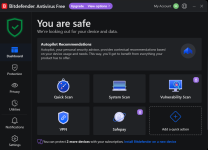
Last edited:

BD free here too
And now that I see what it offers on that desktop PC, I'm going to install it on one of my laptops. Of all the on and off years in using BD, I truly never used the free version. Excellent device security, and online protection, why not install it on a laptop I use dailyBD free here too
Recently browsing
Members who viewed this thread in the last 5 minutes
You may also like...
-

-
 Serious Discussion Behavior vs Signature: which is the best strategy?
 -

-

-
Serious Discussion Best Paid Antivirus in Late 2025 – Norton, Bitdefender, or What?