Question Which AV are you using and why did you choose this one ??

Please provide comments and solutions that are helpful to the author of this topic.
Most of the time, I use either ESET or Kaspersky. I appreciate Kaspersky because they’ve consistently been among the first to detect and publicly report so-called state-sponsored trojans—especially the ones that ended up getting them banned in the U.S., which I personally find quite admirable. 😄
Another reason I like Kaspersky is its strong offline detection capabilities—not just cloud-based protection.

ESET, on the other hand, is my go-to for being fast, lightweight, and still offering above-average protection.

On my main PC, I still use ESET, while on the living room and bedroom PCs—where I’m not the only user—I’ve switched to Kaspersky.

As for BitDefender, I’ve uninstalled it from all systems and canceled the subscription (or had it canceled), mainly because it interferes too much with certificates and often had a noticeable negative impact on performance.
 
After trying the top six free products (can't affor paid ones):
I settled upon AVG

  • RAM utilization midway between Kaspersky and Bitdefender
  • CPU utilization midway between Microsoft defender and Kaspersky
  • Interface midway between Microsoft defender and Bitdefender
  • Detection almost on par with Kaspersky and Bitdefender
  • Behavioral protection midway between Microsoft defender and Kaspersky
  • Web protection doesn't insert its own certificate: faster browsing and less vulnerability
  • The only one with controlled folder access, in addition to Microsoft defender
  • The only one with firewall; basic albeit interactive
  • Has a beautiful icon 👌I like watching it spinning
 
Last edited:
Hello, good afternoon. What free antivirus do you recommend for my work PC? I currently use Microsoft Defender, but I see that AVG is also a good option. The computer isn't that powerful. 8GB of RAM, SSD, Intel i3.
 
Hi, I use Comodo Firewall (configuration recommended by CruelSister) combined with Symantec Endpoint Protection unmanaged (only antivirus module and proactive protection, with some modifications that I think are more effective in protection). I use this combination because it is free and although I am not an expert in the field, I think they provide decent protection for a home user.
I no longer use that setup. Nowadays, I rely on Windows Defender along with Andy Ful’s hardening tools, which help strengthen system security.
 
Dopo aver provato i sei migliori prodotti gratuiti (non posso permettermi quelli a pagamento):
Ho scelto A V G

  • Utilizzo della RAM a metà strada tra Kaspersky e Bitdefender
  • Utilizzo della CPU a metà strada tra Microsoft Defender e Kaspersky
  • Interfaccia a metà strada tra Microsoft Defender e Bitdefender
  • Rilevamento quasi alla pari con Kaspersky e Bitdefender
  • Protezione comportamentale a metà strada tra Microsoft Defender e Kaspersky
  • La protezione web non inserisce il proprio certificato: navigazione più veloce e meno vulnerabilità
  • L'unico con accesso controllato alle cartelle, oltre a Microsoft Defender
  • L'unico con firewall; basilare ma interattivo
  • Ha una bellissima icona, 👌mi piace guardarla girare
Utilizzi ancora AVG Free?
Visualizzi fastidiosi pop-up che ti chiedono di passare alla versione a pagamento?
 
  • Like
Reactions: lokamoka820
Utilizzi ancora AVG Free?
Visualizzi fastidiosi pop-up che ti chiedono di passare alla versione a pagamento?
Not anymore; using MD tweaked manually (3 ASR rules and cloud block level through GP), with SAC on and Fort firewall.
When was using AVG free, I just block avgui.exe using AVG firewall; never got a single ad or popup.
 
Not anymore; using MD tweaked manually (3 ASR rules and cloud block level through GP), with SAC on and Fort firewall.
When was using AVG free, I just block avgui.exe using AVG firewall; never got a single ad or popup.
Which NextDNS also did.

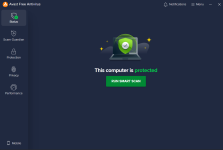
It looks like your work around also applies to Avast, now it's a much cleaner ad free looking UI ;) :) Thanks, that was a nice tip, Parkinsond (y)
Screenshot 2025-10-27 115719.png

Screenshot 2025-10-27 115950.png
 
Which NextDNS also did.

It looks like your work around also applies to Avast, now it's a much cleaner ad free looking UI ;) :) Thanks, that was a nice tip, Parkinsond (y)
View attachment 292378
View attachment 292379
You are welcome, @Jonny Quest ☺️
 
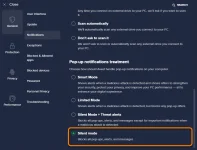
You can now completely disable pop-ups in AVG notification settings.

View attachment 292380
Which Avast has that same option, but it didn't apply to the homepage promotions, "we have a gift for you", etc. as Parkinsond mentioned. Does the AVG home screen look like what I posted above for Avast?

Blocking avgui.exe has an additional advantage of blocking the promotional data displayed on the home page.
 
Which Avast has that same option, but it didn't apply to the homepage promotions, "we have a gift for you", etc. as Parkinsond mentioned. Does the AVG home screen look like what I posted above for Avast?
No, this option will only block annoying pop-ups, it has nothing to do with banner ads (UI ads).