lol. Swatting bugs is so fun.For the fun !


Open MalwareTips from your Home Screen or desktop. Follow discussions, find answers and pick up where you left off.
If you cannot find an install option, update your browser or use its bookmark option to keep MalwareTips close.
After installation, open the app and sign in. Enable push notifications in Preferences if you want alerts. On iPhone and iPad, push requires a Home Screen web app and iOS or iPadOS 16.4 or later.
Sign in to manage notificationsInstallation is optional. Your notification settings stay under your control.
 Thread starter
Windows_Security
Thread starter
Windows_Security
lol. Swatting bugs is so fun.For the fun !

You don't have to bypass it when you can can inject into explorer and then do what you wish to do.now the real bet is how long before someone bypass it ?
Good you pointed that out.You don't have to bypass it when you can can inject into explorer and then do what you wish to do.
You don't have to bypass it when you can can inject into explorer and then do what you wish to do.
Which is a bypass to meGood you pointed that out.
It's a mistake for people to think that protected folders is total protection from ransomware. Because if ransomware hides its identity by injecting itself into a trusted process, protected folders won't help.


Nice article.Here is a nice article to get an overview of the new security features...
6 new and noteworthy security features in Windows 10 Fall Creators Update

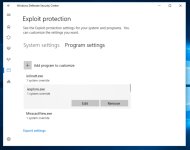
I am running EMET, which Exploit Protection is based on, and it comes with templates. I will screenshot the EMET settings from Chrome, which is on their "popular software" template:Would it be good to add a browser (eg Chrome) to Exploit Protection> Program Settings?
View attachment 170287
If it is added, do you still need to adjust something? What?
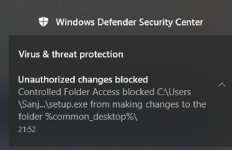
It looks like they added a default/deny level of protection. How do ya like that.CFA block something when Chrome is installed:
View attachment 170283
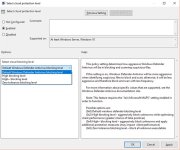
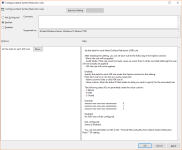
This is one new settings - Zero Tolerance
View attachment 170284
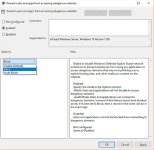
This is second new settings - Block dangerous sites/domains
View attachment 170285
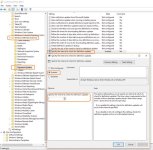
Also, set Win Defender update to every 1h
View attachment 170286

+1 !!!I like it, just need to do some test but can't find the free time...
I would like to someone (@cruelsister) test all this new settings set to max
You don't have to bypass it when you can can inject into explorer and then do what you wish to do.
Well protected folder is simply one of the new security features Microsoft has implemented.Good you pointed that out.
It's a mistake for people to think that protected folders is total protection from ransomware. Because if ransomware hides its identity by injecting itself into a trusted process, protected folders won't help.
It all has these great-sounding names, but...Well protected folder is simply one of the new security features Microsoft has implemented.
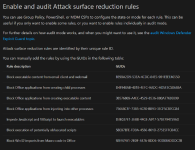
I assume this combine with attack surface reduction and exploit protection should have all users covered.

Exploit Guard is just EMET integrated into Windows.
Members who viewed this thread in the last 5 minutes