H
hjlbx
- Describe the problem
- System works, but sluggish.
- What have you tried?
- Haven't done anything up to this point.
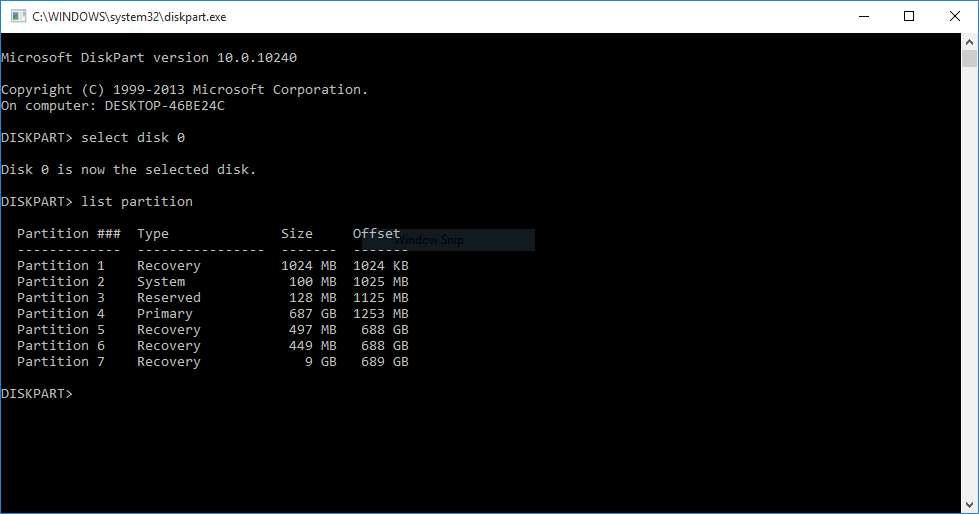
Here is image of what W10 did to one of my Toshiba systems:
mod edit
mod edit


Open MalwareTips from your Home Screen or desktop. Follow discussions, find answers and pick up where you left off.
If you cannot find an install option, update your browser or use its bookmark option to keep MalwareTips close.
After installation, open the app and sign in. Enable push notifications in Preferences if you want alerts. On iPhone and iPad, push requires a Home Screen web app and iOS or iPadOS 16.4 or later.
Sign in to manage notificationsInstallation is optional. Your notification settings stay under your control.
Ow!!
Save your data, format everything and reinstall a fresh Windows 10 by creating one/two data partitions.
Something is rotten. Used DiskPart to delete extra recovery partitions. Attempted W10 reset. Didn't work. Not sure what's wrong. Can't find technical infos to repair this situation... might have to go item-by-item down a very long list of "To Doooooz." Ehm, what a mess...
normal, you deleted partitions , they had a specific position in the HDD , reset/restore were linked to this allocated position. (something related to Wim, etc...)
i had this issue when formatting my PC and installing Linux , after i couldnt use Reset/restore anymore. i found various guide to try to fix it but none avails.
Members who viewed this thread in the last 5 minutes


