New Update Windows 11 incorrectly warns Local Security Authority protection is off

Installed my Window 11 drive and opened Windows Security/Core Isolation details. I had this prior to updating:
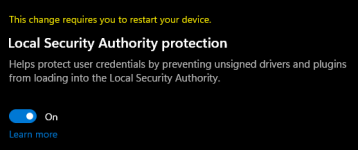
lsa pre.png

After applying the Antimalware platform and update stack package, the LSA section is completely gone. Memory Integrity and Vulnerable Driver Blocklist are the only two entries remaining. I guess the "new" way of addressing bugs is just to whack the whole thing. :D :coffee:
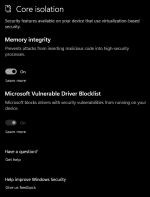
no lsa post.png

Nothing replaces it (yet). I notice the Vulnerable Driver Blocklist option is greyed out on here. It's a searchable and potentially fixable issue, it seems, but I'm not bothering with it. I"d rather have Memory Integrity enabled anyway. If anyone has further info on the greyed out-ness, I'd like to hear it.
 
Will check if mine is showing these changes. Nevertheless, I don’t know why all these tech sites are claiming the LSA protection feature is”gone” or replaced. It’s not. Even if it’s hidden on the Device Security UI, you can still enable it via Group Policy. Just need W10/W11 Pro. And there are ways to get Group Policy Management Editor on Home Editions too.

I expect better from a well-regarded site like Bleeping Computer.

In Group Policy Management Editor go to Computer Configuration > Administrative Templates > System > Local Security Authority > Configure LSASS to run as a protected process > Choose option (see image below)

IMG_7288.png


And that’s it. You’ve got LSA Protection running, even if the option “disappears” in Device Security. Keep in mind Device Security is a buggy mess. Like most things M$ makes. It often claims I don’t have TPM enabled, yet I know I do because I did it myself in BIOS (fTPM on my AMD Ryzen processor). Sometimes Memory Integrity “disappears” from Core Isolation. Other times firmware protection does. Or even after enabling LSA Protection, it stays “disabled” in the UI. And yet it’s actually running fine in the background and that warning is just a bug (Microsoft had to make a post about this one calming everyone down and saying it was just a visual bug, and their devices are secure). And the list of bugs go on and on…

All in all, that Device Security UI is not to be taken too seriously, Monitor it, by all means. But don’t worry if some setting disappear. That’s likely just another bug.
 
Last edited:
  • Like
  • +Reputation
Reactions: Nevi and Trident
Following up on my previous post. I have both Local Security Authority Protection and Kernel-mode Hardware Enforced Stack Protection enabled, simultaneously. Here are some pics:
IMG_7346.png

IMG_7349.jpeg

As you can see, LSA Protection is still showing in my Device Security tab and set to enabled. However, you don’t see Kernel-mode Hardware-enforced Stack Protection in the Device Security tab. So how do I know that particular tweak is enabled too? Easy. Open up System Information (msinfo32), and find the line called Virtualization-based security services Running. And if you see Hardware-enforced Stack Protection (Kernel-mode) there, it’s working fine and is enabled.

This is exactly what I was talking about in my previous post. Sometimes things don’t appear in Device Security, but are clearly still running. Device Security is buggy and that’s why things “disappear.” If you do follow the GPO process outlined in my previous post, you can enable LSA Protection via Group Policy. And if it shows up in Device Security, that’s well and good. And if it doesn’t, don’t worry about it. It’s just a visual bug, similar to my Kernel-enforced Hardware Stack Protection missing from Device Security, but shown to actually be enabled in System Information.

Edit: And yes, I’m fully updated. Checked Windows Update multiple times over multiple restarts.
 
Last edited by a moderator:
After applying the Antimalware platform and update stack package, the LSA section is completely gone. Memory Integrity and Vulnerable Driver Blocklist are the only two entries remaining. I guess the "new" way of addressing bugs is just to whack the whole thing. :D :coffee:
Whoa. Did not expect that this would actually turn out to be the case.


:LOL: :whistle:

Edit:

@a090 said: Nevertheless, I don’t know why all these tech sites are claiming the LSA protection feature is”gone” or replaced. It’s not.

it seems Microsoft did remove LSA in its entirety after all or at least the UI to where one ordinarily cannot manipulate anything about it from Defender's UI. "Hopefully," it'll come back bigger and badder than ever! Woo-hoo!
 
Last edited:
@a090 said: Nevertheless, I don’t know why all these tech sites are claiming the LSA protection feature is”gone” or replaced. It’s not.

it seems Microsoft did remove LSA in its entirety after all or at least the UI to where one ordinarily cannot manipulate anything about it from Defender's UI. "Hopefully," it'll come back bigger and badder than ever! Woo-hoo!

That’s exactly it. They removed the ability to manipulate LSA Protection status (on/off) from the Device Security tab in the Windows Security UI. But it can still be enabled via Group Policy (see my previous posts). And if you’ve enabled it via GP, then it’s still running. Regardless of whether it shows up as disabled in Device Security, or missing entirely.

Similarly, if you enable Kernel-enforced Hardware Stack Protection via GP and it’s not showing up in Device Security, but is showing up in msinfo32, then this is yet again another visual bug in Device Security. The feature is enabled and actively working.

TL;DR: Device Security is a buggy mess. Don’t rely on it fully to know the status of your system protections. It is known to be a bit wonky. And no, LSA Protection was not replaced by Kernel-enforced Hardware Stack Protection. They are two separate protection features, and I can confirm that as I am running them both on my system simultaneously as we speak.
 
Whoa. Did not expect that this would actually turn out to be the case.


:LOL: :whistle:

Edit:

@a090 said: Nevertheless, I don’t know why all these tech sites are claiming the LSA protection feature is”gone” or replaced. It’s not.

it seems Microsoft did remove LSA in its entirety after all or at least the UI to where one ordinarily cannot manipulate anything about it from Defender's UI. "Hopefully," it'll come back bigger and badder than ever! Woo-hoo!
One thing I should say here is that MS has pushed fix related to this via a Microsoft Defender update. As many of us know, MD now updates even when a third-party AV is installed in Windows 11. So it's not recommended to disable MD or its update in Windows 11. Future bug fixes related to Windows Security will arrive this way too.
 
Last edited:
Microsoft has pulled a recent Microsoft Defender update that was supposed to fix a known issue triggering persistent restart alerts and Windows Security warnings that Local Security Authority (LSA) Protection is off.
Today, Redmond revealed that it decided to stop pushing the KB5007651 Defender update due to blue screens or unexpected system restarts when gaming affecting Windows 11 systems where the Defender update was deployed.

"This known issue was previously resolved with an update for Microsoft Defender Antivirus antimalware platform KB5007651 (Version 1.0.2303.27001) but issues were found, and that update is no longer being offered to devices," Microsoft said.

"If you have installed Version 1.0.2303.27001 and receive an error with a blue screen, or if your device restarts when attempting to open some games or apps, you will need to disable Kernel-mode Hardware-enforced Stack Protection."
 
Apparently MS released an update for Defender (version 1.0.2303.28002). So far, the blue screens that annoyed me for over a week have not occurred again. Hopefully it will stay that way. MS can really drive you nuts with its updates.
 
Last edited by a moderator:

I just dismiss the warning; same with asking me to set ransomware protection. They can be safely ignored.
 
  • Like
Reactions: vtqhtr413