Troubleshoot Windows 7 Laptop Blue Screen Help!!

Voltron

New Member
Thread author
May 27, 2015
7
1
4
32
Briefly explain your current issue(s)
Blue screen, fan, laptop
Steps taken to resolve, but have been unsuccessful
manual starting of fan
Hey there.

So my laptop shows a blue screen within 30 mins from the moment it was turned on, no matter what I do with it. Its been doing this for about two weeks now, and I have no clue as to what would be causing this issue. I havent downloaded anything major recently, and I have not changed any configurations.

One thing I am suspecting of being the cause is my fan - Since about a year and a half ago, my laptop would sometimes beep when it turned on, and I had to manually give the fan a kick start for it to operate. Otherwise windows would shut down after a short while. Nowadays I dont get that at all, but instead I get this blue screen every 30 minutes. Could it have died completely and be causing this?

Thanks in advance!
 
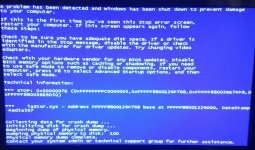
what is the BSOD code? please upload a copy of your minidumps (C:\Windows\Minidump)

forgot about the fan, can you replace it or clean it?
 
Upvote 0
Forgot to include a picture of it. Sorry!
 

Attachments

  • 20150524_123345-1.jpg
    20150524_123345-1.jpg
    717.5 KB · Views: 607
Upvote 0
test stability in windows safe mode F8 then scan with hitmanpro

check temperatures with Core Temp or Aida
 
Last edited:
Upvote 0
0x0000007E: SYSTEM_THREAD_EXCEPTION_NOT_HANDLED

A system thread generated an exception which the error handler did not catch. There are numerous individual causes for this problem, including hardware incompatibility, a faulty device driver or system service, or some software issues. Check Event Viewer (EventVwr.msc) for additional information.

Please provide copies of files located at C:\Windows\Minidump folder

Problem with iaStor.sys
 
Upvote 0
Did u test in safe mode? Try bott ur pc in safe mode for 1 hour & see if it's crash again. BSOD can be of incompatible drivers/hardware, faulty memory stick, application error etc.
 
  • Like
Reactions: Terry Ganzi
Upvote 0
As for the DMP files, there are many, each with varying sizes. They seem to be named by the date at which it crashed, but Im not sure how I can open them.
 
Last edited:
Upvote 0
Thanks for the replies guys, but Im not sure what you really mean by "update THE driver" or "run IT in safe mode". Not sure what youre referring to. Im kinda new to this so would appreciate it if you would explain more in detail :)

EDIT: Ive tried safe mode, and it crashes even faster, within minutes :(
 
Last edited:
Upvote 0
can u tell me what programs & security products u installed in ur PC? Why don't u try to update ur outdated drivers if u have any? u can get drivers from manufacturer's site, if u r not sure about this give me ur system requirements eg motherboard model, gpu etc
 
Upvote 0
Sorry for the ridiculously late response guys. I was talking with a computer professional about this, and he couldnt suggest me much than to reinstall windows 7. I have important files in the computer I do not want to lose, and so I was stuck in the middle not knowing what to do. I tried updating all the new drivers I could think of, replaced new RAM back with the old ones, updated iaStor, but it didnt solve the problem.

Then someone suggested a solution that involved in me deleting the iaStor.sys file as a whole. Long story short, now my windows always fails to start and tells me to fix startup, in which it says the problem cannot be fixed. I am stuck in a loop.

Is there a way I can reinstall iaStor without starting up windows? At this point I think my only option is to reinstall windows 7, but I dont want to lose my files in my harddrive.

Any suggestions would be greatly appreciated!!
 
Last edited:
Upvote 0
If you reinstall Windows 7 and don't format your the drive it will save a folder "Windows.old" all your old files will be saved there.You can move them to an external drive/USB and then use the Windows disk cleanup to remove the Windows.old file if you need the HDD space
 
Upvote 0
Thanks! Ive reinstalled Windows 7, got my files back, and I havent seen a BSOD since. (Hopefully never again)

Thank you all who have given me advice, wouldnt have got here without you. :D
 
  • Like
Reactions: Koroke San
Upvote 0

You may also like...