


A powerful, all-in-one Windows maintenance toolkit built entirely in Batch & Powershell.
Designed for power users, sysadmins, and curious tinkerers – now smarter, safer, and fully offline-compatible.
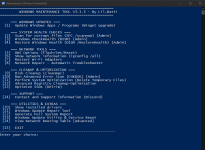
Features
- Run essential repair tools: SFC, DISM, CHKDSK
- Optimize SSD drives (TRIM/defrag compatible)
- Windows Update via winget (interactive selection)
- View and upgrade individual packages (choose by ID)
- Network diagnostics: ipconfig, routing table, DNS config, adapter reset
- Clean temp files, logs, and browser cache
- Save detailed reports to Desktop or custom folder:
- System Info, Network Info, Driver List
- Registry tools (new and improved!):
- Safe cleanup, backup, and corruption scan
- Fully menu-driven registry cleanup:
- List "safe to delete" entries (matches: IE40, IE4Data, DirectDrawEx, DXM_Runtime, SchedulingAgent)
- Bulk delete all safe entries (now 100% stable)
- Easy backup & restore with versioned .reg files
- PowerShell-based logic for precision and compatibility
- All language/region support – no hardcoded adapter names
- No third-party dependencies required
Installation
- Start Start_Windows_Maintenance_Tool.bat file.
- Follow the interactive menu.
Script output may appear in your system language (e.g. English, Danish, etc). This is normal.
GitHub - ios12checker/Windows-Maintenance-Tool
Contribute to ios12checker/Windows-Maintenance-Tool development by creating an account on GitHub.
 github.com


