

The MalwareTips app
Your community, one tap away.
Open MalwareTips from your Home Screen or desktop. Follow discussions, find answers and pick up where you left off.
- Home Screen access
- Optional push alerts
- Your community
You're ready to explore.Explore what's new
Installation instructions
iPhone & iPad
- Open MalwareTips in Safari and tap Share. You may need to open the Page Menu first.
- Choose Add to Home Screen. If it is not listed, use Edit Actions to add it.
- Keep Open as Web App enabled if shown, then tap Add.
Android
- Open MalwareTips in Chrome or another browser that supports app installation.
- Open the browser menu and look for Install app, Install and create shortcut, or Add to Home screen.
- Choose Install and confirm. Wording varies by browser.
Desktop
- Chrome: use the install icon in the address bar, or the menu under Cast, save and share.
- Edge: open the menu, then More tools, Apps and Install this site as an app.
- Safari on Mac: choose Share or File, then Add to Dock. Firefox on Windows: look for the web apps button in the address bar.
If you cannot find an install option, update your browser or use its bookmark option to keep MalwareTips close.
Keep up with your conversations
After installation, open the app and sign in. Enable push notifications in Preferences if you want alerts. On iPhone and iPad, push requires a Home Screen web app and iOS or iPadOS 16.4 or later.
Sign in to manage notificationsInstallation is optional. Your notification settings stay under your control.
You are using an out of date browser. It may not display this or other websites correctly.
You should upgrade or use an alternative browser.
You should upgrade or use an alternative browser.
Advice Request Windows must have updates/programs/apps etc?
-
 Thread starter
Pixel_
Thread starter
Pixel_
- Start date
- 18 Replies
- 3,468 Views
Share practical recommendations that address the author's needs.

There is no definite list, it depends on the program you are trying to run, read the minimum requirements for the program on its website/forum.What are some updates/programs/apps that Windows needs so that everything can operate as planed?
Like: directX , Microsoft Visual C++ etc?
I find myself sometimes with errors or some dll files missing when installing certain apps.
Usually Windows will ask you if an app needs to install/enable some other component like VC++ or DirectX. Personally I haven't seen these kind of error for a long time.
Googling the "error code + name of program you are trying to run" might point you in the right direction.I find myself sometimes with errors or some dll files missing when installing certain apps.

In that case, you can install all the vcredist at one go using this. I had cases where some program installed an older version of vcredist even though I already had the latest one installed. Running this installer again will remove the old one and install the new one automatically again.I find myself sometimes with errors or some dll files missing when installing certain apps.
It's not a must to install all the vcredist but nowadays, I usually do this to avoid any incompatibility in case I install some old apps/games since it doesn't take much space.
GitHub - abbodi1406/vcredist: AIO Repack for latest Microsoft Visual C++ Redistributable Runtimes
AIO Repack for latest Microsoft Visual C++ Redistributable Runtimes - abbodi1406/vcredist
 github.com
Last edited:

Is this also best to install the above "AIO Repack for latest Microsoft Visual C++ Redistributable Runtimes" after clean installation of Windows 11 Pro?In that case, you can install all the vcredist at one go using this. I had cases where some program installed an older version of vcredist even though I already had the latest one installed. Running this installer again will remove the old one and install the new one automatically again.
It's not a must to install all the vcredist but nowadays, I usually do this to avoid any incompatibility in case I install some old apps/games since it doesn't take much space.

GitHub - abbodi1406/vcredist: AIO Repack for latest Microsoft Visual C++ Redistributable Runtimes
AIO Repack for latest Microsoft Visual C++ Redistributable Runtimes - abbodi1406/vcredist
F
ForgottenSeer 77194
I use these:
# Dependencies
Games Dependecies: DirectX
Games Dependecies: XNA Framework
Games Dependecies: OpenAL
Graphics Dependecies: OpenCL and OpenGL Compatibility Pack
C++ Dependecies: Visual C++ Redistributables
C# Dependecies: .NET Runtime
Multimedia Dependecies: K-Lite Codec Pack Basic
.NET Framework 3.5
.NET Framework 4.8
# Dependencies
Games Dependecies: DirectX
Games Dependecies: XNA Framework
Games Dependecies: OpenAL
Graphics Dependecies: OpenCL and OpenGL Compatibility Pack
C++ Dependecies: Visual C++ Redistributables
C# Dependecies: .NET Runtime
Multimedia Dependecies: K-Lite Codec Pack Basic
.NET Framework 3.5
.NET Framework 4.8
Last edited by a moderator:
Yeah, I install after clean installation, but you can install it anytime you want.Is this also best to install the above "AIO Repack for latest Microsoft Visual C++ Redistributable Runtimes" after clean installation of Windows 11 Pro?

This helps, thanks!I use these:
# Dependencies
Games Dependecies: DirectX
Games Dependecies: XNA Framework
Games Dependecies: OpenAL
Graphics Dependecies: OpenCL and OpenGL Compatibility Pack
C++ Dependecies: Visual C++ Redistributables
C# Dependecies: .NET Runtime
Multimedia Dependecies: K-Lite Codec Pack Basic
.NET Framework 3.5
.NET Framework 4.8

@SeriousHoax the size of it was very small:

Is that correct file I downloaded?
But it needed an internet connection so at the end it did install all these listed in Revo:
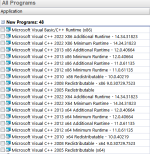
Is that correct file I downloaded?
But it needed an internet connection so at the end it did install all these listed in Revo:
F
ForgottenSeer 95367
Did you bother to carefully read the description before you downloaded anything? The size is small because it is a script (.bat) to download all the C++ from Microsoft. It is an "All-in-One" pack that installs every single C++ runtime whether your system needs it or not.@SeriousHoax the size of it was very small:
View attachment 269737
Is that correct file I downloaded?
But it needed an internet connection so at the end it did install all these listed in Revo:
View attachment 269738
Last edited by a moderator:
One nifty application that I always install in Windows is:
Hourglass - The simple countdown timer for Windows
 chris.dziemborowicz.com
Requires Microsoft .NET Framework 4.8
Hourglass - The simple countdown timer for Windows
Hourglass - The simple countdown timer for Windows
Hourglass is the most advanced simple countdown timer for Windows. Just enter a time in just about any format, and hit Enter.
chris.dziemborowicz.com
Requires Microsoft .NET Framework 4.8
Does this have the .NET Framework 4.8 too?In that case, you can install all the vcredist at one go using this. I had cases where some program installed an older version of vcredist even though I already had the latest one installed. Running this installer again will remove the old one and install the new one automatically again.
It's not a must to install all the vcredist but nowadays, I usually do this to avoid any incompatibility in case I install some old apps/games since it doesn't take much space.
GitHub - abbodi1406/vcredist: AIO Repack for latest Microsoft Visual C++ Redistributable Runtimes
AIO Repack for latest Microsoft Visual C++ Redistributable Runtimes - abbodi1406/vcredist
F
ForgottenSeer 77194
F
ForgottenSeer 77194
Also, OpenCL and OpenGL Compatibility Pack might not be necessary on new computers.I use these:
# Dependencies
Games Dependecies: DirectX
Games Dependecies: XNA Framework
Games Dependecies: OpenAL
Graphics Dependecies: OpenCL and OpenGL Compatibility Pack
C++ Dependecies: Visual C++ Redistributables
C# Dependecies: .NET Runtime
Multimedia Dependecies: K-Lite Codec Pack Basic
.NET Framework 3.5
.NET Framework 4.8
For K-Lite Codec Pack Basic Enable generation for all thumbnails and decline participation in their p2p network.
F
ForgottenSeer 77194
EditedI use these:
# Dependencies
Games Dependecies: DirectX
Games Dependecies: XNA Framework
Games Dependecies: OpenAL
Graphics Dependecies: OpenCL and OpenGL Compatibility Pack (Optional)
C++ Dependecies: Visual C++ Redistributables
C# Dependecies: .NET Runtime
Multimedia Dependecies: K-Lite Codec Pack Basic
Windows Features: .NET Framework 3.5
Windows Features: .NET Framework 4.8
New version I noticed is out 13 days ago. Version v0.64.0.In that case, you can install all the vcredist at one go using this. I had cases where some program installed an older version of vcredist even though I already had the latest one installed. Running this installer again will remove the old one and install the new one automatically again.
It's not a must to install all the vcredist but nowadays, I usually do this to avoid any incompatibility in case I install some old apps/games since it doesn't take much space.
GitHub - abbodi1406/vcredist: AIO Repack for latest Microsoft Visual C++ Redistributable Runtimes
AIO Repack for latest Microsoft Visual C++ Redistributable Runtimes - abbodi1406/vcredist
I had version 62 in my PC and in a recent clean install of Windows, I used version 62. Was that ok, or I need to run the new version 64? Thank you so much.
He updates the file when a new version of vc redist 2022 comes out. So if you want to update to the latest version then you can install the latest one. Most software won't require the very latest version so you can ignore at the moment if you want.New version I noticed is out 13 days ago. Version v0.64.0.
I had version 62 in my PC and in a recent clean install of Windows, I used version 62. Was that ok, or I need to run the new version 64? Thank you so much.
Personally, I always keep it up-to-date.
If even I don't want to clean install Windows, is it a good idea to install a newer version of "GitHub - abbodi1406/vcredist: AIO Repack for latest Microsoft Visual C++ Redistributable Runtimes"In that case, you can install all the vcredist at one go using this. I had cases where some program installed an older version of vcredist even though I already had the latest one installed. Running this installer again will remove the old one and install the new one automatically again.
It's not a must to install all the vcredist but nowadays, I usually do this to avoid any incompatibility in case I install some old apps/games since it doesn't take much space.
GitHub - abbodi1406/vcredist: AIO Repack for latest Microsoft Visual C++ Redistributable Runtimes
AIO Repack for latest Microsoft Visual C++ Redistributable Runtimes - abbodi1406/vcredist
Software I Use - 2021 Edition - TweakHound

 www.tweakhound.com
Apps, Tools & Services · Stefan Imhoff

 www.stefanimhoff.de
I always refer to the two list above.
Software I Use - 2021 Edition - TweakHound
Optimize your computing experience, Performance, Tweak, Tweaker, Tweaking Windows, Tweak Guides, Tweakguides, Privacy, Security, Computer How-to, fix computer, Computer news and information, Windows Xp, Windows 7, Windows 10, Linux
www.tweakhound.com
Apps, Tools & Services · Stefan Imhoff
Apps, Tools & Services · Stefan Imhoff
All the apps, tools, and services I use on my iPhone, iPad, Apple Watch, Apple TV, and Mac.
I always refer to the two list above.
Recently browsing
Members who viewed this thread in the last 5 minutes

