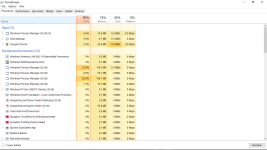
Windows Process Manager (32 Bit) - Need help

here's the screenshot of it. seems like the exact same thing the other guy has.
 

Attachments

  • Screenshot (43).png
    Screenshot (43).png
    84.3 KB · Views: 16
Hello,


51a46ae42d560-malwarebytes_anti_malware.png
Scan with Malwarebytes' Anti-Malware

Please download Malwarebytes Anti-Malware and save it to your desktop.
  • Install the progam.
  • Click the Settings tab, in the left panel choose Protection and tick Scan for rootkits.
  • Click the Scan tab, choose Threat Scan is checked and click Start Scan.
  • If threats are detected, click the Apply Actions button. You will now be prompted to reboot. Click Yes.
  • Upon completion of the scan (or after the reboot), click the Reports tab.
  • Double-click the Scan Log.
  • At the bottom click Export and choose Text file.
Save the file to your desktop and include its content in your next reply.

I did this. Here is what I got.
 

Attachments

I dont know if it helps but i noticed this .exe that popped a day after i had installed Microsoft Network Moniter 3.4, NMap, and Wireshark. These are sniffer programs to detect packets / find ur IP address. I'm useing these for my college classes. Is it possible when i downloaed, installed, and then ran these programs it somehow activated Maleware that was attached to it or could it have like drew it Maleware thru my wifi?
 

Recently browsing

Members who viewed this thread in the last 5 minutes

Back
Top