

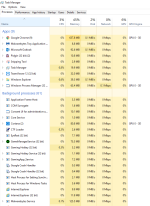
My girlfriend uses my PC for all of about 10 minutes and i had a bunch of viruses. I have managed to clean most of them up (at least i think) by running MBAM, MBAR, and Super Anti Spyware. All though, i can not get rid of this windows process manager (32 bit). See the attached pictures of my processes to ensure theres nothing else running that i missed? Any help at all would be life saving! Thank you!
windows process manager (32 bit) Removal help.
- Thread starter J_hess3
- Start date




You may also like...
-
-
 Help Needed: Suspicious Activity & Possible Malware on Windows 10 PC
- Started by Thomas Ellias
- Replies: 4
-
 Persistant MDM enrollment/Enterprise management/Autopilot on my personal desktop
- Started by frostyfruits43
- Replies: 3
-

-