

That's what I just didSo all I need is to create Enabled DWord key with 0 decimal in these two location for 64 bit OS?
regards.
HKLM\SOFTWARE\Microsoft\Windows Script Host\Settings
HKLM\SOFTWARE\WOW6432Node\Microsoft\Windows Script Host\Settings
Windows script host
- Thread starter Nevi
- Start date
You are using an out of date browser. It may not display this or other websites correctly.
You should upgrade or use an alternative browser.
You should upgrade or use an alternative browser.

Sorry if I made havoc . I just fell over the disabling of the script host, and thought that looked like a good idea.Still do. But of course it has to be done the right way. I am no PC wizard, I just try to make it all play without too much fuzz.

Create the new file, change the extension to .vbs and try to run it, if you get the message, that is it blocked, that you have done it properly.
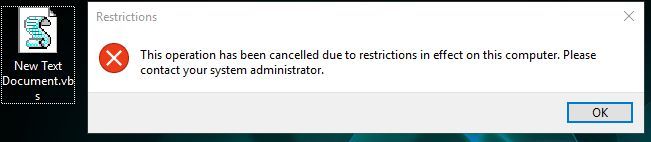
Why did you have to say that?! I was so sure of myself, now I will not be able to sleep anymore, until I solve it.True fileless malware can even use powershell without it being on the target system, the malware is embedded with powershell.

No, for the standard applications.So what happens if I disabled WSH? Does it affects my installation/uninstallation of software or any other side effects?
Windows Script Host scripts are used sometimes (very rarely), for example by 'Intel(r) Energy Checker SDK'. Blocking WSH in the home environment do not break anything important.
Block Windows Script Host script execution on Windows 64-bit:@Andy Ful
So what registry tweaks should apply for system-wide and command prompt protection for 64-bit Windows?
I'm not finding it as a feature in VS etc. Not sure about OSArmor though
Code:
reg add "HKLM\Software\Microsoft\Windows Script Host\Settings" /v "Enabled" /t REG_DWORD /d "0" /f
reg add "HKLM\SOFTWARE\WOW6432Node\Microsoft\Windows Script Host\Settings" /v "Enabled" /t REG_DWORD /d "0" /f
The Command Prompt cannot be blocked system wide, because it is used as an alternative shell in Windows (Safe Boot can start system in Command Prompt). It can be blocked per user. The below is the way to block it on the default Administrator type of account (not SUA):
Code:
reg add "HKCU\Software\Policies\Microsoft\Windows\System" /v "DisableCMD" /t REG_DWORD /d "1" /fThe above reg tweak will not work on SUA (Standard User Account). On SUA one should use the similar key in the proper HKU registry hive.
Yet, OneDrive uses Command Prompt to clean the leftovers after updates, Sandboxie uses it to clean the sandbox, Intel software can use it for launching igfxEM.exe or igfxHK.exe, or igfxTray.exe, etc. So, disabling Command Prompt is more tricky than disabling Windows Script Host.
Last edited:
I guess that only applies, when run as user is specified? I can not run .bat as admin, when disablecmd is in effect.The user still can execute .bat and .cmd scripts as administrator.
PowerShell is the most dangerous Windows scripting language, so it should be restricted in the first place.One side question
Can scripts execute via Powershell besides WSH? If yes, then shouldn't we disable/block Powershell as well?
Besides WSH (or Powershell if it does) what other routes can scripts execute?
Tutorial - How do you secure PowerShell?
PowerShell interpreters can be blocked, but this does not mean that PowerShell functionality can be totally blocked by this. The PowerShell functions are contained in the System.Management.Automation.dll and System.Management.Automation.ni.dll. It is not recommended to block those DLLs.
Thanks. 'Run as administrator' can be used to bypass blocked Command Prompt only if you would block Command Prompt on SUA. But, blocking Command Prompt by policy on SUA cannot be done via HKCU reg tweak. One has to do it via the proper HKU registry key. My post was not precise, so I edited it.I guess that only applies, when run as user is specified? I can not run .bat as admin, when disablecmd is in effect.

Yes, 3rd party apps are the easiest way to do this and other important security tweaks. Appguard needs to be specifically configured to block Windows Script Host, but some other apps will do it out of the box.I use Appguard for this.

A question. H_C blocks Windows Script Host?
D
Deleted member 178
HC is SRP, so if configured properly it should do it.A question. H_C blocks Windows Script Host?
Of course.A question. H_C blocks Windows Script Host?

Create the new file, change the extension to .vbs and try to run it, if you get the message, that is it blocked, that you have done it properly.
View attachment 205337
Why did you have to say that?! I was so sure of myself, now I will not be able to sleep anymore, until I solve it.
Mine is work!
On 64-bit Windows the above checks only 64-bit Windows Script Host.Mine is work!
View attachment 205361
For checking 32-bit Windows Script Host on 64-bit Windows you should also execute from the Explorer the below command line:
c:\Windows\SysWOW64\wscript.exe "path2yourscript"
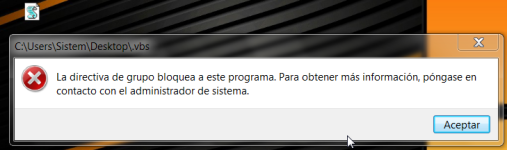
Indeed if H_C block without mercy Windows Script Host.
F
ForgottenSeer 69673
My screen shots show how I have AG set up for scripts.Yes, 3rd party apps are the easiest way to do this and other important security tweaks. Appguard needs to be specifically configured to block Windows Script Host, but some other apps will do it out of the box.
You can block Windows Script Host via H_C settings in 2 different ways:
- Windows policy - blocks it also for administrative tasks.
- SRP - blocks it for the user and malware which run without admin rigths (not elevated), but allows it for administrative tasks.
Last edited:
On 64-bit Windows the above checks only 64-bit Windows Script Host.
For checking 32-bit Windows Script Host on 64-bit Windows you should also execute from the Explorer the below command line:
c:\Windows\SysWOW64\wscript.exe "path2yourscript"
What is that do?
Can use a registry tweak to set it?On 64-bit Windows the above checks only 64-bit Windows Script Host.
For checking 32-bit Windows Script Host on 64-bit Windows you should also execute from the Explorer the below command line:
c:\Windows\SysWOW64\wscript.exe "path2yourscript"
When you execute the script by a mouse-click, then on 64-bit Windows the 64-bit interpreter wscript.exe is used by default to run the script. So, you did not test if the 32-bit interpreter was blocked.What is that do?
The commandline from my post, executes the script like malware can do, by using 32-bit interpreter wscript.exe on 64-bit Windows. So, if you have the script helloworld.vbs in "c:\scripts" folder, then you have to execute the commandline:
c:\Windows\SysWOW64\wscript.exe "c:\scripts\helloworld.vbs"
If you will see the alert that Windows Script Host is blocked, then you can be sure that also 32-bit interpreter wscript.exe is blocked, for sure.
Simply copy & paste & execute the commandline in the 'Quick access' area in Windows File Explorer, or in the Command Prompt console.
Last edited:
What do you mean? I assume that the registry tweaks are already done.Can use a registry tweak to set it?
It is not the commandline to introduce the new tweak, but only the commandline for checking if the already applied reg tweaks (for blocking WSH) are working well.
Last edited:
You may also like...
-
 Question Potenial method for locking script files down!
- Started by Parkinsond
- Replies: 16
-
Security News Windows PowerShell now warns when running Invoke-WebRequest scripts
- Started by Parkinsond
- Replies: 1
-
Scams & Phishing News Multi-Stage Phishing Campaign Targets Russia with Amnesia RAT and Ransomware
- Started by Parkinsond
- Replies: 22
-
 Serious Discussion Orion Malware Cleaner (OMC) - By Trident
- Started by Trident
- Replies: 23
