

The MalwareTips app
Your community, one tap away.
Open MalwareTips from your Home Screen or desktop. Follow discussions, find answers and pick up where you left off.
- Home Screen access
- Optional push alerts
- Your community
You're ready to explore.Explore what's new
Installation instructions
iPhone & iPad
- Open MalwareTips in Safari and tap Share. You may need to open the Page Menu first.
- Choose Add to Home Screen. If it is not listed, use Edit Actions to add it.
- Keep Open as Web App enabled if shown, then tap Add.
Android
- Open MalwareTips in Chrome or another browser that supports app installation.
- Open the browser menu and look for Install app, Install and create shortcut, or Add to Home screen.
- Choose Install and confirm. Wording varies by browser.
Desktop
- Chrome: use the install icon in the address bar, or the menu under Cast, save and share.
- Edge: open the menu, then More tools, Apps and Install this site as an app.
- Safari on Mac: choose Share or File, then Add to Dock. Firefox on Windows: look for the web apps button in the address bar.
If you cannot find an install option, update your browser or use its bookmark option to keep MalwareTips close.
Keep up with your conversations
After installation, open the app and sign in. Enable push notifications in Preferences if you want alerts. On iPhone and iPad, push requires a Home Screen web app and iOS or iPadOS 16.4 or later.
Sign in to manage notificationsInstallation is optional. Your notification settings stay under your control.
You are using an out of date browser. It may not display this or other websites correctly.
You should upgrade or use an alternative browser.
You should upgrade or use an alternative browser.
Windows Security Center won't open and Browser Redirect
- Status
- Not open for further replies.

Backup the registry using Registry Editor
Please be very careful. If something wrong happen it may make your computer unstable.
Now go to the location HKEY_LOCAL_MACHINE\SOFTWARE\Microsoft\Windows NT\CurrentVersion\Image File Execution Options and click on File Menu and Press on Export.
It will ask you where do you want to save this file.
Save that file on your C drive with a name Image File Execution.reg and upload this Image File Execution .reg file in your next replay.....
- Please press the Windows key and R key on your keyboard together.
- Now you will get a Run window.
- Inside that Run Windows type REGEDIT and press on Ok.
- Now your will get a Registry Editor window.
- Inside that Registry Editor Select the My Computer in the Left Panel and press on File Menu and Presson Export.
- It will ask you where do you want to save this file.
- Save that file on your C drive with a name RegistryBackUp.reg
Please be very careful. If something wrong happen it may make your computer unstable.
Now go to the location HKEY_LOCAL_MACHINE\SOFTWARE\Microsoft\Windows NT\CurrentVersion\Image File Execution Options and click on File Menu and Press on Export.
It will ask you where do you want to save this file.
Save that file on your C drive with a name Image File Execution.reg and upload this Image File Execution .reg file in your next replay.....
I also recommend you to switch your antivirus program to a better one. Here are some suggestions:
In addition to your antivirus, you need additional protection such as a firewall and behavioural blocker.
Here are only a few suggestions that will improve your system security. Should you wish to allow us to make full recommendations and set your PC up with maximum security, please start a thread here. Our community of PC enthusiasts and experts will give you feedback and help you secure your system from future malware infections.
- avast! 7 Home Edition - Don't use it with Online Armor
- Avira AntiVir Personal
- Microsoft Security Essentials
In addition to your antivirus, you need additional protection such as a firewall and behavioural blocker.
- Online Armor
- Comodo Firewall - If you are an advance user
Here are only a few suggestions that will improve your system security. Should you wish to allow us to make full recommendations and set your PC up with maximum security, please start a thread here. Our community of PC enthusiasts and experts will give you feedback and help you secure your system from future malware infections.
I am fine with using Avast and Comodo, since MSE will still not run. I have to think though that it is not opening due to a virus or malware that is still present.
Also, my computer is still being redirected any time I do a search and click on a link. That has not changed.
Also, my computer is still being redirected any time I do a search and click on a link. That has not changed.
STEP 1: Run the below OTL fix
<ol><li>Start <>OTL.exe</></li>
<li>Copy/paste the following text written <>inside of the code box</> into the <>Custom Scans/Fixes</> box located at the bottom of OTL
<>NOTICE: This script was written specifically for this user, for use on that particular machine. Running this on another machine may cause damage to your operating system</></li>
<li>Then click the <>Run Fix</> button at the top</li>
<li>Let the program run unhindered, reboot when it is done</li>
<li>Attach the new log produced by OTL (C:\_OTL)</li>
</ol>
<hr />
<ol><li>Start <>OTL.exe</></li>
<li>Copy/paste the following text written <>inside of the code box</> into the <>Custom Scans/Fixes</> box located at the bottom of OTL
Code:
:OTL
O17 - HKLM\System\CCS\Services\Tcpip\Parameters: DhcpNameServer = 128.200.1.201 128.200.192.202
O17 - HKLM\System\CCS\Services\Tcpip\Parameters\Interfaces\{524E062C-E61B-419D-91C5-24E89549DB3C}: NameServer = 8.26.56.26,156.154.70.22
O17 - HKLM\System\CCS\Services\Tcpip\Parameters\Interfaces\{C0F9955B-CC2F-4B9F-9D61-9B8EF3FCCD64}: DhcpNameServer = 128.200.1.201 128.200.192.202
O17 - HKLM\System\CCS\Services\Tcpip\Parameters\Interfaces\{C0F9955B-CC2F-4B9F-9D61-9B8EF3FCCD64}: NameServer = 8.26.56.26,156.154.70.22
O18:[b]64bit:[/b] - Protocol\Handler\livecall - No CLSID value found
O18:[b]64bit:[/b] - Protocol\Handler\ms-help - No CLSID value found
O18:[b]64bit:[/b] - Protocol\Handler\msnim - No CLSID value found
O18:[b]64bit:[/b] - Protocol\Handler\skype4com - No CLSID value found
O18:[b]64bit:[/b] - Protocol\Handler\wlmailhtml - No CLSID value found
O18:[b]64bit:[/b] - Protocol\Handler\wlpg - No CLSID value found

:commands
[emptytemp]
[reboot]<li>Then click the <>Run Fix</> button at the top</li>
<li>Let the program run unhindered, reboot when it is done</li>
<li>Attach the new log produced by OTL (C:\_OTL)</li>
</ol>
<hr />
Last edited by a moderator:
STEP 1: Run the below OTL fix
<ol><li>Start <>OTL.exe</></li>
<li>Copy/paste the following text written <>inside of the code box</> into the <>Custom Scans/Fixes</> box located at the bottom of OTL
<>NOTICE: This script was written specifically for this user, for use on that particular machine. Running this on another machine may cause damage to your operating system</></li>
<li>Then click the <>Run Fix</> button at the top</li>
<li>Let the program run unhindered, reboot when it is done</li>
<li>Attach the new log produced by OTL (C:\_OTL)</li>
</ol>
<hr />
Now before rebooting the computer press on Windows Key and R key together on your keyboard...... Now you will get Run window. Inside that one type NCPA.CPL and press on Ok...Now you can see Network Connections
Select the Networking tab. Under This connection uses the following items, select Internet Protocol Version 4 (TCP/IPv4) and then click Properties.
Click Advanced and select the DNS tab. If there are any DNS server IP addresses listed there, write them down for future reference, and remove them from this window.
Click OK.
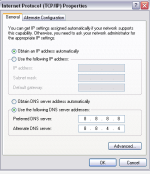
Select Use the following DNS server addresses. If there are any IP addresses listed in the Preferred DNS server or Alternate DNS server, write them down for future reference.
Replace those addresses with the IP addresses of the Google DNS servers:
8.8.8.8 and/or 8.8.4.4.
Press on Apply & Ok.
Now reboot the computer......
[attachment=3999]
<ol><li>Start <>OTL.exe</></li>
<li>Copy/paste the following text written <>inside of the code box</> into the <>Custom Scans/Fixes</> box located at the bottom of OTL
Code:
:OTL
O17 - HKLM\System\CCS\Services\Tcpip\Parameters: DhcpNameServer = 128.200.1.201 128.200.192.202
O17 - HKLM\System\CCS\Services\Tcpip\Parameters\Interfaces\{C0F9955B-CC2F-4B9F-9D61-9B8EF3FCCD64}: DhcpNameServer = 128.200.1.201 128.200.192.202
:commands
[emptytemp]
[reboot]<li>Then click the <>Run Fix</> button at the top</li>
<li>Let the program run unhindered, reboot when it is done</li>
<li>Attach the new log produced by OTL (C:\_OTL)</li>
</ol>
<hr />
Now before rebooting the computer press on Windows Key and R key together on your keyboard...... Now you will get Run window. Inside that one type NCPA.CPL and press on Ok...Now you can see Network Connections
- To change the settings for an Ethernet connection, right-click Local Area Connection, and click Properties.
- To change the settings for a wireless connection, right-click Wireless Network Connection, and click Properties.
Select the Networking tab. Under This connection uses the following items, select Internet Protocol Version 4 (TCP/IPv4) and then click Properties.
Click Advanced and select the DNS tab. If there are any DNS server IP addresses listed there, write them down for future reference, and remove them from this window.
Click OK.
Select Use the following DNS server addresses. If there are any IP addresses listed in the Preferred DNS server or Alternate DNS server, write them down for future reference.
Replace those addresses with the IP addresses of the Google DNS servers:
8.8.8.8 and/or 8.8.4.4.
Press on Apply & Ok.
Now reboot the computer......
[attachment=3999]
Attachments
Last edited by a moderator:
- Status
- Not open for further replies.
Recently browsing
Members who viewed this thread in the last 5 minutes


