

The MalwareTips app
Your community, one tap away.
Open MalwareTips from your Home Screen or desktop. Follow discussions, find answers and pick up where you left off.
- Home Screen access
- Optional push alerts
- Your community
You're ready to explore.Explore what's new
Installation instructions
iPhone & iPad
- Open MalwareTips in Safari and tap Share. You may need to open the Page Menu first.
- Choose Add to Home Screen. If it is not listed, use Edit Actions to add it.
- Keep Open as Web App enabled if shown, then tap Add.
Android
- Open MalwareTips in Chrome or another browser that supports app installation.
- Open the browser menu and look for Install app, Install and create shortcut, or Add to Home screen.
- Choose Install and confirm. Wording varies by browser.
Desktop
- Chrome: use the install icon in the address bar, or the menu under Cast, save and share.
- Edge: open the menu, then More tools, Apps and Install this site as an app.
- Safari on Mac: choose Share or File, then Add to Dock. Firefox on Windows: look for the web apps button in the address bar.
If you cannot find an install option, update your browser or use its bookmark option to keep MalwareTips close.
Keep up with your conversations
After installation, open the app and sign in. Enable push notifications in Preferences if you want alerts. On iPhone and iPad, push requires a Home Screen web app and iOS or iPadOS 16.4 or later.
Sign in to manage notificationsInstallation is optional. Your notification settings stay under your control.
You are using an out of date browser. It may not display this or other websites correctly.
You should upgrade or use an alternative browser.
You should upgrade or use an alternative browser.
Solved Windows Security notification icon is missing
- Thread starter JB007
- Start date
Software Troubleshooting
12 Replies
2,712 Views
Solution

Hello,
This morning the Windows Security notification icon was back without doing anything

This morning the Windows Security notification icon was back without doing anything



@JB007
You can try to make a shortcut (to your Desktop) from this related exe in the following system location:
C:\Windows\System32\SecurityHealthSystray.exe
I had same issue and just executed the file: SecurityHealthSystray.exe after that the icon should be visible again in Windows taskbar/sytsem tray...
You can try to make a shortcut (to your Desktop) from this related exe in the following system location:
C:\Windows\System32\SecurityHealthSystray.exe
I had same issue and just executed the file: SecurityHealthSystray.exe after that the icon should be visible again in Windows taskbar/sytsem tray...
Upvote
0


Try reseting Windows Security
Start -> All Apps-> Right Click Windows Security-> More-> App Settings-> Repair-> Reset.
View attachment 276010
Thanks, I will try these solutions ASAP because now I'm out of office@JB007
You can try to make a shortcut (to your Desktop) from this related exe in the following system location:
C:\Windows\System32\SecurityHealthSystray.exe
I had same issue and just executed the file: SecurityHealthSystray.exe after that the icon should be visible again in Windows taskbar/sytsem tray...

Upvote
0

Setup PCPC setup
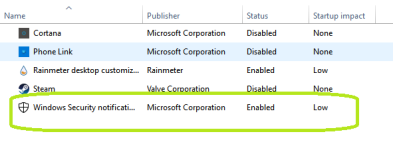
Next time this happens, check 2 things:Hello,
This morning the Windows Security notification icon was back without doing anything
View attachment 276100
Upvote
0
Recently browsing
Members who viewed this thread in the last 5 minutes


