Unmaintained WiseVector Free AI Driven Security

yeah, that's what used to happen..... but now the PDF opens, and I get the malware warning... very odd.

ok, that is odd... I was testing with a saved zip file, but if I download a fresh PDF(zip) file, it is stopped on execution... would there be any reason for that?

so, if I extract the file from the downloads folder, it is stopped on extraction.... but if I extract the file from a different folder, the PDF file is opened, and WVSX issues the warning... :confused:
Hi,
With the realtime protection enabled, WVSX blocked the sample immediately when double click on it.
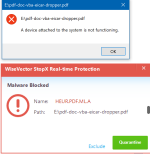
Capture21.PNG
Do you mean that WVSX didn't block the sample when you ran it?
 
Last edited:
Hi,
With the realtime protection enabled, WVSX blocked the sample immediately when double click on it.
View attachment 252953
Do you mean that WVSX didn't block the sample when you ran it?
when the zip is downloaded, and you extract it, it is blocked... but if I move the zip to another folder location called 'security tests', and extract it, the PDF file opens, but you still get the 'malware blocked' popup... so I can only assume that the dropper has been taken care of, as I cannot find an offending TMP file.
Screenshot (1).png
 
Last edited:
when the zip is downloaded, and you extract it, it is blocked... but if I move the zip to another folder location called 'security tests', and extract it, the PDF file opens, but you still get the 'malware blocked' popup... so I can only assume that the dropper has been taken care of, as I cannot find an offending TMP file.
Thanks for your reply.
Can you please tell me what's your default PDF reader? We will try to reproduce what you have posted.
 
Just for your information.
I just downloaded Revo Uninstaller and WVSX flagged it as malware.
Hi,
Thanks for your feedback.
Can you please tell me it was flagged as malware by our static detection or behavior detection?
Please be noted that without exiting WVSX, there will be an malware alert whenever a program is trying to uninstall WVSX or modify the files in our installation folder.
 
Hi,
Thanks for your feedback.
Can you please tell me it was flagged as malware by our static detection or behavior detection?
Please be noted that without exiting WVSX, there will be an malware alert whenever a program is trying to uninstall WVSX or modify the files in our installation folder.

It was flagged when download was complete as a trojan and i got the question to quarantin or exclude. I excluded and reported as false.
 
Hi @WiseVector

See on the screenshot Wisevector Homepage Microsoft Edge Bug 01 vom 16.01.2021 Part 1 in the circle that is so okay or not

Please check and fix it please

With best Regards
Mops21
 

Attachments

  • Wisevector Homepage Microsoft Edge Bug 01 vom 16.01.2021 Part 1.jpg
    Wisevector Homepage Microsoft Edge Bug 01 vom 16.01.2021 Part 1.jpg
    108.8 KB · Views: 309
  • Wisevector Homepage Microsoft Edge Bug 01 vom 16.01.2021 Part 2.jpg
    Wisevector Homepage Microsoft Edge Bug 01 vom 16.01.2021 Part 2.jpg
    84.7 KB · Views: 320
It was flagged when download was complete as a trojan and i got the question to quarantin or exclude. I excluded and reported as false.
Hi,
Can you please tell me what the Heuristic Analysis level you have set?
We have tested, our static detection didn't flag it as malware...
 
Last edited:
Hi @WiseVector

See on the screenshot Wisevector Homepage Microsoft Edge Bug 01 vom 16.01.2021 Part 1 in the circle that is so okay or not

Please check and fix it please

With best Regards
Mops21
Hi,
Thanks for youe feedback.
But with the same version of Microsoft Edge, our homepage looks OK.
10.JPG
捕获.JPG
 
Hi,
Can you please tell me what the Heuristic Analysis level you have set?
We have tested, our static detection didn't flag it as malware...

Default level.
I dont know what happened or if i downloaded from their homesite or if it was the latest version but i got that reaction. Unfortunately i have erased that download so i can not be of more assistans.
 
Just had some time to check out WVSX ver 2.72, specifically as it pertains to the auto restore of encrypted files functionality.

Although not the easiest of tasks as WV will stop almost all encryptors before they even can reach the honeypot files, I did modify a Pony that was able to actually encrypt files that I was monitoring. Once this (the encryption) occurred two popups appeared- the first was the usual malware detected alert- the other popup was a Threat Remediation alert listing all the stuff that was encrypted (with the notation Recovery Needed) along with a choice to Apply (Rollback).

The restoration took a few seconds, but all went rather swimmingly with all the files that were acted upon by Pony were once again happy and healthy and back where they belonged along with the encrypted versions being trashed.

Nice work, WV.

m
 
Just had some time to check out WVSX ver 2.72, specifically as it pertains to the auto restore of encrypted files functionality.

Although not the easiest of tasks as WV will stop almost all encryptors before they even can reach the honeypot files, I did modify a Pony that was able to actually encrypt files that I was monitoring. Once this (the encryption) occurred two popups appeared- the first was the usual malware detected alert- the other popup was a Threat Remediation alert listing all the stuff that was encrypted (with the notation Recovery Needed) along with a choice to Apply (Rollback).

The restoration took a few seconds, but all went rather swimmingly with all the files that were acted upon by Pony were once again happy and healthy and back where they belonged along with the encrypted versions being trashed.

Nice work, WV.

m
Endorsement from Cruella! 🐈

WVSX continues to impress.