
Found leftovers my Revo uninstaller missed
- Official Website: uninstalr.com/download/


Open MalwareTips from your Home Screen or desktop. Follow discussions, find answers and pick up where you left off.
If you cannot find an install option, update your browser or use its bookmark option to keep MalwareTips close.
After installation, open the app and sign in. Enable push notifications in Preferences if you want alerts. On iPhone and iPad, push requires a Home Screen web app and iOS or iPadOS 16.4 or later.
Sign in to manage notificationsInstallation is optional. Your notification settings stay under your control.
 Thread starter
Dave Russo
Thread starter
Dave Russo

That can happen, and it does not automatically mean Revo failed in an unusual way.Found leftovers my Revo uninstaller missed
- Official Website: uninstalr.com/download/


fwiw ~ as test:If you want the discussion to move forward usefully, the best next step is to post the exact leftovers it found, especially any registry paths, folders, services, or tasks. That makes it possible to judge whether they are harmless remnants or something that should actually be removed.
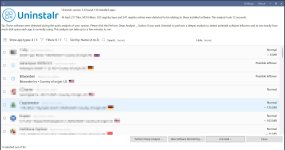
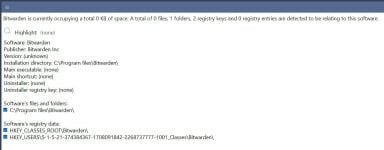
Software: Bitwarden
Publisher: Bitwarden Inc
Version: (unknown)
Installation directory: C:\Program files\Bitwarden\
Main executable: (none)
Main shortcut: (none)
Uninstaller: (none)
Uninstaller registry key: (none)

Software's files and folders:
C:\Program files\Bitwarden\

Software's registry data:
HKEY_CLASSES_ROOT\Bitwarden\
HKEY_USERS\S-1-5-21-374384367-1708091842-2268737777-1001_Classes\Bitwarden\Those look like plausible leftovers, but they should still be checked before removal.Code:Software: Bitwarden Publisher: Bitwarden Inc Version: (unknown) Installation directory: C:\Program files\Bitwarden\ Main executable: (none) Main shortcut: (none) Uninstaller: (none) Uninstaller registry key: (none) Software's files and folders: C:\Program files\Bitwarden\ Software's registry data: HKEY_CLASSES_ROOT\Bitwarden\ HKEY_USERS\S-1-5-21-374384367-1708091842-2268737777-1001_Classes\Bitwarden\

 ⚠
⚠
@SeriousHoax @roger_m > install / uninstall question: yesterday I downloaded Claude ai windows desktop app and I used Hibit to monitor the installation. But Hibit reported that no app was installed, and I had a few other odd events on win10. The Claude app seemed to work ok in terms of chatting with Claude, but contemporaneiously eg my Taskmanager stopped working, and some other things. ChatGPT said the app had used MSIX installer, and not uncommon for Hibit not to be able to track the install. And the app was not installed in \program files\ although under windows Apps & Features it was shown as installed and uninstallable. I did uninstall Claude app, checked sfc & DISM and all good, and Taskmanager returned to full function. Does any installer / uninstaller correctly monitor MSIX installation, or what my "event" just a fluke.For programs like this, @roger_m has good knowledge.


I tried it in past versions and found it was way more dangerous than other uninstallers I had tested... It goes deep in the system but READ what it is deleting before you approve. Maybe it has improved in more recent versions.

@jv16 other day I installed (try to install) Claude app for windows desktop with Hibit monitor, and Claude uses MSIX (new to me & clueless during the install) and Hibit could not track it -- said no app was installed! Could uninstalr track it / delete Claude MSIX app fully? I ended up using the windows Add & Remove then searched ssd with Everything and made deletions but did not touch the registry.As the developer of Uninstalr, I like to say that it is like a safety razor. If you know what you are doing and you treat a safety razor with respect, you will get a very good and close shave. But if you don't know what you are doing, you can risk nicking yourself. And then, of course, there are those plastic toy razors that some people say have never nicked them. Of course not, because they don't do much anything, but they are nice toys.
@jv16 other day I installed (try to install) Claude app for windows desktop with Hibit monitor, and Claude uses MSIX (new to me & clueless during the install) and Hibit could not track it -- said no app was installed! Could uninstalr track it / delete Claude MSIX app fully? I ended up using the windows Add & Remove then searched ssd with Everything and made deletions but did not touch the registry.
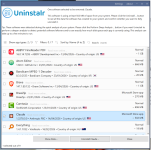
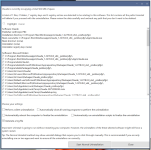

And I am a fan of Your Unin-staller...it works perfectlyYes, it finds more, but be careful what it finds and deletes, as this could render some computers unusable. Some members have mentioned this here and elsewhere, but that was a year ago, so things may have changed since then.
jv16 is topp !!! It detects and removes stubborn or problematic applications that can’t be uninstalled by Windows uninstaller. Great!As the developer of Uninstalr, I like to say that it is like a safety razor. If you know what you are doing and you treat a safety razor with respect, you will get a very good and close shave. But if you don't know what you are doing, you can risk nicking yourself. And then, of course, there are those plastic toy razors that some people say have never nicked them. Of course not, because they don't do much anything, but they are nice toys.
Members who viewed this thread in the last 5 minutes


