Advanced Plus Security Wraith Gaming PC 2020

Last updated
Apr 15, 2020
How it's used?
For home and private use
Operating system
Log-in security
Security updates
Allow security updates and latest features
User Access Control
Always notify
Real-time security
ESET Internet Security + Sandboxie + OSArmor
Firewall security
Periodic malware scanners
HitmanPro
Norton Power Eraser
AdwCleaner
Malware sample testing
I do not participate in malware testing
Browser(s) and extensions
Firefox as primary (always run sandboxed)
Brave as backup
Maintenance tools
CCleaner
Shadow Defender
File and Photo backup
External HDD
System recovery
Windows Backup & Restore
Risk factors
    • Gaming
Computer specs
i5 7600K
GTX 1070 Ti
16GB RAM
1 TB SSD
@harlan4096 how did you get Edge Chromium to work in Sandboxie? Every time I try to run it sandboxed it will just throw errors about plugins not designed to run sandboxed and ublock origin would crash. :cry::(
Edge Chromium (80.0.361.111) running fine here, Sandboxie 5.33.6, W10 Home 1909, browser extensions: Adguard, Bitwarden

Your Sandboxie issues seems to be related to Windows7 :unsure: You may trying the new open-source version 5.40.1

 
Last edited:
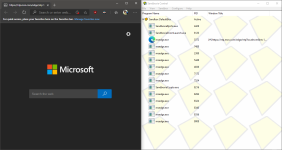
Same as silversurfer. Chromium Edge + Sandboxie (5.40.1) works fine here too on Windows 10. uBlock Origin is also installed.
edge.PNG
 
Nope guys, Chrome & Edge still seems to have issues with Sandboxie. I guess it's because of either the BPP Mode of ESET or the fact that I'm using Windows 7.
What is your version of Sandboxie, 5.33.6 or the new open-source version 5.40.1 🤔
 
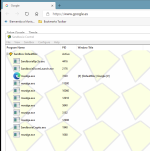
Microsoft Edge Chromium working fine here with SandBoxie 5.33.6 + KTS2021TR:

1586793094102.png

But!!

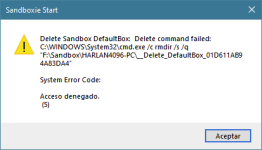
I got this warning every time I close it (I have auto deleting SB Enabled):

1586793267442.png
 
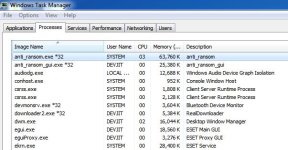
with Kaspersky Anti Ransomware Tool and running beautifully alongside ESET. The best of both worlds- ESET signatures with Kaspersky System Watcher and KSN.
How's the resource consumption? CPU and ram? Also I see there's two free versions. One for Home, one for Business. What's the difference?
 
Backup:
- use a backup solution, with your External HDD, I would recommend Macrium Reflect which is free

Search Engine:
- change this to DuckDuckGo

System Utilities:
- stay clear of CCleaner, my recommendation would be Wise Disk Clean also free to use and Mr @harlan4096 uses this as well

Rest looks good to me, thanks for sharing.

~LDogg

Changed search engine to DuckDuckGo. Thanks for the suggestion, friend.
I too was thinking about ditching CCleaner and going for other alternatives like Wise/Glary/Privazer/Bleachbit.
Since this is my gaming PC, it doesn't have anything in it other than steam games (which I all have backed up to my external HDD). So I really don't need a backup solution on this PC. In the worst case, I'll secure erase the SSD and reinstall Windows. And since I'm mostly a careful user, I generally don't get infected (only once in the last 5 years).
 
Changed search engine to DuckDuckGo. Thanks for the suggestion, friend.
I too was thinking about ditching CCleaner and going for other alternatives like Wise/Glary/Privazer/Bleachbit.
Since this is my gaming PC, it doesn't have anything in it other than steam games (which I all have backed up to my external HDD). So I really don't need a backup solution on this PC. In the worst case, I'll secure erase the SSD and reinstall Windows. And since I'm mostly a careful user, I generally don't get infected (only once in the last 5 years).
No worries friend, glad I can help.

~LDogg