
Troubleshooting Youtube website messed up after privazer scan

dragonmew

Level 3
Verified
Describe the problem
website doesnt laod properly and cant play videos or see images or anythi
What have you tried?
restarted pc,reinstalled chrome,scanned with ccleaner
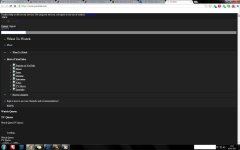
the screenshot is what youtube looks like atm its weird cos i can use other flashed based websites just seems that youtube is being a pain in the neck and i dunn ohow to fix it
 

Attachments

  • Untitled.jpg
    Untitled.jpg
    165.9 KB · Views: 767
you should have been more careful while choosing registry,system,privacy cleaners.
You just can't use any new ones.
 
Upvote 0
Just try to refresh your browser/ clean those traces repeatedly and normally it may cause the internet connection connectivity which the reason failed to load the page properly.

Happens to this barely on my facebook and youtube which includes showing cookie notification.
 
Upvote 0
I don't know what privazer does, but if it deletes the gpu cache it might take a page reload or two to get things back. Clear your browser cache manually for starters.

Then try another browser to ascertain whether this is a browser or system problem.
 
Upvote 0
Looks like it's missing a CSS, or some CDN IPs are being blocked. I really doubt PrivaZer would do that to Youtube, hasn't done it to me yet. My Youtube screen would look like that if I kept PeerBlock running while YT'ing...
 
Upvote 0
the screenshot is what youtube looks like atm its weird cos i can use other flashed based websites just seems that youtube is being a pain in the neck and i dunn ohow to fix it

From you post, I have concluded you are using Google Chrome; is this correct? What security software are you running? When was the last time you have edited/checked your host file for unauthorized entries?
Attempt to clean your browsers cache and cookies using the built in measures provided by your web browser and then report back with more information.

Looks like it's missing a CSS, or some CDN IPs are being blocked. I really doubt PrivaZer would do that to Youtube, hasn't done it to me yet. My Youtube screen would look like that if I kept PeerBlock running while YT'ing...

Try enabling HTTP inside of Peerblock.
tQsqqqJ.png
 
Upvote 0

Recently browsing

Members who viewed this thread in the last 5 minutes

Back
Top