

Have you received alarming messages that your Facebook page is at risk of being deleted? These may be fraudulent messages trying to steal your login details. This article exposes the “Your Facebook Page Will Be Deleted” scam and shares advice to stay safe.
Overview of the Scam
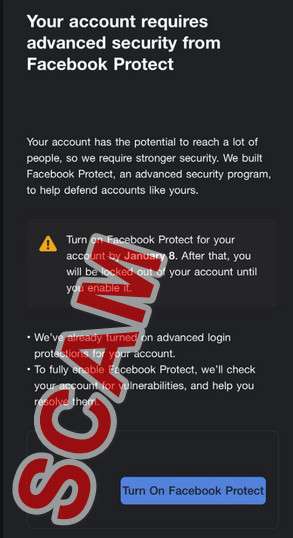
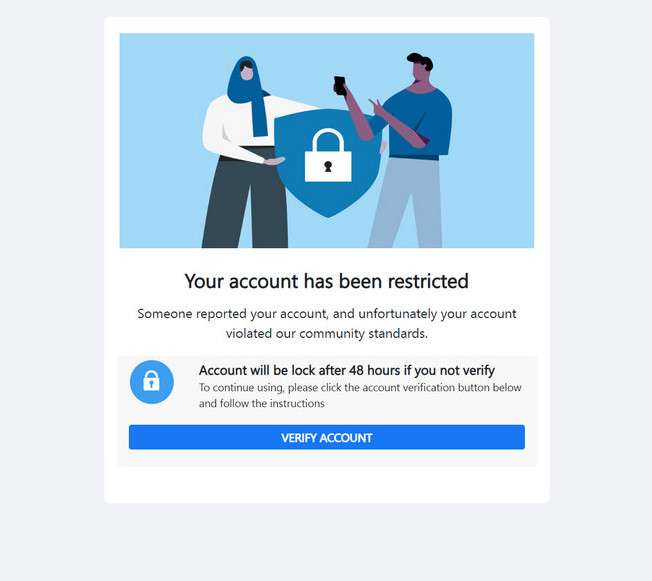
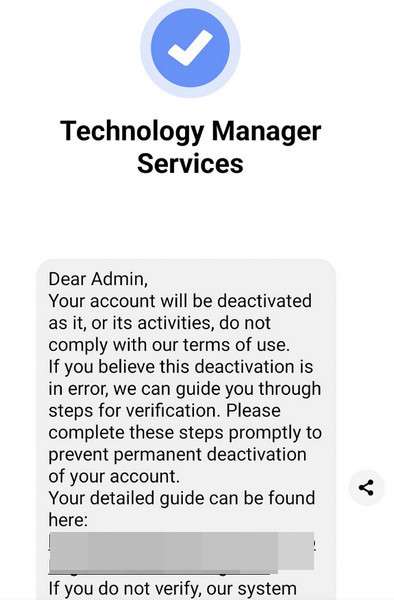
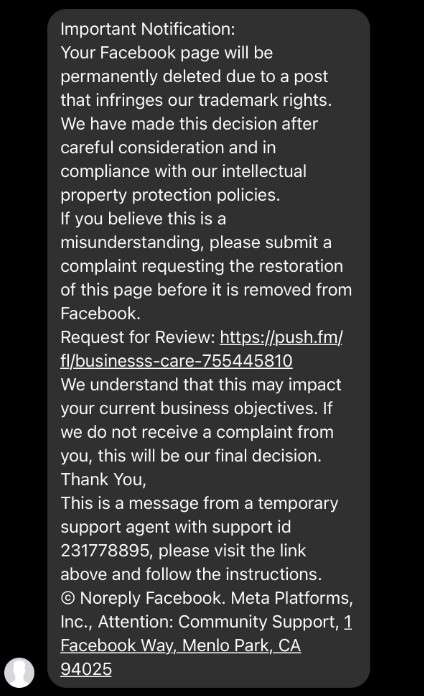
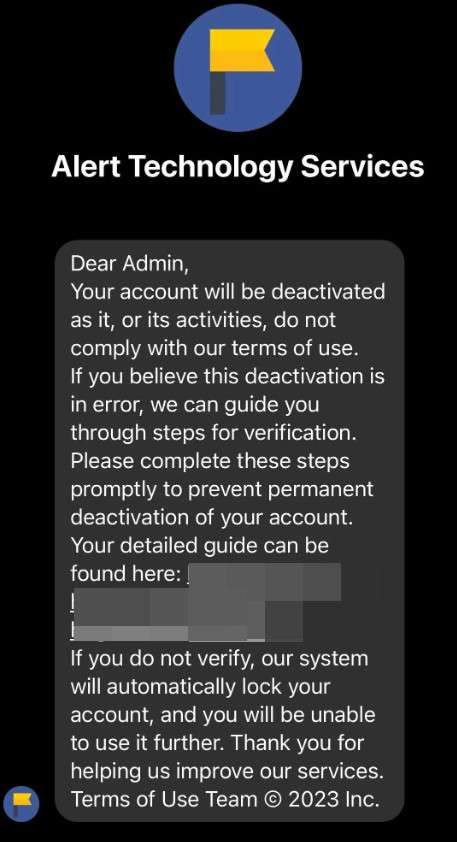
The “Your Facebook Page Will Be Deleted” scam is a viral phishing campaign targeting owners of Facebook pages with alarming messages that their page is soon to be permanently removed due to policy violations. These messages pretend to come from Facebook itself through official notification channels.
However, in reality they aim to trick page admins into urgently clicking links to appeal imminent deletion. The links go to convincing but fake Facebook login portals operated by scammers to capture account credentials and hijack access to the threatened pages, as well as the admins’ personal Facebook profiles.
Once scammers gain access, they can post dangerous, illegal or offensive content under the page’s brand, message followers to spread more scams, access financial data, place unauthorized ads, or anything else the legitimate admin could do. This threatens years of hard work building audiences and poses severe risks to brand reputation.
By triggering desperation to save pages recipients have invested heavily in, scammers convince savvy users to override caution and hand over login credentials without proper vetting, delivering account access on a silver platter.
Scam Mediums and Messages
The “Your Facebook Page Will Be Deleted” scam messages reach recipients through:
- Facebook Messages: Direct messages send to page owners and admins within Facebook Messenger.
- Text Messages: SMS texts sent to any associated mobile numbers listed in page contact info.
- Emails: Messages sent to email addresses connected to Facebook accounts with page admin access.
These messages pretend to come from Facebook’s official verified accounts, using Facebook branding and legalese language. Examples state:
Urgent Notification
Your Facebook page “Awesome Brand” has repeatedly violated platform policies regarding unauthorized copyrighted content sharing. As per our repeat infringement penalties, this page will be permanently deleted within 24 hours. To file an appeal challenging this decision, visit our Facebook verification portal here immediately: www.facebookcopyrightappeal.com
The messages allege various violations based on Facebook’s Terms of Service, Community Standards, or copyright rules as justifications for deletion. This includes accusations of:
- Sharing copyrighted videos or media without licensing permissions
- Posting dangerous, illegal or regulated content
- Running ads without properly disclosing sponsorship
- Impersonating or misrepresenting brand identities
- Automated posting from unauthorized third-party apps
Threatening urgent, irreversible consequences pressures recipients to hastily click links without close inspection that would reveal inconsistencies exposing the scam nature.
How Access is Hijacked
When a worried page admin clicks appeal links within scam warning messages, they are taken to sophisticated fake login portals carefully impersonating Facebook’s real account access sites.
These scam sites precisely mimic the visual design, text, images and URLs of Facebook to appear convincingly legitimate. Most users get tricked into entering their login email and password, which transfers full account access to scammers.
From there, scammers log into both the admin’s personal profile and their managed Facebook pages. This allows criminal activities like:
- Posting dangerous misinformation or illegal content under an established brand’s reach
- Messaging followers with phishing links to steal identities or install malware
- Accessing stored payment credentials and making fraudulent purchases
- Running ads linked to financial scams without the brand’s knowledge
- Collecting and stealing valuable audience data history
In essence, scammers assume complete control and administration capabilities for the compromised Facebook presence. Even if passwords get changed later, extensive damage can be done to years of constructed reputation in only hours or minutes.
Brand trust and audience connection carefully built around authenticity and quality content gets destroyed virtually instantaneously. This is why staying vigilant against social sabotage keeps communities safe, while reporting rather than engaging with scams helps protect collective knowledge and public discourse around important topics.
Who Gets Targeted?
The “Your Facebook Page Will Be Deleted” scam threatens a wide range of page types including:
- Small businesses using Facebook to reach customers
- Community organizations and social causes building local support
- Public figures and influencers engaging fans
- Group administrators overseeing member conversations
- Event coordinators promoting upcoming happenings
- Charities fundraising donations or volunteers
Essentially any organization or entity investing time into growing an audience on Facebook is vulnerable. Losing access threatens marketing pipelines, grassroots mobilization and operational coordination relying on unimpeded connectivity.
Scammers mass blast untold numbers of messages to random pages daily, knowing even a minor success rate still yields profitable numbers of hijacked accounts. There is also potential for specifically targeting high-value pages around election cycles, controversies, crises or breaking news events when influencing public narratives proves most impactful.
By understanding the scam methodology, page owners can avoid knee-jerk reactions to preserve integrity of vital community resources.
How the Scam Works
The “Your Facebook Page Will Be Deleted” scam starts with page owners, group admins or other creators receiving concerning messages about their page containing:
Urgent Notification
Your Facebook page “[Page Name]” will be permanently deleted within 24 hours due to repeated violations of our platform policies regarding prohibited content sharing.
Threatening imminent and irreversible deletion heightens the recipient’s fears of losing their page they potentially invested heavily in building up an audience for over many years.
The initial message continues with details saying:
We have made this decision after extensive review showing multiple posts sharing or linking to copyrighted videos and media files without necessary permissions. This infringes the Facebook Terms of Service Appendix C, Section 3 on intellectual property rights.
Lending legitimacy, the message cites specific sections of Facebook’s real terms related to copyright issues. However, no such unauthorized posts exist.
After panicking the recipient that years of hard work could soon be erased, the scammers then provide hope, saying:
If you believe this is a mistake, you may follow the appeal process below to request restoring your page access before deletion:
- Visit [scam website]
- Login with your page administrator Facebook account credentials
- Fill in the page restoration request form
- Our review team will assess your appeal within 24 hours
A professional looking, urgent appeal process makes the message seem credible on first glance. However, the site is a fake.
Recipients who hastily click and attempt logging in with their page admin credentials inadvertently hand over their login details to the scammers.
After capturing the credentials, scammers gain full access to both administer the recipient’s page and exploit their personal profile. Potential damage includes:
- Posting dangerous, offensive or illegal content under the page’s brand
- Messaging followers to spread more scams or malware
- Accessing and stealing valuable audience data
- Viewing stored payment info and making fraudulent purchases
- Placing unauthorized ads, costing the page owner money
By triggering desperate reactions rather than careful scrutiny, scammers convince even savvy Facebook users to surrender crucial login access, letting criminals hijack brands and platforms they depend on.
How to Spot the “Your Facebook Page Will Be Deleted” Scam
While the urgent warning messages seem worrisome at first glance, several subtle signs reveal their fraudulent nature:
1. Lack of Specific Details
Authentic warnings specify exactly which content violated policies. Scam warnings remain vague with no evidence, only mentioning “repeated violations”.
2. Suspicious Sender Details
Messages pretend to be from Facebook teams, but senders on inspection don’t match official channels like “Facebook Copyright Division”.
3. Logical Flaws
Facebook allows reasonable timeframes to fix compliance issues before permanent deletion. But scam threats demand impossible urgent appeals within 24 hours.
4. Spelling and Grammar Irregularities
Professional warnings avoid awkward syntax or spelling mistakes, while scam messages often contain subtle linguistic mistakes exposing their scam nature.
5. Deceptive Link Destinations
While using Facebook’s name and branding, scam links on closer inspection go to different domains unrelated to Facebook.
6. Login Portal Inconsistencies
Fake login portals imitate Facebook precisely but have subtle design or text differences upon close examination.
7. No Native App Notifications
Facebook communicates policy violations within the platform and mobile app notifications for authenticity, not just external messages.
Staying observant for these suspicious characteristics helps avoid falling for scams by picking up on inconsistencies that don’t match Facebook’s real processes. When in doubt, reach out to Facebook directly through official channels to verify any concerning alerts.
What to do if you have fallen victim
If you entered your login credentials on a suspicious page deletion appeal site, your account may be compromised. Take these steps immediately:
Reset your password
Change your Facebook password immediately to lock the scammers out. Enable two-factor authentication for extra security on your account going forward.
Review page and profile activity
Check your page and personal profile’s posts, messages, payments, and ads sections for any unauthorized changes. Delete anything suspicious posted in your name.
Run antivirus scans
Scan all your devices with Malwarebytes in case malware was installed allowing remote access or spying on your activity for future scams.
Alert your followers
Post on your page admitting it was compromised and that any recent posts, messages or ads are fraudulent. Apologize for the confusion.
Report to Facebook
Report the scam message, website and unauthorized access to Facebook detailing everything known about the incident. Provide links, screenshots and profiles.
Monitor future activity
Keep watch over your page and profile in the coming weeks for any further unusual behavior. Change settings to require approving posts first before they are visible.
Change other passwords
Update passwords for your email, financial accounts or anywhere else you reused the same credentials. Enable multi-factor authentication whenever possible going forward.
Staying vigilant when managing important assets like Facebook pages protects not just investments of money and time, but also hard-earned reputation among audiences built on trust.
Is Your Device Infected? Run a Free Malware Scan
Slow performance, constant pop-ups, or strange behavior? These are classic signs of a malware infection. The fastest way to find out is to scan your device with Malwarebytes Free — one of the most trusted malware removal tools available.
The free version detects and removes the most common threats, including:
- Adware — the cause of those annoying pop-ups
- Browser hijackers — unwanted redirects and changed homepages
- Trojans and spyware — hidden programs stealing your data
- Potentially unwanted programs (PUPs) — software you never asked for
👉 Select your device below — Windows, Mac, or Android — then follow the simple steps to download Malwarebytes, scan your system, and remove any threats it finds. The scan usually takes 5 to 20 minutes.
Run a Malware Scan with Malwarebytes for Windows
Malwarebytes is one of the most popular and trusted anti-malware tools for Windows — and it’s completely free for removing infections. It catches threats that many antivirus programs miss, including adware, browser hijackers, and trojans. Follow the steps below to scan and clean your PC in just a few minutes.
Download Malwarebytes
Click the button below to download the latest version of Malwarebytes for Windows from the official source. The free version is all you need — it will scan your computer and remove adware, browser hijackers, and other malicious software at no cost.
Download MalwarebytesOfficial installer for Windows 11 and 10. Your download starts right away.Want real-time protection? See Malwarebytes Premium Malwarebytes Free for WindowsScans and removes malware at no cost
-
Install Malwarebytes
When the download finishes, open your Downloads folder and double-click the MBSetup file. If Windows shows a User Account Control pop-up, click “Yes” to allow the installation.
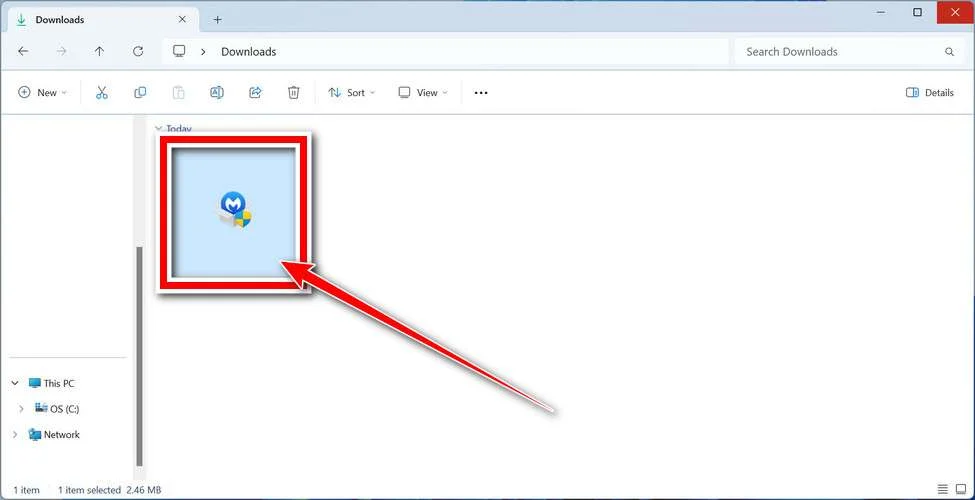
Follow the On-Screen Prompts to Install Malwarebytes
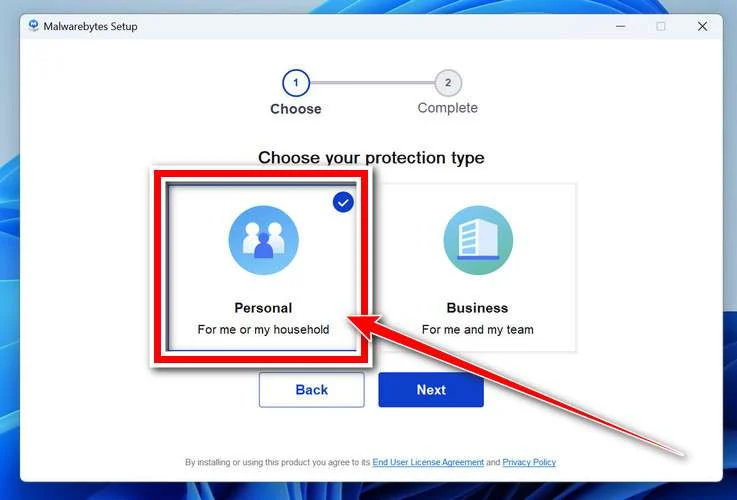
The setup wizard will walk you through a few quick screens:
-
Choose where you’re installing the program — “Personal Computer” or “Work Computer” — then click Next.
-
Malwarebytes will now install on your device. This usually takes under a minute.

-
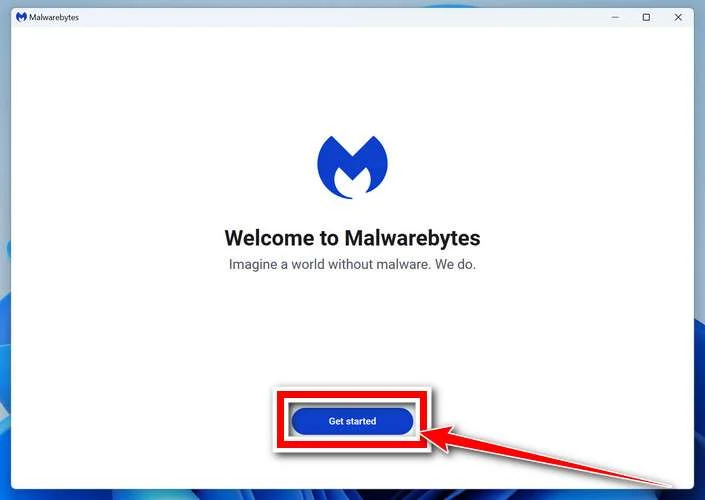
When installation is complete, the “Welcome to Malwarebytes” screen will open automatically.
-
On the final screen, click Open Malwarebytes to launch the program.

-
Enable “Scan for Rootkits”
Before scanning, turn on rootkit detection so Malwarebytes can find even the most hidden threats. Click the Settings gear icon on the left side of the screen.
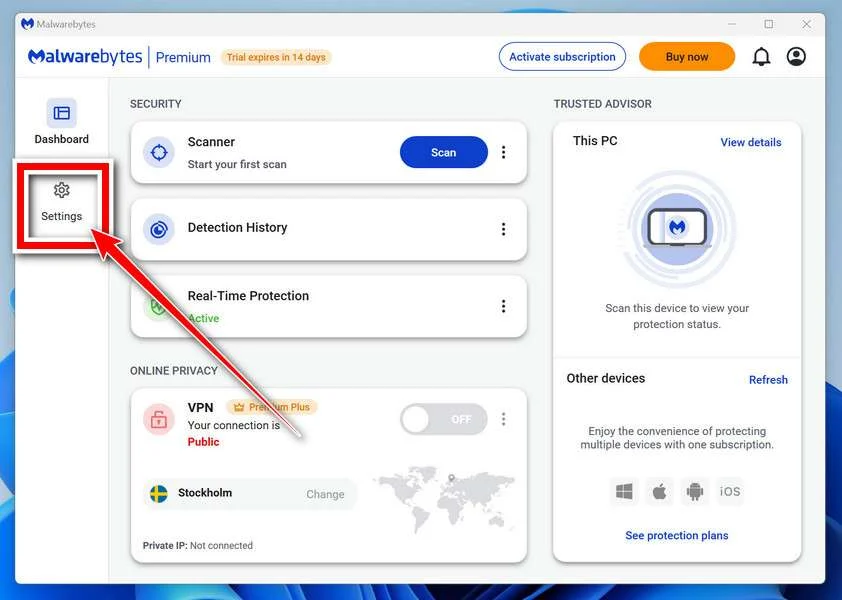
In the settings menu, find “Scan for rootkits” and click the toggle so it turns blue.

Done? Click “Dashboard” in the left pane to return to the main screen.
Start the Scan
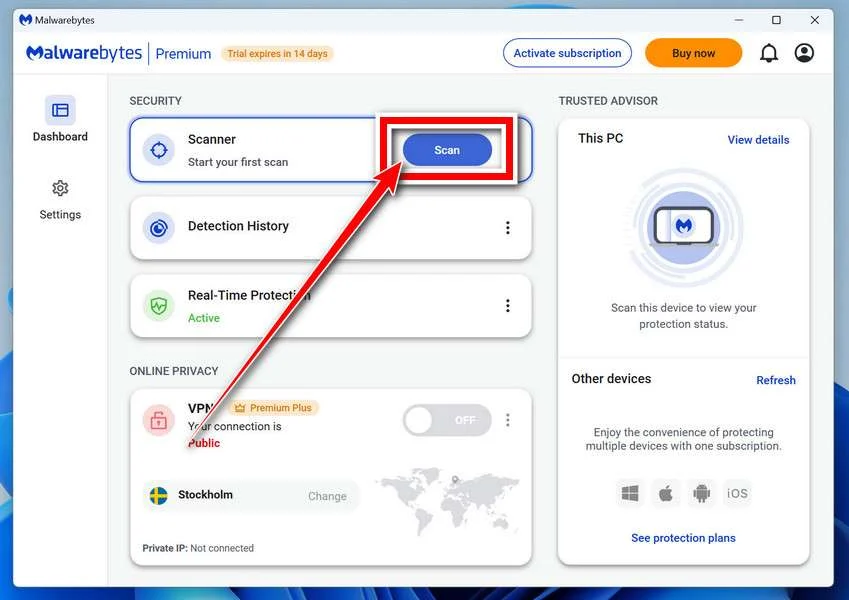
Click the blue Scan button. Malwarebytes will automatically update its virus database and start checking your computer for malware.
-
Wait for the Scan to Finish
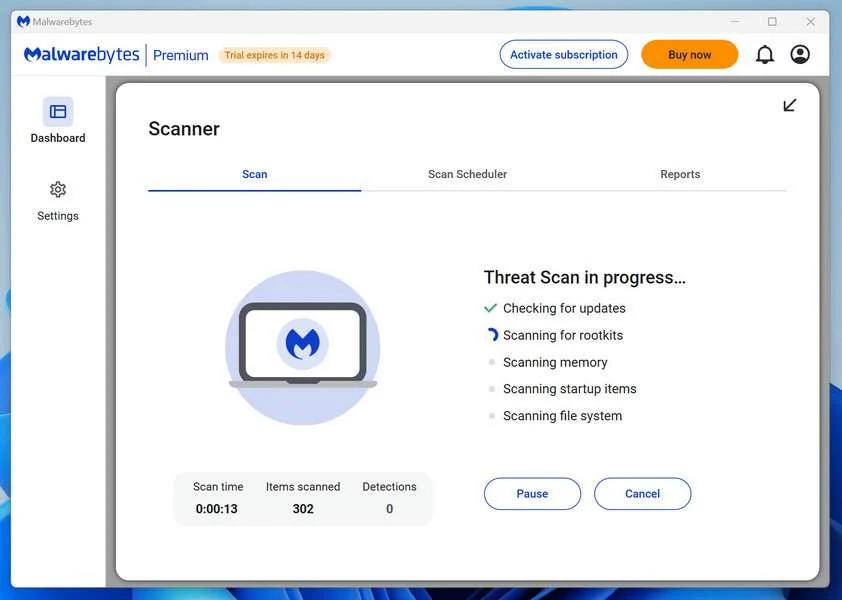
The scan checks your entire system for browser hijackers and other malicious programs, so it can take 5 to 20 minutes depending on your computer. Feel free to do something else — just check back occasionally to see the progress.
-
Quarantine the Detected Threats
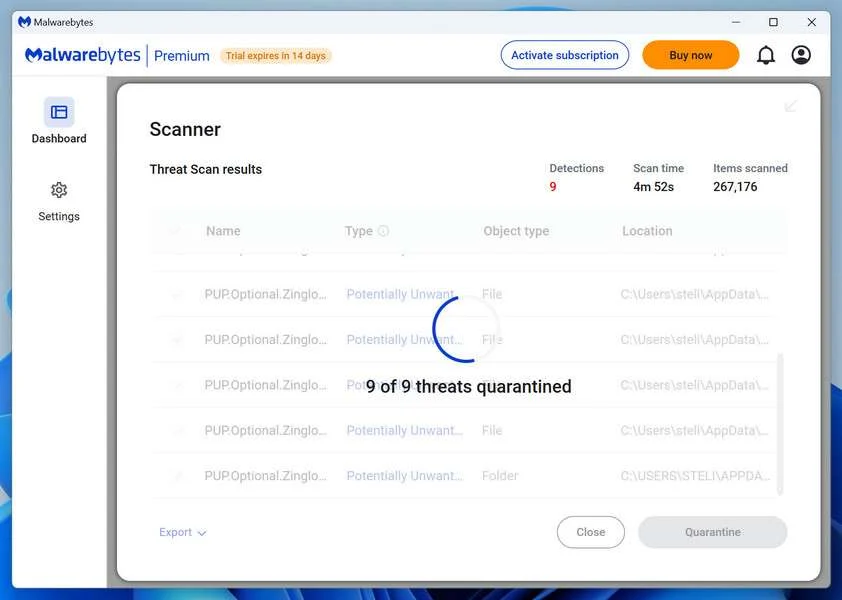
When the scan is done, you’ll see a list of everything Malwarebytes found — malware, adware, and potentially unwanted programs. Click the “Quarantine” button to remove all of them at once.
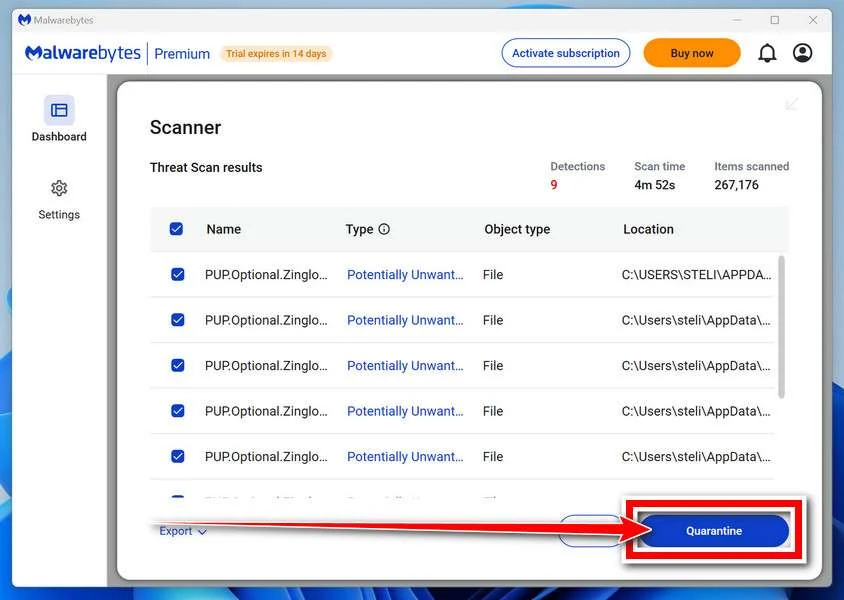
Malwarebytes will now remove the malicious files and registry entries and move them safely into quarantine.
-
Restart Your Computer
Some threats can only be fully removed after a reboot. If Malwarebytes asks you to restart, click Yes. Once you’re logged back in, Malwarebytes has finished removing the threats it found.
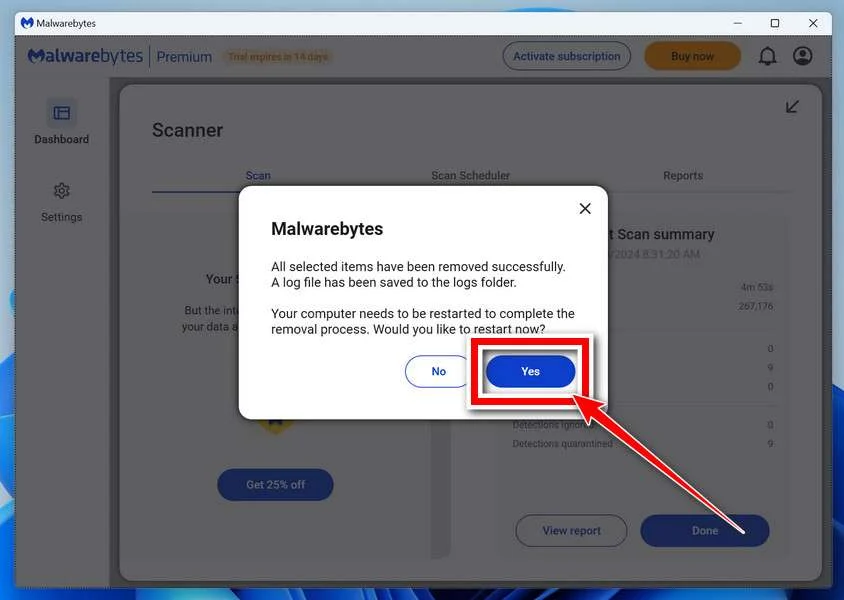
That’s it — your Windows PC is now clean of trojans, adware, and other malware, and should be back to running smoothly.
If you are still having problems with your computer after completing these instructions, then please follow one of the steps:
- Run a computer scan with ESET Online Scanner
- Ask for help in our Windows Malware Removal Help & Support forum.
Run a Malware Scan with Malwarebytes for Mac
Malwarebytes for Mac is a free on-demand scanner that removes the malware other security software tends to miss — adware, browser hijackers, and unwanted programs included. Cleaning an infected Mac with Malwarebytes has always been completely free, and it’s our go-to recommendation. Follow the steps below to scan and clean your Mac in just a few minutes.
-
Download Malwarebytes for Mac
Click the button below to download the latest version of Malwarebytes for Mac.
Download MalwarebytesOfficial installer for macOS. Your download starts right away.Want real-time protection? See Malwarebytes PremiumMalwarebytes Free for MacScans and removes malware at no cost -
Open the Malwarebytes setup file
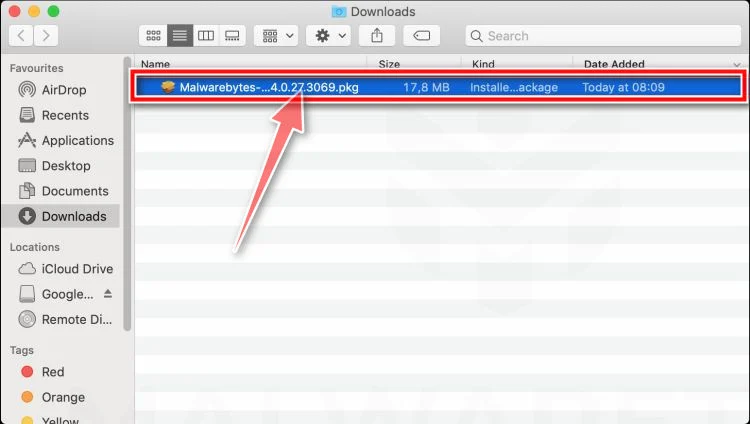
When the download finishes, open your Downloads folder and double-click the setup file to begin the installation.
-
Follow the On-Screen Prompts to Install Malwarebytes
The Malwarebytes for Mac Installer will guide you through a few quick screens. Click “Continue” and keep following the prompts until the installation completes.
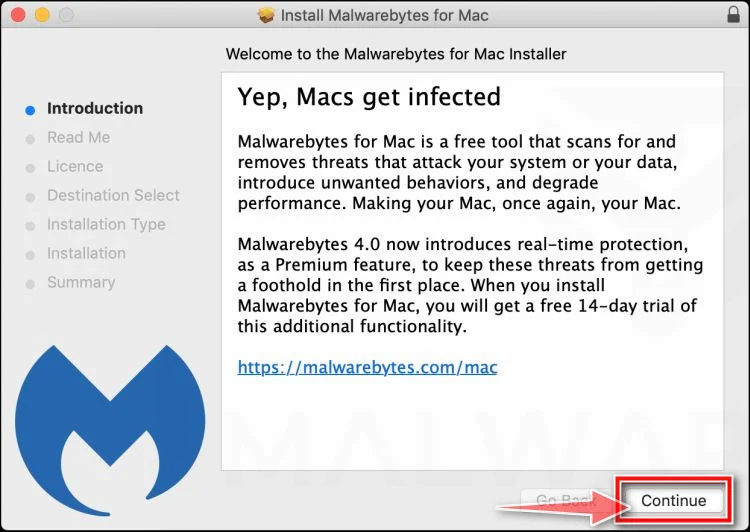
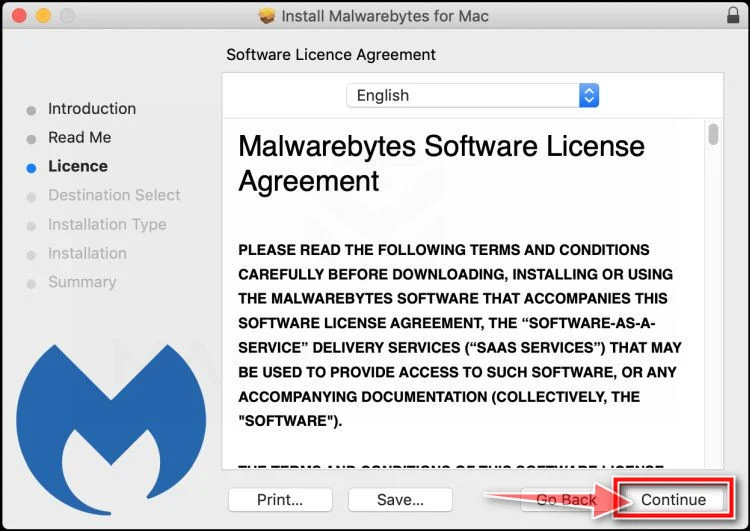
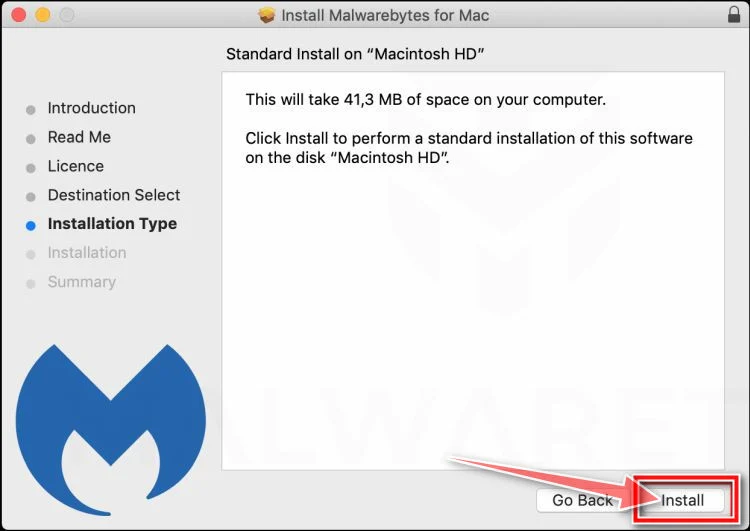
When the installation is complete, Malwarebytes opens to the Welcome to Malwarebytes screen. Click “Get started“.
-
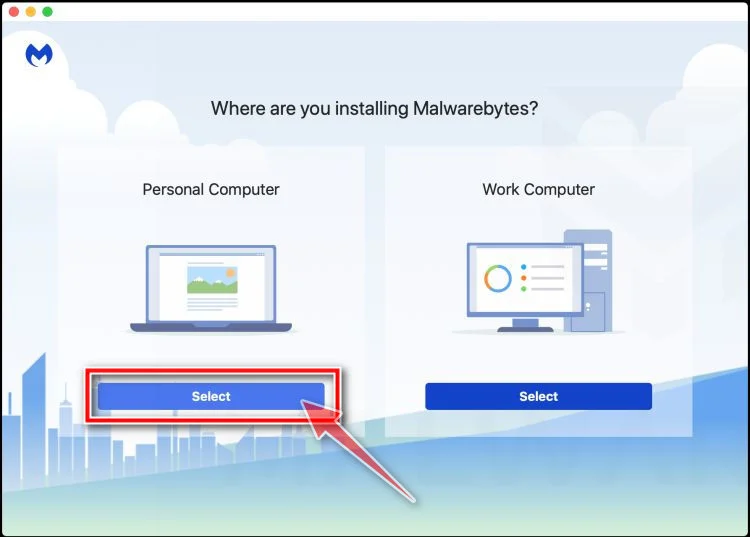
Select “Personal Computer” or “Work Computer”
Malwarebytes will ask what type of computer you’re installing it on. Click either Personal Computer or Work Computer, whichever applies.
-
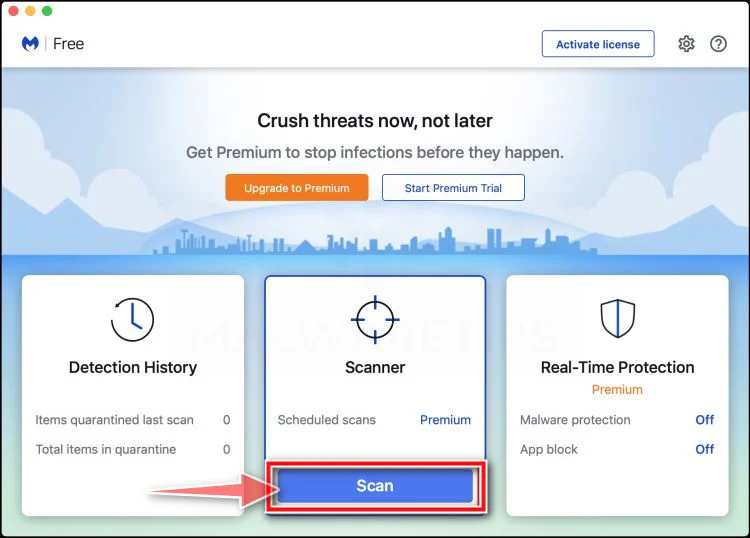
Start the Scan
Click the “Scan” button. Malwarebytes will automatically update its detection database and begin checking your Mac for malware.
-
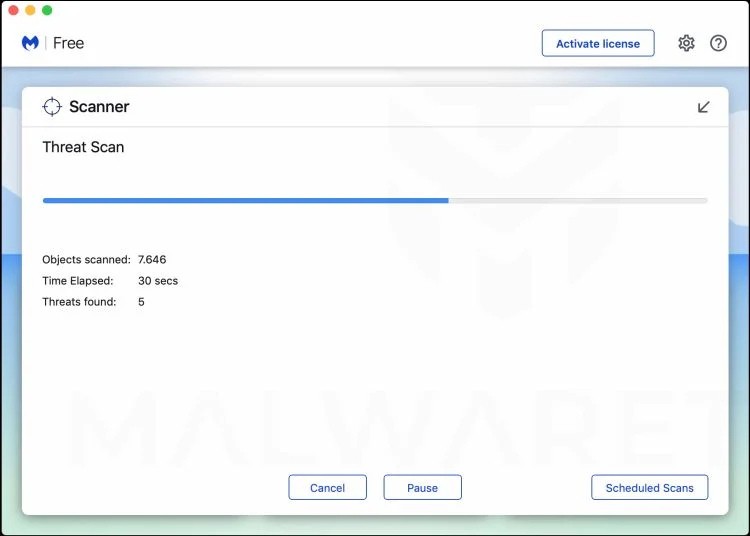
Wait for the Scan to Finish
Malwarebytes will scan your Mac for adware, browser hijackers, and other malicious programs. This can take a few minutes, so feel free to do something else — just check back occasionally to see the progress.
-
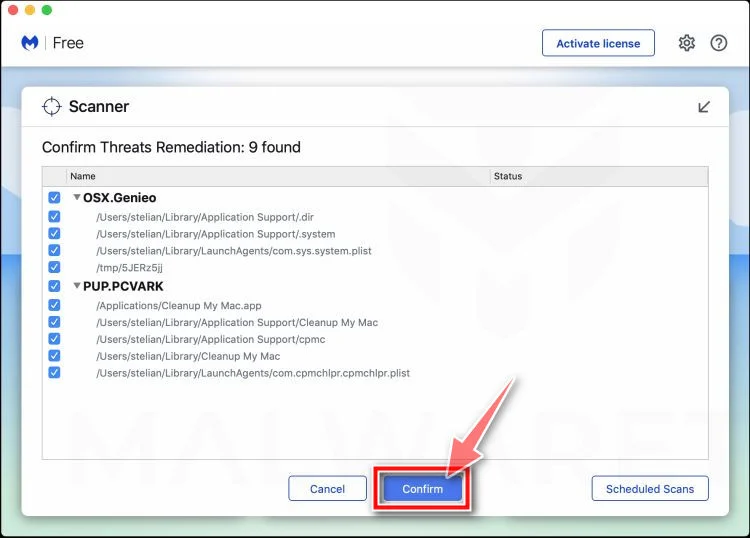
Quarantine the Detected Threats
When the scan is done, you’ll see a list of everything Malwarebytes found. Click the “Quarantine” button to remove all the threats at once.
-
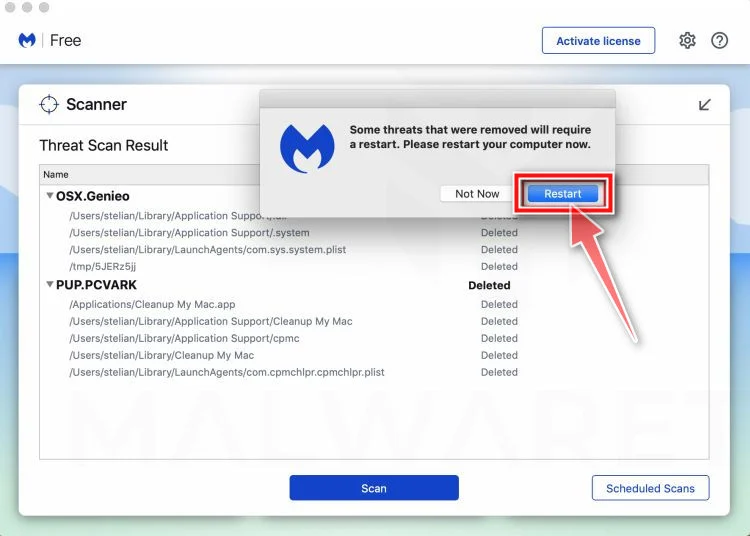
Restart Your Mac
Malwarebytes will now remove all the malicious files it found. Some threats can only be fully removed after a reboot — if Malwarebytes asks you to restart, allow it. Once you’re logged back in, your Mac is clean.
That’s it — your Mac is now free of adware, rogue browser extensions, and other potentially harmful software.
If you are still experiencing problems while trying to remove a malicious program from your computer, please ask for help in our Mac Malware Removal Help & Support forum.
Run a Malware Scan with Malwarebytes for Android
Malwarebytes for Android automatically detects and removes dangerous threats like malware and ransomware so you don’t have to worry about your most-used device being compromised. Aggressive detection of adware and potentially unwanted programs keeps your Android phone or tablet running smooth.
-
Download Malwarebytes for Android.
You can download Malwarebytes for Android by clicking the link below.
Get Malwarebytes for AndroidOpens Google Play in a new tab.Want real-time protection? See Malwarebytes Premium for AndroidMalwarebytes for AndroidScans your phone and removes malware at no cost -
Install Malwarebytes for Android on your phone.
In the Google Play Store, tap “Install” to install Malwarebytes for Android on your device.

When the installation process has finished, tap “Open” to begin using Malwarebytes for Android. You can also open Malwarebytes by tapping on its icon in your phone menu or home screen.

-
Follow the on-screen prompts to complete the setup process
When Malwarebytes will open, you will see the Malwarebytes Setup Wizard which will guide you through a series of permissions and other setup options.
This is the first of two screens that explain the difference between the Premium and Free versions. Swipe this screen to continue.
Tap on “Got it” to proceed to the next step.
Malwarebytes for Android will now ask for a set of permissions that are required to scan your device and protect it from malware. Tap on “Give permission” to continue.
Tap on “Allow” to permit Malwarebytes to access the files on your phone.
-
Update database and run a scan with Malwarebytes for Android
You will now be prompted to update the Malwarebytes database and run a full system scan.

Click on “Update database” to update the Malwarebytes for Android definitions to the latest version, then click on “Run full scan” to perform a system scan.

-
Wait for the Malwarebytes scan to complete.
Malwarebytes will now start scanning your phone for adware and other malicious apps. This process can take a few minutes, so we suggest you do something else and periodically check on the status of the scan to see when it is finished.

-
Click on “Remove Selected”.
When the scan has been completed, you will be presented with a screen showing the malware infections that Malwarebytes for Android has detected. To remove the malicious apps that Malwarebytes has found, tap on the “Remove Selected” button.

-
Restart your phone.
Malwarebytes for Android will now remove all the malicious apps that it has found. To complete the malware removal process, Malwarebytes may ask you to restart your device.
That’s it — your Android phone is now clean — no more malicious apps, adware, or browser redirects.
If you are still having problems with your phone after completing these instructions, then please follow one of the steps:
- Restore your phone to factory settings by going to Settings > General management > Reset > Factory data reset.
- Ask for help in our Mobile Malware Removal Help & Support forum.
Stay Protected: Block Ads and Malicious Sites
Now that your device is clean, keep it that way. Most infections start with a malicious ad or a fake download button — so blocking them at the source is your best defense.
We recommend AdGuard, which blocks malicious ads, phishing pages, and dangerous redirects before they can reach you.
👉 Download AdGuard and browse safely
Frequently Asked Questions About the Facebook Page Deletion Scam
This Facebook page scam tricks owners into surrendering access with threats of permanent deletion. Navigating the complex platform policies around security and content management brings understandable questions. Outlining common concerns empowers page admins to identify and respond appropriately to fraudulent threats aiming to undermine brand integrity through social spaces.
Are the warning messages real or phishing scams?
Messages threatening imminent page deletion over policy violations without specific evidence are almost always fraudulent phishing scams aiming to steal login credentials and hijack page access. Legitimate Facebook notifications specify exact issues and allow reasonable appeal timeframes.
How do scammers send the fake warning messages?
Scammers distribute messages via Facebook Messenger, text message, and email to any associated page admin contact info listed. Messages pretend to come from Facebook support channels but inspecting sender details reveals inconsistencies.
What triggers make Facebook delete pages without warning?
Facebook only disables pages immediately without appeal chances in extreme illegal activity cases like sexual exploitation, terrorism, child safety violations, dangerous conspiracy theories or repeat serious offenses. Most notifications allow administrators to rectify issues without irreversible termination. Brand reputation or investment loss risk falsely pressures urgency in scam threats relying on policy misunderstandings.
What do scammers gain from stealing page admin access?
By hijacking established pages, scammers can post dangerous misinformation, run ads linking financial scams, collect audience data, demand ransom payments from victims desperate to save their brand’s presence after losing control, and orchestrate other forms of fraud – essentially anything page owners themselves can do.
What techniques convince even savvy users that messages are authentic?
From precise visual impersonation of Facebook interfaces to citing real platform policy sections like Terms of Service, scammers thoroughly replicate legitimate authority markers. Victim psychology around risk of losing valuable time investments building audiences also overrides logical scrutiny that would reveal inconsistencies exposing fraudulent threats.
How can Facebook page owners avoid removal policy violations?
Carefully review platform rules around sharing copyrighted material, running ads transparently, aggregating news articles, and prohibitions on dangerous regulated goods or services commerce. Seek official guidance from Facebook for managing complex content areas. Prioritizing audience value and discussion quality fosters organic engagement growth.
Equipping page managers with insights around appealing to fears of irreversible damages makes recognizing related social sabotage scams easier. siempreSharing security experience also keeps wider business and interest communities protected in an increasingly digitally connected world.
The Bottom Line
The “Your Facebook Page Will Be Deleted” scam delivers alarming warnings to panic recipients into surrendering account access rather than scrutinizing inconsistencies exposing the messages’ fraudulent nature.
Page owners should remain skeptical of any alerts threatening permanent deletion and instead report concerning messages directly to Facebook through official channels for verification.
With proper awareness and secure password habits, page administrators can confidently identify scams aiming to jeopardize brand integrity and community trust. Sharing knowledge of common tactics also better protects followers and visitors interacting with platforms powering modern communication.

Join the discussion
0 commentsShare your experience or ask a question about this article.
Discussion
Start the conversation
Have a question or something useful to share? Add the first comment.