


After someone dies, a family photograph or unfinished document can suddenly become difficult to find. An Apple Legacy Contact may face that problem alongside unfamiliar paperwork.
Knowing which records belong together helps you approach the request carefully, especially when several relatives are sorting devices, documents, and memories at once.
Overview
A designation provides a specific route after death
Apple lets an account holder designate someone to request certain account data after death. That person is called a Legacy Contact.
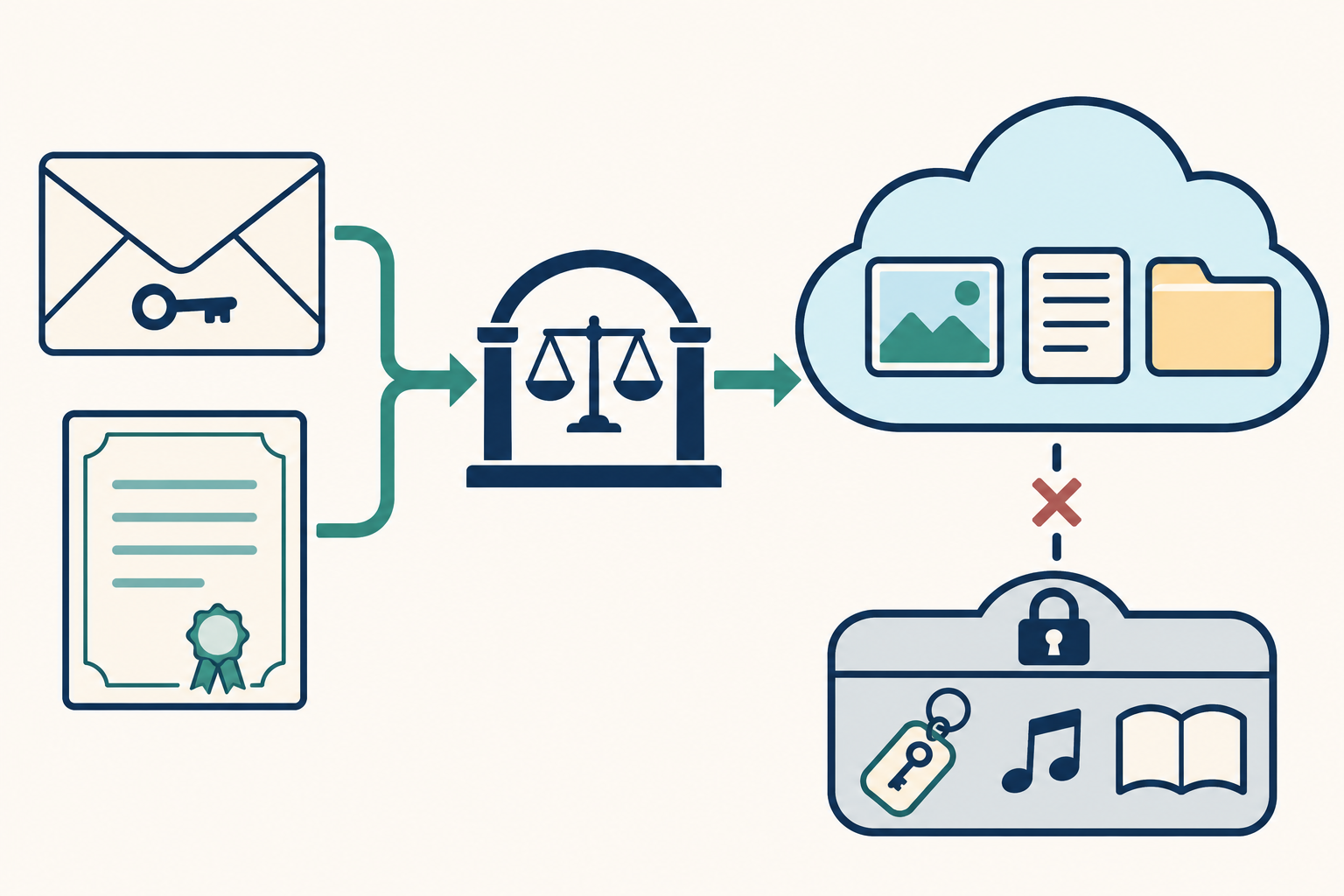
The arrangement matters when the person has already died: you need the access key they created for you, together with the documentation Apple requires.
Apple reviews the request before providing access. Having the key in a folder does not immediately open the account or remove every security restriction.
Stored memories and everyday records may be available
The possible data includes information stored in iCloud and content included in an iCloud Backup. Availability depends on what the person actually stored there.
- Family photographs may be available through iCloud Photos.
- Notes and iCloud Drive files can contain useful documents.
- Mail, contacts, calendars, and reminders are eligible categories.
- Messages in iCloud and call history appear on Apple’s list.
- Health data and voice memos are also listed.
These categories describe possible access, rather than a promise that every photograph, conversation, or record from every device will be present.
Passwords, purchases, and permanent ownership remain separate
Apple excludes iCloud Keychain information and purchased content. A Legacy Contact cannot use this route to inherit the person’s saved passwords or purchased movie library.
Access also has an expiration date. Other designated contacts can affect the account, so collecting important files requires planning beyond simply obtaining approval.
Apple’s Legacy Contact explanation describes the designation and key. The after-death request has additional instructions that deserve a separate reading.
The access key and death record do different jobs
The access key comes from the account holder’s Legacy Contact arrangement. The death record supplies the documentation required when you request access after their death.
Neither record replaces the other in the ordinary Legacy Contact process. A relative’s death certificate alone does not show that you have the designated contact’s key.
Likewise, finding an envelope labeled with your name does not finish the request. Apple still needs the required documentation and must verify the submitted information.
Look for the key where it was actually shared
A key accepted through Apple’s supported sharing process may be saved in your own Apple Account settings. You do not need the deceased person’s unlocked phone to check.
On your iPhone or iPad, open Settings, select your name, then choose Sign-In & Security and Legacy Contact. Select the deceased person’s name from the list.
On a Mac, open System Settings, select your name, then choose Sign-In & Security and Legacy Contact. Select the person’s name to view available options.
If the key arrived another way, check your files for the copy they supplied. Apple mentions printed copies, messages, email, and estate planning documents.
A general password list can be a different record entirely. Look for the specific Legacy Contact access key rather than assuming every account-related document serves that purpose.
Prepare readable documents before starting the request
Apple generally asks for the death certificate, although documentation varies by country or region. In Japan, its example is a family certificate indicating the death.
The request instructions accept PDF, PNG, TIF, JPEG, and GIF documents. Apple specifies at least 300 dpi or 3300 by 2550 pixels.
Each page should lie flat, remain fully legible, and show all four edges. A cropped phone photograph can leave out information needed for review.
Inspect the file before uploading it through Apple. Check that the page opens normally and that names, dates, and stamps remain readable without guessing.
Use Apple’s instructions for Legacy Contact requests to check the current requirements. They also explain identity verification and what happens after submission.
What Apple Legacy Contact access includes and excludes
A familiar app icon can conceal several different kinds of information. Reading the category carefully helps you understand which family records this route might provide.
| Data or record | What Legacy Contact access covers |
|---|---|
| Photos, notes, and files | Eligible categories include iCloud Photos, Notes, and files stored in iCloud Drive. |
| Communication and planning records | Eligible categories include Mail, Contacts, Calendars, Reminders, Messages in iCloud, and call history. |
| Other stored information | Apple also lists Health Data, Voice Memos, Safari Bookmarks, and Reading List. |
| iCloud Backup content | Access can include information actually contained in an iCloud Backup. |
| Saved credentials and payment details | iCloud Keychain information and Apple Account or Apple Pay payment information are excluded. |
| Purchased entertainment and app transactions | Purchased movies, music, books, subscriptions, and in-app purchases are excluded. |
Apple’s complete list of accessible and excluded data is the reference for these boundaries. The exclusions apply even when other useful content becomes available.
For example, a note describing family arrangements and a password saved in iCloud Keychain are different categories. Finding the note does not make the saved password accessible.
The distinction also matters with email. Mail is listed as accessible data, while credentials for internet accounts stored in Keychain remain excluded.
Apple says backup content might include information about downloaded apps, photos and videos stored on the device, device settings, and other backed-up content.
That does not mean every item currently on a device exists in its backup. Treat a backup as its own source when searching for a missing file.
Start with a concrete question, such as finding family photographs or a particular document. Searching for everything can make it harder to recognize the relevant category.
If a file is missing, first consider where the person stored it. A document kept outside iCloud and its backups is beyond the scope described here.
Approval creates a different account with a limited lifetime
Apple sends a confirmation after receiving the request. It also sends an email to the Apple Account whose data you requested, as a security measure.
Apple reviews the information and emails you when that review is complete or additional information is needed. Its guide does not promise a standard approval time.
You can check the request through Apple’s Digital Legacy website. Keep the confirmation available so you can distinguish receipt of the request from approval.
-
Request submitted: Apple receives the information and reviews the required records before granting access.
-
Request approved: You receive instructions for a special Legacy Contact Apple Account, while the account holder’s original account stops working.
-
Access period: The three-year window runs from Apple’s approval of the first Legacy Contact account request.
-
Access expires: Apple permanently deletes the account after the limited period, so download content you want to retain beforehand.
The approval instructions ask you to enter the access key again, confirm contact information, create a password, and set up two-factor authentication for the legacy account.
After creating that account, you can use it to access data through iCloud.com. Apple also identifies privacy.apple.com as a place to download account data.
Some encrypted categories can prompt for the access key again. Keep the original key accessible throughout the collection process instead of discarding it after approval.
If Advanced Data Protection was enabled, Apple’s guide adds an Apple-device sign-in and authorization step before web viewing and downloading can work.
Follow that linked guide for the extra authorization. A web-only plan may need adjustment when the deceased person’s account used that protection.
The phone itself raises a separate question
Holding an iPhone does not resolve the account request, and receiving account access does not reveal its passcode. These are two distinct security boundaries.
Apple says approval removes Activation Lock from devices using the original account. That change allows subsequent device reuse, but it is not a passcode recovery service.
To use an affected iPhone or iPad with another account, Apple requires erasing and restoring it. That action removes the device’s existing contents.
Apple’s guidance for a deceased family member’s account says it cannot remove a passcode lock without erasing the device.
This matters when an old phone may contain photographs that never reached iCloud. The possibility of approved cloud access does not establish that those photographs were uploaded.
Restoring an available iCloud backup onto a suitable device is another process described in the Legacy Contact guide. It still depends on that backup existing.
When possible, plan a suitable device for working with the legacy account before changing your everyday phone. Keep your own account and family records clearly separated.
If the only available device is locked, ask Apple which supported route fits your situation. Avoid treating an irreversible erase as an exploratory troubleshooting step.
Choose the next step that fits your records
Keep the access key and death documents private, and leave devices intact while deciding your next action. Open whichever situations below match your circumstances.
I have the access key and the required death record
Use Apple’s official Legacy Contact instructions to start the request. Check document legibility first, and keep the key for the account setup after approval.
If you lack an Apple device, the instructions include a web route. They also explain how to proceed without an existing Apple Account.
I have the key but need the correct documentation
Check Apple’s stated country or region requirements before submitting an incomplete record. Ask Apple Support for help when the documentation needed for your situation remains unclear.
Save a clear copy of the required document privately. Gathering it does not require posting its contents in a forum or sharing it here.
I cannot find a Legacy Contact access key
Check your own account settings and copies the deceased person supplied. Apple says it cannot access or replace a lost or misplaced key.
If the key remains unavailable, read Apple’s separate after-death access options. A different documentation route may apply, but approval is not guaranteed.
Apple has approved access and I need to preserve files
Read the confirmation for the deadline, finish setting up the special legacy account, and prioritize the records you want to retain outside that temporary account.
Coordinate with any other designated contacts before deletion decisions. Another Legacy Contact may also access the account and permanently delete its data.
What to Do When You Need a Loved One’s Apple Data
-
Write down the particular records you need. List photographs, named files, messages, or other categories instead of assuming access will reproduce every device.
Keep the list separate from the sensitive documents themselves. It can guide your search without circulating death records, credentials, or private correspondence among everyone helping.
-
Match the key to the deceased person. In your own settings or supplied documents, confirm whose Legacy Contact arrangement the record concerns.
If several relatives’ documents are stored together, keep each person’s material distinct. The correct death record still needs to accompany the relevant access request.
-
Follow the official request route with readable documents. Apple’s linked guide provides the supported device and web instructions, including identity verification.
Open the Digital Legacy website through Apple’s support guide. Review what you are submitting, keep the confirmation, and respond through Apple’s process if additional information is required.
-
Use the alternative process when no key exists. Apple’s general after-death guide describes court orders in the United States, Israel, and other locales.
It also names jurisdictions where alternative documentation and processes are accepted. Ask Apple which requirements apply before assuming a document obtained elsewhere will be sufficient.
A will, family relationship, or device possession is not an automatic promise of access. The applicable request still needs Apple’s review of the required information.
-
Agree on preservation before anyone requests deletion. More than one Legacy Contact can have access, and each can make consequential decisions about account data.
Choose a shared plan for which family records to retain and who will collect them. Keep that discussion separate from publicly sharing their contents.
-
Record the expiration date and verify your copies. Once approved, save the deadline from the confirmation and begin collecting important content well before it approaches.
Open the files you downloaded to confirm they contain the intended material. A download notice alone does not tell you whether a particular photograph or document is usable.
Store retained copies somewhere appropriate for their sensitivity, and decide who should receive them. Access to personal records calls for care even within a family.
Frequently Asked Questions
Does the access key replace the deceased person’s password?
The key supports a Legacy Contact request and later access to the approved legacy account. Apple provides a special account rather than the deceased person’s password.
Can Apple replace my missing Legacy Contact access key?
Apple says it cannot access or replace a lost key. Check supplied copies and your settings, then review the separate after-death process if necessary.
Will access include saved passwords and purchased movies?
Apple excludes iCloud Keychain information and purchased content such as movies, music, and books. Subscriptions, in-app purchases, and payment information are also excluded.
Must every applicant provide the same death document?
Documentation varies by country or region. Apple gives Japan’s family certificate indicating the death as an example, so check the requirements applicable to your request.
Does each Legacy Contact receive a new three-year period?
Apple measures the limited access period from approval of the first Legacy Contact account request. Check the confirmation and account for the applicable deadline.
Can approval unlock the phone without deleting its contents?
Approval removes Activation Lock, but Apple says it cannot remove a passcode lock without erasing the device. Plan preservation before following a device-reuse procedure.
The Bottom Line
Use the Apple Legacy Contact route when you have the designated key and required documentation. Expect access to eligible stored data, with important exclusions.
If the key is missing, use Apple’s separate after-death guidance instead of trying to replace it with ordinary credentials or assuming family status guarantees approval.
Once access is granted, preserve the records you need before the deadline. Coordinate with other contacts and decide what to keep before erasing devices or deleting accounts.

Join the discussion
0 commentsShare your experience or ask a question about this article.
Community experiences
Did this happen to you?
Your experience could help someone recognize the same scam. Submit a private report for our team to review.
I experienced this tooReports are reviewed before publication. Sharing publicly is always your choice.
Discussion
Start the conversation
Have a question or something useful to share? Add the first comment.