


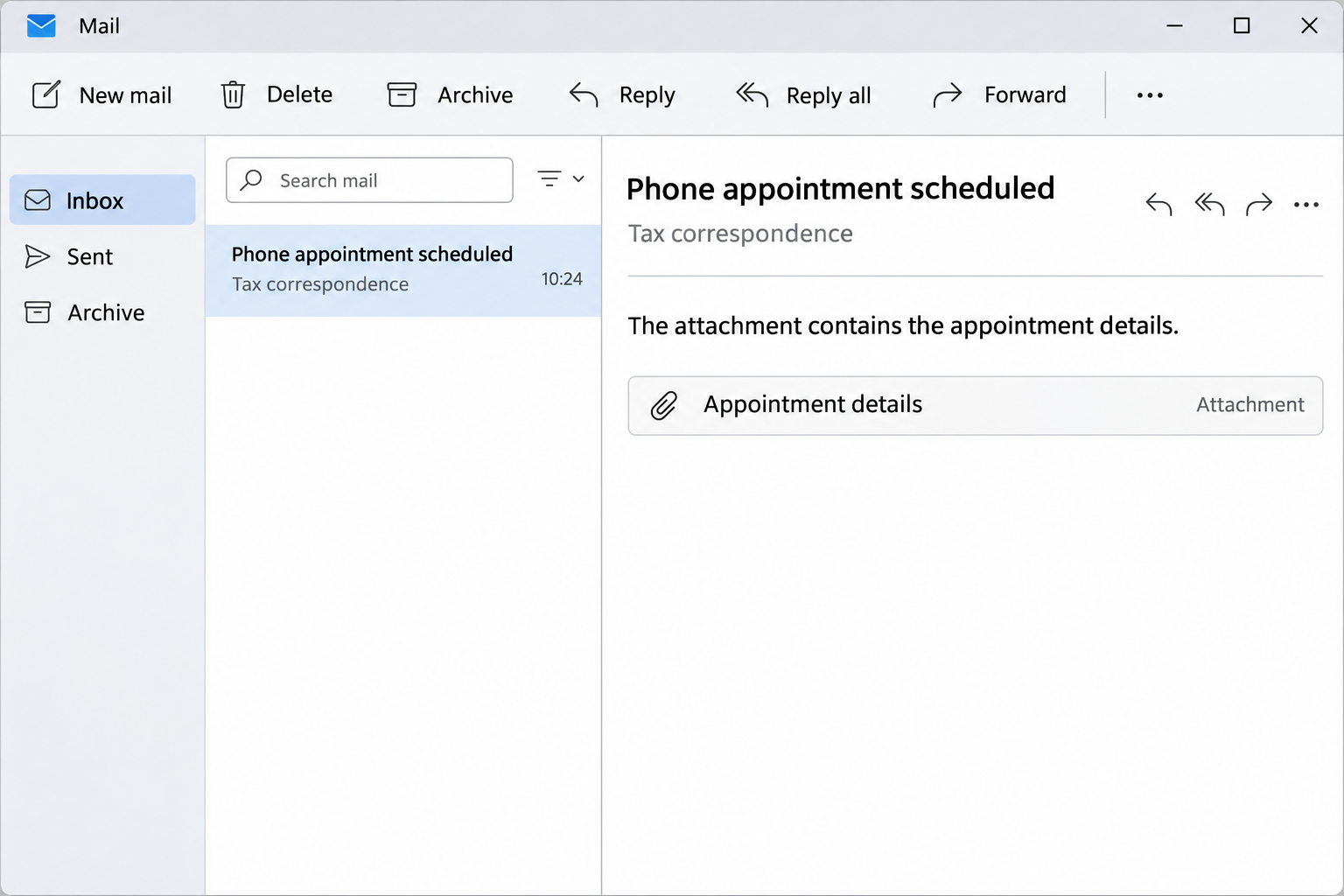
The email says the Australian Taxation Office has booked a phone appointment for you. It includes a time and a type of appointment, just like a routine notice.
There’s one extra instruction: the details you need are in an attachment. That changes how you should handle the message, even if you were expecting to hear about your taxes.
Overview
The invitation is about an appointment, not a tax refund
The Australian Taxation Office, or ATO, warned about this appointment email scam in July 2026. It isn’t the familiar promise of a refund waiting to be collected.
This version tells you a phone appointment has already been arranged. The email can name a date, a time, and the type of call you’re supposedly booked to have.
Those details give it the feel of an appointment reminder. If you’re busy, your first thought may be whether you can make the time, not whether you booked anything.
The email tells you to open an attachment to reschedule or access a service. In the version described by the ATO, the attachment leads to a counterfeit myGov sign-in page.
A separate ATO cybersecurity update reported an increase in tax-themed phishing, including fake appointment notifications. It didn’t identify a single sender, filename, or landing address shared by every version.
The attachment puts a step between the email and the fake sign-in
You don’t necessarily see a suspicious website address in the inbox. The link is inside the document, after you’ve decided that the appointment sounds plausible enough to examine.
That separation is the useful clue here. An attachment can show a date and a time, but it can’t establish who really arranged the call.
The ATO describes the destination as a page designed to steal myGov credentials and personal information. Its warning doesn’t say this appointment attachment has to install a program to work.
The inbox image is a reconstruction of that first step. It isn’t the original email, and no sender, appointment time, or file name in a reconstruction can authenticate a message.
The real appointment can be checked without opening the file
myGov is Australia’s online entry point for linked government services. It isn’t an appointment form that you need to activate from an unsolicited email attachment.
A notification can tell you to check your myGov Inbox. The ATO says it doesn’t email or text a link to sign in to its online services.
If you’re deciding what to do with an appointment notice, look for these differences:
- A specific date and time tell you what the email claims, not who sent it.
- A file that directs you to myGov to reschedule is part of the documented lure.
- An email notification and a message already visible inside myGov are not the same thing.
- If a tax agent arranged the appointment, ask them using an established number.
- If you can’t verify the booking in your usual account, ask the ATO directly.
Don’t cancel an appointment simply because an email looks suspicious. Verify whether there is one first, and let the real office tell you how to keep or change it.
How the ATO Appointment Email Scam Works
Step 1: The email gives you a date to worry about
The sender presents the appointment as something the ATO has already put in its diary. You’re not being asked whether you’d like the agency to call.
An existing booking feels like an obligation. Someone who recently filed a return or asked an accountant a question may assume the notice is connected to that work.
The appointment type adds a second point of familiarity. That text could sound relevant without matching any real request you made. Separate the story from your records.
Compare it with what you can actually trace: a prior call you initiated, a message in your account, or arrangements made with someone whose contact details you already have.
A coincidence is not proof you’re being targeted personally. Without a verified sender or an independent record, an email that happens to fit your circumstances is still unverified.
Step 2: The attachment becomes the supposed way to manage it
Someone who can’t answer a call at the listed time naturally looks for a way to move it. The message points that impulse toward the attached document.
You may see something that looks like an appointment summary rather than a request for a password. Treat access instructions inside the file as part of the same unsolicited message.
The key check doesn’t require a closer look at the filename or paperclip icon. Ask yourself why an appointment email would need to supply its own route into myGov.
If you already opened the document, don’t follow its link to investigate. Close it and make a note of what you actually opened so you can explain the exposure accurately.
Step 3: The document points to a copied myGov sign-in
The page trades on familiarity with myGov. The ATO says the page looks legitimate, but it’s there to collect information rather than show your appointment.
Signing in is an ordinary step when you’re on the real government site. Coming from an unverified attachment is what makes that otherwise ordinary request dangerous.
Take the link out of the decision entirely. Even if the page looks right, close it and open the myGov app or your usual bookmark yourself.
If you use a password manager, an unexpected failure to fill your credentials is another reason to pause. Don’t override it by pasting the password into the page.
Step 4: Information typed on the wrong page can outlast the email
The danger changes once a password or personal information goes into the copied page. Deleting the appointment notice won’t take back anything you already entered.
Someone with usable sign-in details could try to get into myGov. The consequences depend on what was shared, what protections are enabled, and whether the person ever gained access.
If an unexpected approval or security prompt appears, don’t approve it simply because you started reviewing the appointment. It may be tied to an action you didn’t intend.
The agency’s warning identifies the credential theft attempt. It is not a report that every recipient lost a refund, had a bank account changed, or had malware installed.
How to Check the Appointment Without Missing a Real Call
Start with the record you already have
If your agent told you to expect contact, check their original message or your own notes first. Use a number from your existing correspondence, not from the appointment email.
Someone answering a number in the email can repeat the same details back to you. It doesn’t become independent verification just because a person, rather than a page, confirms it.
If the appointment came as a surprise, go through your normal ATO channel. Explain that you’re checking whether a phone appointment exists and give the claimed time if asked.
You don’t need to send your full tax return to obtain a basic check. Start with the specifics of the supposed booking and follow the agency’s verified process.
Understand where genuine ATO correspondence can appear
The ATO’s communications guide distinguishes an external notification from correspondence you view after signing in. That distinction is more useful than sorting messages by how official they look.
If your ATO service is linked, you can check your myGov Inbox and the ATO’s own online service. Open them yourself rather than jumping in from the attachment.
If you don’t have ATO linked, the agency says its mail may arrive by post or through a tax or BAS agent. An empty myGov Inbox isn’t the final answer.
Some messages inside the real Inbox may contain links to online services. That doesn’t make sign-in links in an email attachment equivalent to messages you’ve independently retrieved.
If the real account doesn’t settle it, ask before the planned time
Not all real contact fits neatly into an inbox. If you still have a reason to expect a call, confirm the appointment directly rather than assuming it was canceled.
You can also ask your tax agent whether an appointment is related to work they lodged. Keep the full suspicious message out of unrelated threads that may contain client records.
If you have an accessibility requirement or need an interpreter, arrange that through the verified agency channel. Don’t rely on a portal reached from an unfamiliar tax document.
Keep a confirmed appointment separate from an unexpected follow-up
You might verify a genuine call and then receive another message asking you to confirm a change. Start the check again rather than trusting it because the first appointment existed.
Keep the date and reference from the official check somewhere you can find them. If the email shows a different time, ask which record is current without forwarding its links.
For a household that shares one computer, each person should open their own account. Don’t sign into another person’s account just because the suspicious notice arrived in a shared inbox.
If you manage someone’s tax affairs, tell them which call you confirmed and what they can safely expect. That can keep a second person from opening the same attachment later.
What to Do if You Have Fallen Victim to This Scam
- If you only received it, leave the attachment unopened. Don’t reply to reschedule. Confirm any real booking independently, then report the email through the ATO’s official process.
- If you opened the file or followed the link, close it. Don’t reopen it to see where it goes. Note whether you entered anything, approved a prompt, or installed software.
- If you entered credentials, secure myGov from a trusted device. Change your password using the real service. Follow the official myGov recovery instructions and don’t approve unfamiliar sign-in requests.
- Review signs of access that a password change won’t explain. Check account history, linked services, and connected devices or passkeys. Remove unfamiliar ones and complete the account’s security review.
- Call for help if you can’t sign in. Use the myGov helpdesk contact page, not the suspicious email. If tax information was exposed, notify the ATO as well.
- Tell the relevant service if its records changed. Check linked ATO details and any other affected service. Report an unfamiliar payment destination rather than treating it as a harmless typo.
- Contact the bank if you shared financial details or paid. Describe exactly what you entered or approved. Ask whether it can protect the account or stop an outstanding payment.
- If you supplied identity details, ask how to protect them. Tell the ATO which items were shared. Scamwatch’s recovery guidance explains how to get identity support through IDCARE.
- Report it to the ATO. The agency asks you to forward the full suspicious email to ReportScams@ato.gov.au. Don’t forward it to friends or include passwords or codes.
- Get the device checked if you ran or installed anything suspicious. Use a trusted device to reset credentials. Tell workplace IT if it was a work computer.
If you acted on the message, write down a timeline while it’s fresh. There may be several records to match: the email, what you entered, any approval, and later activity.
Keep that record somewhere private. Screenshots can be helpful, but they should not circulate in public if they include your email address, tax file number, or sign-in information.
If your email password matched the one you entered, change that password too. Check whether the email account still receives ordinary notices and whether its recovery details are yours.
Look for unfamiliar tax activity after securing access, not as a substitute for securing it. If a linked service shows a change, tell that service what you found and when.
Frequently Asked Questions
Does a fake appointment email mean the ATO already has my account details?
No. Receiving it establishes that someone reached your mailbox. If you enter a password, approve a sign-in, or see unfamiliar account activity, act on that specific exposure.
Can the real ATO contact me by email or text?
Yes, for some communications. The distinction is that the agency says it won’t email or text a link to sign in to an online service.
Did merely opening the email hand over my myGov password?
Not by itself. The documented lure tries to get you from the email to a copied sign-in. Report the message and consider what, if anything, you did after opening it.
What if I opened the attachment but didn’t follow the link?
Close it and report it. The documented route uses a link inside the file. If it prompted an installation or you ran anything, get the device checked.
What if I’m expecting a call and the time looks correct?
Check the booking independently with the ATO or the tax agent who arranged it. A matching time is a reason to make a separate check, not to open the attachment.
How can I report the message in Australia?
The ATO lists ReportScams@ato.gov.au for suspicious emails. If you paid or supplied sensitive information, its scam warning directs recipients in Australia to call 1800 008 540 promptly.
The Bottom Line
Don’t use an attachment to sign in or change an ATO phone appointment. The July alert describes a document that takes readers to a copied myGov page.
Check the appointment through a channel you opened yourself. If you already supplied credentials, secure myGov and let the affected service know before waiting for a change to appear.

Join the discussion
0 commentsShare your experience or ask a question about this article.
Discussion
Start the conversation
Have a question or something useful to share? Add the first comment.