


An old post from a familiar restaurant looks harmless enough. You recognize the account, the wording sounds ordinary, and the short link has been sitting there for years.
Then the page that opens has nothing to do with the promise. Before blaming the account or trusting the next screen, it helps to understand what changed.
Overview
A genuine post can lead somewhere its author never intended
The Bitly link-hijacking incident involved old shortened links inside authentic posts. Changing a redirect can alter where readers land without changing the words they originally saw.
Reports described McDonald’s and Burger King links opening unrelated Wikipedia pages. Bitly said it suspended the accounts involved and was disabling the affected links.
Those reports described offensive redirection, not a demonstrated theft of every visitor’s password or payment details. Potential phishing abuse is a separate risk, not a confirmed outcome here.
The company behind the post is not necessarily the attacker
Bitly is a legitimate shortening service, and the named restaurant brands are real businesses. Neither fact makes every destination behind an old short link trustworthy indefinitely.
In this incident, the important distinction is between the post and the redirect. A recognizable account can provide context without proving who currently controls the destination.
Your next action depends on what the link requested
If a link opens an unrelated page, leave rather than following new instructions. Then consider whether you entered information, downloaded anything, or approved a browser permission.
- An unexpected destination alone does not demonstrate that your account was taken over.
- A sign-in request should be checked through the service’s official application or independently chosen website.
- A download or permission request needs attention even when the original post came from a real brand.
- A report should identify the short link and the misleading context without exposing your private information.
What Changed Behind the Old Links
A shortener keeps a mapping between a compact address and another destination. Your browser reaches the shortener first and is then directed toward the stored target.
That separation is useful for sharing long addresses, but it also hides information. The text of the short link does not tell you everything about the eventual page.
According to the reporting, a flaw involving expired Bitly links allowed bad actors to change their destinations. Genuine old posts still contained those same compact addresses.
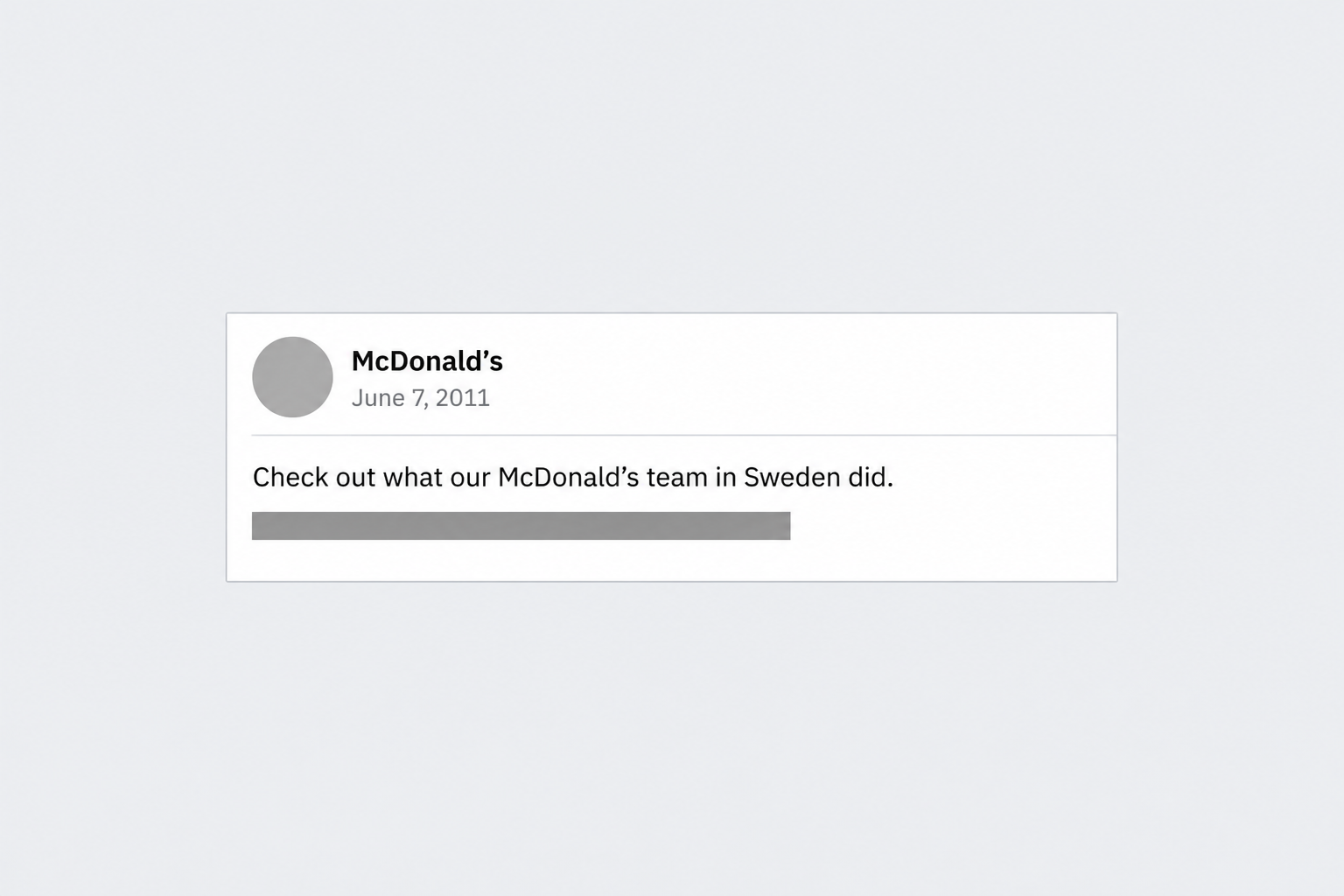
One documented example was a June 2011 McDonald’s post about its team in Sweden. Its link was redirected to an unrelated Wikipedia article about the September 11 attacks.
The image above is a simplified reconstruction of that post, with the link concealed. It illustrates the context without reproducing a usable redirect or an authentic account screenshot.
The reported destinations matter when describing the incident. An offensive Wikipedia redirect is not evidence that a visitor downloaded malware, even though another redirect could point somewhere dangerous.
How Short-Link Hijacking Reaches Readers
Step 1: An old message keeps its original appearance
The surrounding post can remain completely ordinary. Its author, date, and wording may be genuine, giving readers reasons to expect a familiar promotion or company announcement.
Someone finding it through search, an old conversation, or a reshared post may focus on that recognizable context. The compact address offers little additional information at a glance.
This is why verifying the sender solves only part of the problem. The sender’s original intent and the link’s present destination are related but separate questions.
Step 2: The redirect is altered somewhere else
The attacker does not necessarily need the brand’s social-media password. If control over the redirect changes, the old post can effectively send readers to a different destination.
In the reported Bitly case, the problem concerned expired links. That does not mean every expired link, every shortener, or every redirect automatically has the same weakness.
For readers, the consequence is practical rather than technical: a page can inherit attention from a trusted message without inheriting permission from its author.
Step 3: The browser follows the current destination
A reader clicks the same visible address and reaches whatever destination the redirect currently supplies. The surrounding post need not show any warning that its behavior changed.
In this incident, unrelated pages created embarrassment and confusion. More generally, a destination could request account access, display a fake promotion, or offer an unwanted download.
Those possibilities describe why redirect control matters. They should not be confused with proof that those additional attacks occurred through the particular restaurant posts.
Step 4: The visitor decides whether to continue
The safest stopping point is the mismatch itself. A restaurant announcement opening an unrelated page should not persuade you to follow another link or accept an explanation there.
If a new page claims your account needs attention, abandon that route. Open the relevant application yourself and check whether the same issue appears inside your account.
This breaks the chain between the old message and any new request. You no longer depend on whoever controls that redirect to explain what should happen next.
Why Familiar Safety Clues Can Mislead
A real account does not authenticate every later page
A brand’s genuine account is useful evidence about who published a message. It does not establish that every external service mentioned in that message remains unchanged.
The same distinction applies to old emails and saved bookmarks. A link can depend on a shortener, an intermediate redirect, and a destination maintained by different parties.
It is therefore reasonable to question an unexpected page without deciding the original account was hacked. Report the observed mismatch rather than assuming a particular point of compromise.
HTTPS protects a connection, not the promise
A padlock or secure-connection indicator concerns the connection to the displayed site. It does not establish that the site is the destination the original author intended.
A misleading page can also use an encrypted connection. Check the organization and purpose behind a request, particularly when it involves signing in, paying, or sharing a verification code.
Likewise, familiar logos are not enough to approve a sign-in page. Use the service directly when a redirect asks for something unrelated to the original message.
A preview helps, but it is not a permanent guarantee
A destination preview can reveal a mismatch before you visit. It is still an observation about a particular link at a particular moment, not a lifetime safety certificate.
A later redirect, a changed page, or location-dependent content can complicate that picture. Use checking tools as another source of information, rather than permission to ignore suspicious instructions.
How to Check a Short Link Without Following Its Story
Start with the reason for clicking. If you only want the restaurant’s opening hours or a current promotion, visit the business directly instead of reviving an old redirect.
On a desktop, hovering can reveal the underlying link. When that underlying link is still shortened, however, you have identified the shortener rather than the ultimate destination.
Copying the address gives you a way to inspect it separately. Be careful not to select an option that opens the page when you meant to copy it.
Bitly’s official unsafe-link guidance points users toward its Link Checker and reporting process. Start from the official support site rather than an unknown expansion service.
Do not submit private reset links, invitation tokens, or customer-specific addresses to a public checking service. Those addresses may contain access information even without an obvious password.
For a workplace message, ask your IT team which checking method is approved. Sending a confidential internal link to an outside scanner can create a separate disclosure.
If the result looks unrelated to the claimed purpose, stop there. You do not need to visit the destination personally to prove that the message deserves caution.
What to Do If You Followed an Unexpected Bitly Link
-
Close the unexpected destination and identify what actually happened. Note whether you only viewed a page, entered information, downloaded a file, or granted a permission.
Do not assume that reading an unrelated Wikipedia page means your banking information was exposed.
-
If you typed a password, change it through the genuine service from a trusted device. Replace that password elsewhere if you reused it.
Review active sessions and recovery details, and remove unfamiliar access through the service’s own account-security controls.
-
If you shared payment information, contact the card issuer through its verified channel. Explain exactly which information you provided and ask about protective steps.
Keep any payment record separately from screenshots you might share with a public reporting service.
-
If you downloaded or installed something unexpected, stop using it and seek the appropriate device-cleanup guidance. The FTC’s malware advice explains why updates and security checks matter.
Malwarebytes can help check supported devices for unwanted software. AdGuard may reduce exposure to malicious advertising, but neither product reverses a payment or secures a stolen account automatically.
-
Report the suspicious redirect using Bitly’s official abuse-report route. Include the short link and the context that made its destination misleading.
You can also notify the original publisher through its independently located contact channel, without reposting an active harmful link to warn others.
-
Warn anyone you directly forwarded the link to, explaining the observed mismatch. Avoid claiming infections or thefts that you have not established.
A clear correction is more useful than another alarming chain message that encourages people to test the link themselves.
If You Manage a Publisher’s Old Posts and Links
The incident gives publishers a separate housekeeping problem. Old campaigns can continue attracting visitors long after the person who created their shortened links has changed roles.
Keep an inventory of important links and the accounts that control them. Record who can update destinations and which team handles reports when a redirect behaves unexpectedly.
Review high-traffic historical posts, help documents, and campaign pages for broken or surprising destinations. Start with links customers still use rather than attempting random clicks across an entire archive.
When replacing a problematic link, check every place you control that contains it. Updating a homepage does not repair an old social post, support template, or printed document.
Explain significant corrections plainly to readers. Removing a harmful destination and acknowledging a changed link can prevent further confusion without asserting that the whole account was compromised.
A Broken Link Is Not Always a Hijacked Link
An expired promotion, a deleted page, and a maliciously changed redirect can all interrupt an old journey. They are not interchangeable explanations for every error message.
If the shortener displays an error, record what it says. Do not turn that error into a claim that the missing destination stole your information.
A warning page may mean the service identified something unsafe. Respect that warning instead of looking for a different browser or another route around it.
A destination that has simply moved may have a legitimate replacement on the business’s current website. Find it independently, rather than trusting a stranger offering a corrected link.
For reporting purposes, distinguish what you expected from what appeared. A useful description can identify an unrelated destination without speculating about the attacker’s identity or motives.
That distinction also helps the original publisher respond. Its team may need to repair an outdated resource, report abuse to the shortener, or investigate account access.
Apply the Same Caution to Printed QR Codes
A QR code can contain a shortened address rather than a permanent destination. The printed pattern can stay unchanged while a redirect behind it is updated.
That does not mean every QR code is dangerous. It means a printed company logo and a familiar location cannot answer every question about the resulting website.
Read the destination preview your camera supplies before continuing. If it only shows a shortener, you still have not confirmed the business ultimately receiving your visit.
For payments, parking, or account access, use the organization’s official application when uncertain. Do not enter sensitive details just because scanning felt like an ordinary physical-world action.
If a code seems suspicious, keep a photograph of its location without including bystanders or personal documents. Report it through the venue’s independently verified contact details.
This is a general precaution about redirecting links, not evidence that QR codes were involved in the reported restaurant-post incident.
Frequently Asked Questions
Is Bitly itself a scam service?
No, Bitly is a legitimate link-management service. This incident concerned abuse of certain shortened links, not evidence that every Bitly address or customer is fraudulent.
Were McDonald’s and Burger King’s accounts necessarily hacked?
No, changing a shortened link’s destination can affect a genuine post without changing the post itself. The reported redirect problem does not establish account-password theft.
Did these links steal passwords from everyone who clicked?
The reporting described unrelated Wikipedia destinations, not universal credential theft. Treat a separate sign-in or download request according to what it actually asked you to do.
Can I trust a short link because it is old?
No, age does not establish its present destination. If an old message points somewhere unexpected, use the organization directly rather than relying on the redirect.
Does a link checker make any destination completely safe?
No, a checker provides information rather than a guarantee. A result does not justify sharing a password, approving an unfamiliar login, or ignoring a browser warning.
What should I do after only seeing an unrelated page?
Leave the page and report the misleading link. Additional recovery steps depend on whether you entered information, approved access, or downloaded something, not on the surprise alone.
The Bottom Line
Do not continue through an unexpected redirect just because the original post is genuine. Check the organization directly and report a link that no longer matches its promise.
If you already shared information or installed software, address that specific exposure promptly. A changed destination is a reason to stop, not proof that every visitor was compromised.

Join the discussion
0 commentsShare your experience or ask a question about this article.
Community experiences
Did this happen to you?
Your experience could help someone recognize the same scam. Submit a private report for our team to review.
I experienced this tooReports are reviewed before publication. Sharing publicly is always your choice.
Discussion
Start the conversation
Have a question or something useful to share? Add the first comment.