


You read the news, opened a familiar service, or checked a page you had visited many times before. Nothing about the address suggested an unfamiliar website.
Headlines mentioning BBC, CNN, and Zoom now raise an obvious question. What should you actually check, and does simply visiting one of those sites mean something went wrong?
Overview
A trusted outside script became the delivery route
The November 16 Optimizely incident involved malicious JavaScript delivered through a service legitimate websites used. It was not simply another lookalike website pretending to be a familiar brand.
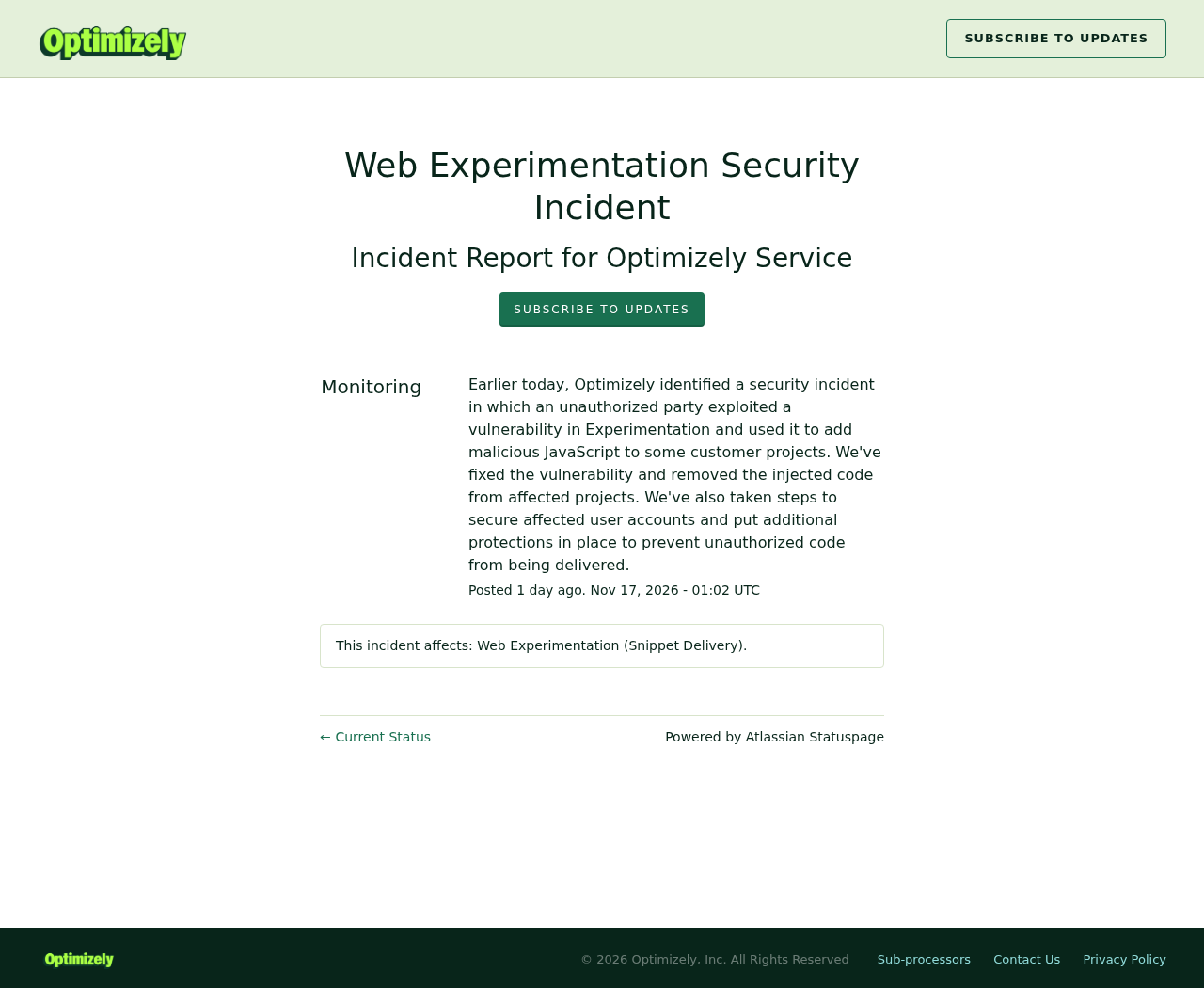
Optimizely’s original incident notice confirms an unauthorized party exploited a vulnerability and added code to customer projects. The company says it fixed the vulnerability and removed that code.
The notice identifies Web Experimentation snippet delivery as the affected service. It does not say every Optimizely product, every customer, or every website visitor suffered the same consequences.
The visitor’s activity and device affect the risk
Original research identified several behaviors, including cryptocurrency-address replacement and payment-data collection. The campaign also attempted exploit delivery to certain iPhones and iPads.
Reading a page, typing card details, making a cryptocurrency transfer, and using an outdated device are different exposures. The useful response starts with which activity actually occurred.
Check transactions and updates before assuming an infection
A familiar website can load outside code, but an incident headline alone cannot establish what happened on your device. Focus on the specific time, page, and transaction.
- Check the actual destination of relevant cryptocurrency transfers against the intended recipient.
- Contact your issuer about suspicious card activity or payment details entered on affected pages.
- Install the latest compatible operating-system and browser updates from official settings.
- Review account activity when there is evidence your session or credentials may have been exposed.
Why a Real Website Was Not Enough Protection
Modern websites often load code supplied by other companies. These scripts can support analytics, payment functions, advertising, or experiments that change how a page looks and behaves.
Optimizely Web helps customers experiment with websites. Its snippet carries out configured changes inside a visitor’s browser.
That trusted relationship explains the delivery route. The reader did not necessarily follow a suspicious email or deliberately download a program before the unwanted code reached the page.
It also explains why changing the website’s spelling is not the issue here. An accurate address can coexist with an outside script that has been altered maliciously.
This does not establish that each named organization’s own servers were breached. The public finding concerns code delivered through a third-party dependency those sites trusted.
How the Optimizely Browser-Script Attack Worked
Step 1: Unauthorized code was added to customer projects
The affected service generated snippets containing customer-specific configuration. Optimizely says the attacker exploited a vulnerability to add malicious JavaScript to some of those projects.
The initial published research did not settle the complete route by which the attacker obtained that ability. Do not substitute a guessed stolen password for the vendor’s confirmed statement.
For customers, the distinction matters because the repair must address the actual unauthorized modification path, not merely remove one suspicious line from a website template.
Step 2: Genuine websites loaded the altered snippets
Affected pages loaded their familiar outside snippet as part of normal operation. The malicious addition then created a route for further attacker-controlled code to run.
Report URI’s original investigation identified infected snippets associated with 178 organizations. That is an organization count, not a count of infected people or stolen cards.
The published examples include BBC, CNN, and Zoom, alongside businesses in other sectors. Being named in the list does not establish identical exposure on every page.
Step 3: The payload interacted with what visitors did
The research describes code that could substitute cryptocurrency addresses and collect certain payment information. Those actions depend on the relevant data being available during the browser session.
A visitor making a transfer therefore faces a different question from someone who only read an article. The payment record becomes important evidence, not the headline alone.
The campaign also included device-specific exploit delivery. A page could therefore present risk without displaying a sign-in form or asking the reader to install a supposed update.
Step 4: Cleanup removed the delivery, not every earlier consequence
Optimizely’s notice says the vulnerability was fixed and injected code removed. That addresses the delivery problem described by the service, rather than undoing past transactions automatically.
A cryptocurrency transfer sent to the wrong address remains a separate recovery problem. Previously captured card information may also require action through the issuer.
This is why the response should match the exposure. Removing a website script, updating a device, replacing a card, and reviewing an account solve different parts of the risk.
What to Check If You Made a Cryptocurrency Transfer
Open the transaction history in the wallet or exchange you normally use. Locate the actual transfer rather than relying on a screenshot of the payment page.
Compare the recorded receiving address with the intended recipient’s independently verified address. Confirm the full address through a trusted channel, not a message supplied by an unfamiliar helper.
Check the network as well as the recipient. A similar-looking token name or an abbreviated display can conceal important differences about where a payment actually went.
If the transfer appears wrong, preserve its transaction identifier, network, amount, time, and related correspondence. Contact the involved platform promptly and describe the precise discrepancy.
Do not send another transfer to verify ownership or unlock a supposed refund. A person promising to reverse a blockchain payment for an advance fee introduces another risk.
If no cryptocurrency transfer occurred, you do not need to invent one to assess this incident. Move to the checks that correspond to your actual browsing activity.
What to Check If You Entered Card Information
Identify the page and approximate time when you entered the details. Keep the order confirmation and payment record so your issuer can understand which transaction concerns you.
The original research distinguishes ordinary page fields from isolated hosted payment frames. That technical boundary should not become a blanket assurance about every checkout or payment processor.
You may not be able to establish the checkout’s implementation afterward. Tell your issuer what you know rather than guessing whether a particular field was technically reachable.
Ask about card protection and transaction monitoring. If an unfamiliar payment appears, report it promptly using the bank’s official application or the number on your card.
An unexpected charge and an authorized order that failed to arrive require different explanations. Describe the actual issue rather than calling every suspicious payment unauthorized.
iPhone, iPad, and Browser Checks
The campaign’s exploit delivery makes software updates especially relevant. Use the device’s genuine update controls rather than an advertisement or popup claiming to provide an emergency repair.
On an iPhone or iPad, open Settings, then General, then Software Update. Install the latest compatible release offered for that device, following Apple’s normal instructions.
For browsers on computers, use the browser’s own update mechanism and restart when requested. Update the operating system too, because browser protection does not replace missing system patches.
Do not assume every visitor’s device was exploited. The relevant software version and actual delivery matter, and a public incident cannot diagnose one device from a distance.
Equally, a page looking normal does not establish that nothing executed behind it. Seek appropriate technical help if there are credible signs of compromise or a targeted warning.
Closing a tab stops that browsing session, but it is not proof that every possible device-level consequence has been removed. Keep session exposure separate from an established infection.
What to Do If You Visited an Affected Page
-
Check whether the relevant visit occurred during the reported incident and which page you used. Preserve your own records without posting your browsing history publicly.
Use the affected organization’s current notice when available, rather than assuming all visits to the brand were equally exposed.
-
Review any cryptocurrency transfers connected to that visit. Compare the actual recorded destination against the intended recipient through an independently trusted channel.
If something differs, retain the transaction details and contact the platform involved without sending more funds.
-
Contact your card issuer if payment details were entered on a potentially affected page or suspicious charges appear. Explain the exposure and ask about the appropriate protective action.
Keep genuine purchase disputes separate from payments you never approved, so the provider can use the correct process.
-
Update your device and browser using official settings. Do not install a cleaner, profile, extension, or security update offered by an unsolicited caller or popup.
A genuine incident can become the pretext for a separate fake-support approach after news coverage spreads.
-
Review account sessions and recent activity if you used sensitive services during the exposure. Investigate unfamiliar devices, recovery changes, or other unexpected access.
If a password may have been disclosed, change it through the real service and replace it wherever you reused it.
-
For a supported computer with suspicious downloads or behavior, use reputable security software and an appropriate cleanup guide. Malwarebytes can assist with detecting unwanted software.
AdGuard can reduce some malicious-advertising exposure, but it cannot undo a redirected transfer or certify that a compromised outside script was harmless.
-
Report a confirmed loss through the relevant payment provider and appropriate authorities. Keep copies of correspondence, transaction identifiers, and any incident reference privately.
Be wary of anyone who contacts you first and promises guaranteed recovery after an advance payment.
What Website Owners Need to Do Differently
Visitors cannot reasonably audit every script a page loads. Website operators must understand their dependencies and investigate whether outside code changed during the relevant incident window.
Confirm whether the affected product and project were actually present. Preserve the relevant configuration and logs, then follow Optimizely’s current security guidance and your incident-response process.
Review unauthorized project changes and related account access. Simply deleting one visible reference may leave another affected delivery path or a separate unauthorized configuration unchanged.
Consider monitoring changes to trusted scripts and limiting unnecessary script execution. Controls should be tested against the real site, because breaking payment or account functions creates another problem.
Content Security Policy and related controls can reduce certain script and connection risks when appropriately configured. They are not proof that any allowed dependency remains trustworthy forever.
Communicate confirmed exposure accurately to customers. Explain the affected period and activities without equating a large organization’s name with a universal infection count.
Make a Short Record Before Contacting Support
You can prepare a useful account of your visit without collecting technical evidence from a malicious server. Begin with the page you used and the approximate time.
Record the device and operating system you were using, if known. Do not guess an old version number from the version currently installed after an update.
Then describe the activity: reading, signing in, entering payment details, or making a transfer. An order confirmation or transaction record can help establish the timing.
Include your time zone when comparing that record with an incident timeline stated in UTC. A local date around midnight can differ from the date used by researchers.
Keep the record concise and share it through the affected provider’s verified support route. There is no need to publish a complete browsing history or full card number.
If a provider asks for more information, confirm what it needs and why. An incident does not justify sending account passwords or verification codes to someone offering assistance.
Retain the response and any reference number. That helps distinguish official follow-up from a later unsolicited message claiming to know about your exposure.
This small timeline also prevents unnecessary confusion between separate events. A payment made days outside the incident window needs its own explanation rather than automatic attribution.
Frequently Asked Questions
Does visiting BBC, CNN, or Zoom mean I was infected?
No, the incident does not establish an infection for every visitor. Your page, timing, device software, and activity affect what exposure may have occurred.
Was this a fake website pretending to be a real company?
The reported delivery involved a trusted third-party script used by legitimate pages. That differs from a lookalike domain, although both can expose visitors to unwanted code.
Did Optimizely say it removed the injected code?
Yes, its incident notice says the vulnerability was fixed and unauthorized code removed from affected projects. That statement does not reverse earlier payments or resolve every visitor’s circumstances.
Can a device scan recover cryptocurrency sent elsewhere?
No, a scan cannot change a completed transfer’s destination. Preserve the transaction record, contact the involved platform, and avoid paying anyone who guarantees a reversal.
Should everyone immediately replace every payment card?
No universal replacement instruction follows from the headline. Contact your issuer about your actual exposure or unfamiliar activity and follow its advice for the relevant card.
What should I do if someone offers an urgent Optimizely cleanup?
Do not grant remote access through an unsolicited approach. Check the organization’s official notice and use your established administrator, device-support provider, or payment issuer as appropriate.
The Bottom Line
Check the activity that could have exposed you: payment details, transfer destinations, account sessions, and outdated software. A trusted website name alone cannot answer those questions.
If you find a suspicious transaction or access change, contact the relevant provider promptly. Update through official settings and reject unsolicited offers promising to repair everything for a fee.

Join the discussion
0 commentsShare your experience or ask a question about this article.
Community experiences
Did this happen to you?
Your experience could help someone recognize the same scam. Submit a private report for our team to review.
I experienced this tooReports are reviewed before publication. Sharing publicly is always your choice.
Discussion
Start the conversation
Have a question or something useful to share? Add the first comment.