


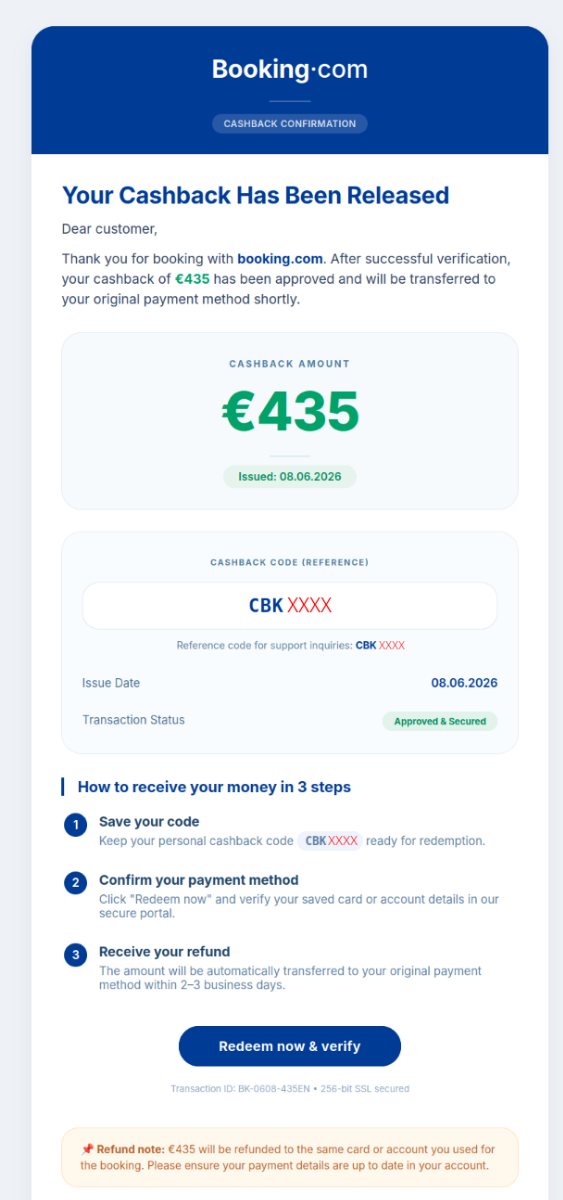
A Booking-branded email says you have cashback waiting and includes a personal redemption code. The offer sounds more credible when the next page actually recognizes that code.
Then the reward becomes a request for your card details. Before trying to collect it, check where the credit should appear and who is asking you to verify it.
Overview
This is a documented Booking impersonation campaign, not a problem with a genuine reservation. Its cashback code helps sell a card-collection page as a rewards process.
A working code is part of the bait
The email presents a code beginning with CBK. The campaign documented by Luxembourg’s government CERT rejects arbitrary codes, so the one supplied in the message appears to work.
That proves the email and the page share a code, not that Booking issued either. A sender can make a form recognize the value it already sent you.
Do not treat passing that check as a reason to provide financial information. The company that owes a reward should be able to confirm it independently.
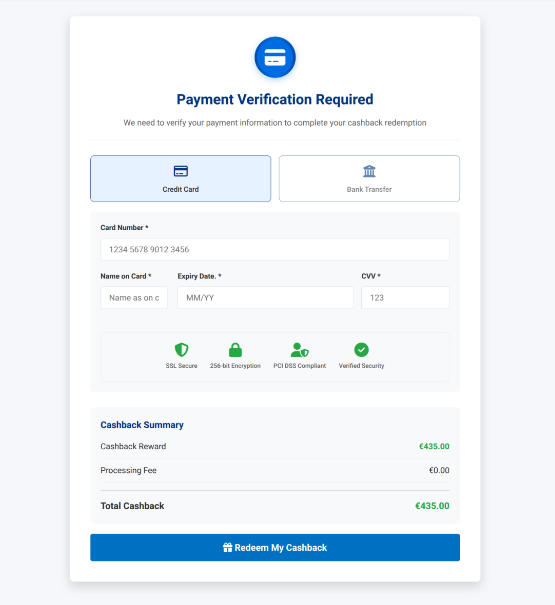
The reward page leads to a card request
GOVCERT.LU documented the campaign on June 9, 2026. After email and code verification, the recipient encounters a page requesting card information.
A bank-transfer option appears, but the documented flow sends the visitor back to the card section. A later loading screen ends in an error rather than a payout.
These observations come from preserved incident evidence, not a test using a reader’s account. The published report does not establish whether that destination remains active today.
Verify a reward without the email’s button
Open Booking’s app or your account through an address you already trust. Look for the offer, reward balance and applicable terms before supplying anything elsewhere.
- A matching redemption code cannot authenticate the website that checks it.
- A familiar logo does not make a card form part of your Booking account.
- An error screen does not mean information you submitted was discarded.
- If card details were exposed, contact the card issuer rather than retrying the supposed payout.
How the Booking Cashback Code Scam Works
Step 1: The email makes a reward feel personal
A general promotion can be easy to ignore. A code that looks reserved for you suggests someone already checked eligibility and left only a small final task.
That is the decision the message wants you to make before you reach the payment page. You begin thinking about collecting an earned reward rather than evaluating an offer.
The cashback claim is not proof of a recent booking, account access or a refund approved by a hotel. Keep those possibilities separate from the text of the email.
If you really are waiting for a travel refund, check its existing case or reservation first. A new message with a different explanation should not replace that record.
Step 2: Redirects and a code check create confidence
GOVCERT observed multiple redirects before the landing page. Some journeys could also show a CAPTCHA before the actual cashback form, making the path resemble an ordinary protected service.
A CAPTCHA can be a real anti-bot check without authenticating the business behind the next page. Completing one is not an endorsement of everything that follows.
The specific code check adds another layer of apparent validation. If a random entry fails but the email’s code succeeds, the recipient may mistake consistency for legitimacy.
Consider what the form actually verified: whether the supplied value matched its own list. It did not verify that you booked travel or that the operator holds a reward.
Step 3: Collecting the reward becomes card verification
After the code stage, the documented campaign asks for card credentials. The site named in the report was bondcharters.vps-isos[.]com, not an address a traveler should trust for Booking payments.
That address is included here only to identify the documented example. Do not visit it to reproduce the process, and do not rely on a single domain blacklist.
The safer rule survives a change of domain: confirm the reward through your independently opened account before giving a newly introduced page any payment information.
Having booked with a card previously does not make an unrelated request to reenter it legitimate. The genuine service can explain the specific credit and its redemption method.
Step 4: The error leaves the recipient unsure what happened
The recorded flow ends with a purported connection to Booking followed by an error. Do not read that screen as confirmation that no data was sent.
A form may transmit information before displaying its next screen. Your bank needs to know what you submitted, even if no completed payment or reward appeared.
Retrying with a different card would expose another account without settling the first one. Save what you can from the existing session, close it and call your issuer.
How to Check Whether Cashback Is Actually Due
Find the reward in the account, not in the message
Open the app from your device or use a saved bookmark. Do not let the email choose the address from which you begin your account check.
Check any Wallet or reward area available to your account and the original offer terms. Availability and redemption rules can differ, so compare the specific promotion.
If you cannot find the offer, ask Booking through its independently reached support channel. Give the message subject and claimed promotion, not a password or card security code.
Booking’s own traveler safety guidance provides a separate reporting route. Use it rather than a support link supplied by the suspected impersonator.
Do not create a new account just to test the link. If the email reached an address you have never used for travel, report the message without completing its form.
Keep cashback, refunds and credits separate
Cashback can be tied to a promotion with its own eligibility conditions. A cancellation refund concerns money already paid for a particular reservation.
A credit usable toward travel may also differ from cash that can be withdrawn. Check what the actual offer promises before expecting a transfer to your bank.
If someone claims your reservation has been verified, compare that statement with the booking’s real status. An unrelated cashback page cannot confirm that a cancellation or payment dispute was resolved.
Use the support conversation attached to the real booking when possible. It keeps the question anchored to a service you purchased, rather than a reward introduced by an unknown sender.
Ask a question that can be answered without more card data
Ask which booking or promotion generated the reward, where its conditions are published and where the entitlement appears. Each question can be checked without payment.
A reply directing you back to the same page does not answer them. Stop if instructed to provide a security code or approve an unfamiliar transaction.
A screenshot of a reward balance can be fabricated or belong to somebody else. Your own account record and verified support conversation are more useful than a forwarded image.
What to Do if You Clicked or Entered Details
- If you only received the email, avoid its links and check the claimed reward through Booking independently.
- If you opened the page but supplied nothing, close it and note whether you downloaded a file or accepted an unexpected permission.
- If you submitted card information, contact the card issuer promptly, even if the website displayed an error.
- If you entered a password, change it through the genuine service and secure any other account using the same password.
- Preserve the original email, relevant times and any transaction reference. Report the impersonation without exposing your own card or reservation information publicly.
Give the card issuer a precise account
Explain whether you typed the card number, expiry date and security code, or also approved a bank notification. Tell the issuer whether any charge appeared.
Ask what controls are appropriate for that exposure, including whether the card should be replaced. A bank can distinguish a compromised card from a transaction you merely viewed.
Keep the case reference and follow any dispute deadlines the issuer gives you. Contacting the travel company alone does not alert the bank that a card may be exposed.
If a transaction appears under an unfamiliar merchant name, save the exact name and amount. Do not assume the name will say Booking or match the email.
Do not approve a second transaction to cancel the first
Read the bank prompt itself rather than a caller’s explanation. A request to authorize money leaving the account does not become a refund because someone calls it verification.
If an unsolicited caller knows that you visited the page, end the conversation and call the bank yourself. That knowledge may come from the same incident.
Do not install a remote-support app to collect or reverse cashback. If you already granted remote access, tell the bank and obtain appropriate device help separately.
If an email address was the only information supplied
An email address alone is not the same as a password or bank approval. Note what you provided and watch for follow-up messages that reuse the reward story.
You may receive messages that refer to the code or claim an incomplete payout needs attention. Familiar details do not make those follow-ups independent confirmations.
Do not pay someone who offers to recover a reward you never received. There is no missing cashback to trace simply because an unverified page displayed a balance.
Preserve the evidence without spreading the link
Save the original message if your email service allows it. Its headers can be more useful to an investigator than a forwarded paragraph or a cropped sender name.
Record what the page displayed after you submitted information, including the error text if you already have a screenshot. Do not revisit the site to obtain one.
Redact personal booking information before warning a group chat. Friends need to understand the pattern, not receive a working phishing link and your travel dates.
Check a Bank Prompt Before Touching Its Confirmation Button
If the process reaches your banking app, stop following the website’s instructions long enough to read the bank’s own description of the action.
Look for the merchant, amount, currency, and whether the prompt concerns a purchase, account access, or another permission. Those details matter more than the reward page’s explanation.
A page saying verification does not change the meaning of an outgoing payment authorization. Decline an unfamiliar request and contact the issuer through your usual banking route.
If you already approved something, record exactly what appeared rather than guessing what the button did. Your bank can assess the specific authorization against its records.
Keep the cashback email separate from any genuine reservation receipts. That prevents the promise of a reward from obscuring which transaction or account needs protection.
Our Disney Plus impersonation investigation covers a different bait leading to account and card requests. Shared techniques do not establish shared operators.
Frequently Asked Questions
Does a working CBK cashback code prove Booking sent the email?
A code can work because the sender and page share a list. That does not connect either one to Booking or to a genuine entitlement.
Check the reward through an independently opened account. If you cannot find it, ask official support before submitting financial information anywhere else.
Why does the page reject a random code?
Selective acceptance can make the reward appear personalized. It shows the page has a validation rule, not that the rule checks a legitimate travel purchase.
Do not keep testing variations to investigate it. You can reject the offer without discovering how the sender generated the original value.
Can real cashback offers ask for payment details?
Redemption conditions vary, which is why the specific offer must be verified through the genuine service. A separate form reached from an unsolicited email is not that verification.
Ask where the reward is recorded and what the published redemption process requires. Never approve an unfamiliar outgoing transaction to receive an alleged credit.
Does the final error mean my card details were not saved?
A failure screen does not tell you what the preceding form transmitted. Treat submitted payment details as exposed and explain the situation to your issuer.
Do not retry using another card or wait for a promised support call. The issuer can advise on the card you already entered.
Is this the same as a hotel asking me to confirm a reservation?
This documented example advertises cashback and uses a reward code before asking for card information. A separate message about a reservation needs its own verification.
For a real booking question, contact the property or Booking through details you obtained independently. Do not assume a matching reservation number authenticates a new payment route.
Should I cancel my genuine Booking reservation?
Receiving this email is not evidence that your genuine booking was cancelled or compromised. Check the reservation through the actual service before making changes.
If you shared account credentials, secure that access and ask support to review unexpected changes. Protect the account without unnecessarily cancelling travel you still want.
The Bottom Line
Do not collect Booking cashback through this email’s form. A working code and a familiar logo cannot turn an unrelated card page into a genuine reward.
Check the reward through your real account first. If you submitted payment details, contact your issuer now rather than waiting for the error page to resolve itself.

Join the discussion
0 commentsShare your experience or ask a question about this article.
Community experiences
Did this happen to you?
Your experience could help someone recognize the same scam. Submit a private report for our team to review.
I experienced this tooReports are reviewed before publication. Sharing publicly is always your choice.
Discussion
Start the conversation
Have a question or something useful to share? Add the first comment.