


The app shows a rising chart and a balance that looks better every time you check. It’s easy to start thinking of those gains as money you already own.
The number that matters may be somewhere else entirely. Before adding anything to a trading app, check what your own wallet says has actually moved.
Overview
What Happened to the Queensland Investor
A 29-year-old Queensland man responded to an ad for a crypto trading app.
Australian Federal Police reported that he downloaded an app, installed a browser extension, and linked his crypto wallet.
The service showed apparent gains after he put crypto into the wallet. Within days, transfers he hadn’t authorized began appearing. Police put his loss at more than A$166,000.
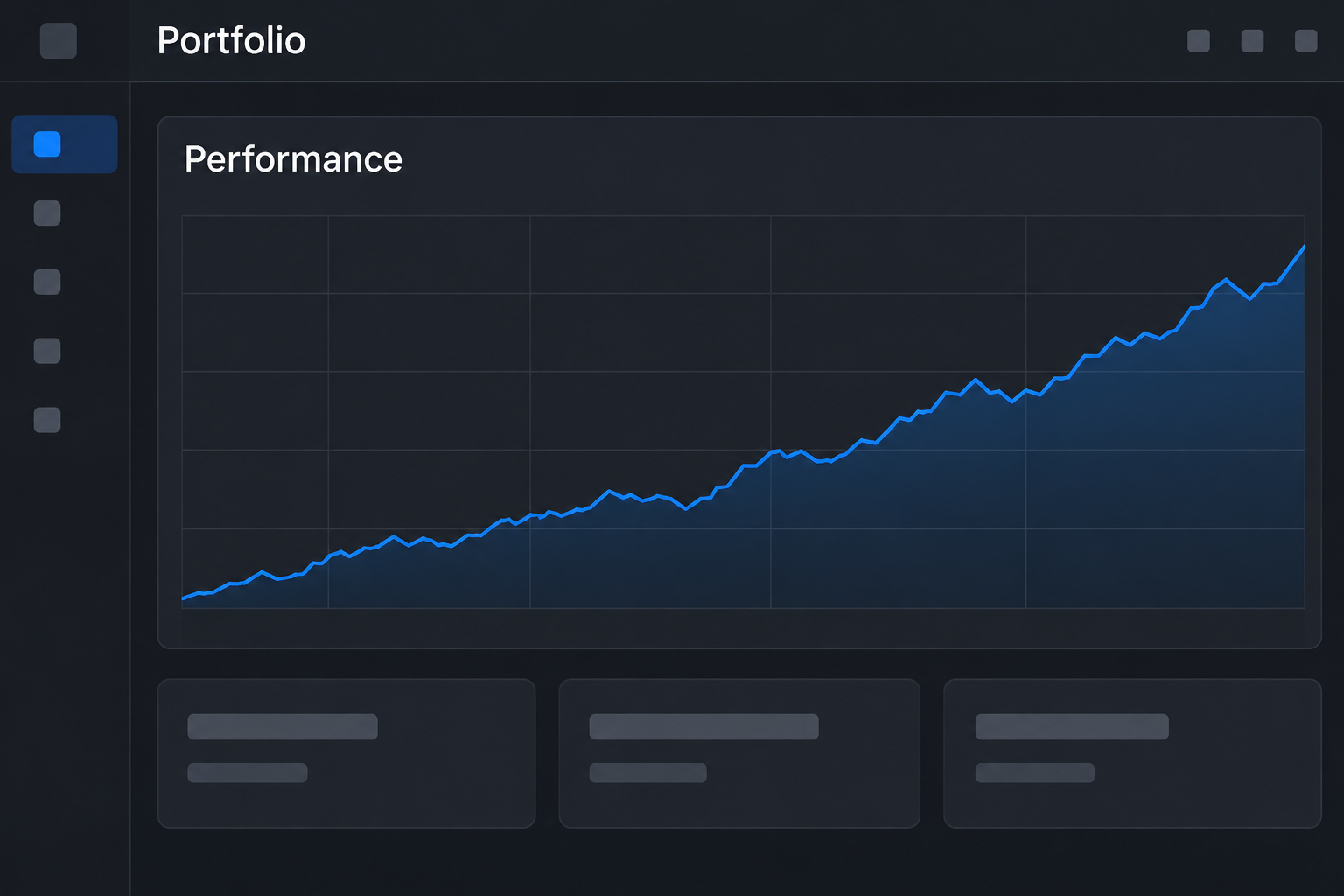
The Guardian covered the case, including the gap between the returns he saw and the transfers he couldn’t stop. The image illustrates the dashboard, not his account.
Why the Trading Screen and the Crypto Wallet Tell Different Stories
The platform controlled what its dashboard displayed. The number on that dashboard wasn’t independent evidence that a trade had settled or that any profit could be withdrawn.
A wallet can show which addresses sent or received assets and may let you see the transactions or permissions that affect those assets.
Police didn’t identify the extension or say exactly how the transfers were initiated. The public account doesn’t establish whether a wallet secret or permission was abused.
Where to Look First if the App Is Still Open
- Stop putting money into the platform and decline further wallet prompts.
- Use a different, trusted device for accounts connected to the incident.
- Check genuine account activity and record unauthorized transfers instead of relying on the app’s chart.
- Contact the exchange or payment provider you actually used and describe what happened.
- Identify which app or extension you installed so you can remove that specific software later.
If you’re seeing transfers you did not authorize, account protection comes before arguing with the trading service’s support chat. It can’t verify itself for you.
How the Fake Crypto Trading App Scam Works
Step 1: The Ad Leads to a Platform You Don’t Know
The case began with an online ad for something the man believed was a real trading app. He didn’t start by looking for an unfamiliar wallet extension.
That is a useful point to catch when evaluating an offer. If you were looking for an investment, why does the advertiser also need you to change your browser?
Get the business name before following installation instructions. Use the regulator’s records or the company’s independently verified website to check the operator and product.
Treat a download page as a separate decision. A good-looking advertisement does not tell you who wrote the software or what the software can access.
Step 2: You Are Asked to Install Software and Link an Existing Wallet
The extension and mobile app were part of the setup described by police. The report doesn’t give a verified product name readers can search for.
Connecting a wallet can let a site request additional actions. Those requests may include signatures or permissions, which are different from simply showing a wallet address on screen.
If your wallet opens a prompt, read it in the wallet itself. An ad or chat window is not a trustworthy explanation of what your approval does.
Leave if you don’t recognize the site or can’t explain the permission. You should never provide a wallet’s recovery phrase just to start using an investment platform.
Step 3: Apparent Returns Make Putting In More Seem Reasonable
The apparent profits made the investment look successful. That part of the story matters because the dashboard appeared reassuring while the wallet was exposed.
You can verify whether a transfer happened without accepting what the dashboard says. Start with the actual wallet or exchange history from a device you trust.
Look for the asset, network, date, and transaction identifier. Don’t use a link sent by the platform’s support team to decide which records are real.
If the dashboard says you made money, ask whether it can point to independently verifiable activity. Better still, don’t make a test deposit to find out.
Step 4: Unauthorized Transfers Appear and Support Cannot Account for Them
The Queensland man discovered transfers he hadn’t made. When he went looking for help on the trading platform, he was directed to a chatbot.
An automated reply is not inherently fraudulent. What mattered here was that it did not explain who controlled the operation or what was happening to his wallet.
Don’t wait for the suspected operator to confirm the losses. Copy the transaction references from a trustworthy source and contact the exchange or payment service you actually used.
If a new contact offers to reverse the transactions for a fee, decline. Nothing about knowing your transaction amount proves the contact can help.
Checks That Don’t Require Paying or Connecting a Wallet
Verify the Business Behind the App
Look up the legal name and any claimed license from outside the app. If it claims to operate in Australia, check the named entity and its relevant permissions.
Use ASIC’s investor alert list as a separate warning check. Compare the exact website and contacts as well as the company name.
An app may name an existing business or show a registration number that belongs to somebody else. A genuine entry does not authenticate the screen that sent you there.
Check What the App Wants Your Wallet to Approve
Look for the application name and network displayed in the wallet prompt. If they don’t match the action you expected, back out and close the original page.
Check whether you are being asked to connect an address, send assets, or authorize later spending. Those actions can have different consequences even if the app calls each one verification.
You can reject a request without losing access to assets you already control. Don’t approve anything just to find out whether a balance or promised withdrawal is genuine.
What to Do if You Have Fallen Victim to This Scam
Stop interacting with the platform and move your response to a trusted device.
Close the site and decline any pending requests. Use a separate device to contact your bank, exchange, or wallet provider through a known app or website.
If another person is guiding you through the response, make sure they aren’t the person who got you into the investment. Don’t share your screen or a recovery phrase.
Work out whether you used an exchange account or a self-custody wallet.
For an exchange account, contact its fraud or security team immediately. Report unfamiliar withdrawals, ask whether it can restrict account activity, and follow its process for passwords and sign-in access.
For self-custody, review the wallet provider’s official compromise guidance. An ordinary account password change cannot make an exposed recovery phrase safe.
Respond to a suspicious permission differently from a disclosed wallet secret.
In a wallet you still control, open the official wallet application or trusted provider guidance. Review connected sites and any asset permissions you actually granted.
Disconnecting a site and revoking an on-chain approval are separate actions. Use the wallet’s documented approval review on the correct network, not a revoke link sent by a stranger.
If your recovery phrase or private key was exposed, stop using that wallet for new deposits. Follow the provider’s documented steps for a new wallet with a separately generated phrase.
Record transactions and contact the relevant payment providers.
Save the wallet address, chain, transaction ID, sending service, and date for each transfer. Record bank transfers or card charges separately from on-chain activity.
Where available, ask your payment provider if it can attempt a recall or dispute. Do not assume that a confirmed on-chain transfer can be reversed.
Report the incident and keep your references.
In Australia, report the scam to Scamwatch. For online theft, go to ReportCyber, choose the individual reporting route, and keep your case number.
Include what you installed and when, what you actually paid, and which transfers you didn’t authorize. Keep recovery phrases and private keys out of every report.
Remove the Unverified Trading App and Chrome Extension
Step 1: Identify What You Installed Before Removing It
Stop using the affected browser for banking or crypto transactions. If this is a work or school device, contact its administrator before changing software or settings.
Write down the app and extension names if you can see them without opening the trading site again. Save installation receipts or the original download message separately.
Don’t remove an unrelated wallet just because its icon looks similar. If the suspect item isn’t clear, get help identifying it before deleting anything.
Step 2: Remove the Confirmed Unwanted Extension From Chrome
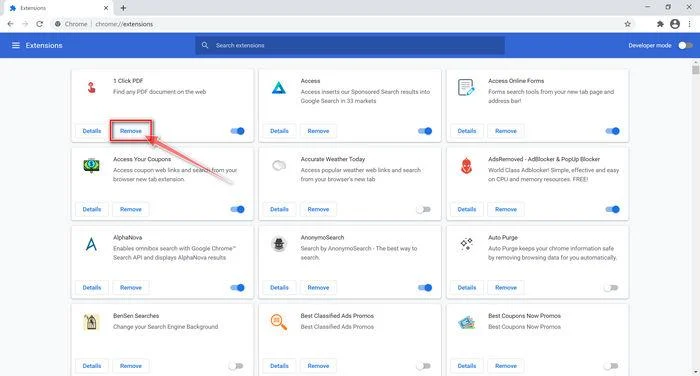
In Chrome, open the three-dot menu and select Extensions, then Manage extensions. You can also type chrome://extensions in the address bar without visiting any website.
Find the extension you identified and choose Remove, then confirm the removal. Google documents the current menu if you need to check the label.
The screenshot shows the Extensions screen and the Remove control. The extensions shown are examples from the tutorial, not names tied to the Queensland case.
Open the Extensions screen again and check that the item is gone. Repeat that check in each Chrome profile or device where it was installed.
If Remove is missing or the extension returns, stop using that profile for sensitive activity. Ask your administrator or a trusted technician to identify what is reinstalling it.
Step 3: Uninstall the App You Identified and Check the Result
On Android, open Settings, then Apps. Select the identified trading app, choose Uninstall, and confirm. Check its details first if the name is ambiguous.
On iPhone, find the identified app in the App Library. Touch and hold it, select Delete App, and confirm instead of only moving it off the Home Screen.
Search your installed apps to confirm it’s gone. If you can’t remove it, don’t disable work management settings or delete a wallet backup to force a result.
Use the MalwareTips removal help forum for unresolved Windows symptoms or get help from the affected device’s support provider. Don’t attach wallet data or personal documents.
Step 4: Recheck the Device and Keep Wallet Recovery Separate
If you also ran an installer or see unexplained changes, have a trusted technician check the affected device before signing back into sensitive services.
Confirm there are no renewed requests from the app and that the extension has not returned. Check wallet activity again from the clean device while the incident is being reviewed.
Removing software doesn’t cancel authorizations already recorded on a blockchain or return stolen funds. Finish the wallet and payment follow-up even if the app itself is gone.
Frequently Asked Questions
Was Every Gain Shown in the App Real?
The police report described apparent profits, not verified gains. A number that rises on a screen doesn’t mean assets were bought, sold, or made available to you.
Use an independently opened wallet or exchange to check transactions. If you see only a claim in the suspect app, don’t treat it as a balance you control.
Did the Chrome Extension Definitely Steal the Money?
Police described the app, extension, and wallet connection before the unauthorized transfers. They didn’t publish the extension’s technical behavior or identify what enabled each transfer.
If you installed suspect software, remove the unwanted items and check account exposure. You do not need a technical attribution to stop using the platform.
Does Disconnecting a Site Cancel Its Wallet Permissions?
Not necessarily, because a site connection and an on-chain approval can be separate. MetaMask explains this difference for its wallet.
Use official instructions for your own wallet and network to check active permissions. Don’t accept a new signing request from the suspicious platform.
What If I Entered My Recovery Phrase?
Treat the old wallet as exposed and stop sending funds to it. An app reinstall or browser reset does not make that recovery phrase private again.
MetaMask’s scam response guidance describes moving remaining assets to a separate wallet you control. Use trusted support if you’re unsure how to do it safely.
Is Sending to a New Wallet the Same as Revoking an Approval?
No, revoking an approval can remove a specific permission. A new wallet with a newly generated recovery phrase addresses a different concern about who can sign.
If the old wallet is already sending out funds automatically, contact your provider through its official channel before sending additional assets into it. Never pay a stranger to rescue it.
Should I Pay for Help to Release a Frozen Balance?
Do not send a release fee requested by the suspected platform. An account screen does not establish that anyone is actually holding an amount for you.
If you lost money, contact the provider that handled your payment and preserve the record. Ignore unsolicited recovery offers even if they can quote details of your loss.
The Bottom Line
Don’t connect a wallet or add funds because a trading app shows a rising balance. Verify who operates it and check the activity in a wallet or account you control.
If you already installed it or see unauthorized transfers, stop using the app and act from a trusted device. Handle wallet exposure and software removal as separate jobs.

Join the discussion
0 commentsShare your experience or ask a question about this article.
Community experiences
Did this happen to you?
Your experience could help someone recognize the same scam. Submit a private report for our team to review.
I experienced this tooReports are reviewed before publication. Sharing publicly is always your choice.
Discussion
Start the conversation
Have a question or something useful to share? Add the first comment.