


A scheduled tax payment is the kind of message you want to check before tomorrow. It can be hard to remember what you set up months ago.
This email offers a confirmation number and a way to see the details. First, consider where a real Direct Pay record would be kept.
Overview
A scheduled withdrawal is a believable claim
The email calls itself an IRS Direct Pay confirmation. It says a withdrawal has been scheduled, supplies a reference number, and tells the reader to download the payment details.
Direct Pay is a real IRS service. Taxpayers can use it to schedule eligible bank payments and choose a confirmation by email.
That legitimate practice is why the message can sound credible. The question isn’t whether the IRS ever sends email; it is whether the transaction exists in your official records.
The landing page changes the government agency
The reported email claims to come from the IRS, but opens a page impersonating a separate agency, the Social Security Administration.
The page presents a simple math question before offering what it calls a payment statement. Solving that question doesn’t verify your identity or link the page to your tax account.
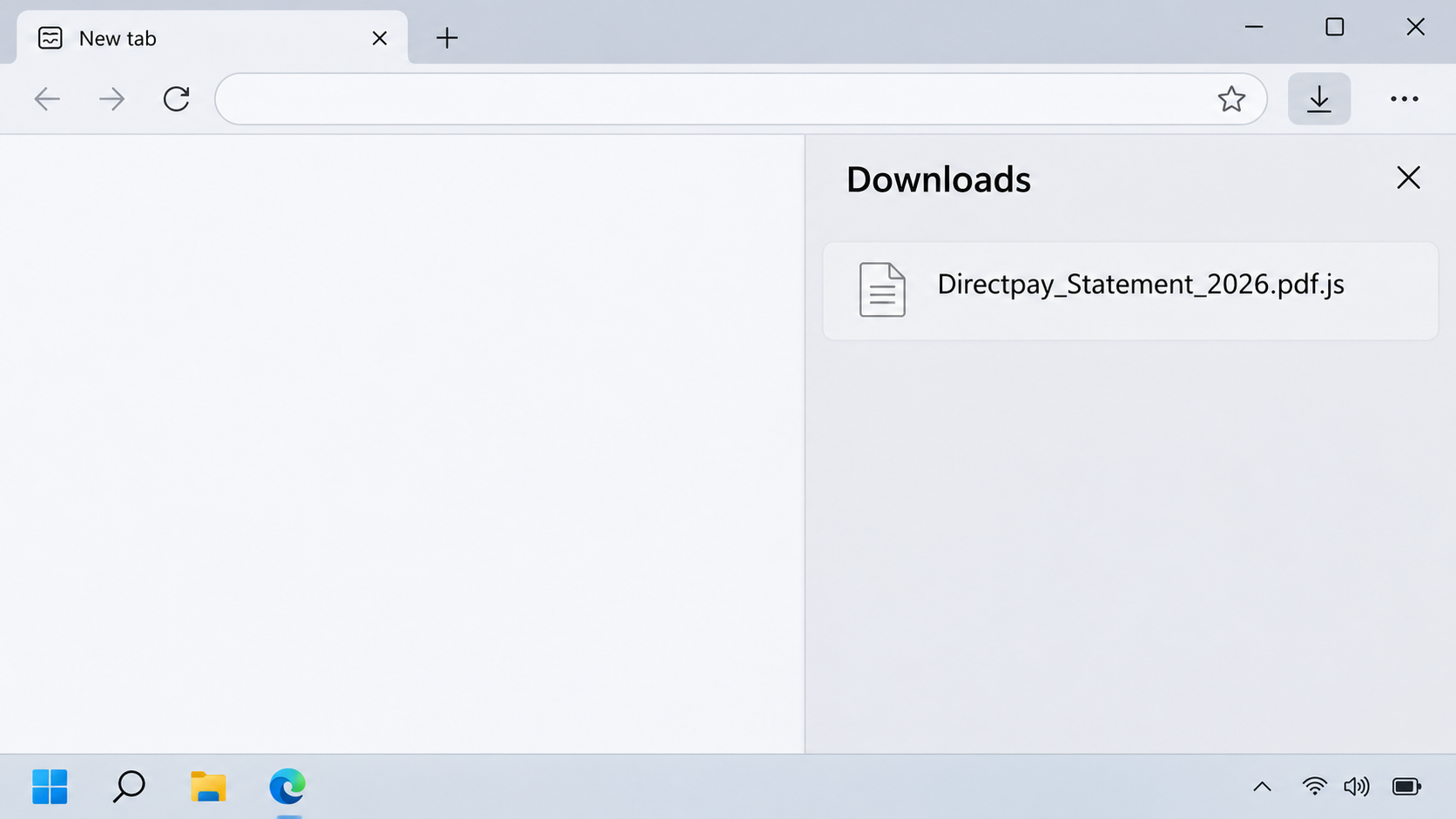
The image above reconstructs the reported filename in a downloads list. It doesn’t show a real IRS record, a visit to the malicious page, or a confirmed infection.
The last part of the filename matters
The reported download is named Directpay_Statement_2026.pdf.js. Its last extension is .js, which identifies a script, not a PDF.
You can make sense of the alert by checking three things independently:
- Compare the supposed payment with your tax account or original Direct Pay records.
- Check your bank’s own records for an actual withdrawal, rather than taking the email’s claim as evidence.
- Look at the full name of anything the browser saved, without selecting it to open.
The final malware family wasn’t established. Treat a script that ran as a Windows exposure, but don’t presume that tax records or funds were stolen.
How the Fake IRS Direct Pay Confirmation Scam Works
Step 1: A number makes the email feel like a receipt
The message presents its reference as confirmation that a payment was scheduled. Readers familiar with Direct Pay know that a genuine transaction also produces a confirmation number.
That similarity is useful to the sender, but it isn’t independent verification. A number you never saw before doesn’t establish that a withdrawal belongs to you.
If you made a real payment, use the reference you saved when making it. A surprise email shouldn’t decide which tax record you look up.
Step 2: The request moves from account history to a download
The button offers what appear to be ordinary payment details. It lets the email avoid answering basic questions while nudging the reader to another site.
There is no need to obtain a special statement to check a recent payment. A self-service lookup exists on the IRS’s own site, independently of the message.
If the page identifies itself as the Social Security Administration, don’t let a second official-sounding name fill the gap. Leave it and return to the actual tax account.
Step 3: The math question looks like a security check
The simple question makes the page feel as though it is guarding a private statement. You aren’t verifying anything about yourself by answering arithmetic.
If you stopped at that point, record it accurately. Solving a question isn’t the same as submitting a Social Security number, exposing a bank login, or running a downloaded file.
The page did use the question before serving a file. Check download history if you saw a save notification, but leave the entry unopened.
Step 4: A script is mistaken for a statement
The word PDF appears in the name before the final script extension. A narrow column can make that final portion harder to notice.
The file doesn’t turn into a document because it includes that word. On Windows, an untrusted script can execute code when opened by an associated scripting engine.
If the file already ran, treat the event as more than a fake tax notice. Check Windows from the point of exposure and check tax and bank accounts from elsewhere.
How to Check a Real IRS Direct Pay Transaction
Look up the payment through Direct Pay
Open IRS Direct Pay for personal taxes yourself. Under Look up a payment, select Look up a personal tax payment.
Use the confirmation number you saved when you made the payment. Enter your tax identifier only after verifying that you are on the official IRS service.
The lookup handles one Direct Pay payment at a time. It can’t authenticate a payment that was made with a different payment service simply because both show a reference number.
Use the online account if the number is missing
From the IRS website open your Individual Online Account. Go to the payments area and review Payment activity for scheduled, processed, and returned payments.
Match the date, amount, and status to your own records. If an accountant or spouse schedules payments for you, check with them through a contact you already have.
Don’t pay again because a message tells you a confirmation is incomplete. Resolve the status with the actual record or an official IRS help channel first.
Read the tax status and the bank debit separately
A confirmation number acknowledges the payment request. It doesn’t prove that funds have settled, which is why your bank and your tax account can show different stages.
The IRS Direct Pay help explains when a scheduled payment can be changed or canceled. Use the official deadline for a payment you actually recognize.
If you see an unexplained withdrawal, record the amount and the bank’s description. Call the bank through a known number and say that you did not authorize it.
What to Do After a Suspicious IRS Payment Confirmation
-
If you only received it, leave the link alone. Save or report the message before deleting it. Don’t open the supposed statement as part of the report.
Use the IRS’s reporting instructions for fake tax messages. Share the original as directed without adding tax returns or bank statements.
-
If you saw the fake statement page, close it. Check whether a file was saved by viewing the browser’s download list without launching any item.
If you only answered the math question, don’t report that you provided an SSN. If you entered other information, record exactly what it was.
-
If you executed the file, stop using that Windows PC. Isolate it from Wi-Fi and Ethernet if safe. Contact workplace IT before restarting or deleting evidence.
Tell a responder that the file ended in .js even though it was presented as a PDF. Specify the time and whether any warning appeared.
-
If you disclosed tax or bank information, get account-specific help. Use a separate device to contact the IRS through its official channels and your bank when banking data was involved.
If you notice a tax return or change you didn’t make, tell the IRS that fact. Don’t send another copy of your tax paperwork to the email sender.
-
If a real withdrawal appears, take it up with the bank and the IRS. Keep their reference numbers together so you can track which side confirmed what.
A fake notice doesn’t automatically make a same-day tax debit fraudulent. Compare the date, amount, and source with prior payments before deciding whether they’re connected.
How to Check Windows After Running the Fake Direct Pay Statement
Step 1: Verify what Windows recorded
On a managed computer, contact your organization’s security team first. On a personal PC, open Windows Security > Virus & threat protection > Protection history.
Look for an event near the download time and record its status. Don’t use the history to allow or restore a blocked script.
Save the alert details, not private tax information. A screenshot of the detection can help a technician without showing any tax identifier.
Step 2: Prepare the legitimate scanner
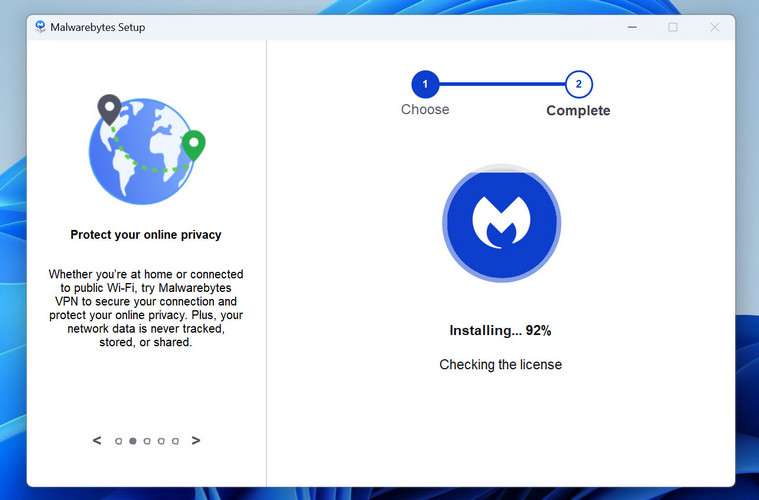
For a personally managed Windows machine, use the Malwarebytes Windows installer. Don’t use a download offered by the tax page or its follow-up message.
If your response plan calls for keeping the PC offline, ask a technician to arrange approved installer and update access. Do not reconnect it merely to search for downloads.
Launch that verified installer and complete the setup prompts. Compare the stage shown below, not every color or label, if your version looks newer.
Step 3: Run a scan without using the PC for tax work
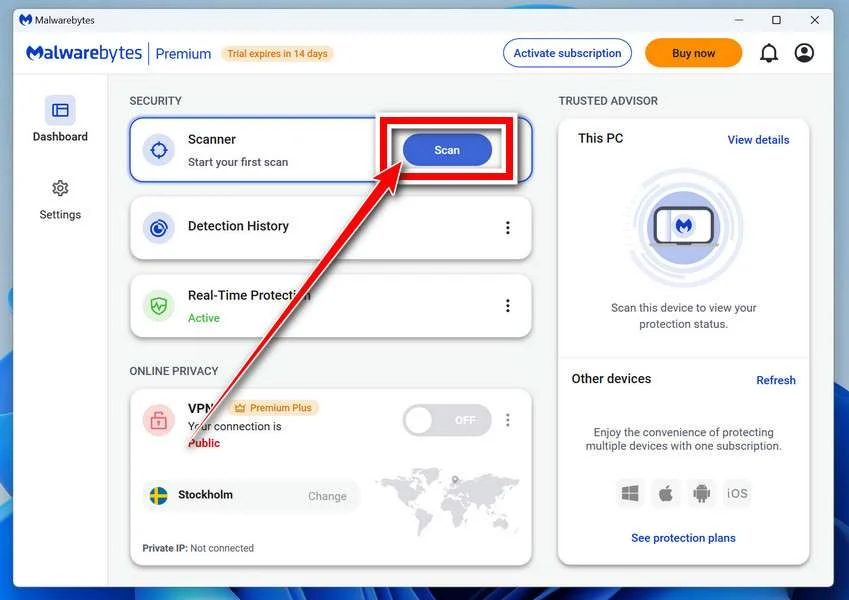
Start Malwarebytes and select Scan in Scanner. Review the detections after it finishes and quarantine threats you are authorized to handle.
Record the result and follow reboot instructions once there is no preservation issue. Scan again after the restart to check for anything that reappears.
Do not open your returns or sign in to tax services as a way to test the machine. Check those accounts independently from a device you trust.
Step 4: Get further help if findings return
A returning detection, new remote-access app, or disabled security setting calls for more than another click on Scan. Ask qualified support whether a clean rebuild is appropriate.
Home users can bring sanitized scan details to MalwareTips support. Keep names, bank references, and tax identifiers out of the posted evidence.
The optional Malwarebytes Premium offer is an affiliate link for ongoing Windows protection. It doesn’t authenticate a Direct Pay record or restore money.
What to Check Before Scheduling a Second Tax Payment
Compare the payment channel as well as the number
A payment you set up inside your IRS account can be real even if it doesn’t fit the story the email tells. Identify how you actually authorized it.
A card payment, a bank debit, and a payment submitted through a tax preparer can produce different records. The Direct Pay lookup serves its own payment channel.
Keep the number from the original submission with the date that you chose. Don’t replace it in your records with a reference from an unsolicited message.
If you can’t find the number, consult the online account or contact the preparer through known details. Ask them to verify the status rather than resubmitting the payment immediately.
Make sure you’re looking at the right person’s record
For a joint return, one spouse may have made a payment on behalf of the other. Check with that person before interpreting a missing item as evidence nothing was scheduled.
If the payment relates to a business, use the official business payment process and the people who normally control that account. Don’t enter company identifiers into a personal email link.
Compare the tax period as well as the amount. A payment for an earlier year won’t necessarily settle the balance for the current year.
Keep a clear timeline if the bank and tax account differ
Write down the date you intended the payment to happen, when the bank first displayed it, and what status the IRS account shows.
If the account shows a return or rejection, read the reason before making a fresh payment. The fake verification email doesn’t explain why a genuine payment changed status.
If the deadline is near and the records disagree, promptly ask the IRS through its official support channel. Don’t rely on the email sender to interpret your payment obligations.
Finding a genuine debit should not cause you to reopen the false statement. The bank and agency records remain the best sources for what was actually scheduled or processed.
Frequently Asked Questions
Can the IRS really email a Direct Pay confirmation?
Yes, if you choose the email option for a payment. Verify the specific transaction in the official lookup or account history rather than trusting the email design.
Does the SSA handle IRS Direct Pay statement downloads?
The switch to Social Security branding was part of this counterfeit page. Use the IRS payment service to verify a federal tax payment.
Is a file with PDF in its name always a PDF?
The last extension identifies a different file type. The reported item ends in .js and should stay unopened, even if its name includes PDF.
Is answering the math question the same as exposing my identity?
The question itself did not take a tax identifier in the reported flow. If you entered other data or ran a file afterward, respond to those actions separately.
What if I really have a payment scheduled for the same date?
Check it with the originally saved confirmation number or in your account. Two events can share a date without the suspicious message being genuine.
Can a Windows scan tell me whether the charge was real?
A device scan cannot verify a tax payment. Handle the device exposure and check the real payment record through the IRS and bank as separate tasks.
The Bottom Line
Don’t get a tax statement through this email. Verify a scheduled payment using the official Direct Pay lookup or your IRS account, and compare it with your bank’s records.
If you ran the file ending in .js, isolate the Windows computer and get it checked. A fabricated payment notice can still lead to a real device incident.

Join the discussion
0 commentsShare your experience or ask a question about this article.
Community experiences
Did this happen to you?
Your experience could help someone recognize the same scam. Submit a private report for our team to review.
I experienced this tooReports are reviewed before publication. Sharing publicly is always your choice.
Discussion
Start the conversation
Have a question or something useful to share? Add the first comment.