


Your hotel’s name appears in a WhatsApp message, followed by your arrival date and booking reference. The sender says there’s one more thing to confirm.
You already arranged the room, but the message suggests you could lose it. With a trip approaching, that’s an uncomfortable problem to leave unanswered.
Overview
The message knows enough to sound like your hotel
This hotel booking scam uses genuine reservation information to make an unexpected payment request feel familiar. The sender may know your name, stay dates and confirmation number.
The request usually concerns card confirmation or another payment. A cancellation warning gives you a reason to act before asking the hotel whether anything needs fixing.
RMS Cloud has confirmed phishing messages quoting booking details after unauthorized access to part of its environment. Its warning covers WhatsApp, email, text messages and reported automated calls.
The company identified guest and booking information among the affected data. It says credit card and payment details were outside that exposure. RMS security notice
A familiar reservation can lead to an unfamiliar payment
The reference number is the part that makes this different from a random travel promotion. It matches something you actually bought and planned around.
That detail gives the sender credibility before you examine the demand. You may spend your time checking the dates while overlooking who will receive the card information.
Look closely at what the message wants you to do next.
- It asks you to confirm card details through a newly supplied link.
- It threatens to cancel a reservation unless you respond quickly.
- It treats information you recognize as sufficient reason to trust the sender.
- It moves a payment discussion into an unexpected message or call.
The booking and the payment request need separate checks
A reservation can be valid while the message about it is fraudulent. Contact the property through the details on your original confirmation before responding to a new demand.
This campaign was flagged in an r/Scams warning directing travelers to reports of messages using real references and check-in dates.
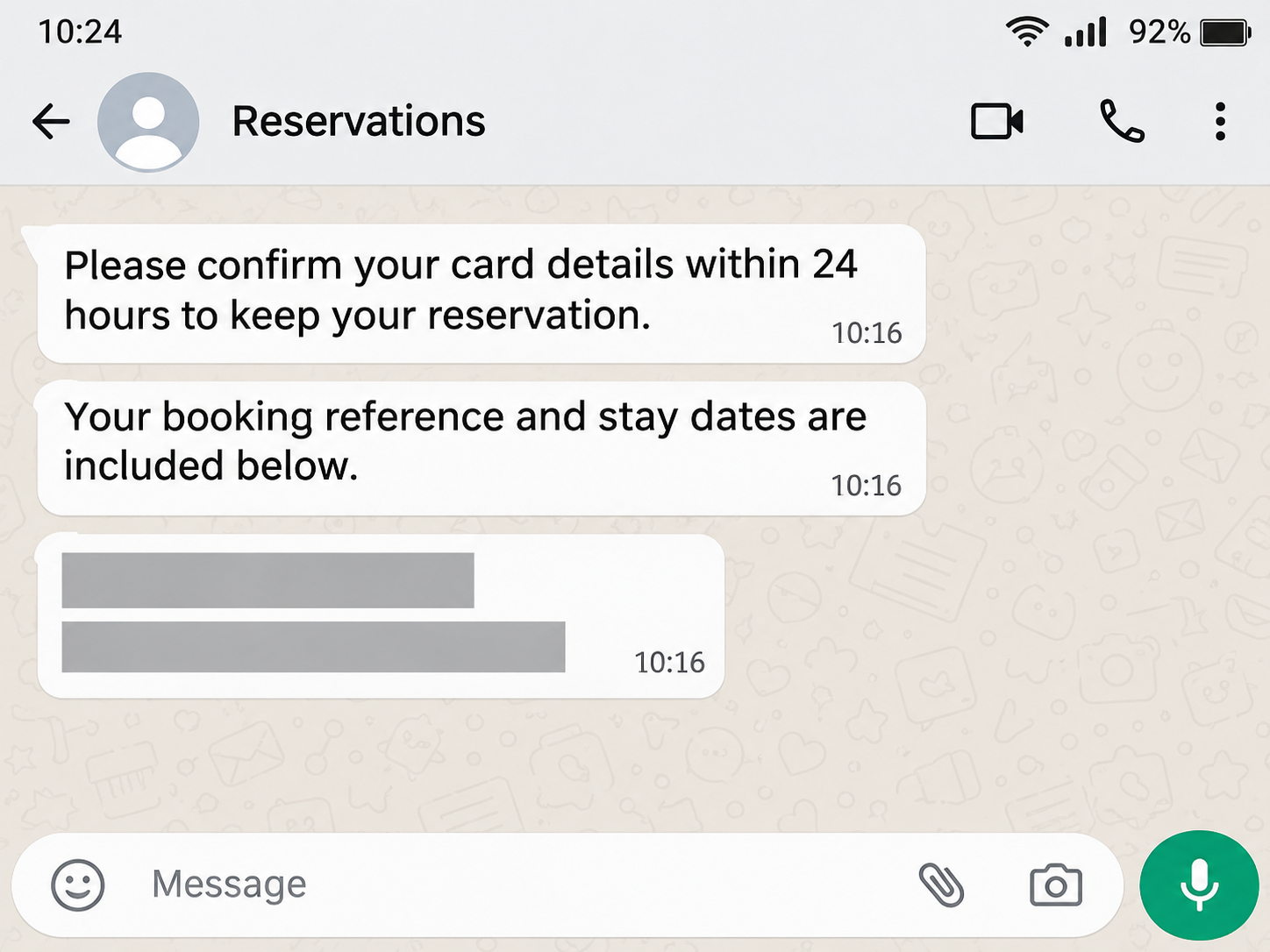
The screen illustration recreates the reported cancellation pressure. It contains no real traveler’s information or working payment link.
Why the Correct Room Details Can Lower Your Guard
Booking information feels private because you normally share it with a small number of people. Seeing it in a message can feel like confirmation of the sender’s role.
Several businesses may be involved in your booking. You might book through a platform, pay through a provider and stay at a property using separate reservation software.
A message carrying an unfamiliar business name therefore needs checking, even when it sounds plausible. Your original booking tells you which property and platform can answer questions.
The danger increases when the demand sounds like routine administration. Confirming a card seems easier than dealing with a canceled room after arriving somewhere unfamiliar.
You may also be checking your phone between flights, at work or while organizing other parts of the trip. A short deadline competes with everything else.
Give the property a chance to verify the problem before solving it for the sender. A genuine reservation issue can be discussed through a contact you independently choose.
If the message refers to a booking you share with someone else, compare it with their confirmation too. Another traveler may have received the same demand.
One person should contact the property and tell the rest of the group what it says. That prevents several people from independently submitting card details.
How the Hotel Booking Confirmation Scam Works
Step 1: Reservation information makes the first message personal
The sender introduces the hotel, a reference or your stay dates. Those details make the request seem connected to an existing transaction.
An attacker doesn’t need to persuade you to book anything. You already care about the room, which gives the message a practical reason to be read.
In this incident, RMS acknowledges unauthorized access involving a subset of guest booking information. That disclosure explains why affected travelers should scrutinize unexpected follow-up messages.
It doesn’t identify the origin of every hotel message circulating elsewhere. Keep your report tied to the property, reservation and message you actually received.
Step 2: A payment problem creates a short deadline
The message says you must confirm details or pay to keep the reservation. The threatened consequence is losing something you already arranged.
A deadline makes checking seem risky. You may worry that waiting for a hotel reply will leave you without accommodation when you need it.
The sender benefits if you treat that deadline as a hotel rule. Ask the property whether the deadline exists before entering anything on the linked page.
If you’re already traveling, save the message and call reception using your original confirmation. Explain that somebody is threatening cancellation and ask staff to check the reservation.
Step 3: The link changes where your information goes
The next page may repeat the property name or booking details. Consistency with the message can make the page seem like another part of the reservation process.
Look beyond those details to the action requested. Entering a card number on a page supplied by the sender creates a new exposure, even after an earlier legitimate payment.
An existing booking reference doesn’t tell you who operates that form. Open the booking platform yourself or speak with the property before supplying financial information.
Avoid experimenting with the form to see what happens. You can report the message without completing a card field, submitting a code or approving a transaction.
Step 4: A bank prompt may appear during the supposed confirmation
If you receive a card approval request, read the merchant and amount carefully. Tell your bank about any request that conflicts with what the hotel independently confirmed.
The sender might say that approving the transaction simply confirms your card. The bank’s own transaction information deserves attention before you accept that explanation.
If you reject an unexpected transaction, still tell the bank you entered card details. Rejecting one attempt doesn’t erase information already submitted on the page.
When reporting the incident, distinguish an attempted charge from a completed payment. Your bank can check what was authorized, declined, pending or posted.
What RMS Has Told Travelers and Properties
RMS identified the unauthorized activity on October 26, 2026. Its November 2 update says independent investigators confirmed containment while the wider investigation continued.
The notice also describes work with accommodation businesses and recommends contacting the property through independently confirmed details. The response concerns both the incident and the phishing that followed.
For guests, the useful action is to check directly with the property. A software provider’s update cannot tell you whether your specific room needs a payment.
Ask the property whether it sent the message, whether your reservation remains active and whether it has issued a warning to guests.
Staff may need the reference from your original confirmation. Share it through the hotel’s verified contact route, together with the message’s time and claimed sender.
If the property confirms the message is fraudulent, ask where to forward it. This helps staff recognize related reports without requiring you to visit the suspect destination.
Avoid posting your full reservation confirmation publicly when warning others. Dates, references and contact details can help someone make another message sound convincing.
Check the Payment Before You Change Your Travel Plans
A threat to cancel a room can push you into making a second booking. First ask the original property whether the reservation is actually affected.
Keep your original receipt and the booking terms together. They give you a record of what was paid and any balance still due at the property.
If a balance remains, ask when and how it should be paid. Have the property explain any change from the arrangement described in your confirmation.
Someone traveling with you may have used a different card for the booking. Check with them before concluding that an unfamiliar payment request belongs to your account.
When you reach the property, ask reception about any unresolved concern before presenting another card. Keep a written response if staff confirm that a payment demand was fraudulent.
If the property cannot locate the booking, contact the platform through its own app. Give it the original reference and explain the cancellation threat you received.
Save separate records for the room purchase and any later suspicious charge. They involve different events, even when the sender uses the same hotel name.
For a work trip, notify the travel organizer if you supplied a company card. They can coordinate with finance while you confirm the accommodation itself.
If the Message Arrives During Your Stay
Walk to reception if you are already at the property. Show staff the message on your phone and ask whether their reservations team sent it.
If you are away from the building, use the contact details you received at check-in. A new message should not become your only way to reach the hotel.
For an apartment or property without a staffed desk, open the original booking conversation yourself. Ask the host about the demand through that established channel.
Explain if the sender is also requesting a passport image or a photograph of your card. Staff need to know the specific action somebody is asking you to take.
If language makes the conversation difficult, ask the booking platform for help contacting the property. Keep the original message available so the demand can be translated accurately.
Write down the name of the person who checks the reservation and their answer. That helps the next shift understand the issue if another message arrives.
What to Do if You Have Fallen Victim to This Scam
-
Stop responding to the sender and save the conversation, including the claimed reservation, deadline and destination address. Avoid reopening the payment form while collecting those details.
-
Call the property through your original booking confirmation. Ask staff to verify your room and tell you whether they requested another payment.
-
If you entered card details, contact the card issuer immediately. Explain where you submitted them and mention any approvals, declined attempts or charges you saw.
-
Review your transactions with the issuer and follow its instructions for protecting the card. Ask how to report any later activity connected to the exposure.
-
If you entered a booking-account or email password, change it through the genuine service and review its security settings. Replace reused passwords on affected accounts too.
-
Send the hotel and booking platform the evidence through verified support routes. Australian travelers can also report the message through Scamwatch and seek identity support through IDCARE.
Report a fraudulent payment promptly, even if you’re still away from home. Use the issuer’s app or the number on your card to start that conversation.
Ask for a reference and write down the next step. If the bank needs a statement later, your saved timeline will help explain what you were told.
The Scamwatch reporting service accepts information about scam attempts. IDCARE provides support for people dealing with identity and cyber incidents.
If a passport scan or other identity document was requested, tell the support service which document you shared. Your response should match the information exposed.
Keep the room confirmation alongside the hotel’s response, and retain the bank’s case reference separately.
You may need to show that the accommodation was genuine while explaining how a later message diverted you.
If another person approved the payment on a shared card, involve them in the bank call. They can explain the approval screen they actually saw.
Be cautious about anyone contacting you afterward to fix the booking or retrieve your payment. Verify their role through the hotel or issuer before sharing another detail.
Frequently Asked Questions
How could the sender know my actual stay dates?
RMS has disclosed unauthorized access involving some guest booking information. Ask your property about its notice, because the origin of a particular message needs case-specific confirmation.
Does this mean my card number was exposed in the RMS incident?
RMS says card and payment details were outside the disclosed exposure. Entering them into a later phishing form creates a separate risk that your issuer should assess.
Should I cancel a reservation after receiving the message?
Contact the property first and verify the reservation. Making a travel change based only on the sender’s warning can create another expense while leaving the original problem unresolved.
What if the WhatsApp account looks like a business account?
A business display name still needs verification against the property’s established contacts. Read the payment request carefully and confirm it outside the conversation before acting.
Is rejecting the bank approval enough after entering my card?
Tell the issuer about the submitted details as well. It can review attempted transactions and decide what protection the card needs after that exposure.
What should I tell the other people on the booking?
Explain which message was fraudulent after checking with the property. Ask whether they received it or supplied information, and have each cardholder contact their own issuer if necessary.
The Bottom Line
Do not enter card details through an unexpected reservation-confirmation message. Verify the room and payment position directly with the property using your original confirmation.
If you already submitted financial information, contact your issuer now and save the message. Keep the booking itself under review with the hotel while the bank handles the payment exposure.

Join the discussion
0 commentsShare your experience or ask a question about this article.
Community experiences
Did this happen to you?
Your experience could help someone recognize the same scam. Submit a private report for our team to review.
I experienced this tooReports are reviewed before publication. Sharing publicly is always your choice.
Discussion
Start the conversation
Have a question or something useful to share? Add the first comment.