


You open your iPhone’s subscription list, expecting to stop a recurring charge. The app you recognize is nowhere in sight, although another payment has appeared.
Before searching through more settings, gather the records connected to that payment. A few overlooked details can turn an apparently missing subscription into something you can trace.
Overview
The subscription list is only one starting point
An iPhone subscription missing from Settings is a billing question, not automatically a broken-phone problem. Start by finding the purchase record behind the recurring payment.
Installing or using an app on your iPhone does not tell you which account purchased its plan. Your service login and payment records answer different questions.
A receipt can point to the right account
Apple’s cancellation guidance directs people with missing subscriptions to check their email receipts, including the Apple Account identified on the purchase.
The useful clues belong together, rather than scattered across an inbox, a statement, and an app screen.
- The receipt identifies the subscription and purchasing account.
- The statement provides the charged amount and billing description.
- The service’s account page may explain the plan’s billing arrangement.
- A previous cancellation record helps establish what you already requested.
The next action depends on who handles billing
A different Apple Account, a family member’s purchase, and a carrier-provided plan need different follow-up. Repeatedly opening the same subscription list cannot resolve those distinctions.
This guide uses Apple’s United States support pages. It explains how to identify the billing route, without promising identical cancellation terms in every country or region.
Follow the Purchase Record Toward the Billing Route
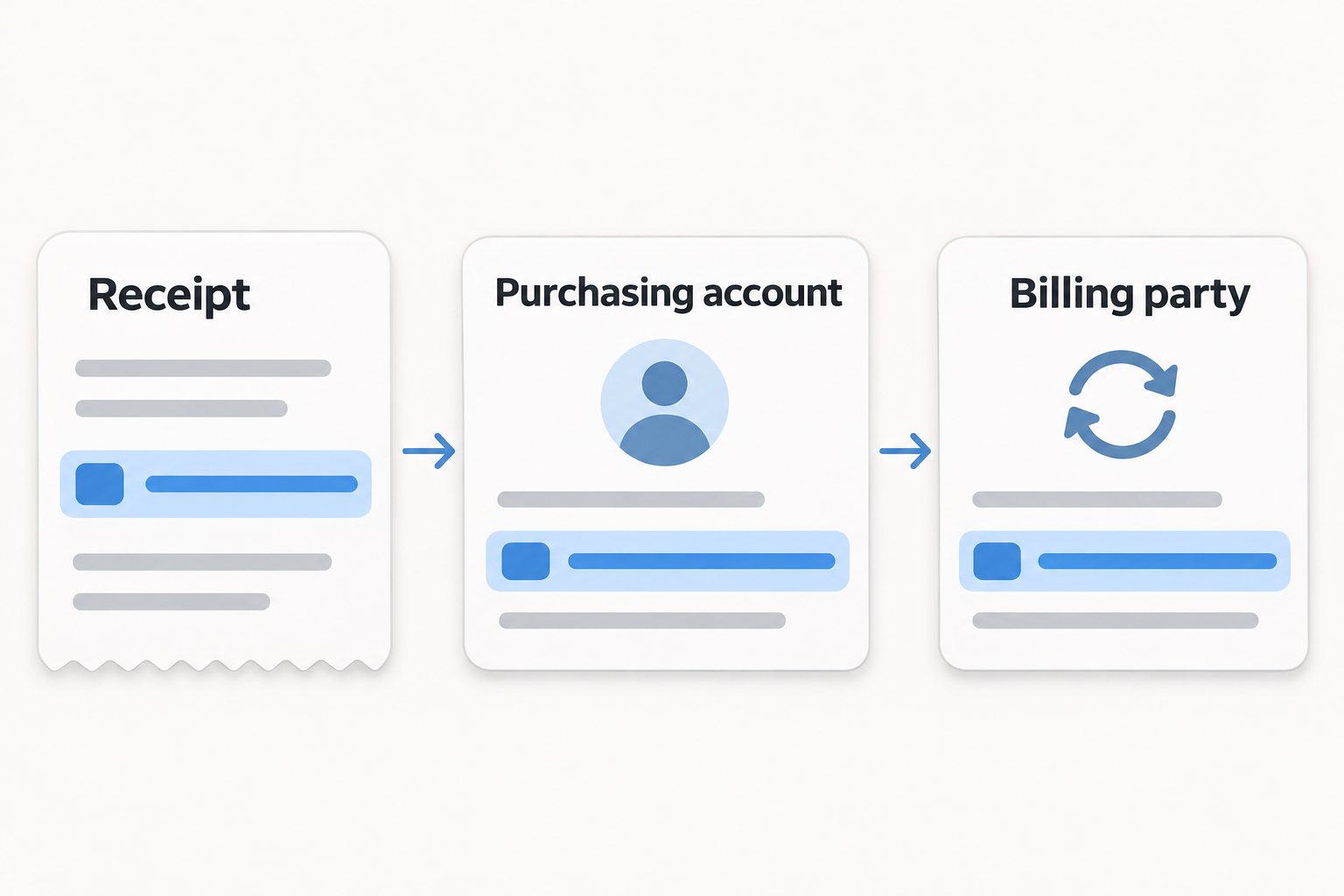
Follow the payment through three connected records. First identify the purchase, then establish account ownership, and finally reach the party managing that payment.
-
Receipt: Find a record that describes the subscription you are trying to manage, rather than another purchase from the same service.
-
Account: Check whether its purchasing account belongs to you, another account you use, or a family member.
-
Billing route: Use the confirmed account or provider’s official cancellation process, instead of assuming every iPhone app is managed in Settings.
These are related checks, but they are not interchangeable. Recognizing the app answers what you use; identifying the purchasing account answers where to investigate.
For example, a subscription’s marketing name may feel familiar while its statement description does not. Matching records is more useful than guessing from one recognizable word.
Keep your search focused on one recurring payment. If several subscriptions need attention, finish one record before combining their amounts, renewal dates, or cancellation results.
Read the Receipt Without Overlooking Its Most Useful Clue
Search your own inboxes for Apple’s suggested phrases, receipt from Apple
and invoice from Apple
. Look for the subscription itself, not simply an Apple logo.
Read the account information as carefully as the plan name. An old address you still control may explain why your usual account shows nothing relevant.
You do not need to publish that address to ask for help. Keep the original receipt privately, and describe the account mismatch without exposing personal information.
The following fictional note shows which details to compare. It is an editorial example, not a real receipt or a representation of Apple’s interface.
- Service and plan
-
The note identifies a monthly reading plan, rather than a separate one-time purchase from the same app.
- Purchasing account
-
The note says an older personal account made the purchase; it deliberately contains no email address.
- Charge details
-
The note records the amount and date for comparison with the relevant statement entry, without showing payment credentials.
- Next check
-
The account mismatch makes that older account the next place to investigate, rather than evidence that the payment is unauthorized.
A receipt can also be genuine but irrelevant to the payment you are investigating. Check the plan and billing period instead of stopping at the first match.
If your inbox has several renewals, work from the charge you want to understand. Distinguish a recent purchase record from an older cancellation confirmation.
When someone forwards a receipt, ask who owns the purchasing account. Receiving a copy does not make its subscription yours to manage.
If the only evidence is an unexpected email, verify whether there is an actual matching transaction. Avoid treating the message’s stated amount as an established charge.
Separate the Payment Description From the Subscription’s Name
A statement entry is a useful clue, but it may not read like the app’s name. Keep the exact description available while comparing purchase records.
Apple explains that apple.com/bill entries can cover purchases, renewals, and family purchases. Multiple purchases may also be combined into one charge.
That makes a simple amount mismatch worth investigating before drawing conclusions. One statement total does not necessarily correspond to one individual subscription.
Apple directs customers to review purchase history at reportaproblem.apple.com. Selecting a purchase date shows the full receipt, including tax, which can help explain the amount.
Reach that address independently when you need it. A billing description containing Apple’s name does not authenticate an unrelated email, caller, or advertised support page.
Organize what you find into three categories: a clear match, a possible match needing explanation, or a charge you still cannot identify.
A clear match connects the same purchase and account to the payment. A possible match might share a date but leave part of the total unexplained.
Do not silently fill that unexplained gap with assumptions. Write down the difference so the appropriate support team can address the specific problem.
Preserve the statement’s original wording in your private notes. Replacing it with the app’s nickname can make a later support conversation unnecessarily confusing.
You can explain the mismatch without sharing a complete statement. When support needs evidence, use its verified channel and provide only the requested information.
Choose the Situation That Matches Your Records
The branches below help you choose a next destination. They do not check your account, collect details, or perform a cancellation.
The essential safety step applies to every branch: use a verified account or provider route, and keep passwords and payment credentials out of public discussions.
The Apple receipt names another account I use
Use the account named on the receipt to investigate the subscription. Apple’s guidance specifically directs cancellation through the purchasing Apple Account.
Keep the receipt nearby so you can compare the subscription before making changes. Changing unrelated sign-in settings can complicate the search without identifying the purchase.
If you cannot access that account, use Apple’s official account-help route. A cancellation search is not a reason to disclose your password to another person.
The Apple receipt names a family member
Ask that family member to review their subscription and handle cancellation. Apple states that you cannot cancel a family member’s subscription yourself.
Agree on the particular plan before asking for changes. Sharing a payment method does not establish that every family purchase was intended for your use.
Have the account holder retain the resulting confirmation. You need an answer about this subscription, not their password or access to their private account.
I cannot find an Apple receipt
Check your bank or card statement to identify the billing party. Apple’s missing-subscription guidance says another company may have sold the subscription.
For a plan supplied through a wireless carrier or another provider, Apple directs customers to that provider for support.
Explain which service you use and what the statement shows. Ask where that specific plan is managed before following cancellation instructions for a different purchase.
These branches are starting points, not a verdict about your payment. Missing email alone does not establish external billing, and family involvement does not establish unauthorized use.
What to Do If Your iPhone Subscription Is Still Missing
Work through the actions below with your own records. The aim is a confirmed billing destination and a documented result, not an endless tour through settings.
-
Identify the payment you want to resolve. Note its statement description, amount, and date, alongside the service and plan you recognize.
Keep unrelated charges separate, especially when several people share a payment method. Similar amounts are not enough to establish the same purchase.
-
Locate the purchasing record before changing anything. Search your own email accounts and compare the subscription details with the payment under review.
If you find a different account or account holder, follow that ownership clue. Avoid repeatedly checking an account that the receipt does not identify.
-
Use Apple’s route when Apple handles the purchase. On iPhone, open Settings, tap your name, choose Subscriptions, and select the relevant plan.
Apple also provides web cancellation through its official guidance. That alternative can help you reach the purchasing account without treating this phone as the only route.
For the identified plan, choose Cancel Subscription and read the resulting status. You might need to scroll before that cancellation control becomes visible.
If an Apple trial is approaching renewal, act promptly. Apple says to cancel an unwanted trial at least 24 hours before it ends.
-
Contact the identified provider for other billing arrangements. Use the company’s established app, account page, or independently verified support channel.
Ask whether it bills the specific plan directly, and where cancellation must be completed. An app developer’s name alone does not settle that question.
-
State your desired outcome in plain language. Say whether you want to stop future renewal, understand an existing charge, or ask about a refund.
Include the service and relevant purchase details in the verified support conversation. Do not assume a question about a charge also requests cancellation.
-
Save the result before closing the conversation. Keep the cancellation confirmation or support response, including any stated end date and reference information.
If the answer does not identify the plan you asked about, request clarification. A general explanation of subscriptions is not confirmation about your particular purchase.
If an Apple charge remains unexplained after checking purchase history, Apple’s guidance directs you to Apple Support. Explain which records you already compared and where they disagree.
For an external charge you still cannot identify, ask your payment provider to help identify the merchant. Describe uncertainty accurately instead of inventing a subscription owner.
Check What the Result Actually Accomplishes
Finding the right billing route is only useful if the final action matches your goal. Keep cancellation, past charges, and continued service access separate.
| What you establish or request | What still needs a separate answer |
|---|---|
| You identify the account that made the purchase. | You still need to confirm the subscription’s renewal status. |
| You ask to stop future renewal. | You still need an answer about any existing payment. |
| You ask about refunding an existing payment. | You still need to establish whether future renewal has stopped. |
| You can still use the service. | You still need the billing record to explain its current status. |
Read a support response for what it actually confirms. If it discusses refund eligibility but says nothing about renewal, ask that separate question directly.
Likewise, keep a cancellation confirmation rather than relying on memory. It gives you a concrete record to compare if a later payment appears.
When Apple’s cancellation screen has no Cancel button or displays an expiration message in red, Apple says the subscription is already canceled.
For another provider, read that provider’s own result instead of expecting Apple’s interface wording. The route you identified determines which confirmation matters.
Build a short closing note for yourself: the plan identified, the billing account or provider, the action requested, and the response received.
That note prevents a familiar problem during follow-up: knowing that someone contacted support, but not knowing which subscription or outcome the conversation covered.
If a family member handled cancellation, ask them to confirm the relevant result without forwarding unnecessary account details. A shared decision does not require shared credentials.
Finally, compare any later payment with the original record and confirmation. Distinguish a genuinely new charge from an older transaction you have only just noticed.
Frequently Asked Questions
Why is an iPhone subscription missing from Settings?
The purchase may belong to another Apple Account, a family member, or an outside billing provider. Use receipts and payment records to determine which explanation fits.
Can I cancel a family member’s Apple subscription?
Apple says you cannot cancel that person’s subscription yourself. Ask the account holder identified on the receipt to review the plan and handle cancellation.
Does apple.com/bill always mean a subscription charge?
No, Apple’s billing description also covers other purchases. Review purchase history and the full receipt before assuming a particular recurring plan caused the charge.
What if the receipt names my older Apple Account?
Investigate through the purchasing account named on that receipt. Confirm the plan before requesting cancellation, and use official account help if access is unavailable.
Who should help with a carrier-provided subscription?
Apple directs customers with carrier or other provider subscriptions to that provider. Identify the specific plan and billing arrangement before asking where cancellation is handled.
Will canceling automatically refund the latest payment?
Do not treat cancellation as a refund confirmation. Ask about the existing payment separately, and retain the response explaining what has actually been approved.
The Bottom Line
For an iPhone subscription missing from Settings, follow the purchase record first. The account or provider behind the payment determines where your cancellation request belongs.
Resolve that ownership question before changing unrelated settings. Then ask clearly about renewal and any existing charge, and keep the confirmation showing the result.

Join the discussion
0 commentsShare your experience or ask a question about this article.
Community experiences
Did this happen to you?
Your experience could help someone recognize the same scam. Submit a private report for our team to review.
I experienced this tooReports are reviewed before publication. Sharing publicly is always your choice.
Discussion
Start the conversation
Have a question or something useful to share? Add the first comment.