


A crypto adviser says your investment has grown to roughly $860,000, but you cannot withdraw it. Suddenly, the explanation involves the IRS and your accountant.
Before accepting that story, look at the money trail. An Ohio court filing describes how a reassuring balance and a supposed tax problem concealed a very different situation.
Overview
A supposed adviser gains access to a real exchange account
A person using the name Jake Williams allegedly persuaded an Ohio resident to fund Coinbase and give remote access to a laptop. Cryptocurrency then left the victim’s account.
The genuine exchange was part of the payment route. Its involvement did not authenticate the caller, the outside wallet, or the claimed investment returns.
The displayed gain did not match money the victim controlled
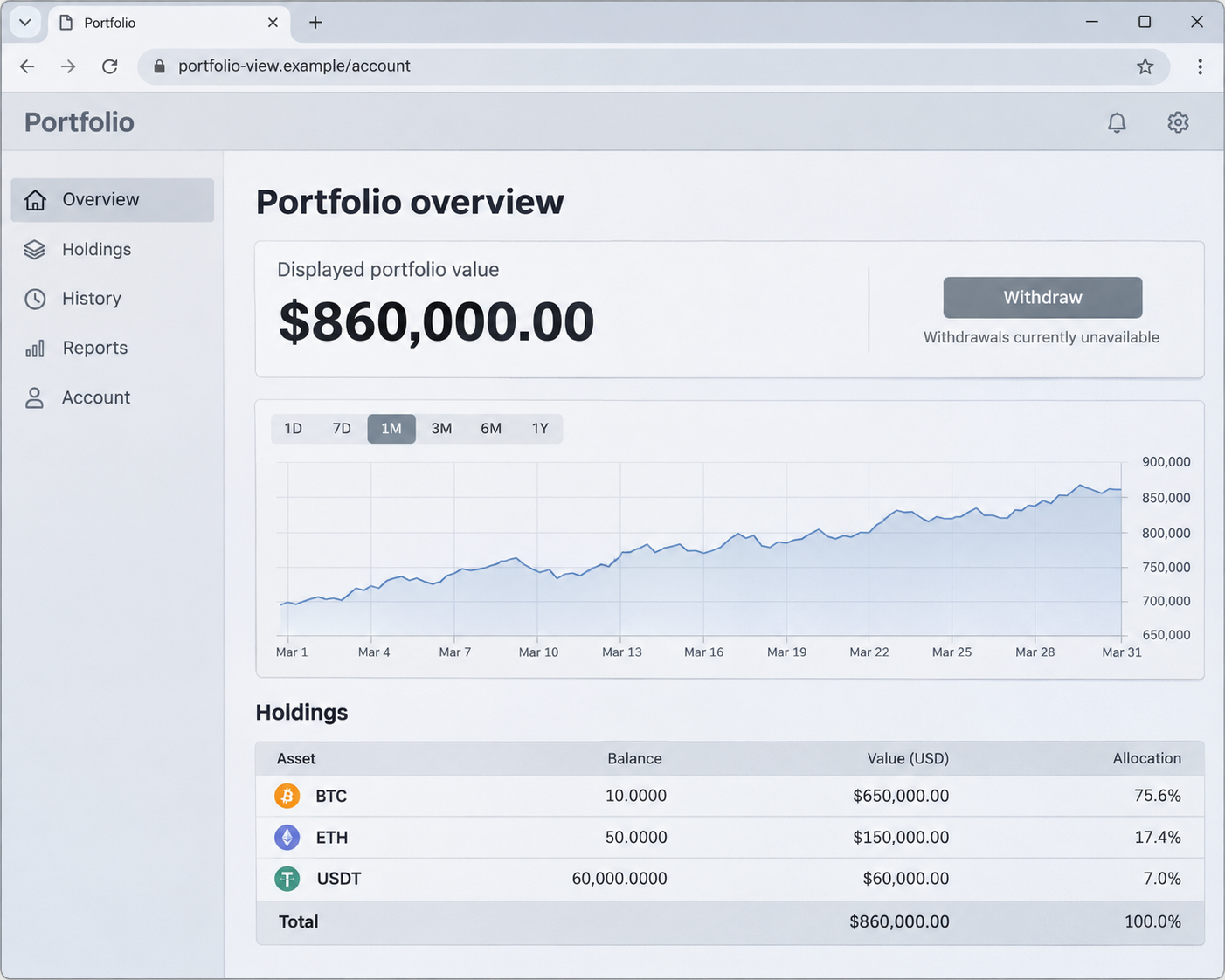
The federal complaint describes a purported $860,000 wallet that the victim could not access or independently locate. An alleged IRS freeze supplied the explanation for blocked withdrawals.
The FBI traced approximately $198,232.92 in transfers to addresses controlled by fraudsters. That loss figure is separate from the much larger balance the caller displayed.
The immediate decision is to stop the caller’s access
Do not let an unsolicited adviser control your computer or direct another transfer. Verify any claimed tax issue through the IRS or your own tax professional independently.
- End remote access before signing into financial accounts again.
- Contact the exchange through its official support route.
- Keep transaction identifiers and the caller’s original contact details.
- Do not pay someone who promises to unlock the balance.
What the Ohio Complaint Actually Says
The Justice Department announced the case on November 13, 2026. Prosecutors filed a civil forfeiture complaint concerning cryptocurrency traced from the alleged theft.
The original complaint says the victim first received an unsolicited call from someone presenting himself as a financial adviser and cryptocurrency expert.
The caller used the name Jake Williams. The filing does not establish that as the operator’s verified legal identity, and this report does not identify an unrelated same-name person.
According to the complaint, the victim moved retirement money through a bank to Coinbase. The caller then obtained remote control and transferred cryptocurrency from the account.
Approximately 60 transfers between December 17, 2025, and March 31, 2026, totaled about $198,232.92. The FBI based its findings on records, interviews, and blockchain analysis.
The filing also reports other fraud complaints involving someone called Jake using the same telephone number. That connection is more specific than a shared first name.
These are allegations in a pending civil case, not a criminal conviction of a verified person named Jake Williams. The government must prove its forfeiture claims.
The portfolio image recreates the reported balance and withdrawal problem. It does not reproduce the victim’s actual wallet, establish its holdings, or authenticate any investment account.
How the Fake Adviser and IRS Freeze Scam Works
Step 1: An unsolicited adviser builds financial trust
The caller introduces himself as someone able to manage cryptocurrency investments. A continuing conversation can make his instructions feel like personalized guidance rather than a stranger’s request.
Do not judge that relationship solely by how helpful the caller sounds. You need independent verification before allowing anyone to move retirement savings or access financial accounts.
Step 2: A legitimate exchange makes the route look familiar
The victim’s own account receives money before cryptocurrency moves outward. Seeing a genuine bank or exchange in that first stage can make the whole arrangement seem legitimate.
It proves only that part of the route uses a real service. Check who controls the destination after funds leave, and whether you can independently manage the supposed investment.
Step 3: Remote control gives the caller a different kind of access
The complaint describes the caller remotely accessing the laptop and moving funds from Coinbase. Being able to watch a transaction does not mean the account holder controls its purpose.
The caller reportedly said the bank’s security prevented him making remote withdrawals there. That was his explanation, not a tested conclusion about the bank’s controls.
A remote session should never become your way of verifying an unsolicited adviser’s honesty. End the session and speak to your financial provider through its own channel.
Step 4: A large balance replaces independent access
The caller showed a wallet supposedly worth about $860,000. The victim could not access it and could not independently locate the supposed funds when interviewed by investigators.
A displayed balance can keep someone focused on protecting apparent profits. The more urgent question is whether real assets exist under the person’s control.
Step 5: A tax story explains why withdrawal never happens
When the victim requested funds, the caller allegedly blamed an IRS freeze linked to an accountant’s failure to file taxes since 2021. The complaint presents that as deception.
Only the caller supplied that explanation in the account described by the complaint. The victim still lacked independent access to the supposed investment.
The established risk is accepting the caller’s explanation for money you cannot access. A supposed problem with your accountant should be checked with your actual accountant independently.
The Fake IRS Freeze and the Real Cryptocurrency Restraint
Two different kinds of freeze appear in this story. The caller’s alleged IRS explanation prevented the victim from obtaining the supposed investment proceeds.
The later government action concerned funds investigators traced. A seizure warrant was served on Circle, which blocklisted an Ethereum address containing approximately 65,028.09 USDC.
That restraint is described in the complaint and supported by the official case record. It is separate from the caller’s unverified claim about the victim’s taxes.
The forfeiture action seeks those restrained assets, not the entire $860,000 displayed balance. Prosecutors said they would seek to return funds if the action succeeds.
Investigators followed transfers through several addresses rather than relying on the portfolio’s claimed profit. The trace describes movements on Ethereum, not an independently verified investment strategy.
The complaint attributes 65,026 USDC to the victim and describes another 2.09 USDC in small receipts. The restrained wallet’s balance is not identical to that victim’s deposits.
Keep transaction identifiers and networks together when reporting your own loss. An address or screenshot without the matching transfer can leave the actual money trail unclear.
Preserve the withdrawal request and the caller’s exact explanation too. The reference to an accountant and an IRS freeze helps document how the alleged deception continued after transfers.
Blocked assets are not automatically a completed refund. The victim’s claimed loss, the amount restrained, and any eventual return must remain separate figures.
No legitimate recovery promise follows merely from quoting a case number. Verify a person claiming to act on this proceeding through the government office independently.
What to Do if You Have Fallen Victim to This Scam
-
Stop the remote session and further transfers
Disconnect the affected computer from the network to end ongoing access. Use another trusted device to contact financial providers and change urgent account credentials.
Record the remote application’s name and the caller’s details when you can do so safely. Do not reconnect merely because the caller offers to repair the problem.
-
Report the transaction through your own exchange account
Contact the exchange using its official app or independently entered website. Explain that a caller obtained remote access and identify unauthorized or fraudulently induced transfers accurately.
Supply transaction identifiers, networks, amounts, destination addresses, dates, and relevant bank references. Ask what account protections and reporting steps remain available without assuming reversal is possible.
-
Secure financial access separately from device cleanup
Replace exposed passwords from a trusted system, review recovery details, and ask providers about unfamiliar sessions or security changes. Include the email receiving account-recovery messages.
If a wallet seed phrase was exposed, say so without sending it to support or posting it publicly. That exposure differs from a compromised exchange password.
-
Preserve the evidence and report the fraud
Keep the call records, messages, portfolio displays, remote-access details, and payment history. File an IC3 complaint and retain its confirmation for follow-up with investigators.
Explain any claimed IRS problem to your own tax professional. Do not let the person controlling the supposed investment supply the only account of your tax position.
-
Refuse paid unlocking or guaranteed recovery offers
The FTC’s cryptocurrency guidance describes fraudulent investment accounts and withdrawal demands. Another payment does not establish that the original balance can be recovered.
Keep legitimate provider inquiries separate from unsolicited recovery approaches. A stranger requesting a fee, seed phrase, or another remote session can create another loss.
Remove Unwanted Remote Access Before Using the Laptop Again
The filing does not name the remote application or the laptop’s operating system. Follow the appropriate instructions below for the software actually installed on your own device.
For an employer-managed computer, contact its security team before uninstalling software or deleting logs. They may need to preserve evidence and handle the device through their incident process.
Step 1: Identify and remove the unwanted remote application
On Windows 11, open Start, Settings, Apps, then Installed apps. Find the application the caller had you install, choose its three-dot menu, and select Uninstall.
Follow its removal prompts and preserve the application name. If you cannot identify it confidently or removal fails, ask trusted technical support rather than deleting arbitrary programs.
On a Mac, quit the remote application and open Finder, then Applications. Follow its developer’s uninstall instructions, using its own uninstaller when one is provided.
If no uninstaller is provided, select the unwanted application and choose File, then Move to Trash. Authenticate if requested, following the developer’s remaining removal instructions.
Review the application’s background or login access through System Settings. Remove only permissions or entries you can connect to the unwanted software; avoid disabling unrelated accessibility or management tools.
Step 2: Install the scanner for your operating system
A scan can help identify additional unwanted software after remote access. It cannot establish what the caller already copied or reverse the financial transfer.
Download Malwarebytes for WindowsWindows free-scanner optionsOptional Windows real-time protection
For Windows, open the downloaded MBSetup installer and follow its prompts. Read optional trial or browser-extension offers; manual scanning is available without buying ongoing protection.

On your own Windows computer, approve the installer permission prompt only when it belongs to the Malwarebytes setup you deliberately downloaded. Follow setup until the application opens.
Download Malwarebytes for MacMac download and protection optionsOptional Mac real-time protection
For macOS, open the Mac installer from Downloads and follow its installation prompts. Grant disk access through the settings for your version when requested.
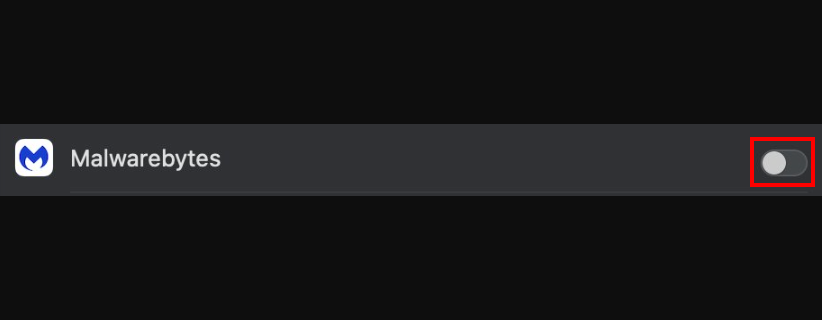
On macOS Ventura 13 and later, open System Settings, Privacy & Security, then Full Disk Access. Enable Malwarebytes and authenticate with your password or Touch ID.
Download only the installer matching your device. These site links can support MalwareTips through affiliate referrals; buying paid protection is optional for the manual scan described here.
Step 3: Run the scan and review its findings
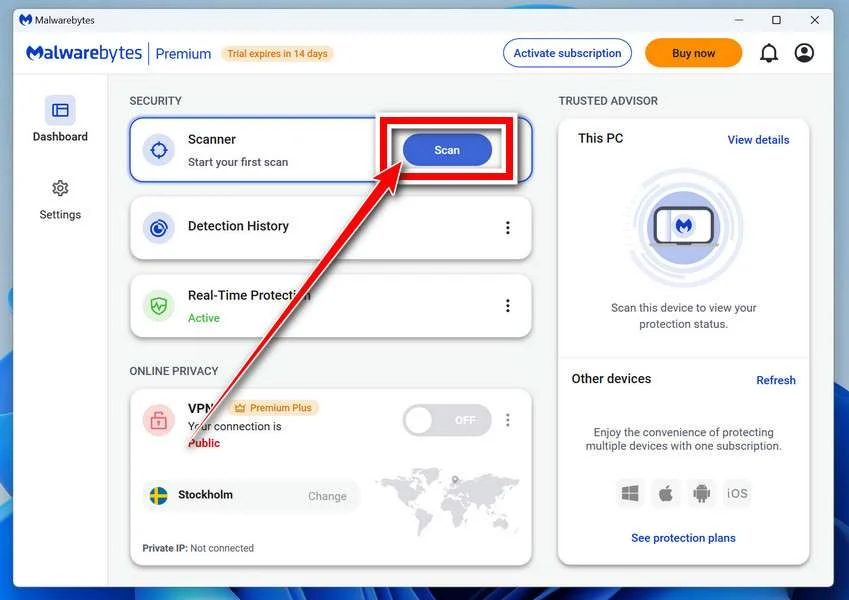
Open Malwarebytes and select Scan on its dashboard. Let the Threat Scan finish rather than assuming that opening the program has checked the computer.
The Mac application also offers manual scanning from its dashboard. Its appearance differs from the Windows example; follow the current Scan control in your installed Mac application.
When the scan completes, review the findings and quarantine detected threats that need removal. If the app already quarantined them, confirm that result in its report.
If you are unsure about a detection, save the report and seek help before restoring or excluding it. Do not follow the original caller’s instructions to allow suspicious items.
Step 4: Restart when requested and verify remaining access
Allow a restart if the scanner requests one, then review its result. Confirm that the unwanted remote application and its access permissions have been addressed.
A scan without detections does not prove the caller never accessed information. Complete the separate account, session, and payment actions even when no malware is found.
If unfamiliar access continues or you cannot complete removal, use the MalwareTips removal-help forum or trusted local support. Keep the machine away from financial sign-ins until reviewed.
Frequently Asked Questions
Is Jake Williams the operator’s confirmed real identity?
The complaint describes a person using that name. It does not authenticate the operator’s legal identity or establish that an unrelated same-name person participated.
Does the $860,000 balance establish an investment profit?
The victim could not access or independently locate the supposed funds. A displayed balance supplied by the caller is not evidence of assets the victim controlled.
Did investigators verify an IRS freeze on the victim’s investment?
The complaint presents the IRS story as the caller’s deceptive explanation. The documented Circle restraint was a separate government action involving traced cryptocurrency.
Does the forfeiture case mean the whole loss was recovered?
The complaint concerns approximately 65,028.09 USDC, while the alleged transfers totaled about $198,232.92. A pending forfeiture action does not establish completed reimbursement.
Was Coinbase accused of operating the scam?
The account was used as part of the transfer route. The complaint describes a caller obtaining remote access and directing funds outward, not Coinbase running the fraud.
Will uninstalling remote software recover the cryptocurrency?
Removing unwanted access addresses device risk, not money already transferred. Contact the exchange and investigators separately, preserving the transaction records and any account-security changes.
The Bottom Line
Do not let an unsolicited crypto adviser control your laptop or explain away withdrawals with an unverifiable IRS story. A large screen balance cannot replace independently controlled funds.
If you already allowed access, disconnect the session, contact your exchange, and preserve the transfers. Complete device and account recovery separately, without paying to unlock supposed profits.

Reviews & discussion
0 commentsShare a firsthand experience, or ask a question.
Community reviews
Jake Williams
Moderated reader experiences, not an editorial verdict.
Start the conversation
Have a question or something useful to share? Add the first comment.