


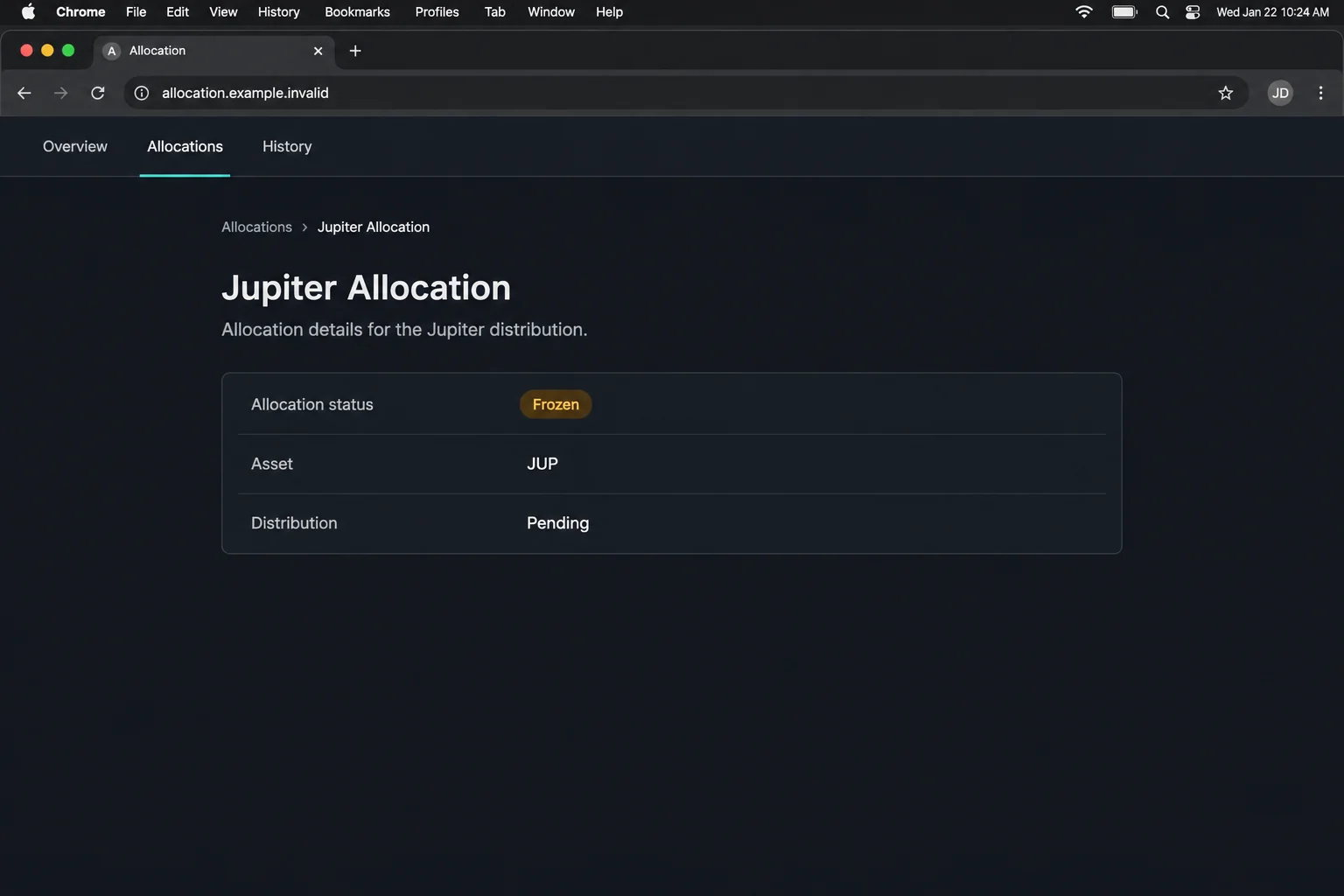
The page says Jupiter already set aside JUP for you. The allocation is supposedly frozen, and a countdown tells you there isn’t much time to claim it.
Before you let the clock decide, look at what the page calls a claim. That word and the action in your wallet can mean very different things.
Overview
A reward you supposedly earned is harder to walk away from
The Jupiter Allocation scam doesn’t start by asking you to buy JUP. It tells you that an allocation has already been assigned and is waiting to be unlocked.
That wording makes waiting feel like a loss. If the tokens seem to be yours, the countdown looks like a deadline to protect them rather than a sales pitch.
The documented page was at a lookalike address outside Jupiter’s normal site. The legitimate Jupiter documentation is an independent starting point for finding the real service.
Numbers and a timer don’t establish an entitlement
The reported page displayed 34,385 eligible wallets and 50 million tokens for distribution. Those were claims in the interface, not balances independently established for the people who saw them.
An earlier MalwareTips domain report also captured an allocation-themed page. The capture supports the page’s identity. It doesn’t prove how a particular transaction would execute.
Look for this combination:
- The promotion calls the allocation frozen even though you haven’t confirmed it elsewhere.
- Precise totals make the page look like an official dashboard.
- The countdown discourages you from checking an announcement separately.
- The alleged unlock requires a wallet action initiated by an unrelated site.
The important question is what the wallet was asked to approve
The documented route took the visitor from a wallet connection to a requested transaction. That’s the point at which a fake claim can become an authorization with real effects.
Connecting isn’t signing. An approved action may move assets or grant permissions, depending on its contents. The word claim on the website doesn’t decide that.
This is a warning about the counterfeit offer, not a claim that the Jupiter platform was responsible or that every person who opened the page lost funds.
How the Jupiter Allocation Scam Works
Step 1: The page presents an allocation as settled business
A legitimate token distribution can have eligibility rules. The fake page skips over the evidence for those rules and starts with the result you want to hear.
It suggests the main decision has already been made. Your supposed task is simply to collect what belongs to you, not determine whether any distribution exists.
If you have used Jupiter before, ask which activity qualified and which announcement describes it. Remembering an actual trade doesn’t establish a link to this page.
Check for an official announcement in a channel you already know. Do not use a support account linked by the same page as your independent confirmation.
Step 2: A timer turns research into something that feels costly
The counter makes a normal precaution look dangerous. Reading the announcement, comparing domains, or checking your wallet could seem like time you can’t afford to spend.
The totals work alongside it. A large, precise count of eligible wallets gives the impression that a calculation has already taken place and many people are participating.
You don’t need to see whether the timer resets to recognize the problem. A timer on a page is not evidence of a contract deadline or your eligibility.
If the promised reward disappears while you’re checking, you haven’t lost a verified asset. You have declined to act on a claim you could not authenticate.
Step 3: The claim moves into a wallet you already trust
The documented page encouraged visitors to connect and then submit an allocation transaction. The shift into a familiar wallet can feel as if the website has passed a safety check.
It hasn’t. A legitimate wallet can receive a request from an untrusted site. Its job is to show you an action you may choose to approve or reject.
Look at the requesting site, selected account, and balance changes shown by the wallet. If the wallet cannot explain the effect, the promotion doesn’t get to explain it for you.
Refuse an unexpected request rather than assuming you can reverse it after checking. The safest time to reject an untrusted action is before approving it.
Step 4: The transaction matters more than the success screen
If you approve a transaction, the website can show any message it likes afterward. A congratulatory screen doesn’t prove you received JUP. A failure screen doesn’t prove nothing happened.
Open the real wallet activity or an established chain explorer through a separate route. Compare the actual status and any outgoing assets with the action you thought you were taking.
An approval that grants permission can outlast a browser tab. If your wallet provider identifies such access, follow its instructions for revoking it. Don’t rely on closing the site.
If the request already moved assets, disconnecting won’t undo the transfer. At that point, preserve the transaction record and focus on limiting further loss.
How to Check a JUP Claim Without Using the Page
Start from a route that existed before the offer
Use Jupiter’s official documentation or the established entry point you normally use. Do not rely on a typed-out URL supplied in a screenshot, a direct message, or a sponsored result.
Look for the announcement tied to that exact distribution. Different rewards programs can use the same token and still have different dates, eligibility criteria, and claim processes.
A real announcement should answer more than whether a page looks familiar. Check who posted it, which event it covers, and how users are told to reach the claim.
If you find no match, leave the wallet disconnected. You don’t need to use a fake page to prove you weren’t eligible for its offer.
Read the transaction as a transaction, not a headline
A genuine wallet might show fees, accounts involved, and a preview of what changes. Read those details. A fee alone isn’t proof of fraud, but an unrelated transfer deserves scrutiny.
An expected claim might have a clear source and destination. A prompt showing assets leaving your account needs an explanation you can verify independently, not a countdown.
If you have several wallets, confirm which address was active. Switching accounts after the fact won’t remove an action you approved under the first one.
If a wallet warning seems vague, take the safer interpretation and reject the request. Ask the provider about its preview without sharing your recovery phrase.
Keep different Jupiter-themed scams separate
A fake staking rewards email and a counterfeit frozen allocation page can both use JUP as bait. They don’t have to share an operator or ask for the same action.
This case concerns a website presenting a frozen allocation and prompting an on-chain claim. A separate email campaign could send recipients to a different site with a different story.
For reporting, keep the page title, the exact time, and the action you saw. Those details are more useful than calling every unsolicited JUP offer the same incident.
What to Do if You Have Fallen Victim to This Scam
-
Leave the fake claim page and reject any open request.
If you didn’t connect or sign, do not reopen it to verify the timer. Find any actual distribution through Jupiter’s known channels.
-
If you connected, remove the session through the wallet.
Open your wallet’s own settings and remove the site from connected apps where that feature exists. Check the address selected during the interaction.
Review activity rather than assuming the connection caused a transfer. A separate signed request or an existing permission can change what you need to do.
-
If you approved something, read the real transaction record.
Check the status, instructions, assets and destination. Save the public transaction identifier before changing anything that might hide the activity from your normal interface.
Use the wallet provider’s official support if the details are unclear. For Phantom users, its wallet incident guidance distinguishes immediate steps from follow-up reporting.
-
Remove continuing authority through a trusted route when applicable.
The right method depends on what was granted. Don’t use a revoke tool advertised by the fake site or a stranger replying to your report.
If you disclosed a recovery phrase or private key, use a clean setup and a new wallet. A disconnected session doesn’t make an exposed secret safe.
-
Report unauthorized transfers with the details you can verify.
Save the chain, time, amount, recipient, and transaction identifier. Contact your wallet provider or relevant fraud reporting channel. If a custodial service is involved, use its security team.
Do not expect the wallet provider to reverse a confirmed blockchain transfer. Reporting promptly can help others examine where the funds went.
-
Ignore anyone who offers a fast recovery for another signature.
Don’t deposit assets to verify ownership. Do not give a stranger remote access or reveal the phrase used to create your wallet.
If the page also led you to run a file, seek device-security help separately. The signature and the device exposure are different problems.
Questions to Answer Before You Submit a Report
If your wallet shows an outgoing asset, write down whether it happened immediately or later. That can help support distinguish a direct transfer from a permission that remained usable.
If the wallet shows a rejected or failed request, check for any other action around the same time. One failed transaction doesn’t identify everything else you may have approved.
Look at the complete transaction record, not a push notification or thumbnail. The public identifier is enough for someone to inspect it without needing access to your account.
Take care with screenshots. A public address is not a secret key, but it can still reveal balances or link accounts to your identity. Share it through an appropriate channel.
Check what happened to the specific asset you were shown
If the page said you received JUP, look for the incoming transaction on the account you actually used. A token name or image displayed inside the page isn’t a receipt.
Look separately at any outgoing assets. The important comparison is between what you expected and what your wallet recorded, not between two totals shown by the offer.
Don’t send another transaction to fix a pending one. Check its status through the wallet or explorer first. Ask official support if the details don’t make sense.
A later message may claim your allocation needs to be unlocked again. Don’t let a prior click create pressure to finish a process you no longer trust.
Report a fake allocation without inviting further loss
Use the platform’s normal reporting route for the post, ad, or message that sent you there. Include the time and the label used for the fake offer.
If you contact the real project, don’t ask it to approve a pending transaction for you. Ask whether it announced the distribution and where its terms are published.
Keep your evidence outside the fake page. A saved transaction identifier or note remains useful when a timer expires or the site is removed.
If the original message came from a known account, let the owner know through a separate route. Someone may have reused their name or accessed the account.
Don’t treat a new wallet address sent by private message as an official recovery destination. Verify any support instruction with the provider before moving assets.
If a genuine distribution ended, check its published terms for any late-claim policy. Do not trust a stranger who says they can bypass the deadline for a fee.
If you reported an unauthorized transfer, update the report with its confirmed status. An apparent loss in a website display and a finalized transfer are not the same evidence.
Frequently Asked Questions
Is the frozen JUP allocation real?
The documented frozen allocation page was a lookalike. Check any claim through Jupiter’s official channels rather than treating the page’s number or timer as proof.
Does Jupiter run the lookalike site?
The documented page copied the real platform’s appearance on a separate domain. There is no evidence the genuine Jupiter platform was behind that offer.
Why does the page ask me to sign a transaction?
The website calls it an unlock. The actual request can have different effects. If the site isn’t independently verified, reject the request rather than trusting its label.
Can I undo a transfer by disconnecting?
No. Disconnecting stops the app’s active connection. It does not reverse a completed transfer or necessarily remove permissions already granted.
What if I didn’t sign anything?
Close the page and remove the connection if one exists. Check your wallet activity for an unexpected action, but don’t assume a transfer occurred merely because you saw a prompt.
Can a real support agent use my transaction ID?
Yes. A public identifier can help them inspect the transaction. They don’t need your private key or recovery phrase to do that.
The Bottom Line
Don’t connect or sign through the fake Jupiter allocation page. Its timer and wallet counts aren’t evidence that you have a reward to unlock.
If you already approved something, check the actual transaction and secure any remaining assets using trusted wallet guidance. Verify a real distribution separately through Jupiter.

Join the discussion
0 commentsShare your experience or ask a question about this article.
Discussion
Start the conversation
Have a question or something useful to share? Add the first comment.