


A message from “Knab” says a Samsung Galaxy S25 was registered to your bank account in Paris. It gives an exact time and asks you to verify your details again.
If you did not add a phone, the email is meant to feel like a security emergency. The way you check the alert matters more than the details it lists.
Overview
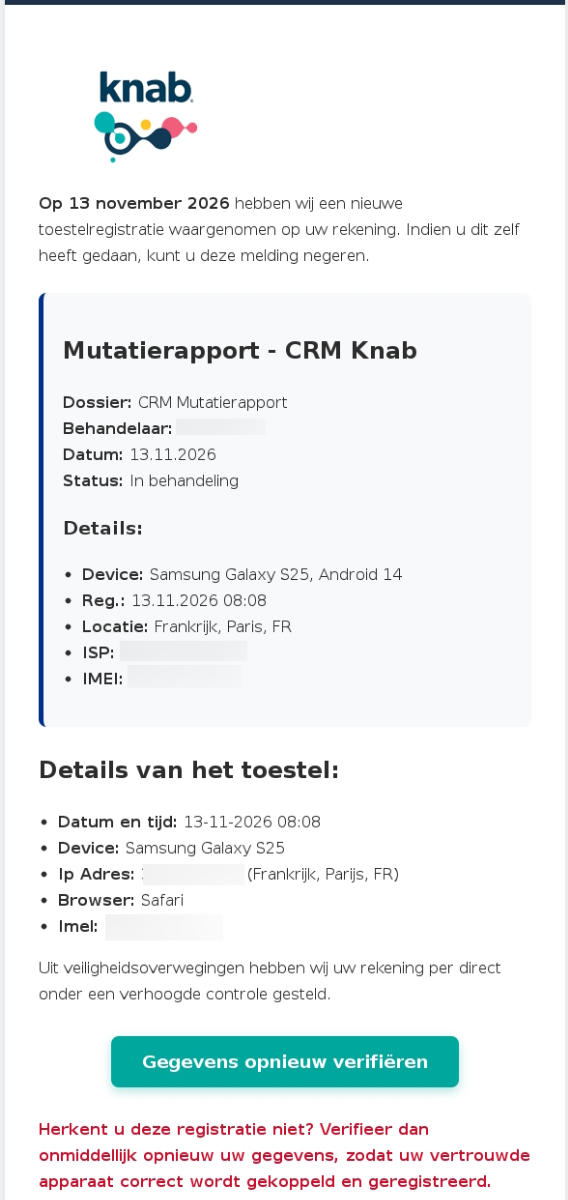
On November 13, 2026, Fraudehelpdesk published this Knab impersonation email. It claims an unfamiliar device was registered and that additional checks now apply.
The device story is not a bank record
The reported Dutch subject starts with “Herinnering,” or reminder. It says Knab detected a new device registration on your account, even if there was no earlier alert.
The body lists an alleged registration at 08:08, names a Galaxy S25 and puts it in Paris. Those are claims in the email, not proof of account access.
The person who wrote a message can choose what city and device to put in it. The bank can check what is actually registered to your account.
What the email asks you to do
If the registration was not yours, the email directs you to verify your information using its button. It presents the action as a way to restore a trusted device.
That is the part to refuse. Open the Knab App already on your phone, or use a verified support route if the app is unavailable.
The helpdesk’s example does not establish what opened after the click. Knab describes risks such as cloned login and fraudulent approval requests in its broader phishing advice.
When you should call the bank immediately
Reading this email is different from approving something in the bank app. A submitted bank credential, unknown approval or unfamiliar transaction makes the incident more urgent.
- Check through Knab’s own app or support page rather than replying to the email.
- Tell the bank what happened, including whether you approved anything with your real device.
- Keep the email and transaction details private while you report the incident.
- Do not send money elsewhere to make the supposed account problem go away.
How the Knab New Device Registration Scam Works
Step 1: A surprise device turns a routine email into a threat
The strongest detail in this version is the one you can check from memory. If you do not own that phone, the story seems to explain an intrusion.
The subject calls it a reminder so that it feels like something has already happened. You may wonder whether you missed a first warning or waited too long.
But remembering that you own a different model only tells you the described event would be surprising. It does not make the email an authenticated report.
That distinction also protects people who did recently buy a Samsung. A plausible coincidence is still a reason to check separately, not a reason to click.
Step 2: The invented case file makes the alert look internal
The email calls part of its text a Knab CRM change report. It shows a case status, a timestamp, a device field, a location field and technical identifiers.
Technical-looking details can distract from inconsistencies. The address printed as IPv4 includes 887 in one segment, even though a dotted decimal IPv4 segment cannot exceed 255.
You do not need to diagnose every mismatch before you stop. A more polished copy could use a valid address, which would still not authenticate its device story.
It is the bank’s account records that settle whether an unknown device was linked. A label reading “in progress” does not create a real Knab support case.
Step 3: Verification moves the recipient away from the bank
The button means verify your details again. A good security workflow lets you open the real bank app yourself and see what the bank actually needs.
The false email makes the button sound like the way back to your trusted device. That reverses the order: the message is asking you to trust it first.
The public sample does not prove that the link served any particular form. Do not enter details or approve an app prompt on the assumption that it is defensive.
If you see an approval request you did not initiate, read what it says before touching anything. A real banking app can display an action you should refuse.
How Real Knab Device Registration Differs
Start with a phone you actually intend to set up
Knab’s device registration instructions start from your own device and account situation. They distinguish people who still have their old device from those who do not.
Use those instructions when you get a new phone. Do not let an unsolicited email dictate which session to start or which approval to confirm.
If your old device is lost or stolen, contact the bank separately. Knab says it can disconnect the old device before you set up the replacement.
If you are helping a parent or partner migrate their phone, let them keep control of their screen and credentials. They should never share a banking code with you.
Know what Knab says it does not request
Knab’s own phishing page says it does not email direct links into its personal banking environment, sign-in page or app. It also warns about requests to scan QR codes.
A visible name and even a plausible-looking sender address are not enough. Knab explicitly warns that people impersonating the bank can imitate sender information.
If the bank has an important message for you, the safest way to resolve a doubt is to ask through a route you opened yourself.
Do not use the email’s contact information merely because its button looks suspicious. The sender can control both the link and any number included as an alternative.
Do not confuse an app approval with bank support
You might recognize the app that displays a prompt and still have no idea who started the action. The app’s branding authenticates its interface, not a caller’s explanation.
Stop if asked to approve a login to check whether another login was blocked. Check the action through independently reached support and tell them what the prompt said.
Likewise, do not let someone guide you through a transfer to a “safe” account. The bank’s own fraud team can tell you what it can do to secure access.
If someone asks you to keep the call secret from your partner or branch, hang up. Find the bank’s contact information using a different channel.
Check who initiated each QR or login request
A device change, a login and a payment are distinct operations. Do not scan a code or approve a screen simply because someone calls it a device check.
If you are following the legitimate setup process, start from the bank’s current instructions and verify that you are registering your own phone, not approving an unrelated session.
Knab’s October 2026 update describes fake bank employees inducing login approval with a QR code. The bank issued that warning separately from this email example.
The November email example does not show a QR code. The point is to judge any later request by what it authorizes, not by whether it matches this screenshot.
Tell the bank when the setup was actually yours
If you saw multiple prompts while installing the app on a new phone, write down which phone displayed each one. Include which screens you cancelled or approved.
Do not keep uninstalling and reinstalling the app just to test the warning. Speak to the bank first if you have no other working way to enter your account.
Have details about your device change ready, but do not send a full screen recording containing codes. A simple timeline can distinguish a routine migration from an unexplained event.
What to Do if You Received the Fake Knab Alert
- Leave the email’s button unopened and check the account using the Knab App you already installed.
- If the app is unavailable, get the fraud contact from Knab’s published security page and call on a trusted phone.
- If you shared details, scanned something or approved a request, describe the exact action to Knab without waiting for money to leave.
- Report the message, retain the date and screenshots, and follow the bank’s instructions for securing the affected account.
If you only opened the message or page
Opening the email does not register the phone it describes. If you opened the link, close the page and note whether you entered anything or accepted a prompt.
You can send the suspicious email to the bank using its published instructions. Do not add a screenshot of the inside of your bank account to prove who you are.
After reporting, remove the false email from your inbox so it does not get mistaken for a genuine alert later. Preserve a private copy if needed.
If you approved access, shared a code or found unexpected activity
Start with the number on Knab’s official security page. Tell the bank whether you completed a sign-in, a device action, a payment or something you could not identify.
Give the approximate time and any amount you saw. If it is a joint account, tell the other holder not to approve unexpected requests while the bank checks it.
Ask the bank to check registered devices and pending or unfamiliar transactions. It can explain the appropriate controls rather than leaving you to guess which card or device to disable.
Keep the receipt or transfer identifier if any money left. Recovery is not guaranteed, and a second payment to an alleged investigator is not a way to secure it.
If you cannot get into the Knab App anymore
Use a known support number instead of a recovery shortcut from a new message. Tell the bank if access stopped before or after you received the alert.
If somebody on the phone wants you to install remote-access software, stop that conversation and call the bank yourself. Do not let the caller stay connected while you check.
Note whether you entered credentials on another device or had help switching phones recently. That context is useful to the bank without being treated as proof of who was responsible.
Record the incident without putting others at risk
If the account belongs to a small business, tell whoever makes payments or shares access. Ask colleagues to verify unfamiliar payment requests through the company’s established process.
Keep the original message, if possible, including the sender details it displayed. Do not forward it to a large group with a working link attached.
Where payment was involved, separate the amount shown in the prompt from the amount recorded by the bank. That distinction can matter when support reviews what happened.
Check for follow-up messages while the case is open. A person who knows a name or amount from the first incident is still not necessarily the bank.
Frequently Asked Questions
Did Knab really detect a Samsung Galaxy S25 in Paris?
The published sample makes that claim, but it is listed as a false email. It cannot tell you whether anyone registered a device on your real account.
If you are concerned about actual access, the bank can check what is registered. Reach it from the app or its published fraud contact rather than the email.
Why does the fake Knab email show a CRM report?
The report format makes the email look as if it came from a bank’s internal case system. It creates the impression that someone has already investigated your account.
A list of fields is not authentication. In this sample even the purported IP address has a number that cannot appear in an ordinary dotted decimal IPv4 address.
Can I keep using my real Knab App?
Yes, opening the app you already installed is a separate way to check your account. Do not approve unfamiliar requests merely because that app displays them.
If your account is locked or a suspicious action appears, contact the bank through its published fraud route. Explain what you see without passing on codes.
What if I recently registered a new mobile device?
A real phone change can coincide with an unrelated scam email. Check what you did with your app and use Knab’s current setup instructions if you still need help.
Do not assume that every confirmation is about your recent change. Compare the time and action through a verified bank channel without using the links provided in the email.
Should I approve a prompt if a caller says it cancels a registration?
Do not approve an action you did not initiate. Read what the app says and contact the bank independently. A caller cannot change the meaning of an approval.
If you already pressed approve, call Knab promptly and give the time and what you remember seeing. Do not wait for an unauthorized charge to appear.
Do I need to replace my bank card after reading this?
Merely reading the email does not give the sender your card number. If you provided card details or see a transaction you did not make, call Knab for specific instructions.
Tell the bank if you shared app access rather than a card number. Those are different exposures and may need different actions.
The Bottom Line
The Knab email uses a device, place and time to make an invented security alert feel real. Verify the event with Knab, not with the sender.
Skip the re-verification button and open your established banking channel. If you already authorized something, contact the bank immediately and tell it what you did.

Join the discussion
0 commentsShare your experience or ask a question about this article.
Community experiences
Did this happen to you?
Your experience could help someone recognize the same scam. Submit a private report for our team to review.
I experienced this tooReports are reviewed before publication. Sharing publicly is always your choice.
Discussion
Start the conversation
Have a question or something useful to share? Add the first comment.