


An email says someone created a QuickBooks account using your company’s name. The notification reaches an inbox you control, but the verification phone belongs to someone else.
Months later, another notice arrives about a money transfer. This time the records include a bill for a company you have never done business with.
Overview
The company recognized the name and address, but not the account
A business reported receiving Intuit notifications about a QuickBooks account it had not created.
The account listed its business name, address and owner, with some information the company recognized as outdated.
The company controlled the email address receiving the notifications. It did not control the phone number initially associated with verification, which made resolving the account harder.
The business suspected some details might have come from public records. The report establishes that the information was used, while the way it was obtained remains unknown.
The newest invoice was for about $4,800
Roughly six months after the first notifications, the business received a notice about an electronic funds transfer request. It reported finding a new invoice for a Wisconsin cleaning company.
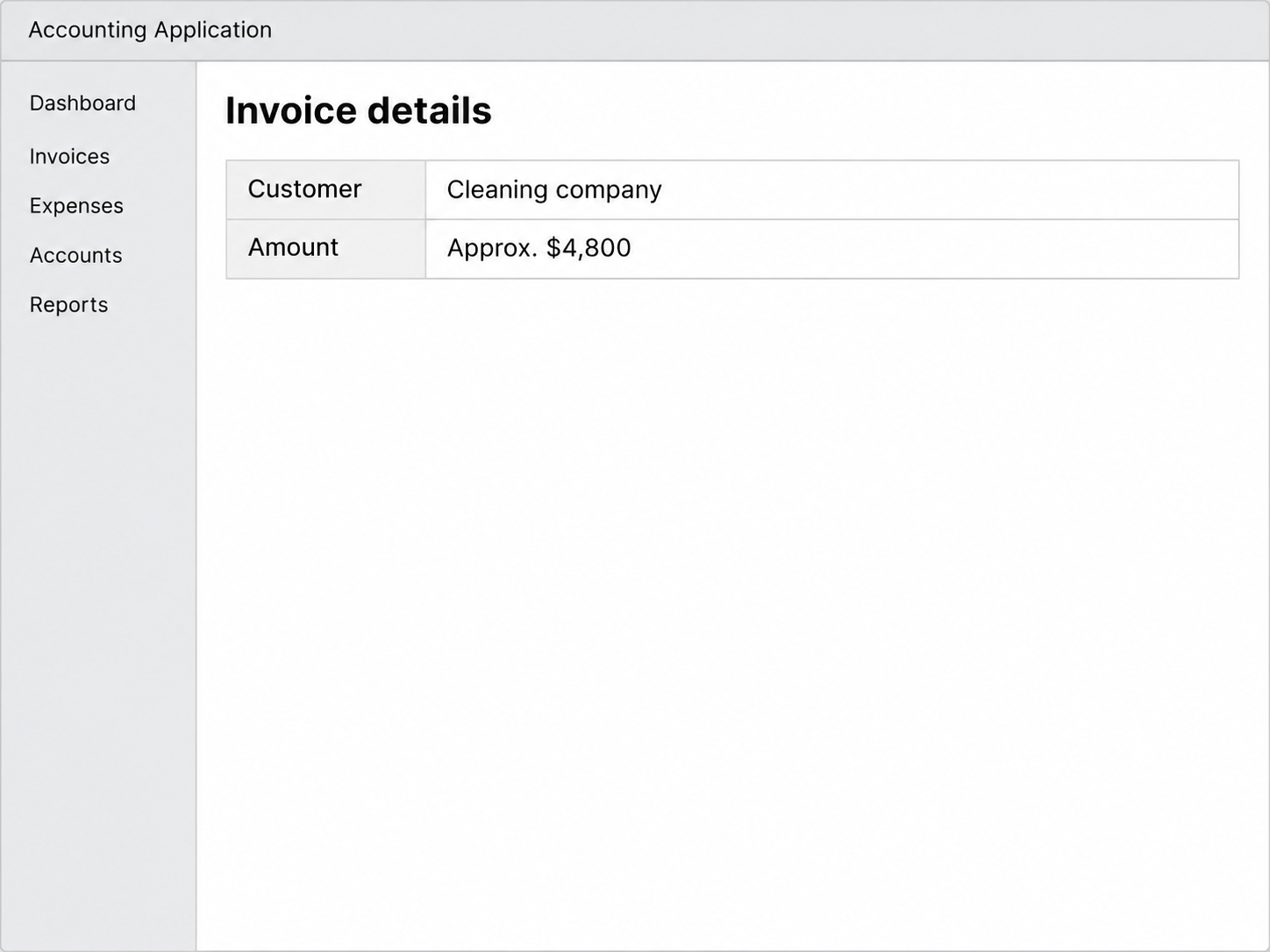
The invoice was for approximately $4,800, and the business said it voided the invoice. The lead illustration shows those details without reproducing the company name.
Two older invoices raised another question. They looked deposited in one view, while the audit records described them as uncleared and undeposited. No independently verified payment was reported.
Who issued the invoice matters more than how it looks
An invoice can appear in real accounting software even when the business named on it never approved it. The same goes for a notification generated by that software.
- Check which company profile or account actually issued the invoice.
- Ask the named supplier about the request through an established contact.
- Tell Intuit if someone is using your own business information in a profile you did not create.
- Identify which items are invoices, internal payment records or verified movements of money.
Intuit’s security guidance includes reporting unauthorized changes and transactions. When you report the invoice, say whether the firm recognizes the customer and authorized the work.
The Difference Between a Fraudulent Invoice and a Fake Invoice Email
The fraud in this case involved a real QuickBooks account, according to the business. It found invoices inside a profile it had never authorized.
Accounting software can generate a bill without confirming that the supplier approved it. Check the invoice against your own purchase records.
That distinction matters to the business being impersonated. An unexpected message about a new account deserves a check even when the sender really is the accounting service.
If a supplier appears in your purchase records, compare the invoice against the person who ordered the work.
A company name and address visible on a bill do not establish a purchase.
A firm may use more than one billing contact.
If the new invoice uses a name you know and an account you don’t, ask the supplier through its previously established contact.
The business in this case did not say that its established QuickBooks books had been taken over. It described a separate account that it had never authorized.
How the QuickBooks Business Identity Scam Unfolded
Step 1: A separate billing account carries real business information
The initial notifications referred to an account using the business name, address and owner’s name. Recognizable details can make a profile appear to belong to the firm.
If an unexpected account notice lists your company’s information, take it to platform support. Your ability to recognize the profile details is a reason to report them.
Step 2: The email notice and the verification phone point to different people
The actual business received the notices by email. When it tried to resolve the initial alert, an unfamiliar phone was part of the sign-in challenge.
That provides a concrete fact to give the platform. It does not establish whose device used the number or that anyone had opened the company’s actual email inbox.
Step 3: The account holds invoices the business does not recognize
The later account records included an invoice for about $4,800, as well as older entries for $5,000 and $10,000.
The businesses and people named on the invoices remain unidentified here.
The newer invoice was billed to a cleaning company in Wisconsin. According to the report, the company whose identity was used had never authorized the account or the bill.
Step 4: Status labels raise a separate question about money
The older invoices appeared to show cash payments in one view. The reporter said the audit details showed no clearing or deposit for those entries, so the labels were insufficient.
QuickBooks documents how audit history records transaction changes. The available details and the people allowed to view them depend on account access.
Ask Intuit or the financial institution which entries represent a settled transaction. The public report does not show who requested the electronic transfer or whether any money moved.
If Someone Bills Under Your Business Name
Work out whether the invoice came from your actual books
Pull up your own accounting account through a bookmark or sign-in you already recognize. Look for the invoice and review its customer name, amount and date if it appears.
If the invoice exists in the company’s authorized account, have its administrator check users and the audit history. The timestamp can identify changes an employee or accountant needs to explain.
If there is no record in your own books, contact Intuit about the possibility of a separate account. Give it the details of the account notice and the unexpected invoice.
Make a list of what the company authorized. Include the billing accounts it currently uses and any older account names a support representative might otherwise mistake for the new one.
Preserve the evidence before changing records
Save the new-account notice and the notice about the transfer request in their original form. Keep copies of the invoice details your company can already see.
If you have authorized access to an account, document any unfamiliar users and transactions before making changes. Ask support how to preserve details you cannot see yourself.
An invoice can have its own number while a payment or transfer has a different one. Keep the identifiers next to the corresponding amounts and dates when you report them.
If you need to warn customers that somebody is using your name, send the warning from a channel they already know. Give them a specific contact for checking invoices.
Ask about the payments side separately
Get the company’s own funding records and check which bank accounts belong to it. Bring up any debit that appears there with the bank responsible for that account.
Ask platform support whether an electronic transfer notice was an attempted request, a completed payment or some other alert. The status changes which organization can help you next.
If a customer says they paid, ask for the receipt from their own bank or processor. An emailed copy of the invoice does not give you those details.
Avoid refunding a customer out of your own account until you know where their payment went.
Your company’s name on the bill can cause the customer to contact the wrong recipient.
When the Invoice Arrives at Your Business Instead
Check with the person who approved the purchase. If nobody recognizes it, ask the named supplier through a number in your records rather than calling a number from the bill.
If the claimed vendor recognizes the work but no longer uses the billing method, ask for fresh verified instructions. Preserve the suspect invoice so their accounting team can compare it.
A partial amount can be misleading too. If the invoice refers to work you ordered, compare the original purchase order and approved payment schedule before anyone decides which records match.
If you paid the invoice, tell your bank the payment route you used and who you intended to pay. Have the transaction reference ready before calling.
Questions That Help Intuit Investigate the Right Account
Give support the notice that identifies the new account
Start with the notice that you received and the address it went to. Explain whether it was sent to a work inbox you already use for accounting.
Tell support that you did not create the profile and identify any name or address on it that matches your business. Include older details if they distinguish the two accounts.
Keep the support case separate from your usual bookkeeping requests. Refer to the suspicious profile by its own identifier if the platform gives you one.
Ask whether it can preserve the relevant history while it verifies authorization. A customer invoice, a verification change and a transfer request may be three different events.
Let the platform resolve competing contact information
A familiar email address on a notice can show where the service delivered it. It does not establish that whoever added the verification phone had permission to act.
If you received a code you did not request, tell support when it arrived. Do not provide codes from messages to anyone who contacts you claiming to handle the report.
Where different contact details appear on the same profile, let Intuit tell you what business records it needs. Avoid guessing that an older staff member created the account.
Keep an eye on legitimate billing while the case is open
Make sure staff know which invoices the company actually issued. A customer might ask about a payment while Intuit is still checking who used the account.
If the company has a verified billing address or portal, use it to remind clients where to check. You can warn them without naming the unrelated invoice recipients.
When someone sends a receipt, ask where it came from and whether their own account records the debit. Preserve that detail alongside the invoice before anyone promises a refund.
A notice about an electronic transfer request can remain useful even if it did not result in a payment. Save the message so support can match it to its records.
What to Do if You Have Fallen Victim to This Scam
-
Save the invoice, notifications and transfer references in their original format, and note which account or inbox actually displayed each one.
-
Contact Intuit through its official site and report the use of your company details, including any unfamiliar verification phone or money transfer request.
-
Verify real customer invoices against the company’s own accounting records and give employees a known contact for checking unfamiliar payment requests.
-
Check accounts your company actually controls for unauthorized activity, and call the relevant bank or processor immediately if you find a payment or debit.
-
If a customer received the bill, contact them through an established relationship and ask them to hold payment while the invoice is checked.
-
Keep the support references and the documents that show when the account, invoice and transfer notices appeared, so you can follow up without guessing.
A business whose name is on an unauthorized account may worry that its main mailbox or books were accessed too.
Review sign-ins and keep that question separate from the unexpected account.
If Intuit asks you to prove the company identity, use the official case you opened. Ask which documents it needs before you send details about the business.
If you only received an invoice and did not pay, that is useful information for the supplier. Tell it what you saw and keep a private copy for follow-up.
Frequently Asked Questions
Can an invoice made with real accounting software still be fraudulent?
A real service can generate a bill from an unauthorized account. Contact the supplier through an established number and verify it against an order you actually approved.
Does an unfamiliar verification phone prove my email account was hacked?
The phone number shows that another detail was associated with the new account. Check your real mailbox’s sign-ins separately before drawing conclusions about who had access.
Did the $4,800 invoice result in a payment?
The business reported voiding the invoice it saw. The available account does not confirm that the recipient paid the bill or that the later transfer went through.
What does a deposited label prove about the older invoices?
The reported invoice and audit views showed different information. Ask the platform and the responsible bank to identify any actual payment rather than treating a label as a settled transfer.
Should I close the unauthorized account myself?
Tell the platform that someone used your business information and ask it to preserve relevant records. Ask the provider what it can do to restrict or close the account.
Who should I contact if I already paid the bill?
Contact the bank or payment provider that moved the money and identify the transaction. Also tell the real supplier through your existing contact so it can check its own records.
The Bottom Line
Hold payment on any invoice the named supplier cannot verify. If your own business appears on an account you never opened, report it to Intuit and keep the original notices.
If any money moved, contact the bank or payment provider with the transaction reference. Let the actual financial records answer what was paid and where it went.

Join the discussion
0 commentsShare your experience or ask a question about this article.
Community experiences
Did this happen to you?
Your experience could help someone recognize the same scam. Submit a private report for our team to review.
I experienced this tooReports are reviewed before publication. Sharing publicly is always your choice.
Discussion
Start the conversation
Have a question or something useful to share? Add the first comment.