


An email signed “Kraken Support” says a notice about annual tax reporting is waiting inside your account. The button is the only way the message offers to see it.
The tax subject is plausible, which makes this message harder to dismiss. The answer depends on where you check, not on whether the email sounds like Kraken.
Overview
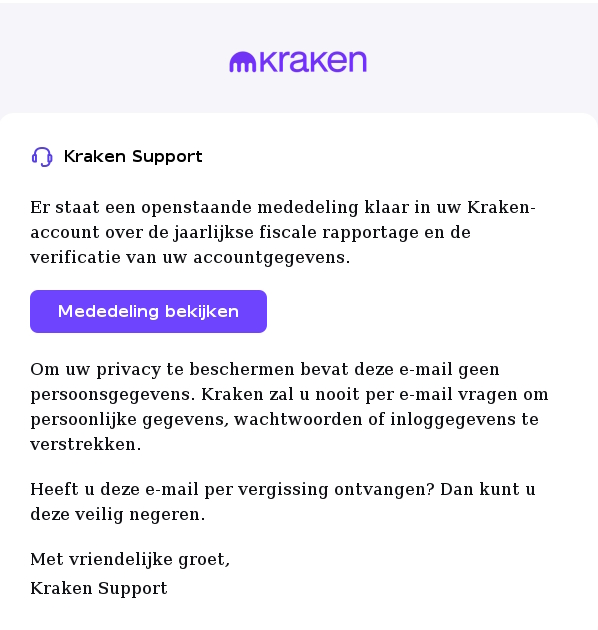
The November 16 Dutch message impersonates Kraken Support. Fraudehelpdesk published the submitted example in its false-email archive. Do not use its button to view an account notice.
The subject line to look for
The Dutch subject is “Informatie over de fiscale rapportage van uw tegoeden.” It roughly means information about the tax reporting of your holdings.
The message goes on to describe a pending communication about annual reporting and verification of account information. It signs off as Kraken Support.
Unlike an overt fake invoice, this email does not demand that you pay a tax bill. It asks you to take the next step online.
Why the tax topic sounds familiar
Kraken really does publish guidance about crypto-asset reporting. Depending on the jurisdiction, a provider may need to collect customer information such as tax residence or a tax identification number.
That makes the subject plausible, not the message authentic. An impersonator can borrow a real compliance topic without having any access to your Kraken account.
You do not have to decide whether a reporting obligation exists by reading this email. Verify any outstanding request through a channel you opened yourself.
What the published example establishes
The helpdesk preserved the wording and the presence of a button labelled “Mededeling bekijken,” meaning view the notice. The example does not show an independently confirmed landing page.
- The reported message uses Kraken Support as its displayed identity.
- It describes tax reporting and account details, rather than an invoice payable to Kraken.
- The visible text does not establish what the linked site asks for or whether it still works.
- Neither the example nor its publication confirms a compromise of Kraken itself.
How the Kraken Tax Reporting Scam Works
Step 1: The message borrows a real compliance obligation
Account holders already expect exchanges to request information when regulations change. Annual reporting sounds administrative and routine, even if the recipient has never received an identical notice.
There is also a difference between reporting information and owing money. An exchange’s report to a tax authority does not by itself calculate or collect the recipient’s tax.
Kraken’s CARF explanation sets out that distinction. It discusses information the exchange may collect and shares general timing that varies across jurisdictions.
The false email does not need to explain any of those details. Its immediate objective is to get the recipient to treat an inbox button as an account entry point.
Step 2: The privacy paragraph lowers suspicion
The fake message says it contains no personal data and claims Kraken will not ask for personal information or credentials by email, making the message sound cautious.
But the paragraph says nothing about what a site reached from the email might request. The important decision is whether to continue through that link at all.
Kraken’s own guidance treats suspicious emails as something to verify independently. You cannot give a message extra credibility simply because its author included sensible security language.
The lack of an account balance or a full name also tells you little about the recipient list. The email could reach someone who has never traded crypto.
Step 3: The button crosses from email into account activity
The button in the example promises to display a notice. The destination is not confirmed, so a cloned login screen or data form remains a possibility.
Even a screen that looks like the exchange would be a bad place to compare passwords, submit identification or approve a request from your authenticator.
An account password and the private recovery phrase for a self-custody wallet are not interchangeable. A legitimate question about tax residence does not require your wallet recovery words.
If you arrived there by mistake, close the page. There is no need to reopen it to work out the exact domain before contacting the exchange.
How to Tell a Real Kraken Tax Request From This Email
Open the account through a separate route
Use the official app already on your phone or a bookmark you previously verified. If you need help finding the service, start with the company’s official support site.
Look for account notices or tasks after signing in normally. Check whether the request is actually present and what information Kraken asks for in that authenticated session.
If nothing appears, or if the app and email describe different things, ask official support about the notice rather than assuming a tax deadline disappeared.
Keep the subject and date available for that conversation. Do not include your password, one-time codes or recovery information in the screenshot you share.
Check the sender, then verify the request anyway
The words Kraken Support beside the subject are a display name. The full address and the actual domain are more informative, but neither settles the issue on its own.
Kraken’s email verification guidance covers its email domains and messages that deserve particular caution. Use it independently of the email you are checking.
A preview that truncates the address can hide extra text. If you know how to open the original message details without following the link, preserve those details for reporting.
Do not forward the email to friends for a vote on the design. One of them may accidentally open the link, and they cannot inspect your account notices anyway.
Separate the account task from your own tax affairs
A genuine provider may ask where you are tax resident. That is different from telling you to move crypto, disclose a seed phrase or settle a fee with a stranger.
If you have a reporting or filing question, ask the relevant tax authority or a qualified adviser. An inbox button cannot tell you what you personally owe.
Do not send a full tax return, passport scan or account statement merely to get someone to explain the request. Ask what is needed through the verified channel first.
Compare the two messages without mixing up accounts
A shared inbox can receive notices for more than one person. Use the email address or username already associated with your account, not an identifier supplied by the new message.
If you own more than one exchange account, check them separately. A documented request from one exchange is not evidence that a second company sent its own notice.
Do not create an account just to investigate the email. A noncustomer can preserve and report the example without giving a company extra identification it did not request.
If you previously closed an account and wonder if earlier activity still matters, ask the exchange directly. The answer may depend on the time period and local rules.
Keep a copy of a genuine submission, not the password that opened it
If support confirms a valid request, complete it through the official account workflow and keep the official acknowledgment if available. Compare the stated reporting period with your own records.
Keep that private record separate from notes about the suspicious email. If you get a follow-up, you should be able to tell which process you actually completed.
Do not paste credentials into a note or take a picture of recovery codes while documenting the task. Save confirmation numbers and dates rather than secrets.
What to Do if You Received the Email
- If you only read the message, save its subject and date, report it if useful, and delete it without using its button.
- If you opened the link but entered nothing, close it and check whether you downloaded anything or granted a permission before deciding what else to do.
- If you typed a password or entered an approval code, contact Kraken through its official support site immediately and describe exactly what you supplied.
- If an unfamiliar withdrawal appears, save its details and ask the exchange to secure the account. Do not pay a stranger promising to cancel it.
If you submitted credentials or approved a prompt
Do not wait for an unfamiliar withdrawal to prove that someone signed in. Tell official support whether you shared a password, entered a code or approved a notification.
Use a trusted device to start the recovery process. Change a password that was exposed, and replace it on other accounts if you reused it.
Secure the email account that receives exchange notices, especially if it shares a password. Active email access can help a stranger intercept future security messages.
Ask the exchange to help check active access, pending withdrawals and account changes. Review any access keys you use for trading software, rather than assuming password recovery covers everything.
If you can no longer sign in, do not keep trying links sent in replies. Start the compromised-account process from the company’s support site.
If the page collected identity or tax information
Write down exactly what you provided, including the difference between an uploaded document and information entered in a form. The possible consequences depend on those details.
Readers in the Netherlands can report the email to Fraudehelpdesk through its official reporting route. Ask the appropriate local service for advice if identifying documents were exposed.
Keep the original email, timestamps and any receipt or reply. Store the evidence privately, and redact tax numbers or addresses before sharing screenshots publicly.
If a page asked only for your name or country, still write that down. Be precise about any financial identifier, date of birth or document that you did not provide.
Use that list when speaking to the exchange or an identity fraud service. It can help you monitor the right accounts instead of guessing what might have been captured.
Be skeptical of subsequent notices about missing tax forms, follow-up identification or account release. Information from the first encounter can make a later message sound unusually specific.
Preserve a useful timeline for support
Write the time you received the email separately from the time you clicked, submitted details or first noticed unusual activity. Include your time zone if you can.
If you were sent to another service after the click, record its description from memory rather than visiting again. Save any available browser history privately for the appropriate investigator.
Give support an opportunity to explain the next step before making changes with consequences you do not understand. Keep a case number for any conversation you started independently.
If someone demands a transfer to protect your account
A callback about the incident does not become trustworthy because the caller knows what you entered. End the call and return to the support session you initiated independently.
Someone offering a secure wallet, a special withdrawal address or an advance-fee recovery service does not need control of your assets to help you report the incident.
If a transfer has already taken place, keep the transaction identifier and destination details for the exchange and authorities. Do not assume there is a guaranteed way to reverse it.
Do not give a recovery phrase to anyone who says it is needed to trace a transfer. It is a key to a wallet, not a transaction reference.
Frequently Asked Questions
Is “Informatie over de fiscale rapportage van uw tegoeden” from Kraken?
The November 16 example under that subject is in Fraudehelpdesk’s false-email archive. Its display name and the subject are not proof of origin.
If a similar message actually concerns your account, you can open Kraken independently and confirm the task there. There is no reason to use the reported email’s button.
Does Kraken actually collect tax residency information?
It may be required to collect that information depending on the account and applicable rules. Kraken explains that possibility in its published tax reporting guidance.
That does not make every tax email legitimate. Confirm the request and submit information only through the authenticated process you reached independently.
Does this email mean someone signed in to my account?
The public example does not establish that anyone accessed your account. It makes a claim about a pending notice, not a verified report of account activity.
If you see an unknown sign-in or transaction after checking independently, treat that evidence as an account issue and contact official support promptly.
What does the “Mededeling bekijken” button open?
The label translates to view the notice. The publicly preserved example does not establish what the destination displayed, so do not rely on a description of a specific form.
You do not need to test the button yourself. Open the genuine account separately and let the exchange confirm whether there is anything to do.
Is just opening the email enough to lose my crypto?
Reading the message is not the same as entering credentials, granting access or signing a transaction. The reported email does not demonstrate an automatic wallet compromise.
Describe what you actually did when seeking help. A downloaded file, an accepted prompt and a sent transfer require different follow-up decisions.
Can a tax request ask for my recovery words?
A tax reporting question does not require the private recovery phrase for your wallet. Do not enter those words into a website claiming to confirm your holdings.
If you already disclosed them, treat that wallet separately from your exchange login. Get help from a trusted source without giving the phrase to anyone else.
The Bottom Line
The Dutch Kraken tax email is convincing because the subject is plausible. The reported example is still impersonation, and its button is not a trustworthy way to check an account.
Open Kraken independently, verify any real request there, and contact official support immediately if you disclosed credentials, approved access or found a transaction you did not make.

Join the discussion
0 commentsShare your experience or ask a question about this article.
Community experiences
Did this happen to you?
Your experience could help someone recognize the same scam. Submit a private report for our team to review.
I experienced this tooReports are reviewed before publication. Sharing publicly is always your choice.
Discussion
Start the conversation
Have a question or something useful to share? Add the first comment.