


A renewal message says your Pass ACL is approaching its expiry date. The familiar yellow styling and a short form make completing the process seem ordinary.
Then a small delivery payment becomes a request for more sensitive information. Before continuing, check which organization is actually handling the supposed renewal.
Overview
A documented imitation of a real membership service
The Pass ACL renewal scam impersonates Automobile Club Luxembourg to collect personal information, card details, and LuxTrust credentials. It is not a warning against genuine ACL membership.
GOVCERT.LU documented the campaign on November 25, 2025, preserving its original forms. Those archived pages illustrate the sequence here, not a new test of the hostile site.
The apparent renewal expands into several disclosures
The recorded path requests identity details, then address and phone information, followed by card data and a LuxTrust-looking authentication screen. A final button returns to genuine ACL.
That last destination cannot authenticate what came before it. A fraudulent page can send you to a real website after collecting the information it wanted.
The right response depends on the last step you completed
- Verify membership questions through ACL independently of the message.
- Contact your issuer promptly after submitting card information.
- Contact your bank and LuxTrust if authentication credentials were disclosed.
- Do not approve another request to fix the supposed renewal.
There Really Was a Membership Renewal Campaign
ACL’s own renewal notice, published November 24, 2025, announced the 2026 collection campaign and warned about phishing at the same time.
That overlap makes the bait particularly plausible. Members expecting correspondence about fees may be more willing to accept a message that appears to concern the same task.
The club says it does not ask people to confirm sensitive information through email or text. Its notice directs members toward the genuine myACL area within acl.lu.
This distinction protects both your account and your membership. You can reject the fraudulent forms while still checking whether a legitimate fee or account matter needs attention.
Do not decide solely from whether you remember receiving an earlier notice. Compare the actual request with your independently opened membership record and the club’s genuine instructions.
If you are not a member, there is no reason to submit personal data to discover why the message arrived. Preserve it and report the impersonation instead.
How the Pass ACL Renewal Scam Works
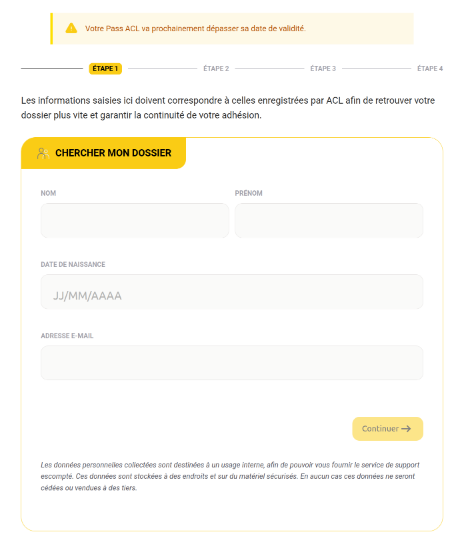
Step 1: The Expiry Claim Makes a Form Feel Necessary
The first preserved page claims the pass will soon exceed its validity date. It asks for names, birth date, and email under the appearance of finding an existing file.
That explanation turns disclosure into apparent account administration. A person may think the form is checking information already held by the club rather than collecting it for strangers.
Ask whether the request appears in the account you reached independently. A copied progress indicator or membership logo does not establish access to genuine records.
Step 2: Contact Information Completes the Apparent Renewal Record
The next stage requests postal address and phone information. This fits the renewal story because a reader may expect a replacement card or membership correspondence.
However, information that sounds relevant to an account can still be collected by the wrong recipient. The purpose stated above a field does not authenticate its operator.
Record whether you completed this stage separately from the payment form. It helps distinguish a disclosure of contact information from an exposure involving banking credentials.
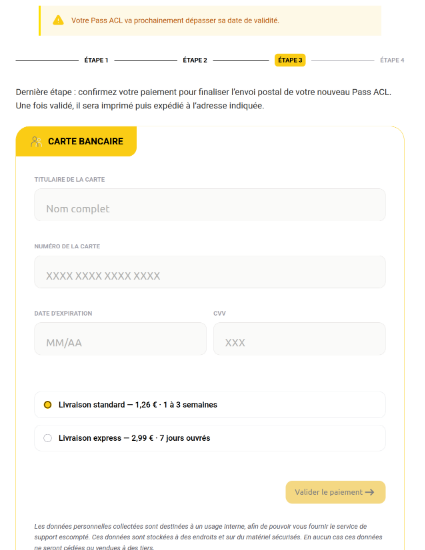
Step 3: A Small Delivery Fee Introduces the Card
The original card page presents standard and express delivery options, with small fees. It requests the cardholder name, number, expiry date, and security code.
The limited apparent cost can reduce hesitation. Yet entering the card exposes information whose usefulness is not restricted to the amount printed beside the delivery option.
Do not enter another card if a submission fails. A failure message cannot tell you whether the first set of details already left the form.
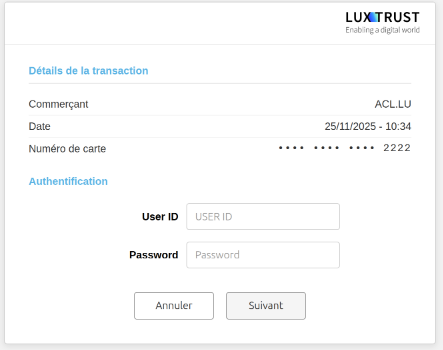
Step 4: The Page Borrows LuxTrust’s Authentication Identity
The following preserved screen displays LuxTrust branding and asks for a user ID and password. That moves the incident beyond an ordinary question about a membership fee.
A logo and transaction summary on a webpage cannot prove that the real authentication service supplied them. Check the actual destination and the independent request context.
Never treat an unfamiliar request as safe because it follows an earlier form you already completed. Each new disclosure needs a valid reason and a verified recipient.
Step 5: Returning to the Genuine Site Creates Reassurance
The final redirection can leave the recipient looking at an authentic organization after interacting with an impersonator. Your browser’s current location does not describe the earlier journey.
If you arrive at a real homepage after submitting details, do not conclude that the preceding forms belonged to it. Check your account and contact the relevant providers.
The actionable question is what you entered or approved before that redirection. Keep that record even if the final screen looked completely normal.
Check the Address Without Trusting the Name
Recognize the Difference Between a Brand Word and a Domain
The recorded hostile domain was myacl[.]lu. It resembles the name of the club’s member area, but it is not the same address as a page within acl.lu.
Inspect the actual website address rather than a button’s label. A familiar word can appear in a different hostname, a path, or a displayed link description.
When uncertain, close the message and begin again from a trusted bookmark or independently typed address. Do not rely on correcting a suspicious link by hand.
Keep Real Membership Notices Separate From Phishing
A genuine reminder can arrive during the same period as a fake one. Verify the specific message rather than declaring every renewal communication safe or fraudulent.
Compare the member name, period, and account status through the real service. If something differs, ask the club directly before making a payment elsewhere.
Do not forward a suspected phishing link to another family member as instructions for renewing a shared account. Send a warning and explain the independent checking route instead.
Do Not Use the Suspect Message’s Verification Contact
A phone number or support button within the same request cannot provide independent confirmation. Obtain the contact information from the genuine organization you opened yourself.
Tell support what the message claimed and which steps you completed. You do not need to disclose a card security code or authentication password to explain the incident.
If a caller follows up and refers to the renewal form, that knowledge does not establish legitimacy. End the call and reach the relevant provider independently.
What to Do if You Responded to the Fake Pass ACL Renewal
- Stop the process, preserve the message and any existing screenshots, and list each form you completed before closing the page.
- If you entered card information, contact the card issuer through its genuine channel and explain that the data went to an ACL impersonation page.
- If you disclosed LuxTrust credentials, contact LuxTrust and your bank immediately through independently verified routes, describing any code or app approval involved.
- Check the real membership account with ACL, separating any genuine fee from the fraudulent delivery or verification request.
- Save transaction references and report the incident through the appropriate police or incident-reporting service without publicly exposing personal information.
Do not revisit the hostile page to reconstruct a missing screenshot. Your saved message, browser history, and transaction records can help establish the sequence without another interaction.
If someone else completed part of the form, ask what they entered too. A family member may have approved a step that you did not see.
Keep the attempted renewal and any real club payment separate in your notes. That helps providers identify which transaction or account needs attention.
If You Entered Only Personal Details
A name and address exposure is different from a bank login exposure. Explain the information accurately rather than assuming every account on your device is compromised.
Be alert to follow-up messages using those details. Correct names, birth dates, and a reference to the original incident can make a later approach feel more convincing.
Do not answer extra questions to prove that you were the person who filled out the form. Verify who is contacting you before providing anything further.
Ask the relevant identity-support or reporting service for advice if particularly sensitive records were shared. The response should reflect what was actually disclosed.
If You Entered a Card or Approved Banking Authentication
Tell the issuer whether you entered details only or also approved something in an app. A card-data exposure and an authorized transaction can require different investigation.
Read any available bank prompt or transaction record carefully. Record the amount, recipient, currency, and time rather than relying on the delivery fee shown by the false page.
Luxembourg Police’s bank-impersonation guidance also addresses disclosure of LuxTrust credentials and transaction approvals. Contact the bank and authentication provider promptly.
Do not approve another payment to cancel the first one. An unsolicited contact describing an approval as a refund cannot change what the banking prompt actually authorizes.
If you need to suspend authentication access, use the provider’s genuine instructions. Do not follow an unfamiliar caller through a new enrollment or replacement-device setup.
Preserve the case numbers and instructions each provider gives you. Your bank, card issuer, and authentication provider may be addressing related but different parts of the exposure.
What This Incident Does Not Require You to Do
Receiving the renewal message does not itself establish malware on your device. A phishing form can create a serious financial risk without installing a malicious program.
Do not factory-reset a phone or buy software merely because you opened the message. First identify whether anything was downloaded, installed, or given unusual access.
If additional software was involved, describe that separately when seeking technical help. Device cleanup cannot reverse a card payment or replace securing exposed authentication credentials.
Likewise, do not abandon genuine assistance membership solely because its name was impersonated. Ask the real club about the account rather than treating the criminal page as its service.
Keep the Final Confirmation in Perspective
A successful-looking completion page records what a website chose to display. It does not independently establish a renewed membership, issued card, or protected banking transaction.
Check the result where it should genuinely exist: the club’s real member record and your bank’s actual transaction history. Those are separate checks with separate purposes.
If nothing appears, do not send another fee to make the process register. Give the relevant provider the evidence you already have and ask it to investigate.
Resolve the Real Membership Question Separately
After stopping the impersonation process, check whether an actual membership matter remains outstanding. Do not assume a payment to the false page settled a genuine club fee.
Compare the membership period and status in the real account. An older forwarded reminder should not decide what is due for a different year.
If you need assistance while traveling, use the club’s independently obtained assistance route. Do not return to the suspicious form because its message implied that help depends on payment.
For a shared or family account, agree who will contact the real club. Keep that conversation separate from the bank’s work on any exposed payment information.
Our separate LuxTrust security-alert investigation covers another impersonation route. Similar branding does not establish that the operators are the same people.
Keeping the records apart avoids a costly misunderstanding: a disputed scam transaction should not be mistaken for evidence that your genuine account has been renewed.
Ask the actual organization to confirm the service outcome, and ask the financial provider about the money. Neither answer can automatically substitute for the other.
Frequently Asked Questions
Is Pass ACL Renewal Itself a Scam?
No, ACL is a genuine membership organization. This warning concerns the impersonation forms, which borrow its renewal process to obtain personal and financial information.
Is myacl.lu the Same as ACL’s Member Area?
No, the hostile domain recorded in this campaign differs from the genuine service within acl.lu. Open the organization independently rather than following a similar-looking address.
Why Does the Form Ask for LuxTrust Details?
The fake authentication stage extends the information request beyond a membership payment. Do not submit credentials simply because LuxTrust branding appears after an earlier form.
Does Returning to the Real ACL Website Prove Safety?
No, a redirection cannot authenticate earlier pages. Act on the information you disclosed before arriving at the genuine site, rather than judging only the final destination.
Should I Contact ACL or My Bank First?
If payment information or authentication credentials were exposed, contact the financial providers promptly. Separately check your genuine membership with ACL through an independent route.
Do I Need to Cancel My Card After Receiving the Message?
Receiving alone does not expose a card. Tell the issuer if details were submitted, and let it assess protection appropriate to that actual exposure.
The Bottom Line
Do not renew Pass ACL through these impersonation forms. A small delivery request, familiar styling, and a final genuine homepage do not make the preceding data collection legitimate.
If you already responded, identify the last step you completed and contact the relevant providers now. Protect banking access separately from checking your real membership.

Join the discussion
0 commentsShare your experience or ask a question about this article.
Community experiences
Did this happen to you?
Your experience could help someone recognize the same scam. Submit a private report for our team to review.
I experienced this tooReports are reviewed before publication. Sharing publicly is always your choice.
Discussion
Start the conversation
Have a question or something useful to share? Add the first comment.