

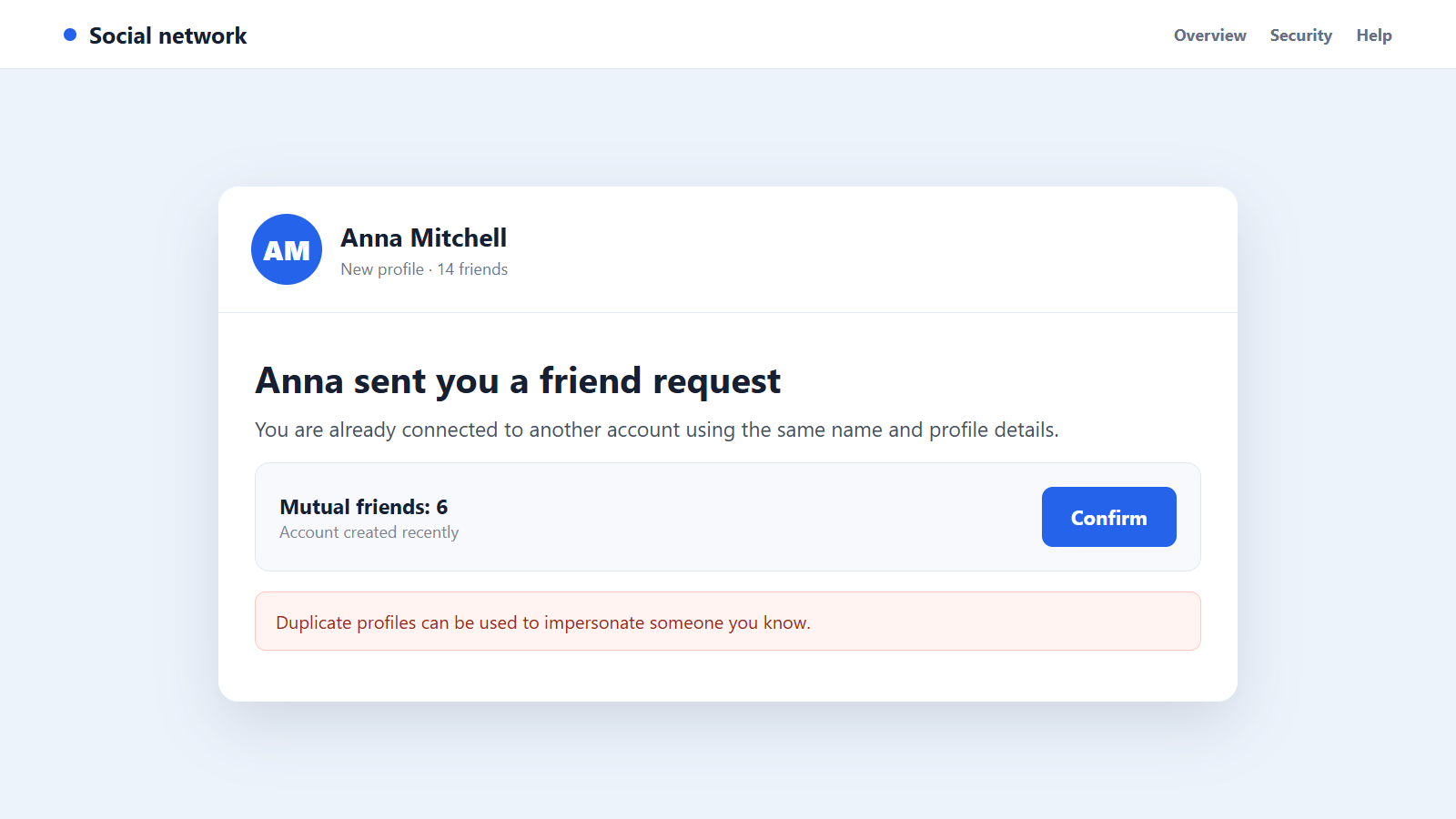
A friend request appears from someone you already know. The name, hometown, photographs, and family connections look right, but the account is new and quietly rebuilding the same circle of trust.
A profile cloning scam does not always begin by hacking the person being copied. It can start with information that was visible to anyone, then grow convincing one familiar contact at a time.
Overview
A copied profile borrows trust without stealing the original account
In a profile cloning scam, a criminal creates a second social-media account using another person’s name, profile picture, cover image, workplace, city, and public posts. The genuine account may remain completely accessible.
This differs from account takeover. A hacked profile uses the victim’s real account, while a clone is an imitation built beside it. Friends can receive requests from both and assume the owner simply started over.
Friends and relatives are usually the real targets
The copied person provides the identity, but the fraudster often wants money, codes, or information from that person’s contacts. Familiarity makes an unusual request feel less risky.
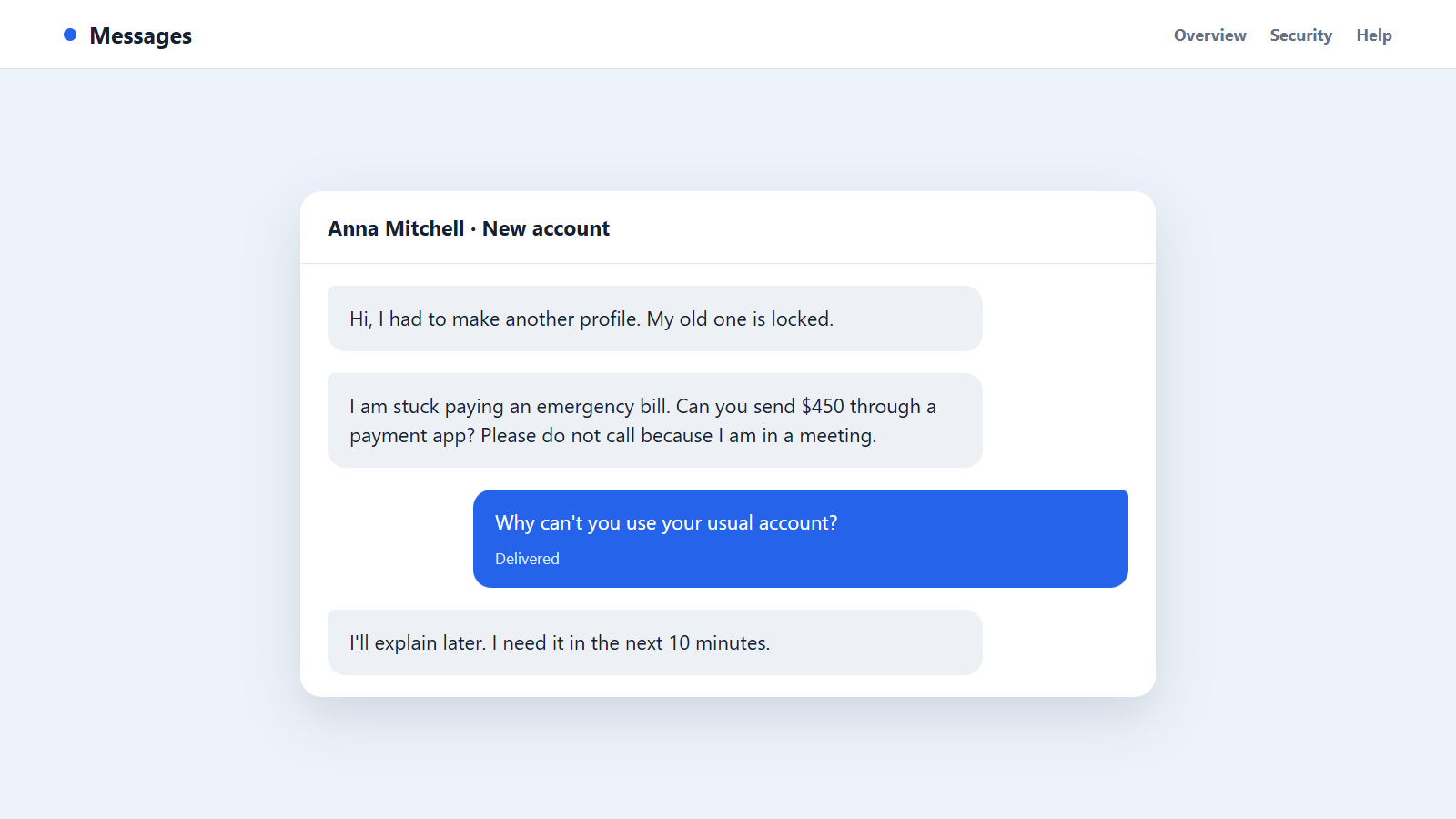
The clone may claim the old account is locked, announce a new phone number, share a grant opportunity, request an emergency payment, promote an investment, or ask for a verification code.
Small inconsistencies reveal the duplicate
The account may have few posts, a recent creation date, a slightly altered username, and a friend list rebuilt from public connections. Its messages avoid voice or video contact.
Warning signs include:
- You receive a new request from someone already in your contacts.
- The profile has copied photographs but little genuine history.
- The username contains extra punctuation, numbers, or misspellings.
- Mutual friends were added within a short period.
- The sender claims the old account is unavailable but provides no public confirmation.
- A private conversation quickly turns to money, codes, investments, or prizes.
- The person refuses a normal call or answers personal questions vaguely.
- The payment recipient uses a different name.
The quickest safe test is contacting the person through a telephone number or conversation you trusted before the new request appeared.
Profile Cloning Is Not the Same as Being Hacked
A clone can be created without learning the victim’s password. Public photos can be downloaded, biographical details copied, and visible friends approached from a newly registered account.
That distinction matters when responding. Changing the genuine account password is sensible if compromise is possible, but it does not remove the separate fake profile.
When a real account is hacked, the owner may lose access, see unknown sessions, or find messages sent from the established profile. With cloning, the original account often looks normal.
Both attacks can happen together. A criminal may first copy a profile, then use messages from the clone to capture a login code and take over the real account.
The FTC warns that social-media scammers can pretend to be people users know and use profile information to target them. It advises verifying money or information requests directly.
Friends should therefore report both the impersonation and any suspicious message. The platform needs the fake profile URL, while the genuine owner needs to know which contacts were approached.
A clone is a social problem as much as an account problem. The response must protect the copied identity, the contact list, and anyone who may still believe the impersonator.
Business pages can be cloned too. A duplicate page may answer customer complaints, announce a giveaway, offer refunds, or direct buyers to a new checkout controlled by the criminal.
Community groups give clones another shortcut. A familiar name commenting below a local post can attract trust before anyone opens the profile and notices its thin history.
Public reactions also help the impersonator prioritize targets. Frequent commenters, relatives, and people who recently congratulated the genuine user are more likely to recognize the copied identity.
For that reason, the owner should warn contacts through more than one channel. A public post helps, but direct messages, email, and group administrators may reach people the clone already blocked.
How the Profile Cloning Scam Works
Step 1: The criminal selects a believable identity
Scammers look for accounts with public photographs, visible friends, personal posts, and active community connections. A profile does not need to be famous to be useful.
Someone with a close family network, local business role, church group, school community, or many birthday messages gives the impersonator a ready audience.
Step 2: Public details are copied into a new account
The fake profile uses the same display name and recognizable images. Work history, location, relationship details, and recent posts may be copied to make the account look lived in.
A slightly different username is often necessary because platforms require unique handles. Many recipients never examine the handle after recognizing the name and photograph.
Step 3: The contact network is reconstructed
The clone sends requests to relatives, coworkers, neighbors, and friends visible on the genuine profile. Early acceptances create mutual connections that make later requests look safer.
The fraudster may start with people who interact publicly and are likely to accept quickly. Each connection becomes social proof for the next target.
Step 4: A harmless explanation removes doubt
The clone says the old account was hacked, locked, duplicated, or abandoned after a phone change. That explanation turns the duplicate itself into part of the story.
Some criminals post ordinary greetings or copied memories before asking for anything. Waiting a few days makes the account look less like a rushed impersonation.
Step 5: Private messages identify responsive contacts
A simple greeting, birthday comment, or question about family starts the conversation. The scammer learns who replies and how the genuine person normally communicates.
Public posts can supply enough context to fake recognition. The criminal may mention a workplace or relative without knowing any private history.
Step 6: The request introduces money, access, or opportunity
The supposed friend needs emergency help, asks the recipient to receive a code, recommends a government grant, promotes a cryptocurrency platform, or offers a marketplace item.
The first request may be small. Compliance tells the scammer that a larger demand could work and that the victim is reluctant to challenge the relationship.
Step 7: Verification is redirected or blocked
The impersonator says the phone microphone is broken, a meeting prevents calls, or the emergency leaves no time. Questions are answered with details already visible online.
If the recipient calls the genuine person through an old number, the scheme usually collapses. That is why the conversation tries to keep every check inside the new account.
Step 8: The clone disappears and returns under another identity
After collecting money or codes, the account may block the victim or change its name. Screenshots and messages can vanish when the platform removes the profile.
The contact list can be reused for another clone, recovery scam, or targeted phishing attempt. A warning should reach friends even after the first fake account is gone.
How to Verify a New Account Without Alerting the Scammer
Do not ask the new account which telephone number to call. Use the number already stored in your contacts, an old email thread, or another established channel.
Ask the genuine person whether a new profile was created. If you cannot reach them, ask a close relative through an independent account.
Compare the full profile URLs, not just display names. Look for extra letters, punctuation, numbers, or a recent account identifier.
Review the timeline from oldest to newest. A clone often has a burst of copied posts and newly added friends rather than years of normal interactions.
Check who comments on the genuine account. If the owner warned about an impersonator, share that warning privately with mutual contacts.
Ask a question whose answer is not public, but avoid exposing more private information to the suspected clone. A wrong answer is useful, while a correct one still requires a separate call.
Never send a login or verification code. A friend does not need the code sent to your device to recover their account, vote in a contest, or add you as a trusted contact.
If money is requested, verify both the person and the recipient. A payment tag or bank account under another name is a strong reason to stop.
Company, Address, and Fulfillment Checks
The social account must connect to an established identity
Compare the account with the person’s known profile, prior messages, telephone number, and email. A familiar photograph is only copied content.
The new account should be confirmed by the real person through a channel that existed before the request.
The location and contact history must remain consistent
Check whether the stated city, workplace, school, and relationships match over time. Clones may combine accurate public details with a new payment account or contact number.
Do not reveal the correct information while testing the profile. Let the sender explain first so inconsistencies remain visible.
The platform report must target the exact fake profile
Copy the clone’s full URL and take screenshots before reporting it. Display names can change, and several accounts may use the same photograph.
Meta provides a process to report impersonation in Messenger. Other platforms have similar categories for accounts pretending to be someone else.
The promised payment or offer must be verified outside the chat
An emergency, grant, investment, sale, or prize should have evidence beyond the cloned profile. Contact the relevant person or organization independently.
Do not accept a receipt, screenshot, or testimonial sent by the same account as fulfillment. The scammer controls all of those materials.
How to Make Your Profile Harder to Clone
- Limit who can see your friends list and personal posts.
- Review public photographs and remove unnecessary identity details.
- Use a unique username that contacts can compare carefully.
- Turn on multi-factor authentication for the genuine account and email.
- Enable alerts for unfamiliar logins and account changes.
- Tell friends that you will never request money or codes from a new account.
- Search your name and profile photo periodically for obvious duplicates.
- Keep an independent way for close contacts to verify urgent requests.
Privacy settings cannot prevent every copy, but they reduce the material available to build a convincing history and contact map.
What to Do if You Have Fallen Victim to This Scam
- Contact the genuine person immediately. Use an old phone number, email, or in-person contact. Explain exactly which profile and message caused the problem.
- Stop sending money or codes. Do not make a second payment to fix the first one, and do not share a security code supposedly needed for a refund.
- Contact the payment provider. Report impersonation fraud, request a reversal or recall, and give the fake account URL, recipient details, amount, and time.
- Report the cloned profile. Select the platform category for impersonation and identify who is being copied. Ask affected friends to submit accurate reports rather than attacking the account publicly.
- Preserve evidence first. Save the profile URL, username, messages, friend request, payment tag, receipts, email addresses, and timestamps before content disappears.
- Secure your own social account. Change the password if you entered it anywhere, sign out unknown sessions, verify recovery details, and enable multi-factor authentication.
- Protect your email account. Email access can reset social and financial accounts. Remove unknown forwarding rules, devices, recovery addresses, and connected applications.
- Warn mutual contacts clearly. Share the exact fake profile URL and explain what it requested. Do not publish sensitive payment or identity details.
- Report financial and identity fraud. File with the FTC at ReportFraud.ftc.gov, local police when appropriate, and the relevant national fraud authority.
- Scan devices that opened suspicious files. Run a full Malwarebytes scan if the clone sent an attachment, app, browser extension, or download.
- Reduce exposure to follow-up links. AdGuard can help block known phishing domains and malicious advertisements, but it cannot identify a copied social identity by itself.
- Reject recovery messages. A stranger who promises account restoration or guaranteed payment recovery for an upfront fee may be using the original victim list.
Frequently Asked Questions
Does a cloned profile mean my account was hacked?
Not necessarily. A criminal can copy public information into a new account without accessing the original. Check login sessions and security settings anyway.
Why would someone clone an ordinary person’s profile?
Trust inside a small community can be more valuable than fame. Friends and relatives may respond quickly to an emergency request from someone they recognize.
Should I accept a second friend request to investigate?
No. Capture the visible URL and ask the genuine person separately. Accepting can expose more posts and connections to the clone.
Can a verified badge prove the account is genuine?
A real platform badge helps, but screenshots and badge-like symbols can be copied. Confirm urgent requests through an established channel.
What if the cloned account already sent money requests?
Warn contacts promptly, preserve the messages, report the profile, and ask anyone who paid to contact their provider immediately.
Can the victim force the platform to remove the clone?
Platforms provide impersonation reports, but review time varies. Accurate URLs, screenshots, identity confirmation, and reports from affected users can support the case.
The Bottom Line
A profile cloning scam builds a new account from familiar pieces, then spends the copied person’s reputation on messages that ask for money, codes, or trust.
Do not verify the clone inside its own conversation. Reach the real person through an established channel, report the exact duplicate, and warn the contacts who may receive the next request.

Join the discussion
0 commentsShare your experience or ask a question about this article.
Discussion
Start the conversation
Have a question or something useful to share? Add the first comment.