


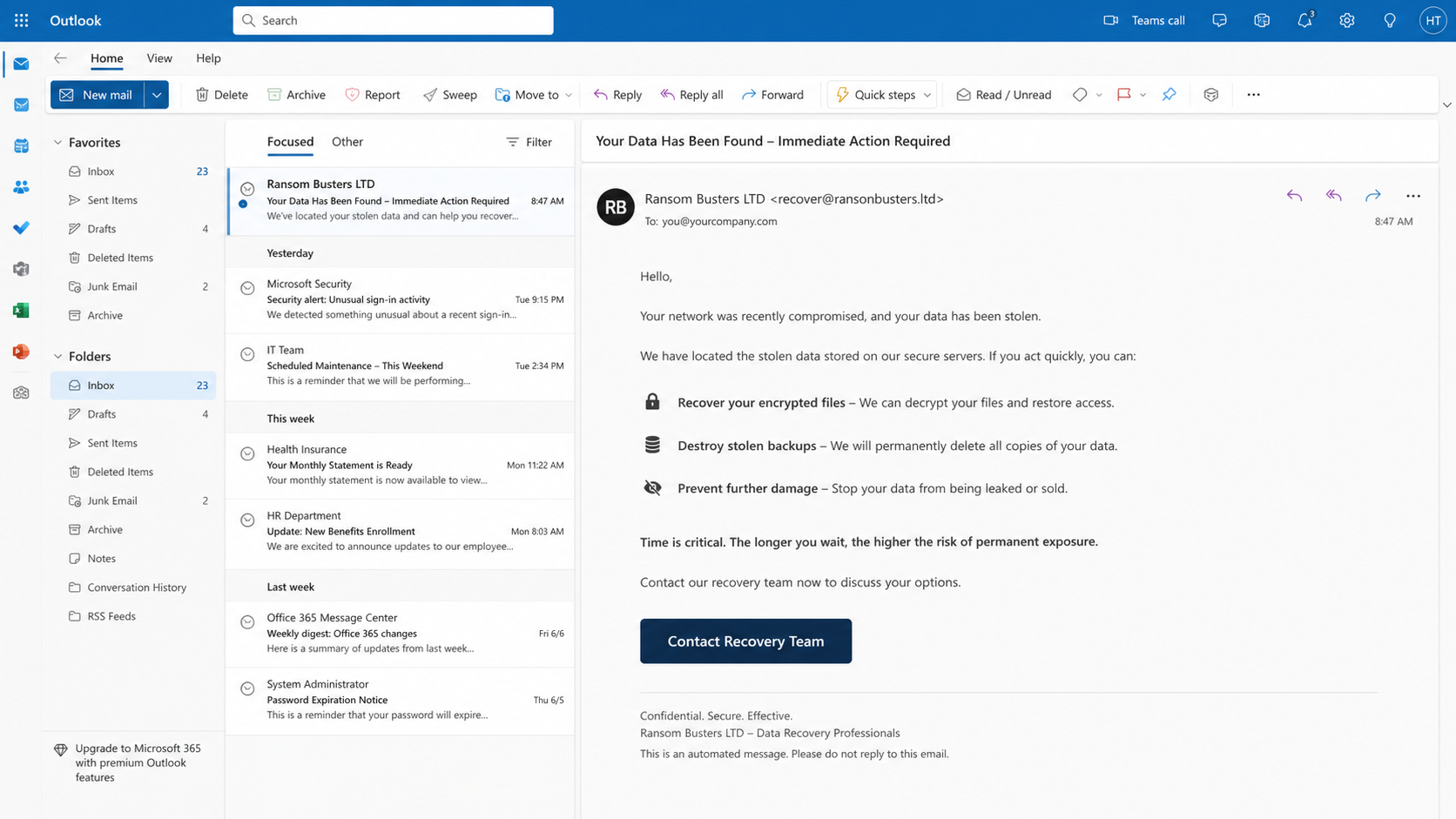
A company already facing ransomware receives an unexpected lifeline. A confident recovery specialist claims to know the attackers and offers a faster path out.
The proposal can arrive before the breach becomes public. That timing makes the sender seem unusually informed, exactly when executives are desperate for certainty.
Overview
Ransom Busters approaches organizations during a real crisis
The Ransom Busters recovery scam targets companies dealing with active ransomware incidents, stolen data, disrupted systems, and intense pressure from customers or regulators.
Its operators do not present themselves as extortionists. They claim to be an independent recovery service capable of solving problems created by a separate criminal group.
That distinction is central to the pitch. A frightened victim may view a recovery company as an ally, even when the offer arrives without any trusted introduction.
Observed messages sought direct contact with chief executives, technology leaders, or incident decision-makers. These people can authorize large payments quickly during an emergency.
The emails reportedly reached some victims before their incidents appeared on public ransomware leak sites. That detail makes ordinary public-information research an incomplete explanation.
Early knowledge can suggest access to criminal infrastructure, communications, or the intrusion itself. It does not prove the sender can provide honest recovery.
The name Ransom Busters LTD sounds reassuring and specialized. A polished business identity, however, is not evidence of licensing, independence, or technical capability.
The seller claims privileged access to ransomware operations
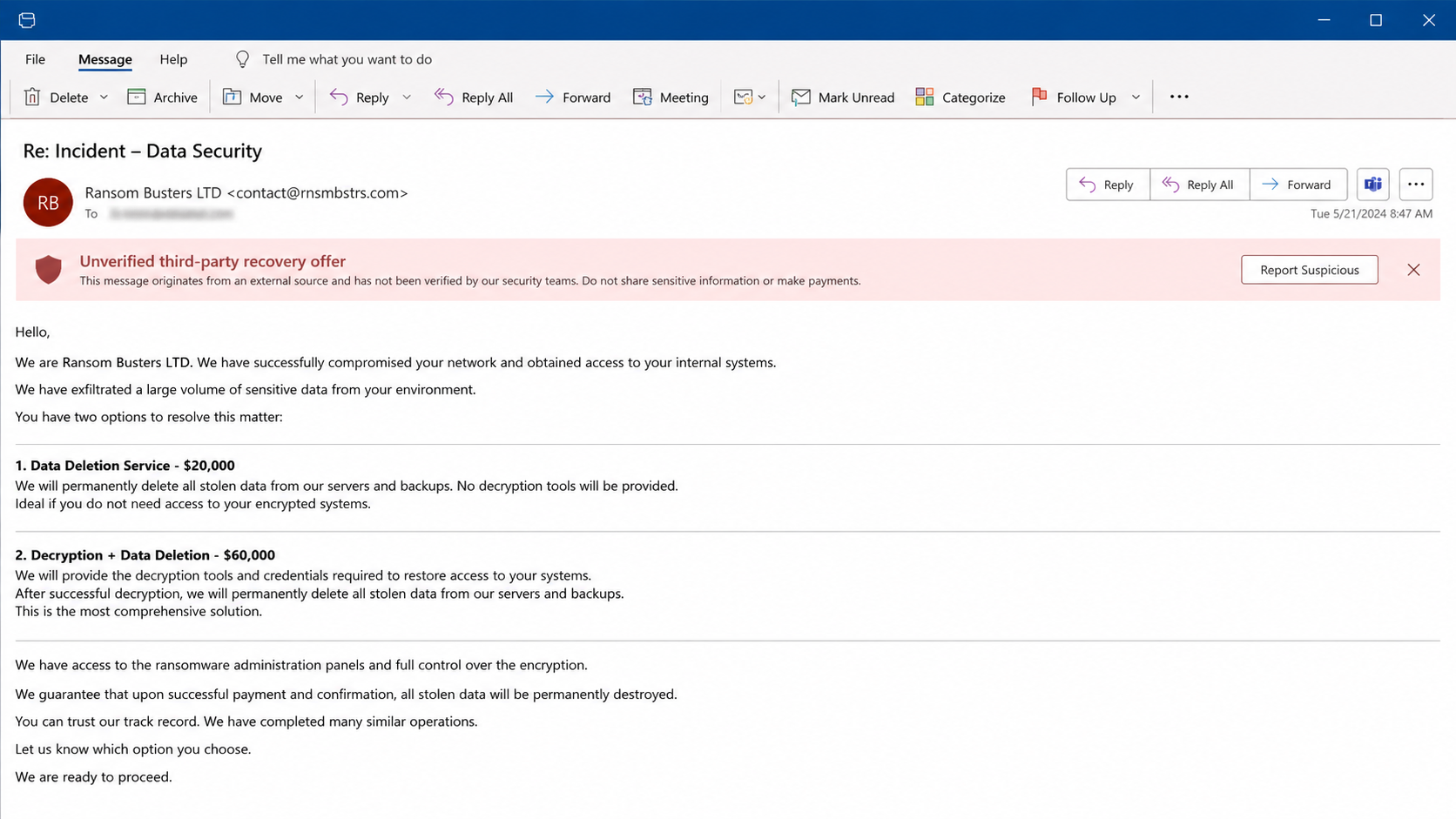
The supposed rescuers say they infiltrated ransomware administration panels. From there, they claim they can retrieve decryptors and permanently erase stolen corporate files.
Those promises address the two fears executives feel most sharply: losing operational access and seeing confidential data exposed or sold.
One reported pricing structure demanded $20,000 for data deletion alone. A broader option, including decryption material and deletion, cost as much as $60,000.
Large fees can appear plausible beside ransomware demands, downtime, legal costs, and recovery bills. The comparison makes the offer feel commercially rational.
Yet a screenshot, written assurance, or claim of panel access cannot prove every copy disappeared. Stolen data may exist in backups, private channels, or buyers’ hands.
A working decryptor also requires testing. The wrong tool can corrupt files, overwrite evidence, or create false confidence while compromised systems remain accessible.
Useful warning signs include:
- An unsolicited recovery offer that contains nonpublic incident details.
- Pressure to reach senior leadership outside established response channels.
- Claims of secret access to several ransomware groups.
- High fees tied to unverifiable promises of data deletion.
- No clear conflict-of-interest explanation.
- Requests to share forensic evidence before signing protective terms.
- Payment instructions that bypass normal vendor due diligence.
Technical overlaps point toward the intrusion ecosystem
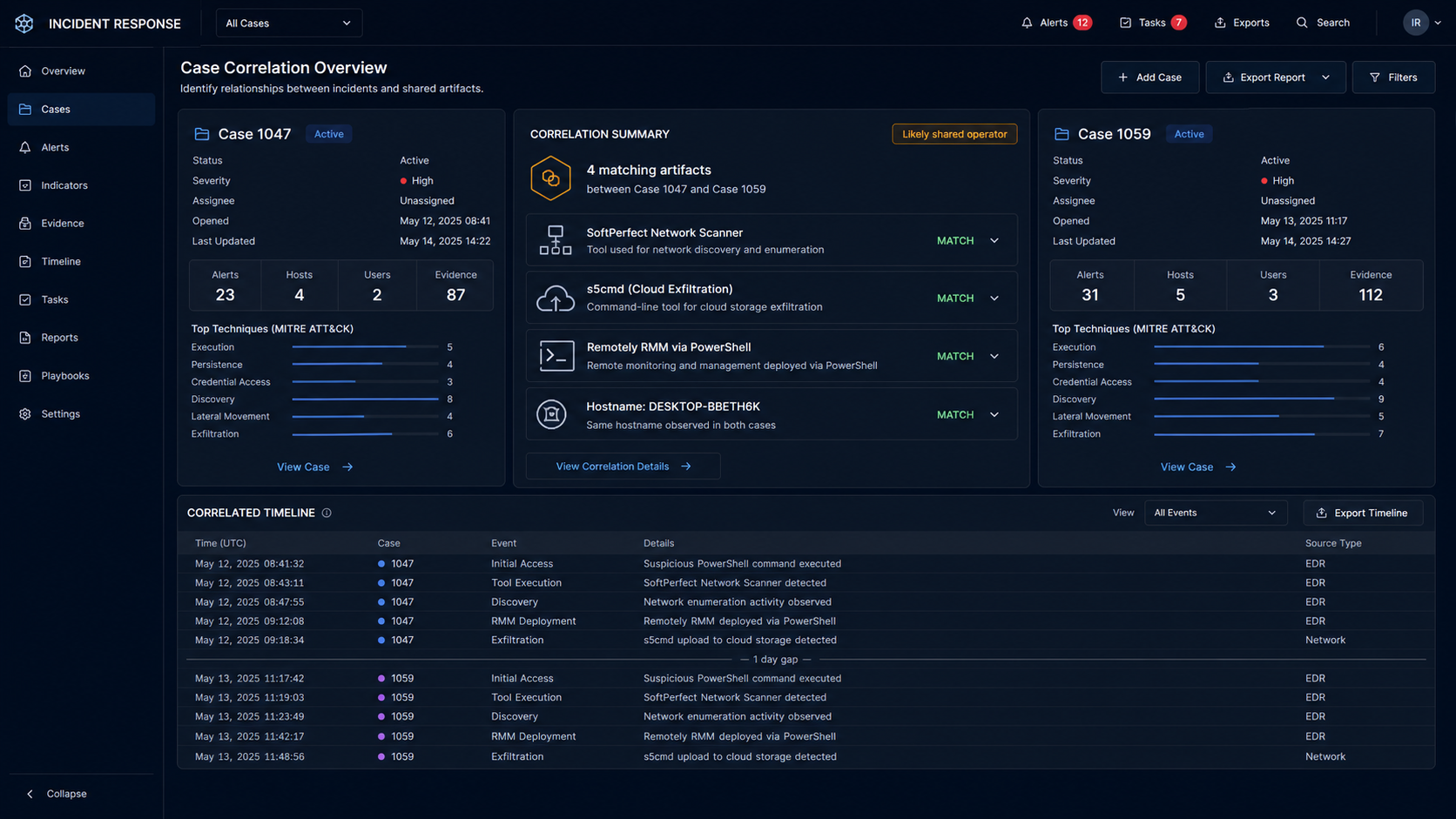
Investigators connected the approach with incidents involving DragonForce, Settra, and Anubis ransomware operations. These are separate criminal brands that can use affiliate structures.
Ransomware-as-a-service programs commonly provide infrastructure to affiliates. An affiliate can conduct intrusions while switching the ransomware brand deployed against each victim.
Two examined compromises contained unusually specific similarities. Both used SoftPerfect Network Scanner for discovery and s5cmd for moving stolen information into Amazon cloud storage.
The intruder also installed Remotely remote-management software through PowerShell. Matching tooling alone is suggestive, but common utilities can appear in unrelated attacks.
Stronger correlation came from repeated local configuration details and the same machine hostname, DESKTOP-BBETH6K. Together, those artifacts support a shared-operator assessment.
Researchers assessed with moderate confidence that one affiliate worked across multiple ransomware programs while trying to divert money through a separate recovery persona.
This matters because the victim may not be choosing between criminals and rescuers. The apparent recovery company may be another commercial face within the same attack chain.
How The Scam Works
Step 1: An affiliate breaks into the organization
The operation begins with unauthorized access, not the recovery email. Entry can involve stolen credentials, an exposed remote service, phishing, or an unpatched internet-facing system.
Once inside, the intruder maps servers, user accounts, shared storage, security tools, and backup systems. Network-scanning utilities accelerate this reconnaissance.
The attacker seeks administrative control because ransomware becomes more damaging when it reaches many endpoints simultaneously. Privileged credentials also help disable defensive controls.
During this period, ordinary business operations may continue. The organization might not realize someone is quietly studying its network.
Remote-management software can create another access route. Because legitimate administrators use similar tools, malicious sessions may initially blend into expected activity.
Every early artifact matters. Authentication logs, process launches, PowerShell history, endpoint alerts, and newly created services can later identify the intrusion’s true scope.
Step 2: Sensitive data is collected and removed
Modern ransomware incidents frequently include data theft before encryption. The criminal gathers contracts, customer records, financial documents, credentials, and internal communications.
Files may be staged in archives before leaving the network. Cloud-transfer programs such as s5cmd can move large collections efficiently to attacker-controlled storage.
Exfiltration gives the operator leverage even if reliable backups restore every encrypted server. Publication threats create legal, reputational, and privacy pressure.
Investigators must determine what was accessed, not merely what was encrypted. File timestamps and transfer logs can help estimate the exposed dataset.
Cloud destinations should be preserved in evidence and reported through appropriate response channels. Blocking one endpoint does not establish that other copies were removed.
The organization’s notification duties may depend on the information involved and applicable law. Counsel and qualified incident responders should guide those decisions.
Step 3: Ransomware creates maximum operational pressure
Encryption interrupts applications, file shares, production systems, and administrative work. A ransom note introduces the criminal’s deadline and communication channel.
Leadership must make decisions while technical teams are still learning what happened. Incomplete information makes confident outside promises especially attractive.
The attackers may threaten to publish data, contact customers, or raise their demand. Those tactics compress the victim’s perceived decision window.
Backups require validation before restoration. If the attacker retained access, restoring too soon can expose clean systems to another encryption event.
A disciplined response separates containment, evidence preservation, restoration, communication, and legal analysis. One payment cannot replace those parallel workstreams.
Organizations should designate who may communicate with unverified parties. Scattered replies can leak strategy, insurance details, or technical information useful to the attacker.
Step 4: The supposed recovery firm makes contact
An email from Ransom Busters LTD arrives offering capabilities that appear tailored to the exact incident. It may mention confidential circumstances or the ransomware family involved.
The sender asks to speak with a chief executive or senior technology leader. Reaching authority directly reduces the influence of cautious security and procurement reviews.
The timing creates implied credibility. Recipients may reason that only a genuine specialist could know about an unpublished compromise.
There is another explanation: the sender may know because it participated in the intrusion, cooperates with the affiliate, or monitors the criminal infrastructure involved.
Staff should preserve the complete message, including headers. Delivery paths, reply addresses, timestamps, and infrastructure can support attribution or law-enforcement reporting.
Do not reveal internal recovery status in an exploratory reply. Even confirmation that backups failed can strengthen the other party’s bargaining position.
Step 5: Extraordinary access claims justify the price
The seller says it can enter ransomware administration panels, obtain decryption resources, and delete stolen files. Those claims are designed to sound technically exclusive.
A tiered price makes the arrangement resemble a professional service proposal. Data deletion costs less, while decryption plus deletion carries a larger fee.
This menu also tests the victim’s priorities and available budget. A reply reveals whether confidentiality or business restoration matters more.
No outsider can reliably demonstrate that every stolen copy is gone. A video showing files disappearing from one panel proves only that one displayed location changed.
Similarly, a decryptor sample should be handled by responders in an isolated environment. Running an unknown executable on production data introduces additional risk.
Written guarantees from an unverified entity have little value when the seller’s identity, jurisdiction, assets, and relationship with the extortionist remain unclear.
Step 6: Payment moves outside normal recovery governance
The victim may be urged to pay quickly while the offer remains available. Cryptocurrency, intermediaries, or unfamiliar bank instructions can complicate recovery and accountability.
Pressure can encourage executives to bypass vendor onboarding, sanctions review, insurer notification, and legal advice. Those controls exist precisely for high-risk transfers.
A payment might produce a key, an unusable file, temporary cooperation, or nothing. Even a successful decryption result does not establish honest data deletion.
The affiliate may seek money beyond the ransomware program’s normal revenue split. A separate recovery invoice can hide that diversion from other criminals.
Insurers may require specific response vendors and approvals. Unauthorized commitments can create coverage disputes while adding another loss.
Before considering any transaction, leadership needs counsel, incident-response expertise, law-enforcement input, and a documented understanding of legal restrictions.
Step 7: The operator benefits from both sides of the emergency
If the recovery persona is connected with the attacker, the same operation can profit from causing the crisis and then selling relief.
The rescue identity also creates a second negotiation channel. It may collect intelligence about backups, urgency, insurance, and executive willingness to pay.
Promises of permanent deletion can reduce reporting or investigative pressure. A victim believing the incident is resolved may preserve less evidence.
The criminal can change company names, websites, payment accounts, and ransomware brands. The recurring pattern is more durable than any single label.
Future outreach may target the same organization with monitoring, legal, or recovery services. Criminal records identify victims likely to pay under stress.
Independent verification protects decision-making. The person offering certainty should never control the only evidence supporting that certainty.
Why a Successful Decryptor Would Not Prove Legitimacy
A working key can demonstrate access to ransomware material. It cannot establish how the seller obtained that access or whether the seller remained independent.
Criminal affiliates naturally possess information about their own deployments. They may also exchange keys, panels, and victim details within private channels.
Some legitimate responders negotiate, acquire decryptors, or locate public recovery tools. Their value comes with documented identity, contracts, references, and defensible handling procedures.
Even excellent decryption cannot remove persistence, stolen credentials, web shells, scheduled tasks, or remote-management agents left inside the environment.
Recovery therefore requires rebuilding trust in the network. Teams must rotate secrets, validate backups, inspect identity systems, and monitor for renewed access.
Data deletion remains the least verifiable promise. Digital material can be duplicated perfectly, making one visible deletion fundamentally different from confirmed destruction everywhere.
Recovery Offer, Incident Evidence, Payment, and Response Checks
Verify the recovery business independently
Examine corporate registration, ownership, staff history, physical presence, professional references, and prior casework. A website and registration number alone provide limited assurance.
Call references through contact information you locate independently. Confirm the work performed, contract scope, and whether the reference actually used the company.
Ask the seller to explain conflicts of interest and how it learned about the incident. Vague secrecy should not substitute for accountable disclosure.
Compare the offer with forensic evidence
Have responders map the email’s claims against the intrusion timeline. Nonpublic accuracy may reveal proximity to the attacker rather than extraordinary investigative skill.
Preserve full headers, domains, wallet addresses, payment instructions, documents, and communication handles. Small technical overlaps can connect supposedly separate identities.
Do not give the seller fresh indicators simply to test its knowledge. That disclosure can help the operator refine a convincing story.
Place every payment behind formal review
Involve legal counsel, insurers, finance, law enforcement, and sanctions specialists before money moves. Requirements vary by location, counterparty, and ransomware group.
Demand a precise contract describing deliverables, verification, failure conditions, custody of data, and refund rights. Refusal exposes how little protection the offer provides.
Never let urgency eliminate dual authorization. A crisis is when payment controls deserve more attention, not less.
Keep incident response independent of the seller
Use a qualified team that answers to the victim organization. It should validate decryptors, preserve evidence, contain access, and oversee restoration separately.
Notify relevant law-enforcement and national cyber authorities. They may recognize infrastructure, wallets, or aliases from other cases.
Continue monitoring after systems return. Recovered availability does not demonstrate that the intruder’s foothold, credentials, or stolen information disappeared.
What to Do if You Have Fallen Victim to This Scam
- Pause further communication and payment. Preserve the offer, complete headers, invoices, wallet addresses, and chat transcripts before accounts or websites disappear.
- Engage independent incident responders. Ask them to contain access, preserve evidence, validate backups, examine exfiltration, and test any supplied decryptor safely.
- Notify counsel, insurance, and law enforcement. Explain both the ransomware incident and the unsolicited recovery approach, including any nonpublic details it contained.
- Contact the payment provider immediately. A bank, exchange, or intermediary may preserve records or stop an unsettled transfer, although recovery is not guaranteed.
- Rotate exposed credentials and secrets. Reset privileged accounts, remote access, cloud keys, service credentials, tokens, and recovery methods from trusted systems.
- Examine every affected endpoint. Deploy enterprise tools and run Malwarebytes where appropriate, while preserving evidence needed for professional forensic analysis.
- Block related infrastructure. Filter malicious domains, addresses, and artifacts across security controls. AdGuard can reduce risky browsing exposure but cannot remediate a breached network.
- Assess notification obligations. Determine whose data left the environment and provide accurate guidance to employees, customers, regulators, or partners when required.
Is Your Device Infected? Run a Free Malware Scan
Slow performance, constant pop-ups, or strange behavior? These are classic signs of a malware infection. A quick way to check is to scan your device with Malwarebytes Free, one of the most trusted malware removal tools available. If you only visited a scam page and didn’t download or install anything, this scan is optional.
The free version detects and removes the most common threats, including:
- Adware — the cause of those annoying pop-ups
- Browser hijackers — unwanted redirects and changed homepages
- Trojans and spyware — hidden programs stealing your data
- Potentially unwanted programs (PUPs) — software you never asked for
👉 Select your device below — Windows, Mac, or Android — then follow the simple steps to download Malwarebytes, scan your system, and remove any threats it finds. The scan usually takes 5 to 20 minutes.
Run a Malware Scan with Malwarebytes for Windows
Malwarebytes is one of the most popular and trusted anti-malware tools for Windows — and it’s completely free for removing infections. It catches threats that many antivirus programs miss, including adware, browser hijackers, and trojans. Follow the steps below to scan your PC and remove what Malwarebytes finds.
Download Malwarebytes
Click the button below to download the latest version of Malwarebytes for Windows from the official source. The free version is all you need — it will scan your computer and remove adware, browser hijackers, and other malicious software at no cost.
Download MalwarebytesOfficial installer for Windows 11 and 10. Your download starts right away.Want real-time protection? See Malwarebytes Premium Malwarebytes Free for WindowsScans and removes malware at no cost
-
Install Malwarebytes
When the download finishes, open your Downloads folder and double-click the MBSetup file. If Windows shows a User Account Control pop-up, click “Yes” to allow the installation.

Follow the On-Screen Prompts to Install Malwarebytes
The setup wizard will walk you through a few quick screens:
-
Choose where you’re installing the program — “Personal Computer” or “Work Computer” — then click Next.

-
Malwarebytes will now install on your device. This usually takes under a minute.

-
When installation is complete, the “Welcome to Malwarebytes” screen will open automatically.

-
On the final screen, click Open Malwarebytes to launch the program.

-
Optional: Check for rootkits with a Custom Scan
You don’t need to change any settings for a normal scan. The standard Threat Scan in the next step is enough for most problems, so you can go straight to it.
If you also want to check for rootkits, use a Custom Scan. In current versions of Malwarebytes, rootkit scanning is only available there:
- On the Scanner tile, click the three-dot menu and select Advanced Scan.
- Choose Custom Scan. In its options, check Scan for rootkits.
- Select your system drive (usually C:\) as the location to scan, then start the scan. It takes longer than a Threat Scan.
- When it finishes, review and quarantine the results as described in the steps below.
Rootkit scanning isn’t available on Windows devices with ARM processors.
Start the Scan
Click the blue Scan button. Malwarebytes will automatically update its virus database and start checking your computer for malware.

-
Wait for the Scan to Finish
The scan checks your entire system for browser hijackers and other malicious programs, so it can take 5 to 20 minutes depending on your computer. Feel free to do something else — just check back occasionally to see the progress.

-
Quarantine the Detected Threats
When the scan is done, you’ll see a list of everything Malwarebytes found — malware, adware, and potentially unwanted programs. Click the “Quarantine” button to remove all of them at once.

Malwarebytes will now remove the malicious files and registry entries and move them safely into quarantine.

-
Restart Your Computer
Some threats can only be fully removed after a reboot. If Malwarebytes asks you to restart, click Yes. Once you’re logged back in, Malwarebytes has finished removing the threats it found.

When the scan is done, check whether the problems you noticed have stopped. If they continue, see the options below.
If you are still having problems with your computer after completing these instructions, then please follow one of the steps:
- Run a computer scan with ESET Online Scanner
- Ask for help in our Windows Malware Removal Help & Support forum.
Run a Malware Scan with Malwarebytes for Mac
Malwarebytes for Mac is a free on-demand scanner that removes the malware other security software tends to miss — adware, browser hijackers, and unwanted programs included. Cleaning an infected Mac with Malwarebytes has always been completely free, and it’s our go-to recommendation. Follow the steps below to scan your Mac and remove what Malwarebytes finds.
-
Download Malwarebytes for Mac
Click the button below to download the latest version of Malwarebytes for Mac.
Download MalwarebytesOfficial installer for macOS. Your download starts right away.Want real-time protection? See Malwarebytes PremiumMalwarebytes Free for MacScans and removes malware at no cost -
Open the Malwarebytes setup file
When the download finishes, open your Downloads folder and double-click the setup file to begin the installation.

-
Follow the On-Screen Prompts to Install Malwarebytes
The Malwarebytes for Mac Installer will guide you through a few quick screens. Click “Continue” and keep following the prompts until the installation completes.



When the installation is complete, Malwarebytes opens to the Welcome to Malwarebytes screen. Click “Get started“.
Malwarebytes needs Full Disk Access to check your whole Mac. When it asks, open System Settings > Privacy & Security > Full Disk Access, turn on Malwarebytes (it may be listed as Malwarebytes Protection), and confirm with your password or Touch ID. Then return to Malwarebytes. On macOS Monterey and earlier, this setting is in System Preferences > Security & Privacy > Privacy.
-
Select “Personal Computer” or “Work Computer”
Malwarebytes will ask what type of computer you’re installing it on. Click either Personal Computer or Work Computer, whichever applies.

-
Start the Scan
Click the “Scan” button. Malwarebytes will automatically update its detection database and begin checking your Mac for malware.

-
Wait for the Scan to Finish
Malwarebytes will scan your Mac for adware, browser hijackers, and other malicious programs. This can take a few minutes, so feel free to do something else — just check back occasionally to see the progress.

-
Quarantine the Detected Threats
When the scan is done, you’ll see a list of everything Malwarebytes found. Click the “Quarantine” button to remove all the threats at once.

-
Restart Your Mac
Malwarebytes will now remove all the malicious files it found. Some threats can only be fully removed after a reboot — if Malwarebytes asks you to restart, allow it. Once you’re logged back in, check whether the problems you noticed have stopped. If they come back, save the scan report and ask for help in our forum.

If the problems you noticed continue after the scan, see the options below.
If you are still experiencing problems while trying to remove a malicious program from your computer, please ask for help in our Mac Malware Removal Help & Support forum.
Run a Malware Scan with Malwarebytes for Android
Malwarebytes for Android scans your phone or tablet for malware, adware, and potentially unwanted apps. The free version scans only when you start a scan. Real-time protection, which checks apps automatically, is part of the paid Premium version.
-
Download Malwarebytes for Android.
You can download Malwarebytes for Android by clicking the link below.
Get Malwarebytes for AndroidOpens Google Play in a new tab.Want real-time protection? See Malwarebytes Premium for AndroidMalwarebytes for AndroidScans your phone and removes malware at no cost -
Install Malwarebytes for Android on your phone.
In the Google Play Store, tap “Install” to install Malwarebytes for Android on your device.

When the installation process has finished, tap “Open” to begin using Malwarebytes for Android. You can also open Malwarebytes by tapping on its icon in your phone menu or home screen.

-
Follow the on-screen prompts to complete the setup process
When Malwarebytes opens, it walks you through a short setup. Tap Get started and follow the prompts. If you see an offer for a trial or a paid plan, read it before you accept. You can skip it and keep using the free scanner.
Malwarebytes will ask for permission to access the files on your phone so it can scan them. Tap Allow, or turn on the permission in the Android screen that opens, then return to Malwarebytes.
-
Run a scan with Malwarebytes for Android
On the main screen, tap Scan now. In some versions, you open the menu, tap Scanner, and then tap Run a scan.
-
Wait for the Malwarebytes scan to complete.
Malwarebytes will now start scanning your phone for adware and other malicious apps. This process can take a few minutes, so we suggest you do something else and periodically check on the status of the scan to see when it is finished.

-
Remove the detected apps.
When the scan has been completed, you will see a list of the threats that Malwarebytes for Android has detected. Next to each detected item, tap the menu icon (three dots), then choose to uninstall the app or delete the file. Android then asks you to confirm. Tap OK or Uninstall to remove the app.
-
Restart your phone.
When the detected apps are removed, restart your phone if Malwarebytes asks you to. Then check whether the problems you noticed have stopped.
If the problems you noticed continue after the scan, see the options below.
If you are still having problems with your phone after completing these instructions, then please follow one of the steps:
- Ask for help in our Mobile Malware Removal Help & Support forum.
- Only as a last resort, reset your phone to factory settings. Read the warning below first.
- Back up your photos, videos, files, and messages, for example to your Google account or a computer.
- Make sure you know your Google account email and password. The phone asks for them after the reset. If you changed the password recently, Google recommends waiting 24 hours before you reset.
- On a Samsung phone, also make sure you know your Samsung account password.
- If you use an authenticator app for two-step verification, move your accounts to another device or save your backup codes first.
Stay Protected: Block Ads and Malicious Sites
No scan can prove a device is completely clean, so it helps to block threats before they reach you. Most infections start with a malicious ad or a fake download button — so blocking them at the source is your best defense.
We recommend AdGuard, which blocks malicious ads, phishing pages, and dangerous redirects before they can reach you.
👉 Download AdGuard and browse safely
Frequently Asked Questions
Is Ransom Busters a legitimate ransomware recovery company?
The observed Ransom Busters approach carries serious warning signs. Investigators linked its outreach and technical details with ransomware activity, so treat it as untrusted.
How could the sender know about a private ransomware incident?
Possible explanations include involvement in the intrusion, access to criminal panels, cooperation with an affiliate, or visibility into private ransomware communications.
Can anyone prove that stolen data was permanently deleted?
Usually not with certainty. A file can exist in several locations, and deleting one displayed copy does not prove every backup or transfer vanished.
Should a company ever run a decryptor from an unknown seller?
Not on production systems. Qualified responders should examine it in isolation, retain copies of encrypted data, and verify results before broader use.
Does paying a recovery firm eliminate breach-notification duties?
No. Obligations depend on facts, jurisdictions, and exposed information. Payment or claimed deletion does not erase the underlying unauthorized access.
What is the safest first response to an unsolicited recovery offer?
Preserve it, avoid revealing internal details, and give it to independent responders, counsel, insurers, and appropriate law-enforcement contacts for assessment.
The Bottom Line
The Ransom Busters recovery scam turns a ransomware emergency into another opportunity for pressure, secrecy, and payment.
Its most persuasive feature is private knowledge. That knowledge may show proximity to the attack, not a trustworthy ability to rescue the victim.
Treat extraordinary claims as evidence to investigate. Keep restoration, legal decisions, payment review, and forensic work under independent control.

Join the discussion
0 commentsShare your experience or ask a question about this article.
Discussion
Start the conversation
Have a question or something useful to share? Add the first comment.