

An unexpected workplace invitation says your administrator has opened a new “Team Community,” complete with shared files, discussions, and a friendly first-step button.
The language feels welcoming rather than alarming. For someone moving between projects, clients, and remote workspaces, that familiarity can be disarming.
Overview
The email borrows the rhythm of a normal workplace invitation
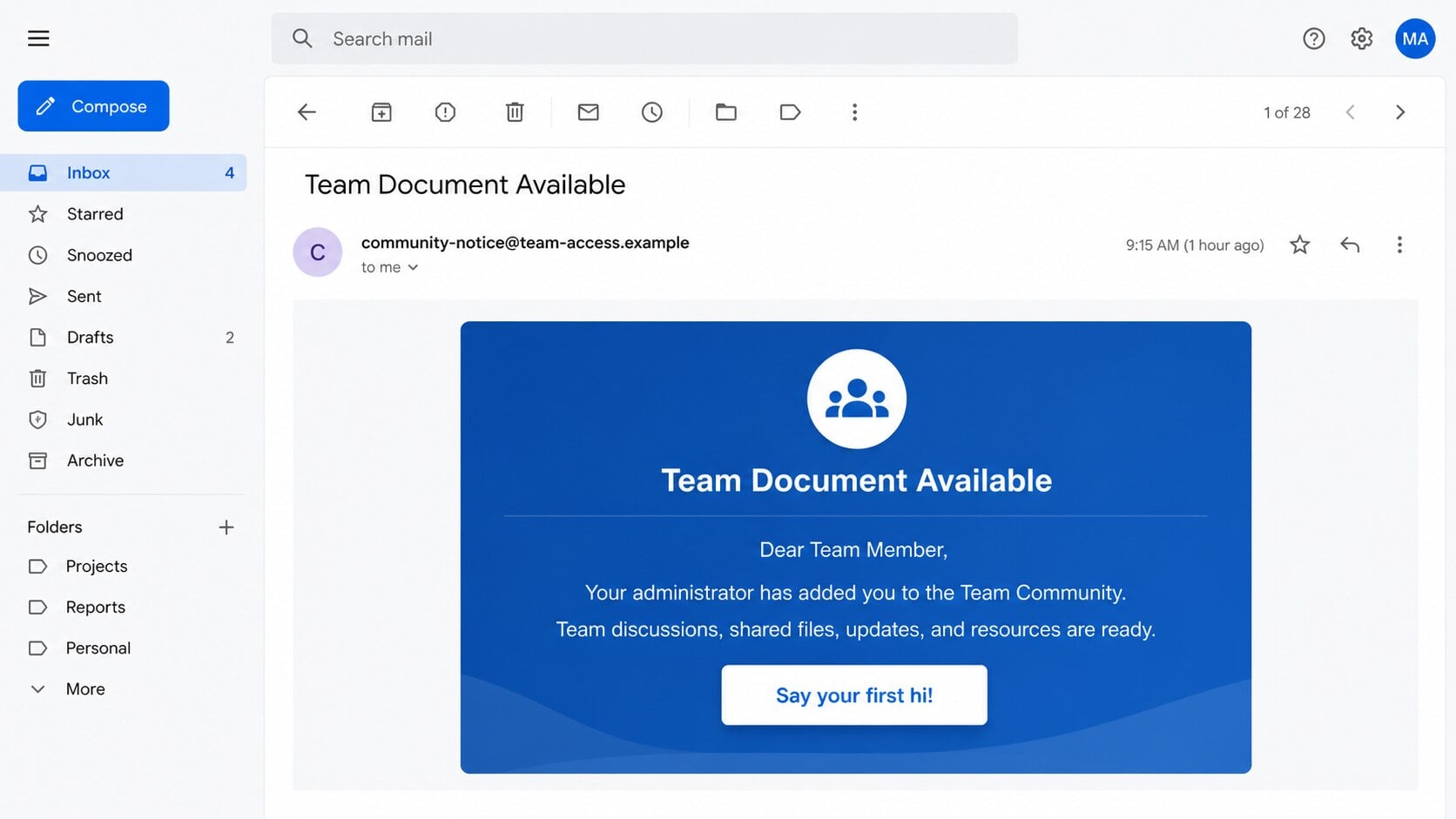
The Team Community Invitation scam tells recipients that an administrator has added them to a central collaboration space.
It describes team conversations, documents, announcements, and other resources, then offers a button such as “Say your first hi!”
Another version says access is ready and asks the recipient to open the community or complete a profile.
The invitation leads outside the organization’s sign-in system
The reviewed button did not open a recognized company tenant or established collaboration service.
It directed visitors to an unrelated website displaying a familiar work-account login form.
The form sought account credentials. The apparent project invitation existed to make that request feel expected.
The scam abuses Microsoft-style expectations without Microsoft involvement
Team language, blue styling, and a familiar sign-in layout encourage recipients to connect the message with Microsoft workplace tools.
Those visual suggestions do not establish any connection to Microsoft or the recipient’s employer.
- No known manager or project owner introduces the community.
- The workspace name is generic and broadly reusable.
- The call to action points to an unrelated domain.
- The page requests work-account credentials.
- The alleged invitation cannot be confirmed inside the usual tenant.
Why the “Team Community” Story Feels Plausible
Employees receive genuine invitations all the time
Modern organizations use several platforms for chat, document review, training, contractors, and customer collaboration.
A new invitation may not seem unusual, especially after a department change, onboarding event, acquisition, or outside partnership.
Scammers benefit from that routine complexity. Recipients may assume another team selected a tool they have not seen before.
The message gives belonging before asking for access
“Your administrator added you” implies approval has already happened.
The recipient is not asked to evaluate a new service. They are told they already belong and need only enter.
That small shift discourages questions about who authorized the workspace or whether the invitation was expected.
A casual button softens a serious credential request
“Say your first hi!” sounds playful and low risk.
It frames the click as social participation, not authentication on an unknown website.
The password prompt appears later, after the invitation has established momentum and the visitor expects a normal sign-in.
How the Team Community Invitation Scam Works
Step 1: Attackers select workplace addresses
Business emails are gathered from corporate websites, professional profiles, conference lists, breaches, and previously compromised address books.
The campaign does not need an accurate organization chart. Generic administrator language works across many companies.
Some versions insert a company name from the address domain, creating inexpensive personalization at scale.
Step 2: A fabricated workspace is announced
The letter presents the Team Community as the official hub for conversations, files, operational updates, and resources.
There is no accountable inviter, recognizable project history, tenant identifier, or business reason for the access.
Instead, broad descriptions let each recipient imagine a legitimate purpose.
Step 3: The button creates a harmless first action
The recipient is encouraged to greet the group, open the community, or review shared materials.
These actions sound reversible. None appears to involve money, confidential information, or administrative privileges.
That low-stakes framing helps the email pass the reader’s instinctive danger check.
Step 4: External hosting displays a copied sign-in experience
The destination may be an attacker-controlled domain, compromised website, or hosted page that resembles a familiar identity provider.
Brand colors and login language are easy to reproduce. The page’s hostname remains outside the genuine provider’s control.
A legitimate federated login should redirect to the organization’s approved identity domain, not imitate it locally.
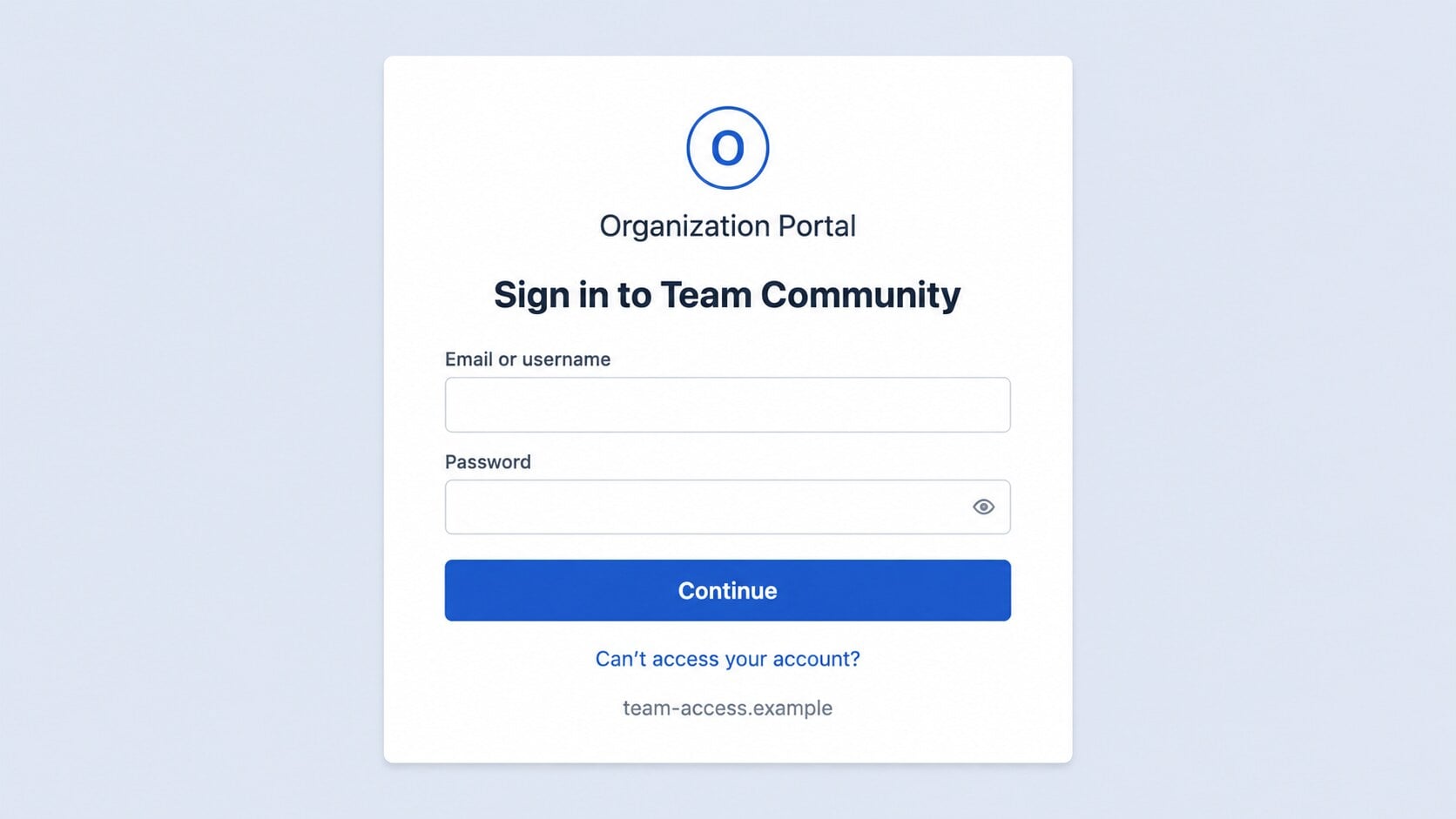
Step 5: The form collects work credentials
The victim enters an email address and password to reach the nonexistent workspace.
Those values are transmitted to the phishing operator. The form may then redirect elsewhere or display an error to reduce suspicion.
Repeated prompts can capture a corrected password, especially when the visitor assumes the first attempt failed.
Step 6: The stolen account exposes a wider workplace
A work identity may unlock mail, cloud files, chat history, shared drives, calendars, internal applications, and customer information.
The exact reach depends on permissions and multi-factor protections.
Even limited access can reveal names, current projects, invoice conversations, and the language used by real administrators.
Step 7: Trusted access fuels internal phishing
Attackers can send new invitations from the compromised account to colleagues who recognize the sender.
They may also place malicious links inside active project discussions or shared-document conversations.
One external lure can become an internal campaign with better context and fewer obvious warning signs.
A Real Collaboration Invite Should Survive Independent Verification
Genuine invitations normally identify the service, tenant, inviter, organization, and workspace with enough detail for the recipient to confirm them.
The proposed access should also appear after signing into the approved service independently.
If a team exists only through one unexpected email link, the recipient has no trusted evidence that the workspace is real.
Ask the named administrator through an established channel. Do not use contact details supplied inside the invitation.
Inviter, Workspace, Domain, and Identity Checks
The inviter should be a real, reachable person
An “administrator” without a name is not accountable.
Check whether a manager, project owner, or IT administrator actually created the workspace and expected your participation.
Confirm through the company directory, existing chat, or a known telephone number.
The workspace should appear inside the approved service
Open the organization’s usual collaboration application without using the emailed button.
Look for pending invitations, notifications, guest access, and the alleged community name.
A legitimate assignment should not disappear simply because you reached the service safely.
The destination must belong to the real identity provider
Inspect the complete domain before entering credentials.
A copied login card on an unfamiliar host is not a Microsoft, Google, Okta, or company sign-in page.
Subdomains must be read from right to left. A trusted word at the beginning can still sit under a criminal’s domain.
The account needs a post-incident permissions review
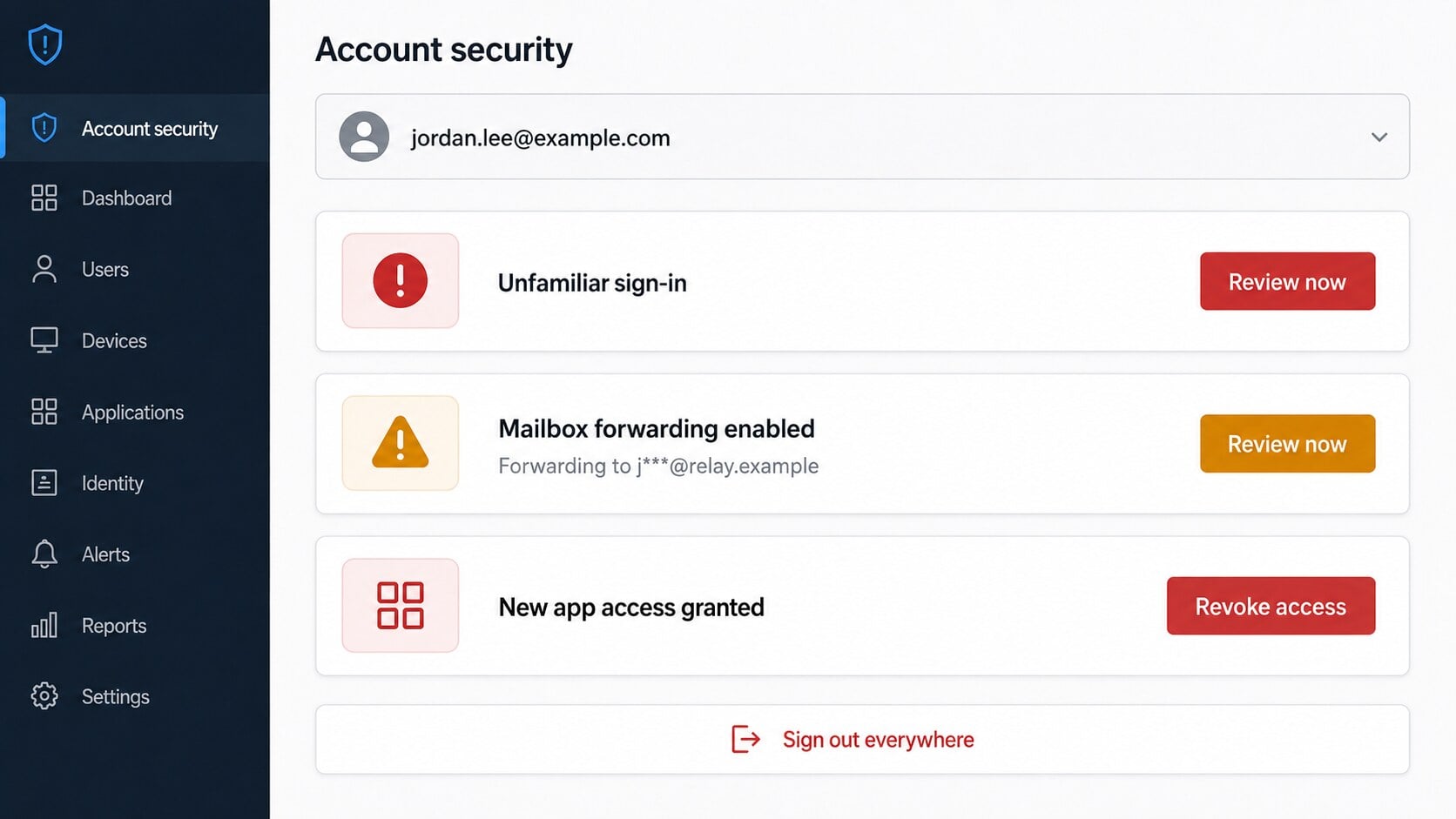
Work identities can retain access through sessions, application grants, forwarding rules, delegates, and recovery changes.
Changing the password is essential, but it may not remove every token or altered setting.
Administrators should review centralized logs and revoke suspicious access across connected services.
Why a Stolen Work Account Can Be More Valuable Than a Personal Password
Shared files reveal current operations
Project folders may contain proposals, customer lists, contracts, technical documents, schedules, and meeting notes.
Even read-only material helps criminals understand which requests will look normal to employees.
Sensitive files may create reporting obligations beyond the account owner’s personal recovery.
Internal messages supply authority
A compromised employee can appear inside an existing team conversation rather than arriving as an unknown outsider.
Attackers may imitate a manager, request a file, or direct coworkers toward another fake login.
The trusted sender address makes hurried recipients less likely to inspect the destination.
Calendar and organizational data expose timing
Meetings, travel, absences, and reporting deadlines show when decision makers are unavailable or staff expect unusual requests.
Criminals can time payment changes or urgent tasks around those gaps.
They can also reference real event names to make impersonation more convincing.
Cloud access may outlive the password
Approved applications and session tokens sometimes remain useful until explicitly revoked.
An attacker may grant a new app permission, create an application password, or establish mailbox forwarding before the victim reacts.
Recovery should therefore include every persistence mechanism supported by the organization’s identity platform.
Warning Signs Inside the Invitation
- The administrator and organization are not clearly identified.
- The workspace has a generic name such as “Team Community.”
- The email describes many resources without naming one real file.
- The friendly button hides an unrelated destination.
- The login page is hosted outside the company tenant.
- The recipient cannot find the invitation independently.
- The message uses copied Microsoft-style language without a valid Microsoft domain.
- The sign-in form asks for a password before showing any workspace context.
Professional formatting cannot replace verifiable ownership. A genuine invitation remains genuine when checked through the approved platform and known staff.
If the request fails those checks, report it to the organization’s security team before other employees receive the same lure.
Why Contractors and Guest Users Face Extra Ambiguity
External projects frequently create unfamiliar invitations
Consultants may join several customer tenants while seeing different logos, naming conventions, and authentication flows.
A message from an unknown administrator can therefore resemble an ordinary step in a new engagement.
Scammers exploit that uncertainty by keeping the project description broad and the supposed inviter anonymous.
Guest access may use a different identity than expected
Some organizations invite a personal address, while others create a temporary company identity.
That variation makes a surprising login prompt feel less obviously wrong.
The project owner should tell guests which address, tenant, and provider will handle authentication before access begins.
Confidentiality can be used to discourage verification
A later message may describe the workspace as restricted, private, or available only to selected members.
Recipients might avoid asking colleagues because they assume the project is sensitive.
Confidential work still needs verifiable authorization. Confirm with the named owner through an established private channel.
How Organizations Can Make Real Invitations Safer
Tell people what invitation to expect
Project owners should announce the platform, workspace name, inviter, and approximate delivery time before sending an external invitation.
A brief verified message gives recipients context attackers cannot easily manufacture.
New guests should also know where the invitation will appear after they sign in independently.
Use one documented identity route
Employees should know the approved login hostname and whether outside services redirect to it.
Bookmarking that destination reduces dependence on emailed buttons.
Organizations can block or warn on authentication pages appearing outside approved domains.
Require strong multi-factor authentication
Authenticator apps, passkeys, and hardware keys can stop many attacks using a stolen password.
Prompt matching and number challenges help users notice approvals they did not initiate.
Training must emphasize that unexpected prompts are denied and reported, never approved to make them disappear.
Make reporting faster than investigating alone
A visible reporting button and responsive security team let employees escalate uncertainty without delaying legitimate work.
Administrators can then search for identical subjects, senders, and destinations across the organization.
Removing the entire campaign protects people who have not opened the invitation yet.
- Publish the approved collaboration domains.
- Preannounce guest invitations through trusted channels.
- Use phishing-resistant authentication where practical.
- Centralize mail reports and domain blocking.
- Review guest access after each project ends.
What to Do if You Have Fallen Victim to This Scam
Act quickly, but do not panic. Work-account incidents are recoverable when the account owner and administrator contain them together.
- Stop using the invitation. Close the page, save the message and destination, and avoid testing additional credentials.
- Contact your administrator directly. Use the internal directory or established support channel, not an address or number inside the suspicious email.
- Reset the work password. Complete the change through the approved identity portal from a device you trust.
- Revoke sessions and tokens. Sign out everywhere, remove unfamiliar devices, cancel application passwords, and withdraw unknown app permissions.
- Examine collaboration services. Review sent mail, chats, shared files, calendar events, guest invitations, and recent downloads for unauthorized activity.
- Remove persistence. Delete unexpected forwarding, inbox rules, delegates, recovery changes, and newly registered authentication methods.
- Identify exposed information. Determine which files, conversations, customer records, or credentials were accessible during the intrusion window.
- Scan any downloaded content. Malwarebytes can find malicious files or persistence. AdGuard helps stop many known phishing destinations and harmful ad chains.
- Warn coworkers with clear examples. Explain the invitation wording and tell recipients not to trust follow-up messages from the affected account.
- Document the incident. Preserve timestamps, headers, audit logs, and administrator actions for legal, privacy, insurance, or regulatory review.
Is Your Device Infected? Run a Free Malware Scan
Slow performance, constant pop-ups, or strange behavior? These are classic signs of a malware infection. The fastest way to find out is to scan your device with Malwarebytes Free — one of the most trusted malware removal tools available.
The free version detects and removes the most common threats, including:
- Adware — the cause of those annoying pop-ups
- Browser hijackers — unwanted redirects and changed homepages
- Trojans and spyware — hidden programs stealing your data
- Potentially unwanted programs (PUPs) — software you never asked for
👉 Select your device below — Windows, Mac, or Android — then follow the simple steps to download Malwarebytes, scan your system, and remove any threats it finds. The scan usually takes 5 to 20 minutes.
Run a Malware Scan with Malwarebytes for Windows
Malwarebytes is one of the most popular and trusted anti-malware tools for Windows — and it’s completely free for removing infections. It catches threats that many antivirus programs miss, including adware, browser hijackers, and trojans. Follow the steps below to scan and clean your PC in just a few minutes.
Download Malwarebytes
Click the button below to download the latest version of Malwarebytes for Windows from the official source. The free version is all you need — it will scan your computer and remove adware, browser hijackers, and other malicious software at no cost.
Download MalwarebytesOfficial installer for Windows 11 and 10. Your download starts right away.Want real-time protection? See Malwarebytes Premium Malwarebytes Free for WindowsScans and removes malware at no cost
-
Install Malwarebytes
When the download finishes, open your Downloads folder and double-click the MBSetup file. If Windows shows a User Account Control pop-up, click “Yes” to allow the installation.

Follow the On-Screen Prompts to Install Malwarebytes
The setup wizard will walk you through a few quick screens:
-
Choose where you’re installing the program — “Personal Computer” or “Work Computer” — then click Next.

-
Malwarebytes will now install on your device. This usually takes under a minute.

-
When installation is complete, the “Welcome to Malwarebytes” screen will open automatically.

-
On the final screen, click Open Malwarebytes to launch the program.

-
Enable “Scan for Rootkits”
Before scanning, turn on rootkit detection so Malwarebytes can find even the most hidden threats. Click the Settings gear icon on the left side of the screen.

In the settings menu, find “Scan for rootkits” and click the toggle so it turns blue.

Done? Click “Dashboard” in the left pane to return to the main screen.
Start the Scan
Click the blue Scan button. Malwarebytes will automatically update its virus database and start checking your computer for malware.

-
Wait for the Scan to Finish
The scan checks your entire system for browser hijackers and other malicious programs, so it can take 5 to 20 minutes depending on your computer. Feel free to do something else — just check back occasionally to see the progress.

-
Quarantine the Detected Threats
When the scan is done, you’ll see a list of everything Malwarebytes found — malware, adware, and potentially unwanted programs. Click the “Quarantine” button to remove all of them at once.

Malwarebytes will now remove the malicious files and registry entries and move them safely into quarantine.

-
Restart Your Computer
Some threats can only be fully removed after a reboot. If Malwarebytes asks you to restart, click Yes. Once you’re logged back in, Malwarebytes has finished removing the threats it found.

That’s it — your Windows PC is now clean of trojans, adware, and other malware, and should be back to running smoothly.
If you are still having problems with your computer after completing these instructions, then please follow one of the steps:
- Run a computer scan with ESET Online Scanner
- Ask for help in our Windows Malware Removal Help & Support forum.
Run a Malware Scan with Malwarebytes for Mac
Malwarebytes for Mac is a free on-demand scanner that removes the malware other security software tends to miss — adware, browser hijackers, and unwanted programs included. Cleaning an infected Mac with Malwarebytes has always been completely free, and it’s our go-to recommendation. Follow the steps below to scan and clean your Mac in just a few minutes.
-
Download Malwarebytes for Mac
Click the button below to download the latest version of Malwarebytes for Mac.
Download MalwarebytesOfficial installer for macOS. Your download starts right away.Want real-time protection? See Malwarebytes PremiumMalwarebytes Free for MacScans and removes malware at no cost -
Open the Malwarebytes setup file
When the download finishes, open your Downloads folder and double-click the setup file to begin the installation.

-
Follow the On-Screen Prompts to Install Malwarebytes
The Malwarebytes for Mac Installer will guide you through a few quick screens. Click “Continue” and keep following the prompts until the installation completes.



When the installation is complete, Malwarebytes opens to the Welcome to Malwarebytes screen. Click “Get started“.
-
Select “Personal Computer” or “Work Computer”
Malwarebytes will ask what type of computer you’re installing it on. Click either Personal Computer or Work Computer, whichever applies.

-
Start the Scan
Click the “Scan” button. Malwarebytes will automatically update its detection database and begin checking your Mac for malware.

-
Wait for the Scan to Finish
Malwarebytes will scan your Mac for adware, browser hijackers, and other malicious programs. This can take a few minutes, so feel free to do something else — just check back occasionally to see the progress.

-
Quarantine the Detected Threats
When the scan is done, you’ll see a list of everything Malwarebytes found. Click the “Quarantine” button to remove all the threats at once.

-
Restart Your Mac
Malwarebytes will now remove all the malicious files it found. Some threats can only be fully removed after a reboot — if Malwarebytes asks you to restart, allow it. Once you’re logged back in, your Mac is clean.

That’s it — your Mac is now free of adware, rogue browser extensions, and other potentially harmful software.
If you are still experiencing problems while trying to remove a malicious program from your computer, please ask for help in our Mac Malware Removal Help & Support forum.
Run a Malware Scan with Malwarebytes for Android
Malwarebytes for Android automatically detects and removes dangerous threats like malware and ransomware so you don’t have to worry about your most-used device being compromised. Aggressive detection of adware and potentially unwanted programs keeps your Android phone or tablet running smooth.
-
Download Malwarebytes for Android.
You can download Malwarebytes for Android by clicking the link below.
Get Malwarebytes for AndroidOpens Google Play in a new tab.Want real-time protection? See Malwarebytes Premium for AndroidMalwarebytes for AndroidScans your phone and removes malware at no cost -
Install Malwarebytes for Android on your phone.
In the Google Play Store, tap “Install” to install Malwarebytes for Android on your device.

When the installation process has finished, tap “Open” to begin using Malwarebytes for Android. You can also open Malwarebytes by tapping on its icon in your phone menu or home screen.

-
Follow the on-screen prompts to complete the setup process
When Malwarebytes will open, you will see the Malwarebytes Setup Wizard which will guide you through a series of permissions and other setup options.
This is the first of two screens that explain the difference between the Premium and Free versions. Swipe this screen to continue.
Tap on “Got it” to proceed to the next step.
Malwarebytes for Android will now ask for a set of permissions that are required to scan your device and protect it from malware. Tap on “Give permission” to continue.
Tap on “Allow” to permit Malwarebytes to access the files on your phone.
-
Update database and run a scan with Malwarebytes for Android
You will now be prompted to update the Malwarebytes database and run a full system scan.

Click on “Update database” to update the Malwarebytes for Android definitions to the latest version, then click on “Run full scan” to perform a system scan.

-
Wait for the Malwarebytes scan to complete.
Malwarebytes will now start scanning your phone for adware and other malicious apps. This process can take a few minutes, so we suggest you do something else and periodically check on the status of the scan to see when it is finished.

-
Click on “Remove Selected”.
When the scan has been completed, you will be presented with a screen showing the malware infections that Malwarebytes for Android has detected. To remove the malicious apps that Malwarebytes has found, tap on the “Remove Selected” button.

-
Restart your phone.
Malwarebytes for Android will now remove all the malicious apps that it has found. To complete the malware removal process, Malwarebytes may ask you to restart your device.
That’s it — your Android phone is now clean — no more malicious apps, adware, or browser redirects.
If you are still having problems with your phone after completing these instructions, then please follow one of the steps:
- Restore your phone to factory settings by going to Settings > General management > Reset > Factory data reset.
- Ask for help in our Mobile Malware Removal Help & Support forum.
Stay Protected: Block Ads and Malicious Sites
Now that your device is clean, keep it that way. Most infections start with a malicious ad or a fake download button — so blocking them at the source is your best defense.
We recommend AdGuard, which blocks malicious ads, phishing pages, and dangerous redirects before they can reach you.
👉 Download AdGuard and browse safely
If no credentials were entered and no file was opened, reporting and deleting the invitation may be sufficient.
Do not pay anyone claiming they can secretly restore the organization. Recovery should stay with authorized administrators and established providers.
Frequently Asked Questions
Is Team Community a real Microsoft product?
The phrase is generic. The campaign uses Microsoft-style expectations, but the reviewed invitation and destination were not connected to Microsoft.
Could my employer create a workspace without telling me first?
Possibly. Confirm inside the approved platform or with the named administrator before using any emailed login link.
Why does the sign-in page look familiar?
Login layouts are easy to copy. Domain ownership, not visual similarity, determines who receives the credentials.
What if multi-factor authentication blocked the attacker?
Change the password anyway, reject unexpected prompts, revoke sessions, and ask administrators to review sign-in logs.
Should I approve a prompt to finish joining the team?
No unexpected approval should be accepted. A prompt may be the attacker’s attempt to complete account access.
Can a stolen account compromise coworkers?
Yes. Attackers can message contacts, misuse shared spaces, and send believable invitations from the genuine account.
The Bottom Line
The Team Community Invitation scam turns a friendly workplace welcome into a route toward a counterfeit sign-in page.
Verify the inviter and workspace independently. If credentials were shared, involve the administrator immediately and remove every session, rule, and permission the intruder may have left.

Join the discussion
0 commentsShare your experience or ask a question about this article.
Discussion
Start the conversation
Have a question or something useful to share? Add the first comment.