


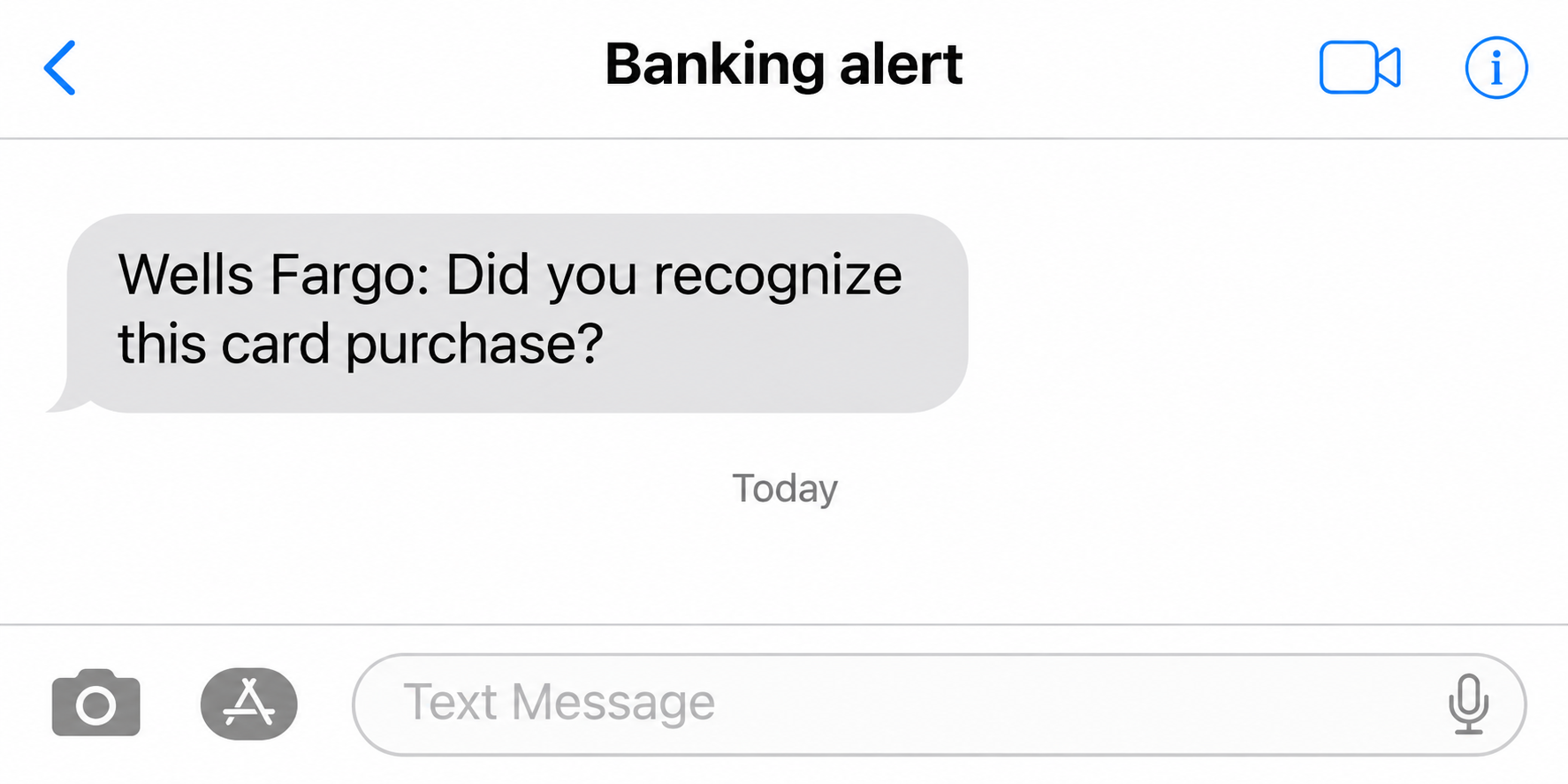
A Wells Fargo fraud alert text asks if you made a purchase you don’t recognize. You study the sender and wonder whether answering will stop the charge.
A real bank alert and a fake fraud conversation can start with the same question. The way you check the charge matters more than how the message looks.
Overview
A fraud alert and an access code are not interchangeable
A card alert points to activity the bank wants you to check. An Advanced Access code is a security step for an action such as verifying your identity.
A caller can send you searching for a real code, then try to make you read it aloud. Receiving a genuine code doesn’t make that caller a bank employee.
A documented short code is not a reason to skip verification
Wells Fargo documents text channels for enrolled alerts and Advanced Access. Those numbers help explain how the bank communicates; they don’t tell you who you’re speaking to afterward.
The safer test is to open the bank directly and review the account. If a charge isn’t visible or an alert is unclear, use the number on your card.
The danger starts with the action the supposed bank asks for
A request to share an access code, approve a transaction you didn’t start, or send funds somewhere safer changes the problem. Treat that as an attempt to get authorization.
- Charge alert: Investigate the actual account activity and card status independently.
- Unrequested access code: Don’t share it. Check account security with the bank.
- Call after a text: End it and start a new call yourself.
- Transfer or card approval already made: Report what you authorized and when, without waiting for a statement.
What Wells Fargo Actually Says About 93557 and 93733
Wells Fargo’s alerts FAQ describes short code 93557 for text alert enrollment. The enrollment confirmation follows a process you begin in your Wells Fargo settings.
The Advanced Access page lists 93557 and 93733 for its texts. A number associated with a real bank program doesn’t identify the type of message by itself.
Read the content, not just the name above the conversation. Compare a purchase question with a text that contains a code. They don’t do the same thing.
Don’t use a third-party list of short codes as a decision tree. The list doesn’t know what you just did, which transaction is pending, or who called after the SMS.
Equally, you don’t need to prove that someone spoofed a particular short code to stay safe. Even a legitimate message can be followed by a separately placed fraudulent call.
The bank’s Zelle instructions distinguish receiving a code from disclosing it. Wells Fargo says it doesn’t contact you to ask for that code afterward.
If you did not start an action that needs confirmation, don’t approve it. Ask the bank what action it can see rather than asking the caller what the code means.
How the Wells Fargo Fraud Alert Text Scam Works
Step 1: A purchase question invites a quick response
The message claims there was an attempt to use your card or move money. A simple question about whether you recognize it makes answering feel like blocking the transaction.
The amount may look specific enough to be real. Specific information can be copied or guessed, and it still needs a match in the bank’s own records.
Instead of deciding whether to answer the sender, decide where to check the transaction. If you’re already signed into the bank app, you have a route the sender doesn’t control.
Step 2: An apparent fraud specialist takes over
A follow-up call can make the first message feel confirmed. The caller may refer to the same charge, describe a protective hold, or say there’s a case in progress.
The claim that the call is a continuation of your report is not proof of its origin. A caller can follow up on a text they sent themselves.
Don’t let an agent choose the number you’ll use to verify them. A transfer to another voice or a callback to a number they dictate leaves them in charge.
Step 3: The fix asks you to authorize something new
You might be told to share a sign-in or enrollment code to stop a charge. A code that authorizes access can instead help someone complete an action on your account.
Another version asks you to move money to protect it. A transfer you authorize is money leaving your account, regardless of which protection label the caller gives it.
Watch for the change in purpose. Checking a transaction is one thing; approving access, adding a recipient, or sending money to fix it is something else.
Which Alert Did You Really Get?
| What came in | What it could mean | What to check first |
|---|---|---|
| Message asking about a card transaction | Real monitoring alert or an invented purchase | Card and activity screens in your bank app |
| Code for an action you started yourself | A security check for that specific action | Match the purpose to what you are doing in the bank |
| Code or approval you didn’t request | Someone else may have attempted an action | Reject the request and contact the bank directly |
| Caller asks you to move funds for safety | A new transfer, not a reversal | Disconnect and contact verified bank support immediately |
Open the account for the correct card. A card purchase, Zelle payment, and wire transfer won’t necessarily appear in the same view or be handled the same way.
Compare the merchant, time, and amount if they’re shown. An unfamiliar merchant label can need investigation even when the text got a detail right.
There may not be a posted charge to match. A declined or attempted payment can be different from a charge that has settled in your account.
No matching entry doesn’t authorize you to accept the caller’s instructions. Ask the bank whether an attempt is recorded and whether the card needs attention.
If you see a charge you didn’t make, don’t keep chatting about the text. Report the transaction through the bank and ask it to check both events.
Compare the purpose in any approval prompt with what is actually happening. A prompt describing a transfer or sign-in doesn’t become a cancellation request because a voice says so.
When you share an account, contact the other authorized person separately if appropriate. Verify their purchase without passing the bank’s private credentials to anyone.
What to Ask the Bank When You Call It Yourself
Tell the bank what prompted the call without implying that its staff sent the message. Start by saying you received a purchase alert and want to verify activity independently.
Ask what the bank sees on that card. Give the amount, date, and merchant from the alert without sharing the one-time code from a separate message.
Ask whether your card is still active and what the bank recommends for this case. A card concern doesn’t automatically mean every linked account needs the same action.
If you received an Advanced Access code in the same period, mention it separately. Ask whether it relates to a sign-in, enrollment, or other action visible to the bank.
If you recently changed your own alert preferences, compare the timing to that change. A confirmation you expected is different from a new enrollment request you don’t recognize.
Ask what kind of transaction the bank is checking. A debit card authorization isn’t a Zelle transfer, and neither is a wire just because someone described it as one.
Keep the case number the bank gives you. Follow up through a verified route, even if someone later calls and repeats a number that sounds familiar.
If you have several cards, check the last four digits inside your account before you discuss restrictions. Don’t post the whole card number in a public fraud report.
If the app shows a card is locked, ask what still needs to be resolved. A lock is a protective control, not a decision about an earlier charge.
Two Plausible Alerts Can Need Opposite Responses
Imagine you made a purchase earlier and the official app shows the same merchant and amount. If the bank asks you to confirm it there, you can respond there.
Now suppose a caller says a similar purchase has to be reversed with a transfer to yourself. Even if a real purchase exists, this new request isn’t the original charge.
Compare the destination on the transfer screen with the bank’s official instruction, not the story you hear on the phone. If you didn’t start the payment, don’t approve it.
A purchase that was declined may warrant a check with the card issuer even if it never posts. That doesn’t warrant a second transfer to prevent the first one.
If you often share a card account, agree ahead of time on how to ask about purchases. A short call to a known person beats forwarding a private security prompt.
Correct the description if the bank finds a different event. You can have a suspicious message, a genuine attempted purchase, or both, and the remedy follows what actually happened.
Preserve the Difference Between an Attempt and a Loss
Write down whether you got a notice, opened a page, typed information, gave a code, approved access, or sent funds. The bank needs to know which action happened.
Start with the account in the original message. If the caller switched from a card alert to Zelle or an ATM, report that change separately.
Prepare a timeline, including when the text came in and when the money moved. Keep it short enough that a fraud specialist can see what needs immediate attention.
If a transfer is on the account, save the reference and recipient information shown in the bank. Don’t forward raw account details to a person who contacted you unexpectedly.
Don’t let forwarding the SMS delay your report about a lost transfer. Ask the bank about the money first, then preserve the message for investigation.
The temporary holding account case shows how a Wells Fargo impersonator turned fraud concerns into a separate trip to an ATM.
What to Do If You Received the Alert or Followed Its Instructions
-
Verify from the account before responding to anyone. Open the app or call the number on your card. Ask about the stated activity and any access attempts.
-
If you clicked, follow the bank’s phishing instructions. Wells Fargo’s fraud reporting page lists a specific contact route for customers who interacted with suspicious messages.
Distinguish opening a page from typing credentials, submitting data, or granting device access. The bank needs to know what happened, not what the sender called the process.
-
If you shared a code or banking password, say so immediately. From a trusted device, ask the bank to check recent access and changes you didn’t request.
Use the official route to change exposed credentials. Tell the bank if the caller also had you approve a prompt or add a payment recipient.
-
If you sent money, report the specific payment type. Provide the amount, time, recipient, and reason you thought it was authorized. Ask what recovery options are available.
Describe the events accurately rather than guessing which dispute category applies. An outgoing payment you made under pressure is not the same report as a transfer you never initiated.
-
For messages you didn’t act on, follow the reporting instructions. Preserve the sender and wording, then use the bank’s own phishing report address or method.
A fraud report with the FTC can document the impersonation in the U.S. It doesn’t replace the bank action needed for an exposed account.
Frequently Asked Questions
Does Wells Fargo really use 93557 or 93733?
The bank documents those for Advanced Access and 93557 for some alerts. Use that information for context, not as permission to share codes or act through an unexpected call.
Should I reply to a Wells Fargo text about a charge?
If you’re unsure of the message, verify it separately first. The bank can tell you how to respond to a genuine alert without relying on that text.
What if my account shows no charge?
Check whether the message describes an attempt or a completed transaction. If you still can’t reconcile it, contact the bank without using the number in the message.
Can a genuine security code be part of a scam?
The code can come from the bank while someone else is trying to use it. A request to read it aloud doesn’t validate the caller.
Should I send money to reverse a suspicious Zelle payment?
Don’t initiate a new transfer at the caller’s direction. Tell Wells Fargo what you see in Zelle activity and ask it to check the original entry.
What if I gave the caller a code but didn’t send money?
Report that you shared the access code anyway. It could authorize an account action even if you didn’t pay, so ask the bank what happened afterward.
The Bottom Line
Check a Wells Fargo fraud alert text through the bank you opened yourself. An exact-looking amount or well-timed phone call can’t substitute for an independent check.
If you shared a code, approved access, or moved money, tell Wells Fargo right away. Explain exactly which action you took so it can address the right risk.

Join the discussion
0 commentsShare your experience or ask a question about this article.
Community experiences
Did this happen to you?
Your experience could help someone recognize the same scam. Submit a private report for our team to review.
I experienced this tooReports are reviewed before publication. Sharing publicly is always your choice.
Discussion
Start the conversation
Have a question or something useful to share? Add the first comment.