Serious Discussion About Kerish Doctor and All Apps on Local Accounts?

System utilities
17 Replies 3,156 Views

annaegorov

Level 11
Well-known
Forum Veteran
I think Kerish Dr. is one of the best apps. But I do have a problem with it, and some other apps do the same.

I have a admin account and a local account on Windows 11.

I don't use the admin account, on my PC.

Problem is Kerish Doctor (and others too) won't run automatically on the local account, even though I gave myself (as Local user) admin rights, and set to run as admin, via right click/properties/security/add.

It isn't running in task manager, nor is it in the taskbar, unless I start it manually. Runs fine if you login to Admin.

I also put a shortcut in shell:startup, and went to settings/Apps/Startup and Kerish Doctor is there.

I also went to Taskbar settings/other system tray icons and Kerish Doctor is on. Lastly CCleaner shows Kerish Doctor in "programs that start on startup.

Any ideas?

Thank You
 
see system explorer 7.0 open it, then open app inn question, find it in the list then right click on it, see options
 
n.png

this?
 
I should hope so, but I don't know. I do know I kind of borked my system some years ago with Kerish. But some users swear by it. Just be advised.
Thank you for the advice, I used it last week, but I was too confused to accept the change of all what it finds, and I didn't understand some of its parts, so I didn't do anything with it waiting for technical advice.
 
Is there a tutorial (article or video) that describe how to use Kerish Doctor?
Not that I'm aware of. But you can just let it run in the background and let it take care of your system. It automatically scans for and cleans junk and registry errors. You will get notifications if there is anything that requires your attention, for example if has recommendations to optimise your computer, or if it's found a critical security vulnerability in an app you have installed. While there are a lot of additional functions you can use, I rarely use them. It's just always running in the background monitoring my PC.
 
We have noticed a problem with Kerish Doctor. It prevented some programs from working properly during startup. Proton VPN had to be started manually, and an audio program started incorrectly. I have read that several people have this problem. Now you can avoid much of this by removing the startup function in Kerish.
 
Not that I'm aware of. But you can just let it run in the background and let it take care of your system. It automatically scans for and cleans junk and registry errors. You will get notifications if there is anything that requires your attention, for example if has recommendations to optimise your computer, or if it's found a critical security vulnerability in an app you have installed. While there are a lot of additional functions you can use, I rarely use them. It's just always running in the background monitoring my PC.
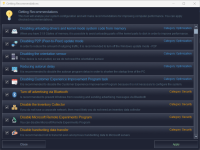
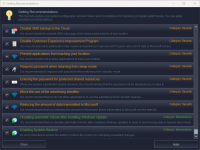
What about the recommendations section, should I apply or ignore?

2025-04-23 at 18-36-56 KerishDoctor.png2025-04-23 at 18-37-06 KerishDoctor.png
 
We have noticed a problem with Kerish Doctor. It prevented some programs from working properly during startup.
That shouldn't be happening. If you contact their support they should be able to fix the issue. They usually don't take long to reply.
 
That shouldn't be happening. If you contact their support they should be able to fix the issue. They usually don't take long to reply.
If you
That shouldn't be happening. If you contact their support they should be able to fix the issue. They usually don't take long to reply.

I disabled startup programs I had problems with in startup in KD, then it worked fine.
 
Last edited:

Recently browsing

Members who viewed this thread in the last 5 minutes

Back
Top