New Update AdGuard for Windows - Beta Updates Thread

AdGuard for Windows 7.19 beta 2​

We have good news and good news — in this beta we have fixed an extremely annoying bug and added some style to make your browsing experience smoother.

Blue screen no more​

Enough users have encountered BSOD for it to be a coincidence. We spent an unhealthy amount of time under the hood and almost broke our brains, but here comes the solution. We updated our network drivers WFP and TDI, and we encourage you to update to this version if you have experienced this problem.

Ad blocker with style​

With the version of CoreLibs comes a handy feature — support for userstyles. What’s the deal here?
Userstyles are like userscripts that allow you to change how web pages look in your browser without modifying their content. They work by adding CSS styles to the website’s existing styles. For example, if you want a dark theme on a website that doesn’t offer one, you can use a userstyle to do it.

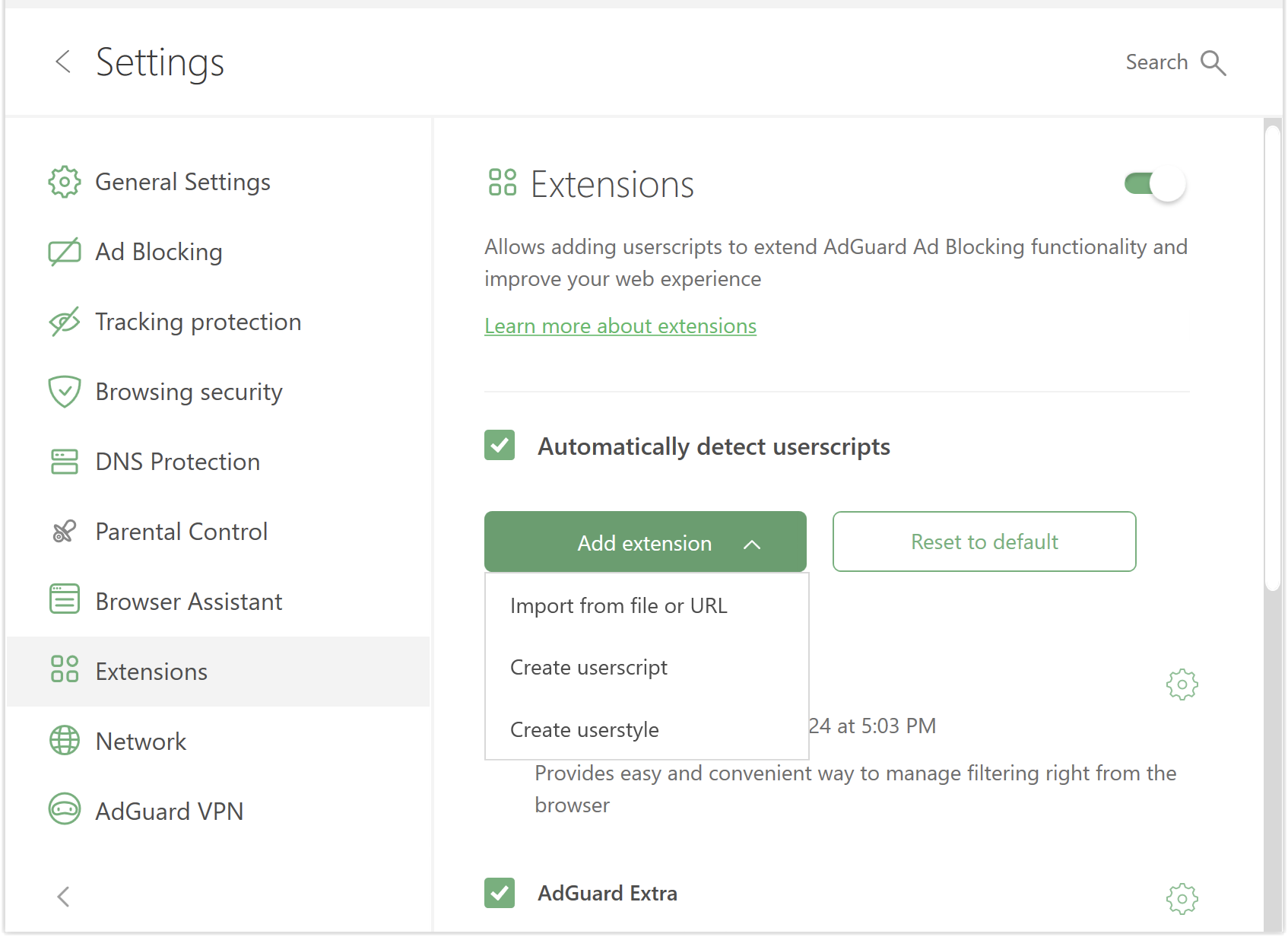
To add a userstyle, go to Settings → Extensions → Add → Import from file or URL. Or you can create your own: click Add → Create userstyle. You can find ready userstyles online. After installing a userstyle, open your browser and there it is, all styled up.

 
Last edited:

AdGuard for Windows 7.19 RC​

Release date: October 10, 2024

In this release candidate, we have fixed some bugs and updated the CoreLibs. Oh, and we’ve also added a new login option. What’s that about?

Well, we took our cue from The Matrix. Remember the scene where Neo plugs into a training program and after a few keystrokes he’s taken into a virtual reality where he becomes super cool?

With our new option, when you select Log in with email, you’ll be taken to a browser to sign in. This can save you a few keystrokes in the future, since you won’t have to enter your login information into the app and worry about remembering your password. Plus, every AdGuard user is already super cool, so there’s that.


Changelog​


Fixes​

  • Main window always opens at system start-up #5227
  • Filtering log shows $permission rule instead of an appropriate filter name when blocking an HTML element #5231

CoreLibs (Filtering engine)​

  • CoreLibs updated to v1.16.44 #5242

Improvements​

  • Enable post-quantum cryptography when it’s used by the filtered app #1916

Fixes​

  • AdGuard content script is blocked by CSP on uber.com #1903
  • GM_xmlhttpRequest doesn’t support the Referer header #1899

 
Last edited:

AdGuard for Windows 7.20 beta 1​

This beta version comes with a feature that has already been introduced in other products and has now made its way into AdGuard for Windows.

Differential filter updates​

Previously, whenever there was a minor change to a filter list, the entire list had to be downloaded again. This approach was inefficient and resulted in excessive bandwidth usage, increased latency, and unnecessary server load.

Now we apply differential updates. Instead of downloading the entire filter list each time, AdGuard only downloads the changes made to the lists — automatically every hour. More filter updates = more effective ad blocking.

As we would do with any new release, we have equipped this beta with updated WFP and TDI drivers and updated filtering engines — CoreLibs and DnsLibs. What else is there to ask? If there is — your input is welcome in our repository

Changelog​


Improvements​

  • Added support for Zen Browser #5256

Fixes​

  • Excluding Wi-Fi SSID from the DNS filtering does not work #5252
  • HTML requests are not displayed in the filtering log if there is a rule with the $generichide modifier #5213
  • “Image of the day” is blocked by Disable Windows OS ads #5190
  • When updating filters, the screen does not fit properly #5249
  • Can’t save a custom IP in Blocking mode for hosts rules #5257
  • After importing settings by shared URL, DNS server is added to the Recommended servers list instead of Custom #5277
  • The main window opens at start-up even when Open main window at system start-up is not enabled #5227
  • Filters are reset when updating from 7.20 nightly 3 to nightly 4 #5296
  • The main window stays open when Windows starts #5294
  • When blocking an HTML element, the $permission rule is displayed in the Filtering log #5231

CoreLibs (filtering engine)​

  • CoreLibs updated to v1.16.48 #5246

DnsLibs (DNS filtering engine)​

  • DnsLibs updated to v2.5.51 #5264


AdGuard for Windows 7.20 beta 1​


Nice to see AdGuard updating and always moving towards greater heights to help protect us against ads!
 
AdGuard for Windows 7.20 beta 2, January 20, 2025
Our devs were too busy enjoying TikTok again, so for now you only have a beta version of AdGuard for Windows. It has some bug fixes and stability improvements.
Changelog
Fixes

  • Types of filters and some of their names are not translated #5311
  • The splash screen of the AdGuard app appears after the PC is restarted #5302
 
AdGuard for Windows 7.20 beta 3 (Release date: February 13, 2025)
In addition to the traditional CoreLibs update, this beta also introduces revamped blocking pages — you can now do more than just look at them, you can interact with them.

Previously, if you tried to visit a website that was on our list of phishing domains, or if you accessed adult content with Parental Control enabled, you’d see a screen saying that access was blocked. That’s it.

Now you have more options. For example, If AdGuard blocks a website due to phishing suspicion, but you’re sure it’s safe, you can report a false positive directly from the blocked page. You can also access our security check tool to get more details about the website.

 
Not a stable build but worth mentioning because of the big changes:
 
Not a stable build but worth mentioning because of the big changes:
AdGuard is solid, but I don't use it. The Windows app slows down browsing, the Android app often fails to auto-start, the iPad app doesn't auto-update, and the Android TV app doesn't auto-start. I'll see if improvements justify reinstalling it.
 
AdGuard is solid, but I don't use it. The Windows app slows down browsing, the Android app often fails to auto-start, the iPad app doesn't auto-update, and the Android TV app doesn't auto-start. I'll see if improvements justify reinstalling it.
Yeah, it slows down browsing speed a bit, but nowadays I consider it acceptable. HTTPS scanning is always going to be slightly slower than browser-based adblockers like uBlock Origin.
There are ways to make AdGuard auto-start if Android's battery saving feature kills it. So I don't have this issue anymore.
I'll copy-paste what I shared on Reddit a few times, which worked for most users I suggested it to.
Disable battery optimization for AdGuard, also go to Settings > General > Advanced and enable Watchdog, then at the same place go to Low-level settings and enable Restore VPN automatically.
My smartphone also has an option named Allow background activity which I enable for AdGuard.
Does Android/Google TV allow you to install the AdGuard certificate into the user certificate store similar to Android phones to filter browser's traffic? I haven't tried AdGuard on my TV yet. If filtering browsers is possible then I'll install it otherwise it's unnecessary on the tv.
 
There are ways to make AdGuard auto-start if Android's battery saving feature kills it. So I don't have this issue anymore.
Despite trying everything—AdGuard's knowledge base, online tips, and all my phone's settings—nothing worked consistently. The problem might be my parents' Xiaomi phones; AdGuard identifies Xiaomi as the trickiest, shutting down the app for unknown reasons.

Does Android/Google TV allow you to install the AdGuard certificate into the user certificate store similar to Android phones to filter browser's traffic? I haven't tried AdGuard on my TV yet. If filtering browsers is possible then I'll install it otherwise it's unnecessary on the tv.
I can't recall anything about the AdGuard certificate. It was unstable; I often had to try multiple times to open it. AdGuard worked well with free movies on SonyLiv and Zee5 when I tried. The movies played without ads.
 
One more interesting thing about the the upcoming AdGuard is that it's coming with a new driver for filtering network traffic.
According to a AdGuard developer,
The new driver works with TCP/UDP filtering at the AFD level.
I didn't know what AFD is or AFD level filtering means. So, I asked ChatGPT and here's the explanation.
At its core, AFD stands for Ancillary Function Driver — a built-in Windows kernel driver (afd.sys) that acts as the foundational implementation of Winsock (the Windows sockets API). Any time you create a socket (AF_INET, SOCK_STREAM/UDP, …) in user-mode, the call is ultimately routed through afd.sys via IOCTLs — making it the central hub for TCP/UDP communication in kernel space.
---
🚦 What does "filtering at the AFD level" mean?

1. Deepest Socket Hook

AFD is the very first point where TCP/UDP sockets are handled in the kernel, right after a user-mode app asks for one.

Injecting a custom driver here lets you intercept every socket operation—creating, sending, receiving—before WFP, TDI, or user-mode filters even get involved.

2. IOCTL-Based Filtering

Your filtering driver watches for IOCTL commands targeting AFD endpoints.

It can block or modify socket creation, data sending, or receiving at the interface level—much more granular than adjusting firewall rules.

3. TCP/UDP Control via AFD IOCTLs

TCP and UDP operations are orchestrated through AFD IOCTLs.

Hijacking these calls lets you intercept raw data, apply filters/rules, and decide to pass or drop packets.

Libraries like lib-nosa use these same AFD IOCTLs to build sockets directly for raw performance.
---
Why AdGuard is moving to AFD filtering

Performance: Filtering at the AFD level introduces minimal latency, since data is intercepted as early as possible—no extra hops through proxies or higher-level frameworks.

Completeness: This approach guarantees every TCP or UDP socket—system-wide—is visible and filterable, which is vital for thorough ad/content blocking.

Capability: Operating at the IOCTL level gives AdGuard maximal control—blocking, rewriting, or logging traffic at the kernel’s anchor point for socket IO.
---
TL; DR

AFD = Ancillary Function Driver: the kernel driver behind Winsock.

Filtering at the AFD level: hooking into AFD IOCTL calls to intercept and modify TCP/UDP socket operations at the earliest, most fundamental stage in the networking stack.

Result: A high-performance, all-encompassing filtering mechanism that outpaces proxy or WFP-based methods.

Let me know if you’d like a deeper breakdown of how AFD fits into the Windows networking layers or examples of IOCTL commands involved!
The current WFP based driver has caused BSOD for some users over the years. Now they are going even deeper for better and proper system-wide filtering and potentially improving performance and bugs.
It made me even more curious to try the nightly build but I'm worried about nasty bugs so haven't tried it yet.
 
I tried out the nightly builds. My browsing is still slow with AdGuard. Advanced settings lack the option to reroute secure DNS browser traffic through the app's resolver. I hope it remains a feature in future updates. In general, it's unstable and frequently freezes during navigation.