Open MalwareTips from your Home Screen or desktop. Follow discussions, find answers and pick up where you left off.
If you cannot find an install option, update your browser or use its bookmark option to keep MalwareTips close.
After installation, open the app and sign in. Enable push notifications in Preferences if you want alerts. On iPhone and iPad, push requires a Home Screen web app and iOS or iPadOS 16.4 or later.
Sign in to manage notificationsInstallation is optional. Your notification settings stay under your control.
Added the optionI updated to 24H2 before KB5045934 & had no issues, there isn't a box for that - 24H2 was a good upgrade![]()
SettingsWell, no windows/app crashes or stability issues for me.
I have three main issues so far with 24H2: delay in showing UAC prompt, delay during locking windows with Win+L and a very slight lag during windows explorer launch (after launch navigation is fine).
I tried in-place upgrade but that didn't solve the issue.
Edit: There is no option for those having issues after upgrade.
Reinstall now button.I believe I used that after upgrading early via Installation Assistant, and it didn't fix any problems. But my fault for trying to be an early adopter.SettingsSystem
Recovery
Fix problems using Windows Update
Click on
Reinstall nowbutton.
What problems do you have?I believe I used that after upgrading early via Installation Assistant, and it didn't fix any problems. But my fault for trying to be an early adopter.
Same here.View attachment 286389View attachment 286390
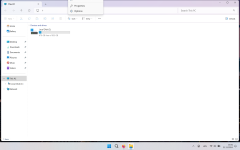
Any one else have this weird issue? when file explorer is in full screen and when clicked on the 3 dot menu, the ribbon menu goes up instead of coming down and only two options are visible.
Edit: Found a workaround Windows 11 24H2: Explorer bug opens menu “upwards” - Workaround
Yes, I can confirm same is on my PC as well. Though, I never realized this because all my windows are maximized.View attachment 286389View attachment 286390
Any one else have this weird issue? when file explorer is in full screen and when clicked on the 3 dot menu, the ribbon menu goes up instead of coming down and only two options are visible.
Edit: Found a workaround Windows 11 24H2: Explorer bug opens menu “upwards” - Workaround

The best thing is to let Windows do it's thing and you won't have any issues 100%. This is my approach to Windows Update and never let me down.I have not yet received the update notification, when I receive it, I will wait for a couple of months then install it, nothing rush me to get 24H2 now.
It will update way before the deadline, whenever it's ready. Don't worry.And that is why I wait until I see 24H2 with the regular updates, like I do right now. I think I have time until end 2025 or 2026 to switch to 24H2. (If I am not mistaken, that is.) Either way I do not have to hurry to get it.
Members who viewed this thread in the last 5 minutes